
手眼标定之相机随动eye-in-hand 示例:handeye_movingcam_calibration
*
* This example explains how to use the hand eye calibration for the case where
* the camera is attached to the robot tool and the calibration object
* is stationary with respect to the robot.
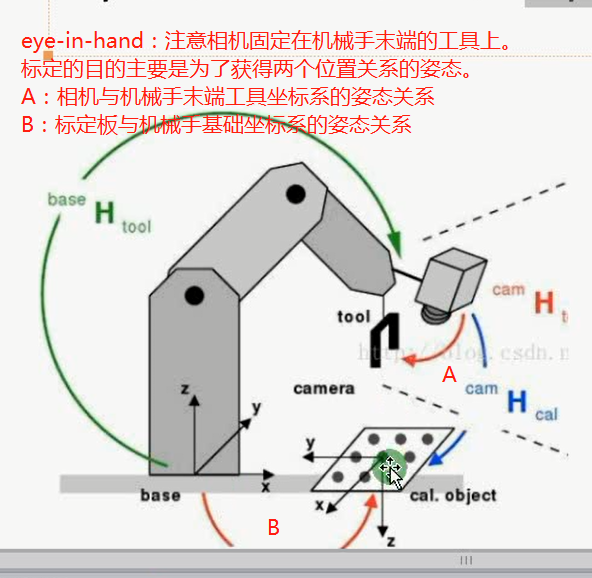
*这个示例展示了如何使用手眼标定,针对相机固定在机械手末端且标定板相对于机械手基础坐标系静止的情形。
* The robot positions the camera with respect to the calibration plate.
*机械手相对与相机姿态反映在标定板上。
* In this case, the goal of the hand eye calibration is to determine two unknown poses:
*在这种情况下,手眼标定的目标是得到两个未知的姿态。
* - the pose of the robot base in the coordinate system
* of the calibration object (CalObjInBasePose).
*标定板相对机械手基础坐标系的姿态
* - the pose of the camera in the coordinate system of the
* tool center point (ToolInCamPose).
*机器手末端工具坐标系相对于相机的姿态
* Theoretically, as input the method needs at least 3 poses of the
* calibration object in the camera coordinate system.
* However, it is recommended to use at least 10 Poses.
* The corresponding poses of the robot tool in the robot base coordinate system
* (ToolInBasePose) changes for each calibration image,
* because it describes the pose of the robot moving the camera.
* The poses of the calibration object are obtained from images of the
* calibration object recorded with the camera attached to the robot.
* To obtain good calibration results, it its essential to position
* the camera with respect to the calibration object so that the object appears
* tilted in the image.
* After the hand eye calibration, the computed transformations are
* extracted and used to compute the pose of the calibration object in the
* camera coordinate system.
dev_update_off ()
* Directories with calibration images and data files
ImageNameStart := '3d_machine_vision/handeye/movingcam_calib3cm_'
DataNameStart := 'handeye/movingcam_'
NumImages := 14
read_image (Image, ImageNameStart + '00')
dev_close_window ()
get_image_size (Image, Width, Height)
dev_open_window (0, 0, Width, Height, 'black', WindowHandle)
dev_set_line_width (2)
dev_set_draw ('margin')
dev_display (Image)
set_display_font (WindowHandle, 14, 'mono', 'true', 'false')
* Load the calibration plate description file.
*加载标定板描述文件
* Make sure that the file is in the current directory or
* in HALCONROOT/calib, or use an absolute path.
*确保文件在正确的路径或使用相对路径
CalTabFile := 'caltab_30mm.descr'
* Read the initial values for the internal camera parameters
*读取相机的内参
read_cam_par (DataNameStart + 'start_campar.dat', StartCamParam)
* Create the calibration model for the hand eye calibration
* where the calibration object is observed with a camera
*创建一个手眼标定模板,标定板在相机视野内
create_calib_data ('hand_eye_moving_cam', 1, 1, CalibDataID)
* Set the camera type used
*设置相机内参
set_calib_data_cam_param (CalibDataID, 0, 'area_scan_division', StartCamParam)
* Set the calibration object
*设置标定板参数
set_calib_data_calib_object (CalibDataID, 0, CalTabFile)
* Start the loop over the calibration images
* Set the opitmization method to be used
set_calib_data (CalibDataID, 'model', 'general', 'optimization_method', 'nonlinear')
disp_message (WindowHandle, 'The calibration data model was created', 'window', 12, 12, 'black', 'true')
disp_continue_message (WindowHandle, 'black', 'true')
stop ()
for I := 0 to NumImages - 1 by 1
read_image (Image, ImageNameStart + I$'02d')
* Search for the calibration plate, extract the marks and the
* pose of it, and store the results in the calibration data
* The poses are stored in the calibration data model for use by
* the hand eye calibration and do not have to be set explicitly
find_calib_object (Image, CalibDataID, 0, 0, I, [], [])
get_calib_data_observ_contours (Caltab, CalibDataID, 'caltab', 0, 0, I)
get_calib_data_observ_points (CalibDataID, 0, 0, I, RCoord, CCoord, Index, PoseForCalibrationPlate)
* Visualize the extracted calibration marks and the estimated pose (coordinate system)
dev_set_color ('green')
dev_display (Image)
dev_display (Caltab)
dev_set_color ('yellow')
disp_cross (WindowHandle, RCoord, CCoord, 6, 0)
dev_set_colored (3)
disp_3d_coord_system (WindowHandle, StartCamParam, PoseForCalibrationPlate, 0.01)
* Read pose of tool in robot base coordinates (ToolInBasePose)
*读机械手基础坐标系下的末端工具的姿态,每张图只要机械手末端相对标定板有XYZ方向的平移或旋转,此姿态就会不一样。
read_pose (DataNameStart + 'robot_pose_' + I$'02d' + '.dat', ToolInBasePose)
* Set the pose tool in robot base coordinates in the calibration data model
set_calib_data (CalibDataID, 'tool', I, 'tool_in_base_pose', ToolInBasePose)
* Uncomment for inspection of visualization
* disp_message (WindowHandle, 'Extracting data from calibration image ' + (I + 1) + ' of ' + NumImages, 'window', 12, 12, 'black', 'true')
* disp_continue_message (WindowHandle, 'black', 'true')
* stop ()
endfor
disp_message (WindowHandle, 'All relevant data has been set in the calibration data model', 'window', 12, 12, 'black', 'true')
disp_continue_message (WindowHandle, 'black', 'true')
stop ()
* Perform the hand eye calibration and store the results to file
* The calibration of the cameras is done internally prior
* to the hand eye calibration
dev_display (Image)
disp_message (WindowHandle, 'Performing the hand-eye calibration', 'window', 12, 12, 'black', 'true')
calibrate_hand_eye (CalibDataID, Errors)
* Query the camera parameters and the poses
get_calib_data (CalibDataID, 'camera', 0, 'params', CamParam)
* Get poses computed by the hand eye calibration
*tool_in_cam_pose:在相机坐标系下工具坐标系的关系
get_calib_data (CalibDataID, 'camera', 0, 'tool_in_cam_pose', ToolInCamPose)
*obj_in_base_pose:在机械手基础坐标系下标定板的姿态
get_calib_data (CalibDataID, 'calib_obj', 0, 'obj_in_base_pose', CalObjInBasePose)
dev_get_preferences ('suppress_handled_exceptions_dlg', PreferenceValue)
dev_set_preferences ('suppress_handled_exceptions_dlg', 'true')
try
* Handle situation where user does not have the permission
* to write in the current directory.
*
* Store the camera parameters to file
*保存一个相机的内参
write_cam_par (CamParam, DataNameStart + 'final_campar.dat')
* Save the hand eye calibration results to file
*保存工具坐标系(机械手末端)相对于相机的姿态参数
write_pose (ToolInCamPose, DataNameStart + 'final_pose_cam_tool.dat')
*保存标定板相对于机械手基础坐标系的姿态参数
write_pose (CalObjInBasePose, DataNameStart + 'final_pose_base_calplate.dat')
catch (Exception)
* do nothing
endtry
dev_set_preferences ('suppress_handled_exceptions_dlg', PreferenceValue)
dev_display (Image)
* Display calibration errors
Message := 'Quality of the results: root mean square maximum'
Message[1] := 'Translation part in meter: ' + Errors[0]$'6.4f' + ' ' + Errors[2]$'6.4f'
Message[2] := 'Rotation part in degree: ' + Errors[1]$'6.4f' + ' ' + Errors[3]$'6.4f'
disp_message (WindowHandle, Message, 'window', 12, 12, 'black', 'true')
disp_continue_message (WindowHandle, 'black', 'true')
stop ()
* For the given camera, get the corresponding pose indices and calibration object indices
query_calib_data_observ_indices (CalibDataID, 'camera', 0, CalibObjIdx, PoseIds)
* Compute the pose of the calibration object in the camera coordinate
* system via calibrated poses and the ToolInBasePose and visualize it.
for I := 0 to NumImages - 1 by 1
read_image (Image, ImageNameStart + I$'02d')
dev_display (Image)
* Obtain the pose of the tool in robot base coordinates used in the calibration.
* The index corresponds to the index of the pose of the observation object.
get_calib_data (CalibDataID, 'tool', PoseIds[I], 'tool_in_base_pose', ToolInBasePose)
* Compute the pose of the calibration object relative to the camera
calc_calplate_pose_movingcam (CalObjInBasePose, ToolInCamPose, ToolInBasePose, CalObjInCamPose)
* Display the coordinate system
dev_set_colored (3)
disp_3d_coord_system (WindowHandle, CamParam, CalObjInCamPose, 0.01)
Message := 'Using the calibration results to display '
Message[1] := 'the coordinate system in image ' + (I + 1) + ' of ' + NumImages
disp_message (WindowHandle, Message, 'window', 12, 12, 'black', 'true')
if (I < NumImages - 1)
disp_continue_message (WindowHandle, 'black', 'true')
stop ()
endif
endfor
* Clear the data model
clear_calib_data (CalibDataID)
*
* After the hand-eye calibration the computed pose
* ToolInCamPose can be used in robotic grasping applications.
* If the tool coordinate system is placed at the gripper
* and a detected object ObjInCamPose shall be grasped
* (here the calibration object),
* the pose of the detected object relative
* to the robot base coordinate system has to be computed.
*姿态反转
pose_invert (ToolInCamPose, CamInToolPose)
*由两个已知姿态得到第三个姿态,相当于两个分数乘法,其中一个分子与另一个分母相等,相约的情况
pose_compose (ToolInBasePose, CamInToolPose, CamInBasePose)
pose_compose (CamInBasePose, CalObjInCamPose, ObjInBasePose)
手眼标定之相机随动eye-in-hand 示例:handeye_movingcam_calibration的更多相关文章
- 手眼标定eye-to-hand 示例:handeye_stationarycam_calibration
* * This example explains how to use the hand eye calibration for the case where* the camera is stat ...
- halcon 手眼标定的坐标转换原理讲解
原文链接:https://blog.csdn.net/opencv_learner/article/details/82113323 一直以来,对于手眼标定所涉及到的坐标系及坐标系之间的转换关系都没能 ...
- ROS标定IDS相机
参考 ROS 相机标定http://blog.csdn.net/ArtistA/article/details/51125560 ROS里的标定程序只要使用了OPNCV的标定程序: opencv 相机 ...
- 相机标定:PNP基于单应面解决多点透视问题
利用二维视野内的图像,求出三维图像在场景中的位姿,这是一个三维透视投影的反向求解问题.常用方法是PNP方法,需要已知三维点集的原始模型. 本文做了大量修改,如有不适,请移步原文: ...
- 相机标定简介与MatLab相机标定工具箱的使用(未涉及原理公式推导)
相机标定 一.相机标定的目的 确定空间物体表面某点的三维几何位置与其在图像中对应点之间的相互关系,建立摄像机成像的几何模型,这些几何模型参数就是摄像机参数. 二.通用摄像机模型 世界坐标系.摄像机坐标 ...
- 相机标定:kalibr标定工具箱使用总结
1 多相机标定 1.1采集图像和IMU 1.2制作Bag包 1)组织文件结构 ~/kalibr_workspace/test/stereo_calib bagsrc cam0 (1+time(0))* ...
- MATLAB二维相机标定的解决方案 calibration
第一步,在命令行下面输入cameraCalibrator,启动MATLAB相机标定.相机矫正界面 cameraCalibrator 第二步:拍照.如果你是做相机标定,你应该知道,你需要一些calibr ...
- 直接线性变换解法(DLT)用于标定相机
直接线性变换法是建立像点坐标和相应物点物方空间坐标之间直接的线性关系的算法.特点:不需要内外方位元素:适合于非量测相机:满足中.低精度的测量任务:可以标定单个相机. 1 各坐标系之间的关系推导直接线性 ...
- 相机标定过程(opencv) + matlab参数导入opencv + matlab标定和矫正
%%%%%%%%%%%%%%%%%%%%%%%%%%%%%%%%%%%%%%%%%% 辛苦原创所得,转载请注明出处 %%%%%%%%%%%%%%%%%%%%%%%%%%%%%%%%%%%%%%%%%% ...
随机推荐
- C# .NET 按ASCII 从小到大排序
//C#的SortedDictionary<string,string>集合对key不是按照ascii码排序的因为他没有区分大小写,这就是个差别. 如果参数名中间有大写,小写,数字,Sor ...
- 在 Linux 系统中读取 GBK 编码的文档
Linux 系统中,默认使用 UTF-8 编码.有时,我们下载的一些文件(比如 TXT 电子书,中文字幕等)使用了 GBK 编码,这样,当我们读取这些文件时,就会看到乱码.一般来说,有两种解决办法. ...
- Unix即IDE
前言 在图形界面下大家都想要这种能够集成在一起的工具,那是因为这类窗口应用除了用复制粘贴,没有别的方法使他们更好地协同工作,它们缺失一种 共用接口(common interface) . 有关这个问题 ...
- CleanMyMac X教程之-安装卸载
Mac清理软件CleanMyMac X的出现成功的吸引了Mac用户的注意,CleanMyMac X是2018年发布的,深受许多Mac用户的青睐.windows操作端有360等众多清洁软件,那么Mac端 ...
- MFC 使用Skin++ 美化皮肤
查了好几天关于MFC应用程序换肤的资料,经过各种莫名其妙的问题的困扰,现分享一下自己的体会.希望可 以避免一些弯路.另外会在附上一些资源. 环境:Windows 7 + VS2012 + SkinSh ...
- python科学计算包numpy用法(一)
numpy是python中一个用来做科学计算的包,用起来十分方便,下面是我总结的numpy的用法: 1.如何创建矩阵 创建矩阵有很多种方法,主要包括以下几种: 通过array函数创建 >> ...
- 为什么我说IPFS社区从卖矿机开始,就是错的
要回答这个问题,首先要了解去中心化存储项目和传统的区块链项目有什么区别.其中去中心化存储项目包括IPFS,基于IPFS的FileCoin.PPIO.Storj等. 传统区块链项目没有供需问题 首先以比 ...
- Mysql 数据库复制
Mysql 数据库复制 数据库复制是一种同步手段,主库向一台或多台数据库同步数据. 这个功能我自己曾经用uts数据传输工具实现过! 现在学习了一下mysql数据库复制的其他方式 第一个就是最简单的使用 ...
- mybatis与Spring
提问1:如果没有spring-mybatis,我们如何在spring中使用定义bean,如何使用事务? mybatis-Spring为我们带来多种方式的Mapper接口的注册,扫描,识别. 如果不使用 ...
- VC维的来龙去脉——转载
VC维的来龙去脉——转载自“火光摇曳” 在研究VC维的过程中,发现一篇写的很不错的VC维的来龙去脉的文章,以此转载进行学习. 原文链接,有兴趣的可以参考原文进行研究学习 目录: 说说历史 Hoeffd ...