
手眼标定之相机随动eye-in-hand 示例:handeye_movingcam_calibration
*
* This example explains how to use the hand eye calibration for the case where
* the camera is attached to the robot tool and the calibration object
* is stationary with respect to the robot.
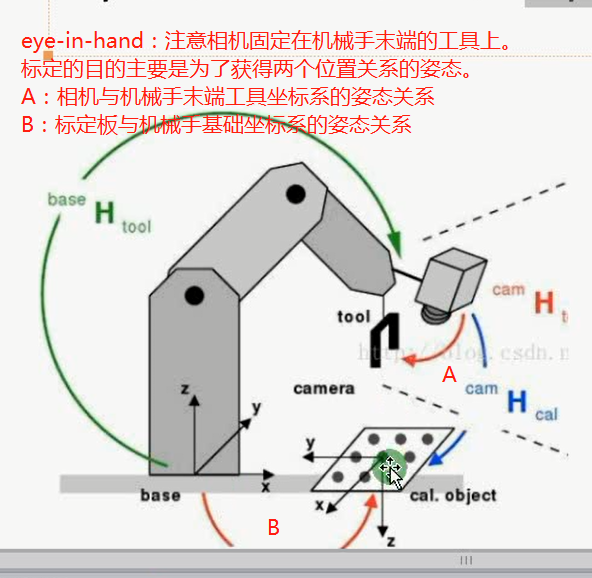
*这个示例展示了如何使用手眼标定,针对相机固定在机械手末端且标定板相对于机械手基础坐标系静止的情形。
* The robot positions the camera with respect to the calibration plate.
*机械手相对与相机姿态反映在标定板上。
* In this case, the goal of the hand eye calibration is to determine two unknown poses:
*在这种情况下,手眼标定的目标是得到两个未知的姿态。
* - the pose of the robot base in the coordinate system
* of the calibration object (CalObjInBasePose).
*标定板相对机械手基础坐标系的姿态
* - the pose of the camera in the coordinate system of the
* tool center point (ToolInCamPose).
*机器手末端工具坐标系相对于相机的姿态
* Theoretically, as input the method needs at least 3 poses of the
* calibration object in the camera coordinate system.
* However, it is recommended to use at least 10 Poses.
* The corresponding poses of the robot tool in the robot base coordinate system
* (ToolInBasePose) changes for each calibration image,
* because it describes the pose of the robot moving the camera.
* The poses of the calibration object are obtained from images of the
* calibration object recorded with the camera attached to the robot.
* To obtain good calibration results, it its essential to position
* the camera with respect to the calibration object so that the object appears
* tilted in the image.
* After the hand eye calibration, the computed transformations are
* extracted and used to compute the pose of the calibration object in the
* camera coordinate system.
dev_update_off ()
* Directories with calibration images and data files
ImageNameStart := '3d_machine_vision/handeye/movingcam_calib3cm_'
DataNameStart := 'handeye/movingcam_'
NumImages := 14
read_image (Image, ImageNameStart + '00')
dev_close_window ()
get_image_size (Image, Width, Height)
dev_open_window (0, 0, Width, Height, 'black', WindowHandle)
dev_set_line_width (2)
dev_set_draw ('margin')
dev_display (Image)
set_display_font (WindowHandle, 14, 'mono', 'true', 'false')
* Load the calibration plate description file.
*加载标定板描述文件
* Make sure that the file is in the current directory or
* in HALCONROOT/calib, or use an absolute path.
*确保文件在正确的路径或使用相对路径
CalTabFile := 'caltab_30mm.descr'
* Read the initial values for the internal camera parameters
*读取相机的内参
read_cam_par (DataNameStart + 'start_campar.dat', StartCamParam)
* Create the calibration model for the hand eye calibration
* where the calibration object is observed with a camera
*创建一个手眼标定模板,标定板在相机视野内
create_calib_data ('hand_eye_moving_cam', 1, 1, CalibDataID)
* Set the camera type used
*设置相机内参
set_calib_data_cam_param (CalibDataID, 0, 'area_scan_division', StartCamParam)
* Set the calibration object
*设置标定板参数
set_calib_data_calib_object (CalibDataID, 0, CalTabFile)
* Start the loop over the calibration images
* Set the opitmization method to be used
set_calib_data (CalibDataID, 'model', 'general', 'optimization_method', 'nonlinear')
disp_message (WindowHandle, 'The calibration data model was created', 'window', 12, 12, 'black', 'true')
disp_continue_message (WindowHandle, 'black', 'true')
stop ()
for I := 0 to NumImages - 1 by 1
read_image (Image, ImageNameStart + I$'02d')
* Search for the calibration plate, extract the marks and the
* pose of it, and store the results in the calibration data
* The poses are stored in the calibration data model for use by
* the hand eye calibration and do not have to be set explicitly
find_calib_object (Image, CalibDataID, 0, 0, I, [], [])
get_calib_data_observ_contours (Caltab, CalibDataID, 'caltab', 0, 0, I)
get_calib_data_observ_points (CalibDataID, 0, 0, I, RCoord, CCoord, Index, PoseForCalibrationPlate)
* Visualize the extracted calibration marks and the estimated pose (coordinate system)
dev_set_color ('green')
dev_display (Image)
dev_display (Caltab)
dev_set_color ('yellow')
disp_cross (WindowHandle, RCoord, CCoord, 6, 0)
dev_set_colored (3)
disp_3d_coord_system (WindowHandle, StartCamParam, PoseForCalibrationPlate, 0.01)
* Read pose of tool in robot base coordinates (ToolInBasePose)
*读机械手基础坐标系下的末端工具的姿态,每张图只要机械手末端相对标定板有XYZ方向的平移或旋转,此姿态就会不一样。
read_pose (DataNameStart + 'robot_pose_' + I$'02d' + '.dat', ToolInBasePose)
* Set the pose tool in robot base coordinates in the calibration data model
set_calib_data (CalibDataID, 'tool', I, 'tool_in_base_pose', ToolInBasePose)
* Uncomment for inspection of visualization
* disp_message (WindowHandle, 'Extracting data from calibration image ' + (I + 1) + ' of ' + NumImages, 'window', 12, 12, 'black', 'true')
* disp_continue_message (WindowHandle, 'black', 'true')
* stop ()
endfor
disp_message (WindowHandle, 'All relevant data has been set in the calibration data model', 'window', 12, 12, 'black', 'true')
disp_continue_message (WindowHandle, 'black', 'true')
stop ()
* Perform the hand eye calibration and store the results to file
* The calibration of the cameras is done internally prior
* to the hand eye calibration
dev_display (Image)
disp_message (WindowHandle, 'Performing the hand-eye calibration', 'window', 12, 12, 'black', 'true')
calibrate_hand_eye (CalibDataID, Errors)
* Query the camera parameters and the poses
get_calib_data (CalibDataID, 'camera', 0, 'params', CamParam)
* Get poses computed by the hand eye calibration
*tool_in_cam_pose:在相机坐标系下工具坐标系的关系
get_calib_data (CalibDataID, 'camera', 0, 'tool_in_cam_pose', ToolInCamPose)
*obj_in_base_pose:在机械手基础坐标系下标定板的姿态
get_calib_data (CalibDataID, 'calib_obj', 0, 'obj_in_base_pose', CalObjInBasePose)
dev_get_preferences ('suppress_handled_exceptions_dlg', PreferenceValue)
dev_set_preferences ('suppress_handled_exceptions_dlg', 'true')
try
* Handle situation where user does not have the permission
* to write in the current directory.
*
* Store the camera parameters to file
*保存一个相机的内参
write_cam_par (CamParam, DataNameStart + 'final_campar.dat')
* Save the hand eye calibration results to file
*保存工具坐标系(机械手末端)相对于相机的姿态参数
write_pose (ToolInCamPose, DataNameStart + 'final_pose_cam_tool.dat')
*保存标定板相对于机械手基础坐标系的姿态参数
write_pose (CalObjInBasePose, DataNameStart + 'final_pose_base_calplate.dat')
catch (Exception)
* do nothing
endtry
dev_set_preferences ('suppress_handled_exceptions_dlg', PreferenceValue)
dev_display (Image)
* Display calibration errors
Message := 'Quality of the results: root mean square maximum'
Message[1] := 'Translation part in meter: ' + Errors[0]$'6.4f' + ' ' + Errors[2]$'6.4f'
Message[2] := 'Rotation part in degree: ' + Errors[1]$'6.4f' + ' ' + Errors[3]$'6.4f'
disp_message (WindowHandle, Message, 'window', 12, 12, 'black', 'true')
disp_continue_message (WindowHandle, 'black', 'true')
stop ()
* For the given camera, get the corresponding pose indices and calibration object indices
query_calib_data_observ_indices (CalibDataID, 'camera', 0, CalibObjIdx, PoseIds)
* Compute the pose of the calibration object in the camera coordinate
* system via calibrated poses and the ToolInBasePose and visualize it.
for I := 0 to NumImages - 1 by 1
read_image (Image, ImageNameStart + I$'02d')
dev_display (Image)
* Obtain the pose of the tool in robot base coordinates used in the calibration.
* The index corresponds to the index of the pose of the observation object.
get_calib_data (CalibDataID, 'tool', PoseIds[I], 'tool_in_base_pose', ToolInBasePose)
* Compute the pose of the calibration object relative to the camera
calc_calplate_pose_movingcam (CalObjInBasePose, ToolInCamPose, ToolInBasePose, CalObjInCamPose)
* Display the coordinate system
dev_set_colored (3)
disp_3d_coord_system (WindowHandle, CamParam, CalObjInCamPose, 0.01)
Message := 'Using the calibration results to display '
Message[1] := 'the coordinate system in image ' + (I + 1) + ' of ' + NumImages
disp_message (WindowHandle, Message, 'window', 12, 12, 'black', 'true')
if (I < NumImages - 1)
disp_continue_message (WindowHandle, 'black', 'true')
stop ()
endif
endfor
* Clear the data model
clear_calib_data (CalibDataID)
*
* After the hand-eye calibration the computed pose
* ToolInCamPose can be used in robotic grasping applications.
* If the tool coordinate system is placed at the gripper
* and a detected object ObjInCamPose shall be grasped
* (here the calibration object),
* the pose of the detected object relative
* to the robot base coordinate system has to be computed.
*姿态反转
pose_invert (ToolInCamPose, CamInToolPose)
*由两个已知姿态得到第三个姿态,相当于两个分数乘法,其中一个分子与另一个分母相等,相约的情况
pose_compose (ToolInBasePose, CamInToolPose, CamInBasePose)
pose_compose (CamInBasePose, CalObjInCamPose, ObjInBasePose)
手眼标定之相机随动eye-in-hand 示例:handeye_movingcam_calibration的更多相关文章
- 手眼标定eye-to-hand 示例:handeye_stationarycam_calibration
* * This example explains how to use the hand eye calibration for the case where* the camera is stat ...
- halcon 手眼标定的坐标转换原理讲解
原文链接:https://blog.csdn.net/opencv_learner/article/details/82113323 一直以来,对于手眼标定所涉及到的坐标系及坐标系之间的转换关系都没能 ...
- ROS标定IDS相机
参考 ROS 相机标定http://blog.csdn.net/ArtistA/article/details/51125560 ROS里的标定程序只要使用了OPNCV的标定程序: opencv 相机 ...
- 相机标定:PNP基于单应面解决多点透视问题
利用二维视野内的图像,求出三维图像在场景中的位姿,这是一个三维透视投影的反向求解问题.常用方法是PNP方法,需要已知三维点集的原始模型. 本文做了大量修改,如有不适,请移步原文: ...
- 相机标定简介与MatLab相机标定工具箱的使用(未涉及原理公式推导)
相机标定 一.相机标定的目的 确定空间物体表面某点的三维几何位置与其在图像中对应点之间的相互关系,建立摄像机成像的几何模型,这些几何模型参数就是摄像机参数. 二.通用摄像机模型 世界坐标系.摄像机坐标 ...
- 相机标定:kalibr标定工具箱使用总结
1 多相机标定 1.1采集图像和IMU 1.2制作Bag包 1)组织文件结构 ~/kalibr_workspace/test/stereo_calib bagsrc cam0 (1+time(0))* ...
- MATLAB二维相机标定的解决方案 calibration
第一步,在命令行下面输入cameraCalibrator,启动MATLAB相机标定.相机矫正界面 cameraCalibrator 第二步:拍照.如果你是做相机标定,你应该知道,你需要一些calibr ...
- 直接线性变换解法(DLT)用于标定相机
直接线性变换法是建立像点坐标和相应物点物方空间坐标之间直接的线性关系的算法.特点:不需要内外方位元素:适合于非量测相机:满足中.低精度的测量任务:可以标定单个相机. 1 各坐标系之间的关系推导直接线性 ...
- 相机标定过程(opencv) + matlab参数导入opencv + matlab标定和矫正
%%%%%%%%%%%%%%%%%%%%%%%%%%%%%%%%%%%%%%%%%% 辛苦原创所得,转载请注明出处 %%%%%%%%%%%%%%%%%%%%%%%%%%%%%%%%%%%%%%%%%% ...
随机推荐
- Linux基础入门-用户及文件权限管理
一.Linux用户管理: 不同的用户的文件都是放在同一个物理磁盘上的甚至同一个逻辑分区或者目录里,但是由于Linux的用户管理和权限机制,不同用户不能轻易查看.修改彼此的文件. 1. 查看用户: wh ...
- HashMap与LinkedHashMap的区别
/** * remark: * HashMap与LinkedHashMap的区别 * 这里必须使用LinkedHashMap: * 原因 ...
- Nginx reverse proxy NSQAdmin
以下配置只针对nsqadmin v1.1.0 (built w/go1.10.3)版本 ## The default server# server { listen 80 defau ...
- vue 跨域问题
前段时间做一个vue打包成安卓和IOS的App,遇到了跨域问题,直接拿了之前项目的配置,却不起作用. import org.springframework.context.annotation.Con ...
- bitmap--Bitmap详解与Bitmap的内存优化
一.Bitmap: Bitmap是Android系统中的图像处理的最重要类之一.用它可以获取图像文件信息,进行图像剪切.旋转.缩放等操作,并可以指定格式保存图像文件. 常用方法: public voi ...
- 国家码和reginCode映射关系
import org.apache.commons.lang.StringUtils; import java.util.HashMap; import java.util.Map; public c ...
- 使用svn创建分支!
1 在主分支上 右键svn---选中 branch/Tag选项 2,填写新分支目录之后 点击 ok键 3,在新创建的分支目录 右键 --> Chenckout下 就可以把代码拉下来了 4.更新 ...
- C#6.0新语法
.自动属性初始化的改进(有用) 原来的用法(声明时无法同时初始化),例如: class MyClass { public int Age { get; set; } public string Nam ...
- Linux中常用目录作用
Linux一般相应的文件都会会放在相应的目录下.这样更有利于文件的查找. 1.可以在家目录root或home,以及temp目录下随便放东西. 2.根目录下的bin和sbin,usr目录下的bin和sb ...
- win10系统搜索不到某些老式打印机
问题: win10系统在设置选项里面搜索打印机,却找不到打印机. 百度了一下: 基本说的是驱动问题. 解决方法: 1.下载lansee局域网扫描软件 2.打开嗅探工具点击开始 3.搜索出来之后,会在共 ...