
13. nginx,lvs之一
摘要:
1、详细描述常见nginx常用模块和模块的使用示例
2、简述Linux集群类型、系统扩展方式及调度方法
3、简述lvs四种集群有点及使用场景
4、描述LVS-NAT、LVS-DR的工作原理并实现配置
1、详细描述常见nginx常用模块和模块的使用示例
Nginx的代码由一个核心和一系列的模块组成。
核心(core functionality)主要用于提供全局应用的基本功能,创建必要的运行时环境及确保不同模块之间平滑地进行交互等,对应于配置文件的main段和event段。核心涉及的指令官方文档:http://nginx.org/en/docs/ngx_core_module.html。
还有很多功能都通过模块实现,nginx是高度模块化程序。如web相关的功能模块有"ngx_http_*_module",和mail相关的功能模块有"ngx_mail_*_module",和tcp代理、负载均衡相关的功能模块有"ngx_stream_*_module",这些类别的模块中又分为很多类别的模块,如http类别的模块中有基本核心模块、事件类模块、缓存类模块、SSL相关模块、负载均衡类模块upstream等等。
以下是http功能模块类中常见的模块。
| http类模块名 | 模块功能说明 | |
|---|---|---|
| ngx_http_core_module | http核心模块,对应配置文件中的http段,包含很多指令,如location指令 | |
| ngx_http_access_module | 访问控制模块,控制网站用户对nginx的访问,对应于配置文件中的allow和deny等指令 | |
| ngx_http_auth_basic_module | 通过用户名和密码认证的访问控制,如访问站点时需要数据用户名和密码,指令包括auth_basic和auth_basic_user_file | |
| ngx_http_charset_module | 设置网页显示字符集。指令之一为charset,如charset utf-8 | |
| ngx_http_fastcgi_module | fastcgi模块,和动态应用相关。该模块下有非常多的子模块。 | |
| ngx_http_flv_module | 支持flv视频流的模块,如边下边播 | |
| ngx_http_mp4_module | 同flv模块 | |
| ngx_http_gzip_module | 压缩模块,用来压缩nginx返回的响应报文。一般只压缩纯文本内容,因为压缩比例非常大,而图片等不会去压缩 | |
| ngx_http_image_filter_module | 和图片裁剪、缩略图相关模块,需要安装gd-devel才能编译该模块 | |
| ngx_http_index_module | 定义将要被作为默认主页的文件,对应指令为index。"index index.html,index.php" | |
| ngx_http_autoindex_module | 当index指令指定的主页文件不存在时,交给autoindex指令,将自动列出目录中的文件autoindex {on/off} | |
| ngx_http_log_module | 和访问日志相关的模块,指令包括log_format和access_log | |
| ngx_http_memcached_module | 和memcached相关的模块,用于从memcached服务器中获取相应响应数据 | |
| ngx_http_proxy_module | 和代理相关,允许传送请求到其它服务器 | |
| ngx_http_realip_module | 当nginx在反向代理的后端提供服务时,获取到真正的客户端地址,否则获取的是反向代理的IP地址 | |
| ngx_http_referer_module | 实现防盗链功能的模块 | |
| ngx_http_rewrite_module | 和URL地址重写相关的模块,需要安装pcre-devel才能编译安装该模块 | |
| ngx_http_scgi_module | simple cgi,是cgi的替代品,和fastcgi类似,但更简单 | |
| ngx_http_ssl_module | 提供ssl功能的模块,即实现HTTPS | |
| ngx_http_stub_status_module | 获取nginx运行状态信息 | |
| ngx_http_upstream | 和负载均衡相关模块 |
下面只介绍三个模块:
ngx_http_access module 实现基于IP地址的访问控制
ngx_http_auth_basic_module 实现基于用户的访问控制,使用basic认证机制认证
ngx_http_stub_status_module 用于输出nginx的基本状态信息
1.1 在服务器上配置/etc/nginx/conf.d/vhost.conf文件
[root@bogon conf.d]# cat vhost.conf

server {

       listen 80;

       server_name www.danlee.io;

       root /data/nginx/vhost;

       location / {

                deny 192.168.1.11;

                allow all;

       }

       location ~* ^/(admin|login) {

                 auth_basic "admin area or login url";

                 auth_basic_user_file /etc/nginx/.ngxpasswd;

       }

       location /ngxstatus {

                stub_status;

       }

}

[root@bogon conf.d]# tree /data

/data

└── nginx

    └── vhost

        ├── admin

        │   └── index.html

        └── index.html

3 directories, 2 files

[root@bogon conf.d]# cat /data/nginx/vhost/index.html

<h1>www.danlee.io, mainpage</h1>

[root@bogon conf.d]# cat /data/nginx/vhost/admin/index.html

<h1>Admin area</h1>

[root@bogon conf.d]#htpasswd -c -m /etc/nginx/.ngxpasswd tom

[root@bogon conf.d]#htpasswd -m /etc/nginx/.ngxpasswd jerry

[root@bogon conf.d]# cat /etc/nginx/.ngxpasswd

tom:$apr1$nYfn6I3F$NmKnqGEwLtOySxkNljc9P1

jerry:$apr1$2sa3N.Kg$Ju1tJ8IcMX4lmgS8qzOKo.


[root@bogon conf.d]# nginx -t

nginx: the configuration file /etc/nginx/nginx.conf syntax is ok

nginx: configuration file /etc/nginx/nginx.conf test is successful

[root@bogon conf.d]# nginx -s reload
1.2 在两个客户端验证
首先在两个客户端上都编辑/etc/hosts文件添加服务器IP and server name.
192.168.1.21 www.danlee.io
客户端192.168.1.22上 验证:
 [root@bogon ~]# curl http://www.danlee.io/ngxstatus

 Active connections:

 server accepts handled requests

 Reading:  Writing:  Waiting:

 [root@bogon ~]# curl http://www.danlee.io

 <h1>www.danlee.io, mainpage</h1>

 [root@bogon ~]# curl http://www.danlee.io/index.html

 <h1>www.danlee.io, mainpage</h1>

 [root@bogon ~]# cat /etc/hosts

 127.0.0.1   localhost localhost.localdomain localhost4 localhost4.localdomain4

 ::         localhost localhost.localdomain localhost6 localhost6.localdomain6

 192.168.1.21  www.danlee.io
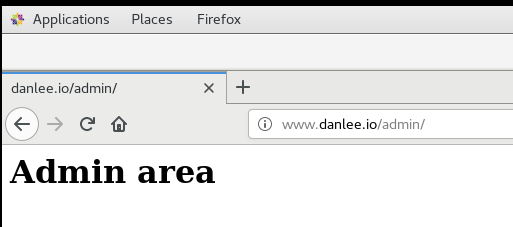
客户端192.168.1.11上 验证:
 [root@localhost ~]# curl http://www.danlee.io

 <html>

 <head><title> Forbidden</title></head>

 <body bgcolor="white">

 <center><h1> Forbidden</h1></center>

 <hr><center>nginx/1.12.</center>

 </body>

 </html>

 [root@localhost ~]# curl http://www.danlee.io/ngxstatus

 Active connections:

 server accepts handled requests

 Reading:  Writing:  Waiting:

 [root@localhost ~]# curl http://www.danlee.io/admin

 <html>

 <head><title> Authorization Required</title></head>

 <body bgcolor="white">

 <center><h1> Authorization Required</h1></center>

 <hr><center>nginx/1.12.</center>

 </body>

 </html>

 [root@localhost ~]#
备注: 因为没有在服务器端对ngxstatus模块配置验证,此客户端依然可以访问该页面数据。
2、简述Linux集群类型、系统扩展方式及调度方法
Linux Cluster类型:
LB:Load Balancing,负载均衡;
HA:High Availiablity,高可用;
A=MTBF/(MTBF+MTTR)
(0,1):90%, 95%, 99%, 99.5%, 99.9%, 99.99%, 99.999%, 99.9999%
HP:High Performance,高性能;
系统扩展方式:
Scale UP:向上扩展
Scale Out:向外扩展
ipvs scheduler:
根据其调度时是否考虑各RS当前的负载状态,可分为静态方法和动态方法两种:
静态方法:仅根据算法本身进行调度;
RR:roundrobin,轮询;
WRR:Weighted RR,加权轮询;
SH:Source Hashing,实现session sticky,源IP地址hash;将来自于同一个IP地址的请求始终发往第一次挑中的RS,从而实现会话绑定;
DH:Destination Hashing;目标地址哈希,将发往同一个目标地址的请求始终转发至第一次挑中的RS,典型使用场景是正向代理缓存场景中的负载均衡;
动态方法:主要根据每RS当前的负载状态及调度算法进行调度;
Overhead=负载值
LC:least connections
Overhead=activeconns*256+inactiveconns
WLC:Weighted LC
Overhead=(activeconns*256+inactiveconns)/weight
SED:Shortest Expection Delay
Overhead=(activeconns+1)*256/weight
NQ:Never Queue
LBLC:Locality-Based LC,动态的DH算法;
LBLCR:LBLC with Replication,带复制功能的LBLC;
3、简述lvs四种集群特点及使用场景
lvs集群的类型:
lvs-nat:修改请求报文的目标IP;多目标IP的DNAT;
lvs-dr:操纵封装新的MAC地址;
lvs-tun:在原请求IP报文之外新加一个IP首部;
lvs-fullnat:修改请求报文的源和目标IP;
lvs-nat:
多目标IP的DNAT,通过将请求报文中的目标地址和目标端口修改为某挑出的RS的RIP和PORT实现转发;
(1)RIP和DIP必须在同一个IP网络,且应该使用私网地址;RS的网关要指向DIP; (DIP是内网,VIP是外网?)
(2)请求报文和响应报文都必须经由Director转发;Director易于成为系统瓶颈;
(3)支持端口映射,可修改请求报文的目标PORT;
(4)vs必须是Linux系统,rs可以是任意系统;
lvs-dr:
Direct Routing,直接路由;
通过为请求报文重新封装一个MAC首部进行转发,源MAC是DIP所在的接口的MAC,
目标MAC是某挑选出的RS的RIP所在接口的MAC地址;源IP/PORT,以及目标IP/PORT均保持不变;
Director和各RS都得配置使用VIP;
(1) 确保前端路由器将目标IP为VIP的请求报文发往Director:
(a) 在前端网关做静态绑定;
(b) 在RS上使用arptables;
(c) 在RS上修改内核参数以限制arp通告及应答级别;
arp_announce
arp_ignore
(2) RS的RIP可以使用私网地址,也可以是公网地址;RIP与DIP在同一IP网络;RIP的网关不能指向DIP,以确保响应报文不会经由Director;
(3) RS跟Director要在同一个物理网络;
(4) 请求报文要经由Director,但响应不能经由Director,而是由RS直接发往Client;
(5) 不支持端口映射;
lvs-tun:
转发方式:不修改请求报文的IP首部(源IP为CIP,目标IP为VIP),而是在原IP报文之外再封装一个IP首部(源IP是DIP,目标IP是RIP),
将报文发往挑选出的目标RS;RS直接响应给客户端(源IP是VIP,目标IP是CIP);
(1) DIP, VIP, RIP都应该是公网地址;
(2) RS的网关不能,也不可能指向DIP;
(3) 请求报文要经由Director,但响应不能经由Director;
(4) 不支持端口映射;
(5) RS的OS得支持隧道功能;
lvs-fullnat:
通过同时修改请求报文的源IP地址和目标IP地址进行转发;
CIP <--> DIP
VIP <--> RIP
(1) VIP是公网地址,RIP和DIP是私网地址,且通常不在同一IP网络;因此,RIP的网关一般不会指向DIP;
(2) RS收到的请求报文源地址是DIP,因此,只能响应给DIP;但Director还要将其发往Client;
(3) 请求和响应报文都经由Director;
(4) 支持端口映射;
注意:此类型默认不支持;
总结:
lvs-nat, lvs-fullnat:请求和响应报文都经由Director;
lvs-nat:RIP的网关要指向DIP;
lvs-fullnat:RIP和DIP未必在同一IP网络,但要能通信;
lvs-dr, lvs-tun:请求报文要经由Director,但响应报文由RS直接发往Client;
lvs-dr:通过封装新的MAC首部实现,通过MAC网络转发;
lvs-tun:通过在原IP报文之外封装新的IP首部实现转发,支持远距离通信;
4、描述LVS-NAT、LVS-DR的工作原理并实现配置
lvs-nat:
多目标IP的DNAT,通过将请求报文中的目标地址和目标端口修改为某挑出的RS的RIP和PORT实现转发;
(1)RIP和DIP必须在同一个IP网络,且应该使用私网地址;RS的网关要指向DIP;
(2)请求报文和响应报文都必须经由Director转发;Director易于成为系统瓶颈;
(3)支持端口映射,可修改请求报文的目标PORT;
(4)vs必须是Linux系统,rs可以是任意系统;
1)准备:
1. 关闭selinux, 清空iptables, 同步dr, rs1, rs2上的时间
2. 在rs1, rs2上分别安装nginx, telnet-server
在dr上安装nginx, ipvsadm
3. dr调度器:
DIP: 192.168.1.6
VIP: 127.16.1.7
rs1服务器1 RIP1:127.16.1.8
rs2服务器2 RIP2: 127.16.1.9
如果是dr, rs在同一台电脑上的虚拟机上,dip, rip都需要改为仅主机模式vmnet1。调整网络前先安装必要的软件包。
VIP, RIP需要使用私网地址。
Director要打开核心转发功能sysctl -w net.ipv4.ip_forward=1
如何在虚拟机中添加一个新的网卡,可以参考(实际步骤会不相同)https://blog.csdn.net/qq_21383435/article/details/51126577
2)配置:
在RS1上:
# vim /usr/share/nginx/html/test1.html 添加内容<h1>RS1, ####172.16.1.8</h1>
# systemctl start nginx.service
# ss -tnl 检查80端口是否打开
在RS2上:
# vim /usr/share/nginx/html/test1.html 添加内容<h1>RS2, ####172.16.1.9</h1>
# systemctl start nginx.service
# ss -tnl 检查80端口是否打开
在DR上:
[root@bogon ~]# ifconfig
ens33: flags=4163<UP,BROADCAST,RUNNING,MULTICAST> mtu 1500
inet 192.168.1.6 netmask 255.255.255.0 broadcast 192.168.1.255
inet6 fe80::fb51:8e3:4aa5:5358 prefixlen 64 scopeid 0x20<link>
ether 00:0c:29:37:ff:fd txqueuelen 1000 (Ethernet)
RX packets 7072 bytes 5524007 (5.2 MiB)
RX errors 0 dropped 0 overruns 0 frame 0
TX packets 3960 bytes 354712 (346.3 KiB)
TX errors 0 dropped 0 overruns 0 carrier 0 collisions 0
ens37: flags=4163<UP,BROADCAST,RUNNING,MULTICAST> mtu 1500
inet 172.16.1.7 netmask 255.255.0.0 broadcast 172.16.255.255
inet6 fe80::20c:29ff:fe37:ff07 prefixlen 64 scopeid 0x20<link>
ether 00:0c:29:37:ff:07 txqueuelen 1000 (Ethernet)
RX packets 717 bytes 85009 (83.0 KiB)
RX errors 0 dropped 0 overruns 0 frame 0
TX packets 133 bytes 15590 (15.2 KiB)
TX errors 0 dropped 0 overruns 0 carrier 0 collisions 0
lo: flags=73<UP,LOOPBACK,RUNNING> mtu 65536
inet 127.0.0.1 netmask 255.0.0.0
inet6 ::1 prefixlen 128 scopeid 0x10<host>
loop txqueuelen 1000 (Local Loopback)
RX packets 0 bytes 0 (0.0 B)
RX errors 0 dropped 0 overruns 0 frame 0
TX packets 0 bytes 0 (0.0 B)
TX errors 0 dropped 0 overruns 0 carrier 0 collisions 0
[root@bogon ~]# ipvsadm -A -t 192.168.1.6:80 -s rr #注意此处为VIP
[root@bogon ~]# ipvsadm -a -t 192.168.1.6:80 -r 172.16.1.9 -m
[root@bogon ~]# ipvsadm -a -t 192.168.1.6:80 -r 172.16.1.8 -m
[root@bogon ~]# ipvsadm -Ln
IP Virtual Server version 1.2.1 (size=4096)
Prot LocalAddress:Port Scheduler Flags
-> RemoteAddress:Port Forward Weight ActiveConn InActConn
TCP 192.168.1.6:80 rr
-> 172.16.1.8:80 Masq 1 0 0
-> 172.16.1.9:80 Masq 1 0 0
在客户端上:
[root@stephen ~]# curl http://192.168.1.6/test1.html
<h1>RS1, ####172.16.1.8</h1>
[root@stephen ~]# curl http://192.168.1.6/test1.html
<h1>RS2,###172.16.1.9</h1>
[root@stephen ~]# for i in {1..10}; do curl http://192.168.1.6/test1.html; done
<h1>RS1, ####172.16.1.8</h1>
<h1>RS2,###172.16.1.9</h1>
<h1>RS1, ####172.16.1.8</h1>
<h1>RS2,###172.16.1.9</h1>
<h1>RS1, ####172.16.1.8</h1>
<h1>RS2,###172.16.1.9</h1>
<h1>RS1, ####172.16.1.8</h1>
<h1>RS2,###172.16.1.9</h1>
<h1>RS1, ####172.16.1.8</h1>
<h1>RS2,###172.16.1.9</h1>
LVS-DR模型:
Direct Routing,直接路由;
通过为请求报文重新封装一个MAC首部进行转发,源MAC是DIP所在的接口的MAC,
目标MAC是某挑选出的RS的RIP所在接口的MAC地址;源IP/PORT,以及目标IP/PORT均保持不变;
Director和各RS都得配置使用VIP;
(1) 确保前端路由器将目标IP为VIP的请求报文发往Director:
(a) 在前端网关做静态绑定;
(b) 在RS上使用arptables;
(c) 在RS上修改内核参数以限制arp通告及应答级别;
arp_announce
arp_ignore
(2) RS的RIP可以使用私网地址,也可以是公网地址;RIP与DIP在同一IP网络;RIP的网关不能指向DIP,以确保响应报文不会经由Director; 他们的网关相同可以吗?
(3) RS跟Director要在同一个物理网络;
(4) 请求报文要经由Director,但响应不能经由Director,而是由RS直接发往Client;
(5) 不支持端口映射;
1)准备:
1. 关闭selinux, 清空iptables, 同步dr, rs1, rs2上的时间
2. 在rs1, rs2上分别安装httpd 在dr上安装ipvsadm
3.dr, rs都是桥接
dr调度器:
DIP: 192.168.1.6
VIP: 192.16.1.99 在ens33:0上
rs1服务器1 RIP1:192.168.1.4
VIP: 192.168.1.99 在lo:0上
rs2服务器2 RIP2: 192.168.1.5
VIP: 192.168.1.99 在lo:0上
思考: vip要和rip在同一网段中吗?
当VIP全部设置为VIP: 172.16.0.99,结果失败,地址0改为1后就成功了。
2)配置:
在RS1上:
# vim /var/www/html/test1.html 添加内容<h1> RS1, 192.168.1.4 </h1>
[root@bogon ~]# vim setparam.sh
[root@bogon ~]# cat setparam.sh
#!/bin/bash
#
vip='192.168.1.99'
mask='255.255.255.255'
iface='lo:0'
case $1 in
start)
echo 1 > /proc/sys/net/ipv4/conf/all/arp_ignore
echo 1 > /proc/sys/net/ipv4/conf/lo/arp_ignore
echo 2 > /proc/sys/net/ipv4/conf/all/arp_announce
echo 2 > /proc/sys/net/ipv4/conf/lo/arp_announce
ifconfig $iface $vip netmask $mask broadcast $vip up
route add -host $vip dev $iface
;;
stop)
ifconfig $iface down
echo 0 > /proc/sys/net/ipv4/conf/all/arp_ignore
echo 0 > /proc/sys/net/ipv4/conf/lo/arp_ignore
echo 0 > /proc/sys/net/ipv4/conf/all/arp_announce
echo 0 > /proc/sys/net/ipv4/conf/lo/arp_announce
;;
*)
echo "Usage $(basename $0) start|stop"
exit 1
;;
esac
[root@bogon ~]# bash -n setparam.sh
[root@bogon ~]# bash -x setparam.sh start
+ vip=192.168.1.99
+ mask=255.255.255.255
+ iface=lo:0
+ case $1 in
+ echo 1
+ echo 1
+ echo 2
+ echo 2
+ ifconfig lo:0 192.168.1.99 netmask 255.255.255.255 broadcast 172.16.0.99 up
+ route add -host 192.168.1.99 dev lo:0
# scp setparam.sh 192.168.1.5:/root/
# systemctl start httpd.service
# ss -tnl 检查80端口是否打开
在RS2上:
[root@bogon ~]# ls
anaconda-ks.cfg setparam.sh
[root@bogon ~]# bash -x setparam.sh start
+ vip=192.168.1.99
+ mask=255.255.255.255
+ iface=lo:0
+ case $1 in
+ echo 1
+ echo 1
+ echo 2
+ echo 2
+ ifconfig lo:0 192.168.1.99 netmask 255.255.255.255 broadcast 192.168.1.99 up
+ route add -host 192.168.1.99 dev lo:0
[root@bogon ~]# ifconfig
ens33: flags=4163<UP,BROADCAST,RUNNING,MULTICAST> mtu 1500
inet 192.168.1.5 netmask 255.255.255.0 broadcast 192.168.1.255
inet6 fe80::8b7:c57a:ebbd:80b7 prefixlen 64 scopeid 0x20<link>
ether 00:0c:29:9e:a5:df txqueuelen 1000 (Ethernet)
RX packets 15795 bytes 17043985 (16.2 MiB)
RX errors 0 dropped 0 overruns 0 frame 0
TX packets 8126 bytes 786863 (768.4 KiB)
TX errors 0 dropped 0 overruns 0 carrier 0 collisions 0
lo: flags=73<UP,LOOPBACK,RUNNING> mtu 65536
inet 127.0.0.1 netmask 255.0.0.0
inet6 ::1 prefixlen 128 scopeid 0x10<host>
loop txqueuelen 1000 (Local Loopback)
RX packets 4 bytes 336 (336.0 B)
RX errors 0 dropped 0 overruns 0 frame 0
TX packets 4 bytes 336 (336.0 B)
TX errors 0 dropped 0 overruns 0 carrier 0 collisions 0
lo:0: flags=73<UP,LOOPBACK,RUNNING> mtu 65536
inet 192.168.1.99 netmask 255.255.255.255
loop txqueuelen 1000 (Local Loopback)
# vim /var/www/html/test1.html 添加内容<h1> RS2, 192.168.1.5 </h1>
# systemctl start httpd.service
# ss -tnl 检查80端口是否打开
在DR上:
[root@bogon network-scripts]# curl http://192.168.1.4/test1.html
<h1> RS1, 192.168.1.4 </h1>
[root@bogon network-scripts]# curl http://192.168.1.5/test1.html
<h1> RS2, 192.168.1.5 </h1>
[root@bogon network-scripts]# ifconfig
ens33: flags=4163<UP,BROADCAST,RUNNING,MULTICAST> mtu 1500
inet 192.168.1.6 netmask 255.255.255.0 broadcast 192.168.1.255
inet6 fe80::fb51:8e3:4aa5:5358 prefixlen 64 scopeid 0x20<link>
ether 00:0c:29:37:ff:fd txqueuelen 1000 (Ethernet)
RX packets 2310 bytes 241192 (235.5 KiB)
RX errors 0 dropped 0 overruns 0 frame 0
TX packets 476 bytes 42028 (41.0 KiB)
TX errors 0 dropped 0 overruns 0 carrier 0 collisions 0
lo: flags=73<UP,LOOPBACK,RUNNING> mtu 65536
inet 127.0.0.1 netmask 255.0.0.0
inet6 ::1 prefixlen 128 scopeid 0x10<host>
loop txqueuelen 1000 (Local Loopback)
RX packets 0 bytes 0 (0.0 B)
RX errors 0 dropped 0 overruns 0 frame 0
TX packets 0 bytes 0 (0.0 B)
TX errors 0 dropped 0 overruns 0 carrier 0 collisions 0
[root@bogon network-scripts]# ifconfig ens33:0 192.168.1.99 netmask 255.255.255.255 broadcast 192.168.1.99 up
[root@bogon network-scripts]# ifconfig
ens33: flags=4163<UP,BROADCAST,RUNNING,MULTICAST> mtu 1500
inet 192.168.1.6 netmask 255.255.255.0 broadcast 192.168.1.255
inet6 fe80::fb51:8e3:4aa5:5358 prefixlen 64 scopeid 0x20<link>
ether 00:0c:29:37:ff:fd txqueuelen 1000 (Ethernet)
RX packets 2513 bytes 259088 (253.0 KiB)
RX errors 0 dropped 0 overruns 0 frame 0
TX packets 602 bytes 56844 (55.5 KiB)
TX errors 0 dropped 0 overruns 0 carrier 0 collisions 0
ens33:0: flags=4163<UP,BROADCAST,RUNNING,MULTICAST> mtu 1500
inet 192.168.1.99 netmask 255.255.255.255 broadcast 172.16.0.99
ether 00:0c:29:37:ff:fd txqueuelen 1000 (Ethernet)
lo: flags=73<UP,LOOPBACK,RUNNING> mtu 65536
inet 127.0.0.1 netmask 255.0.0.0
inet6 ::1 prefixlen 128 scopeid 0x10<host>
loop txqueuelen 1000 (Local Loopback)
RX packets 0 bytes 0 (0.0 B)
RX errors 0 dropped 0 overruns 0 frame 0
TX packets 0 bytes 0 (0.0 B)
TX errors 0 dropped 0 overruns 0 carrier 0 collisions 0
在客户端上:
[root@stephen ~]# curl http://192.168.1.99/test1.html
<h1> RS1, 192.168.1.4 </h1>
[root@stephen ~]# curl http://192.168.1.99/test1.html
<h1> RS2, 192.168.1.5 </h1>
[root@stephen ~]# for i in {1..15}; do curl http://192.168.1.99/test1.html; done
<h1> RS1, 192.168.1.4 </h1>
<h1> RS2, 192.168.1.5 </h1>
<h1> RS1, 192.168.1.4 </h1>
<h1> RS2, 192.168.1.5 </h1>
<h1> RS1, 192.168.1.4 </h1>
<h1> RS2, 192.168.1.5 </h1>
<h1> RS1, 192.168.1.4 </h1>
<h1> RS2, 192.168.1.5 </h1>
<h1> RS1, 192.168.1.4 </h1>
<h1> RS2, 192.168.1.5 </h1>
<h1> RS1, 192.168.1.4 </h1>
<h1> RS2, 192.168.1.5 </h1>
<h1> RS1, 192.168.1.4 </h1>
<h1> RS2, 192.168.1.5 </h1>
<h1> RS1, 192.168.1.4 </h1>
13. nginx,lvs之一的更多相关文章
- Nginx/LVS/HAProxy负载均衡软件的优缺点详解
PS:Nginx/LVS/HAProxy是目前使用最广泛的三种负载均衡软件,本人都在多个项目中实施过,参考了一些资料,结合自己的一些使用经验,总结一下. 一般对负载均衡的使用是随着网站规模的提升根据不 ...
- Nginx/LVS/HAProxy负载均衡软件的优缺点详解(转)
PS:Nginx/LVS/HAProxy是目前使用最广泛的三种负载均衡软件,本人都在多个项目中实施过,参考了一些资料,结合自己的一些使用经验,总结一下. 一般对负载均衡的使用是随着网站规模的提升根据不 ...
- Nginx/LVS/HAProxy负载均衡软件的优缺点详解(转)
PS:Nginx/LVS/HAProxy是目前使用最广泛的三种负载均衡软件,本人都在多个项目中实施过,参考了一些资料,结合自己的一些使用经验,总结一下. 一般对负载均衡的使用是随着网站规模的提升根据不 ...
- (总结)Nginx/LVS/HAProxy负载均衡软件的优缺点详解
PS:Nginx/LVS/HAProxy是目前使用最广泛的三种负载均衡软件,本人都在多个项目中实施过,参考了一些资料,结合自己的一些使用经验,总结一下. 一般对负载均衡的使用是随着网站规模的提升根据不 ...
- Nginx/LVS/HAProxy 负载均衡软件的优缺点详解
Nginx/LVS/HAProxy 负载均衡软件的优缺点详解 Nginx/LVS/HAProxy是目前使用最广泛的三种负载均衡软件,本人都在多个项目中实施过,参考了一些资料,结合自己的一些使用经验 ...
- Nginx/LVS/HAProxy负载均衡软件的优缺点
一般对负载均衡的使用是随着网站规模的提升根据不同的阶段来使用不同的技术.具体的应用需求还得具体分析,如果是中小型的Web应用,比如日PV小于1000万,用Nginx就完全可以了:如果机器不少,可以用D ...
- 总结)Nginx/LVS/HAProxy负载均衡软件的优缺点详解
总结)Nginx/LVS/HAProxy负载均衡软件的优缺点详解 PS:Nginx/LVS/HAProxy是目前使用最广泛的三种负载均衡软件,本人都在多个项目中实施过,参考了一些资料,结合自己的一些使 ...
- Nginx/LVS/HAProxy负载均衡软件的优缺点详解【转】
转自 (总结)Nginx/LVS/HAProxy负载均衡软件的优缺点详解http://www.ha97.com/5646.html PS:Nginx/LVS/HAProxy是目前使用最广泛的三种负载均 ...
- (转载)Nginx/LVS/HAProxy三种主流负载均衡软件的对比
原地址:http://www.ha97.com/5646.html PS:Nginx/LVS/HAProxy是目前使用最广泛的三种负载均衡软件,本人都在多个项目中实施过,参考了一些资料,结合自己的一些 ...
- Nginx LVS HAProxy 对比
一般对负载均衡的使用是随着网站规模的提升根据不同的阶段来使用不同的技术.具体的应用需求还得具体分析,如果是中小型的Web应用,比如日PV小于1000万,用Nginx就完全可以了:如果机器不少,可以用D ...
随机推荐
- 在Windows下通过压缩包方式安装MySQL
需求:下载MySQL有两种方法,一是下载可执行文件,通过点点点的方式,比较简单没什么技术含量,但是之前通过此方法下载的MySQL与Python进行连接交互的时候总是报1045错误,一直没找到原因,尝试 ...
- jirba库的使用和好玩的词云
1.jieba库基本介绍 (1).jieba库概述 jieba是优秀的中文分词第三方库 - 中文文本需要通过分词获得单个的词语 - jieba是优秀的中文分词第三方库,需要额外安装 - ...
- ubuntu16.04 使用kinectv2跑Elasticfusion
1.安装openni2 参考:https://blog.csdn.net/D206_hero/article/details/78985859?utm_source=blogxgwz3 sudo a ...
- 网络请求 Requests
网络请求 Requests url: 就是需要请求,并进行下一步处理的urlcallback: 指定该请求返回的Response,由那个函数来处理.method: 一般不需要指定,使用默认GET方法请 ...
- Jmeter 传 PUT 请求方式
最近用 Jmeter 发送 PUT 请求,踩了个坑,现记录如下: 难点在在于 body 内有一大串 json 形式的内容 1.PUT 请求的 body 内,直接将 json串传 form-data 形 ...
- Cheat Engine(简称CE)初体验
经常玩一些单机游戏,如CS.植物大战僵尸,,这几天刚好网上看到有人用CE修改内存,直接修改内存数据. 之前没有玩过此类东西,激动不已,于是自己也动手写了几行代码, 实现了CS子弹无限制,血量无限,阳光 ...
- 【C++】ubuntu中读取指定目录中的所有文件
摘要:ubuntu系统下,C++程序读取指定文件夹中多个文件,保存文件名列表.文件名没有规律且不考虑读取子文件夹中的文件. 系统配置:ubuntu16.04, cmake编译 首先安利一个函数,输入s ...
- CSS的块级元素和内联元素的概念
三生有幸,偶然之下知道了<CSS世界>这本书,让我产生了探究 CSS 的想法. 这里对 CSS 中的块级元素和内联元素的概念做一个简单的整理. 可能对于我们前端开发人员来讲,一般接触到的元 ...
- C# 6.0:在catch和finally中使用await
Asyn方法是一个现在很常用的方法,当使用async和await时,你或许曾有这样的经历,就是你想要在catch块或finally块中使用它们,比如当出现一个exception而你希望将日志记在文件或 ...
- HTML 理解标签 - 帧
帧 : frame(已弃用) 是一个HTML元素,它定义了可以显示另一个HTML文档的特定区域.一个框架应该用在一个框架内 <frameset> iframe 表示嵌套的浏览上下文,有效地 ...