
【读书笔记】iOS-UIFont-动态下载系统提供的字体-官方代码
一,工程目录
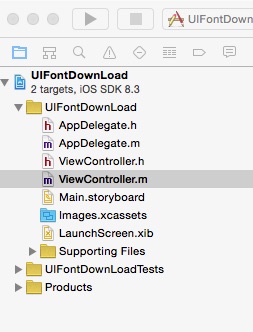
二,AppDelegate.m

- (BOOL)application:(UIApplication *)application didFinishLaunchingWithOptions:(NSDictionary *)launchOptions {

    // Override point for customization after application launch.

    ViewController *view=[[ViewController alloc]init];

    UINavigationController *nav=[[UINavigationController alloc]initWithRootViewController:view];

    self.window.backgroundColor=[UIColor whiteColor];

    self.window.rootViewController=nav;

    return YES;

}
三,ViewController.h
#import <UIKit/UIKit.h>

@interface ViewController : UIViewController

<UITableViewDelegate,UITableViewDataSource>

{

    UITableView *myTableView;

    NSArray *fontNames;

    NSArray *fontSamples;

}

@end
四, ViewController.m
#import "ViewController.h"

#import <CoreText/CoreText.h>

@interface ViewController ()

@end

@implementation ViewController

- (void)viewDidLoad {

    [super viewDidLoad];

    // Do any additional setup after loading the view, typically from a nib.

    //初始化数据

    [self addData];

    //初始化界面

    [self addView];

}

#pragma -mark -functions

//初始化界面

-(void)addView

{

    myTableView=[[UITableView alloc]initWithFrame:CGRectMake(0, 100, 320, 200)];

    myTableView.delegate=self;

    myTableView.dataSource=self;

    [self.view addSubview:myTableView];

}

//初始化数据

-(void)addData

{

    fontNames = [[NSArray alloc] initWithObjects:

                 @"STXingkai-SC-Light",

                 @"DFWaWaSC-W5",

                 @"FZLTXHK--GBK1-0",

                 @"STLibian-SC-Regular",

                 @"LiHeiPro",

                 @"HiraginoSansGB-W3",

                 nil];

    fontSamples = [[NSArray alloc] initWithObjects:

                   @"汉体书写信息技术标准相",

                   @"容档案下载使用界面简单",

                   @"支援服务升级资讯专业制",

                   @"作创意空间快速无线上网",

                   @"兙兛兞兝兡兣嗧瓩糎",

                   @"㈠㈡㈢㈣㈤㈥㈦㈧㈨㈩",

                   nil];

}

#pragma -mark -UITableViewDelegate

- (NSInteger)tableView:(UITableView *)tableView numberOfRowsInSection:(NSInteger)section

{

    return [fontNames count];

}

- (UITableViewCell *)tableView:(UITableView *)tableView cellForRowAtIndexPath:(NSIndexPath *)indexPath

{

    static NSString *MyIdentifier = @"MyIdentifier";

    UITableViewCell *cell = [tableView dequeueReusableCellWithIdentifier:MyIdentifier];

    if (cell == nil) {

        cell = [[UITableViewCell alloc] initWithStyle:UITableViewCellStyleDefault reuseIdentifier:MyIdentifier];

    }

    cell.textLabel.text = fontNames[indexPath.row];

    return cell;

}

- (void)tableView:(UITableView *)tableView didSelectRowAtIndexPath:(NSIndexPath *)indexPath

{

    [self asynchronouslySetFontName:fontNames[indexPath.row]];

}

#pragma -mark -functions

//字体开始进行下载

- (void)asynchronouslySetFontName:(NSString *)fontName

{

    UIFont* aFont = [UIFont fontWithName:fontName size:12.];

    //判断字体是否已经被下载

    if (aFont && ([aFont.fontName compare:fontName] == NSOrderedSame || [aFont.familyName compare:fontName] == NSOrderedSame)) {

        NSLog(@"字体已经被下载");

        return;

    }

    //用字体的PostScript名字创建一个Dictionary

    NSMutableDictionary *attrs = [NSMutableDictionary dictionaryWithObjectsAndKeys:fontName, kCTFontNameAttribute, nil];

    // 创建一个字体描述对象CTFontDescriptorRef

    CTFontDescriptorRef desc = CTFontDescriptorCreateWithAttributes((__bridge CFDictionaryRef)attrs);

    //将字体描述对象放到一个NSMutableArray中

    NSMutableArray *descs = [NSMutableArray arrayWithCapacity:0];

    [descs addObject:(__bridge id)desc];

    CFRelease(desc);

    __block BOOL errorDuringDownload = NO;

    //开始对字体进行下载

    CTFontDescriptorMatchFontDescriptorsWithProgressHandler( (__bridge CFArrayRef)descs, NULL,  ^(CTFontDescriptorMatchingState state, CFDictionaryRef progressParameter) {

        NSLog( @"state %d - %@", state, progressParameter);

        double progressValue = [[(__bridge NSDictionary *)progressParameter objectForKey:(id)kCTFontDescriptorMatchingPercentage] doubleValue];

        if (state == kCTFontDescriptorMatchingDidBegin) {

            dispatch_async( dispatch_get_main_queue(), ^ {

                NSLog(@"字体已经匹配");

                });

        } else if (state == kCTFontDescriptorMatchingDidFinish) {

            dispatch_async( dispatch_get_main_queue(), ^ {

                NSLog(@"字体下载完成");

                      // Log the font URL in the console

                CTFontRef fontRef = CTFontCreateWithName((__bridge CFStringRef)fontName, 0., NULL);

                CFStringRef fontURL = CTFontCopyAttribute(fontRef, kCTFontURLAttribute);

                CFRelease(fontURL);

                CFRelease(fontRef);

                if (!errorDuringDownload) {

                    NSLog(@"%@ downloaded", fontName);

                }

            });

        } else if (state == kCTFontDescriptorMatchingWillBeginDownloading) {

            dispatch_async( dispatch_get_main_queue(), ^ {

                NSLog(@"字体开始下载");

            });

        } else if (state == kCTFontDescriptorMatchingDidFinishDownloading) {

            dispatch_async( dispatch_get_main_queue(), ^ {

                NSLog(@"字体下载完成");

                });

        } else if (state == kCTFontDescriptorMatchingDownloading) {

            dispatch_async( dispatch_get_main_queue(), ^ {

                NSLog(@"下载进度");

            });

        } else if (state == kCTFontDescriptorMatchingDidFailWithError) {

            NSLog(@"下载失败");

            NSError *error = [(__bridge NSDictionary *)progressParameter objectForKey:(id)kCTFontDescriptorMatchingError];

            if (error != nil) {

                NSLog(@"errorMessage--%@-",[error description]);

            } else {

                NSLog(@"error message is not available");

            }

            errorDuringDownload = YES;

            dispatch_async( dispatch_get_main_queue(), ^ {

                NSLog(@"Download error: %@", [error description]);

            });

        }

        return (bool)YES;

    });

}

- (void)didReceiveMemoryWarning {

    [super didReceiveMemoryWarning];

    // Dispose of any resources that can be recreated.

}

@end
参考资料:《iOS开发进阶》 -唐巧
【读书笔记】iOS-UIFont-动态下载系统提供的字体-官方代码的更多相关文章
- 【读书笔记】iOS-UIFont-动态下载系统提供的多种中文字体网址
苹果可使用的字体列表: https://support.apple.com/zh-cn/HT202599 动态下载字体的代码demo: https://developer.apple.com/libr ...
- UIFontDownLoad ----动态下载系统提供的字体
程序运行结果如下 : 当点击对应单元格实现下载对应的字体. 控制台打印结果如下 : 2015-10-05 11:14:04.132 UIFontDownLoad[12721:86827] state ...
- iOS 动态下载系统提供的中文字体
使用系统提供的中文字体,既可避免版权问题,又可以减小应用体积 #pragma mark - 判断字体是否已经被下载 - (BOOL)isFontDownLoaded:(NSString *)fontN ...
- [读书笔记]Java之动态分派
以下内容来自周志明的<深入理解Java虚拟机>. 前一篇说了静态分派和重载有关,现在的动态分派就和覆盖Override有关了. 先看代码: public class DynamicDisp ...
- [读书笔记]iOS 7 UI设计 对比度
好久没写随笔了,最近在读<iOS 7 byTutorials>,很不错,推荐给大家. 每一个好的程序员也都是一个设计师,不懂设计的程序员不是好的CTO.哈哈,开个小玩笑. iOS 7设计的 ...
- $《第一行代码:Android》读书笔记——第1章 Android系统
(一)Android系统架构 1.Linux内核层:各种底层驱动,如显示驱动.音频驱动.电源管理等. 2.系统运行库层:各种库支持,如3D绘图.浏览器内核.数据库等. 3.应用框架层:各种API,各种 ...
- 读书笔记-iOS核心动画高级技巧
如果不使用+imageNamed:,那么把整张图片绘制到CGContext可能是最佳的方式了. 这里我们利用了CALayer的KVC来存储和检索任意的值,将图层和索引打标签. 使用KVC打标签
- 【读书笔记】【深入理解ES6】#13-用模块封装代码
什么是模块 模块是自动运行在严格模式下并且没有办法退出运行的 JavaScript 代码. 在模块顶部创建的变量不会自动被添加到全局变量作用域,这个变量仅在模块的顶级作用域中存在,而且模块必须导出一些 ...
- 《实战java高并发程序设计》源码整理及读书笔记
日常啰嗦 不要被标题吓到,虽然书籍是<实战java高并发程序设计>,但是这篇文章不会讲高并发.线程安全.锁啊这些比较恼人的知识点,甚至都不会谈相关的技术,只是写一写本人的一点读书感受,顺便 ...
随机推荐
- Java知多少(109)数据库更新
数据库更新操作包括数据表创建.删除.以及数据表记录的增加.删除.修改等操作.如果利用数据 SQL命令实现,则利用Statement对旬的executeUpdate()方法,执行SQL的update语句 ...
- Enjoy Android
大趋势所迫,开始学习Android, @mark一下
- 后端码农谈前端(HTML篇)第三课:常见属性
一.HTML全局属性 1.核心属性 属性 描述 id 设置元素的唯一 id. class 设置元素的一个或多个类名(引用样式表中的类). style 设置元素的行内样式(CSS内联样式). title ...
- Container Stack
- 使用C语言描述静态链表和动态链表
静态链表和动态链表是线性表链式存储结构的两种不同的表示方式. 静态链表的初始长度一般是固定的,在做插入和删除操作时不需要移动元素,仅需修改指针,故仍具有链式存储结构的主要优点. 动态链表是相对于静态链 ...
- NPM install - killed error solution
在接手一个Node项目的时候,npm install.却出现了"killed"的错误.以为是Node版本的问题,熟练地切换了0.11与0.10版,同样无解. 由于新的npm版本吧, ...
- gcview使用
1.下载适用的版本 https://github.com/chewiebug/GCViewer Supported verbose:gc formats are: Oracle JDK 1.8 -Xl ...
- 二、中间件(middleware)
1. 中间件(middleware) Django中的中间件主要实现一些附加功能,在request被用户handler处理前,以及用户handler处理后生存的response进行处理.因此 ...
- MIME(Multipurpose Internet Mail Extensions)的简介
多用途互联网邮件扩展类型(MIME) 作用:用于标识Web资源类型(Multipurpose Internet Mail Extensions,MIME) 效果:Web上MIME为每种类型的资源提供一 ...
- Dev 饼图
// 添加引用命名空间 using DevExpress.XtraCharts; /* *具体步骤:(1)先构建饼图对象的数据源DataTable * (2)再设置饼图对象的相关参数 * (3)饼图空 ...