
android布局学习-使用FrameLayout和LinearLayout制作QQ空间底部导航栏
【声明:本博客通过学习“J灬叶小超 ”博客而写,链接:http://www.cnblogs.com/yc-755909659/p/4288260.html】
--------------------------------------------------------------------------------------------------------
界面效果如下所示:

-------------------------------------------------------------------------------------------------------------
【分析】
此导航栏的设计通过FrameLayout和LinearLayout编写,我们知道每个FrameLayout都是具有叠加效果: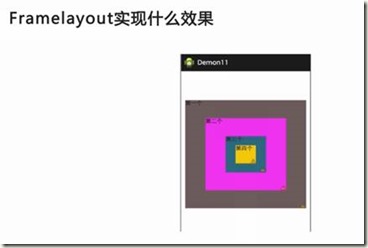 (通过图片可以进一步理解)
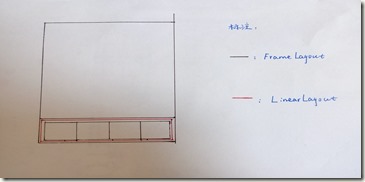
对这个分析,小编花了一个图:
-------------------------------------------------------------------------------------------------------------
【代码】
<RelativeLayout xmlns:android="http://schemas.android.com/apk/res/android"

    xmlns:tools="http://schemas.android.com/tools"

    android:layout_width="match_parent"

    android:layout_height="match_parent">

    <FrameLayout

        android:id="@+id/frame_content"

        android:layout_width="match_parent"

        android:layout_height="match_parent"

        android:layout_above="@+id/frameMenu"

        android:layout_alignParentTop="true">

        </FrameLayout>

    <FrameLayout

        android:id="@+id/frameMenu"

        android:layout_width="match_parent"

        android:layout_height="wrap_content"

        android:layout_alignParentBottom="true" >

        <LinearLayout

            android:layout_width="match_parent"

            android:layout_height="match_parent"

            android:background="@color/skin_tabbar_bg"

            android:orientation="horizontal">

            <!--动态-->

            <FrameLayout

                android:id="@+id/layout_at"

                android:layout_width="fill_parent"

                android:layout_height="wrap_content"

                android:layout_weight="1">

                <ImageView

                    android:id="@+id/image_at"

                    android:layout_width="wrap_content"

                    android:layout_height="wrap_content"

                    android:layout_gravity="top|center"

                    android:background="@drawable/skin_tabbar_icon_auth_select"/>

                <TextView

                    android:layout_width="wrap_content"

                    android:layout_height="wrap_content"

                    android:layout_gravity="bottom|center"

                    android:text="@string/skin_tabbar_icon_auth"

                    android:textSize="12sp"/>

            </FrameLayout>

            <!-- 与我相关 -->

            <FrameLayout

                android:id="@+id/layout_auth"

                android:layout_width="fill_parent"

                android:layout_height="wrap_content"

                android:layout_weight="1" >

                <ImageView

                    android:id="@+id/image_auth"

                    android:layout_width="wrap_content"

                    android:layout_height="wrap_content"

                    android:layout_gravity="top|center"

                    android:src="@drawable/skin_tabbar_icon_at_select" />

                <TextView

                    android:layout_width="wrap_content"

                    android:layout_height="wrap_content"

                    android:layout_gravity="bottom|center"

                    android:text="@string/skin_tabbar_icon_at"

                    android:textColor="@android:color/black"

                    android:textSize="12sp" />

            </FrameLayout>

            <!-- 留白 -->

            <FrameLayout

                android:layout_width="fill_parent"

                android:layout_height="wrap_content"

                android:layout_weight="1" >

            </FrameLayout>

            <!-- 我的空间 -->

            <FrameLayout

                android:id="@+id/layout_space"

                android:layout_width="fill_parent"

                android:layout_height="wrap_content"

                android:layout_weight="1" >

                <ImageView

                    android:id="@+id/image_space"

                    android:layout_width="wrap_content"

                    android:layout_height="wrap_content"

                    android:layout_gravity="top|center"

                    android:src="@drawable/skin_tabbar_icon_space_select" />

                <TextView

                    android:layout_width="wrap_content"

                    android:layout_height="wrap_content"

                    android:layout_gravity="bottom|center"

                    android:text="@string/skin_tabbar_icon_space"

                    android:textColor="@android:color/black"

                    android:textSize="12sp" />

            </FrameLayout>

            <!-- 玩吧 -->

            <FrameLayout

                android:id="@+id/layout_more"

                android:layout_width="fill_parent"

                android:layout_height="wrap_content"

                android:layout_weight="1" >

                <ImageView

                    android:id="@+id/image_more"

                    android:layout_width="wrap_content"

                    android:layout_height="wrap_content"

                    android:layout_gravity="top|center"

                    android:src="@drawable/skin_tabbar_icon_more_select" />

                <TextView

                    android:layout_width="wrap_content"

                    android:layout_height="wrap_content"

                    android:layout_gravity="bottom|center"

                    android:text="@string/skin_tabbar_icon_more"

                    android:textColor="@android:color/black"

                    android:textSize="12sp" />

            </FrameLayout>

         </LinearLayout>

        <LinearLayout

            android:layout_width="match_parent"

            android:layout_height="1px"

            android:background="@android:color/black" >

        </LinearLayout>

     </FrameLayout>

    <!-- 中间按钮背景 -->

    <ImageView

        android:id="@+id/toggle_btn"

        android:layout_width="wrap_content"

        android:layout_height="wrap_content"

        android:layout_alignParentBottom="true"

        android:layout_alignTop="@+id/frameMenu"

        android:layout_centerInParent="true"

        android:src="@drawable/skin_tabbar_btn"/>

    <!-- 中间按钮 -->

    <ImageView

        android:id="@+id/plus_btn"

        android:layout_width="wrap_content"

        android:layout_height="wrap_content"

        android:layout_alignParentBottom="true"

        android:layout_alignTop="@+id/frameMenu"

        android:layout_centerInParent="true"

        android:src="@drawable/skin_tabbar_icon_select" />

</RelativeLayout>
【结构图】
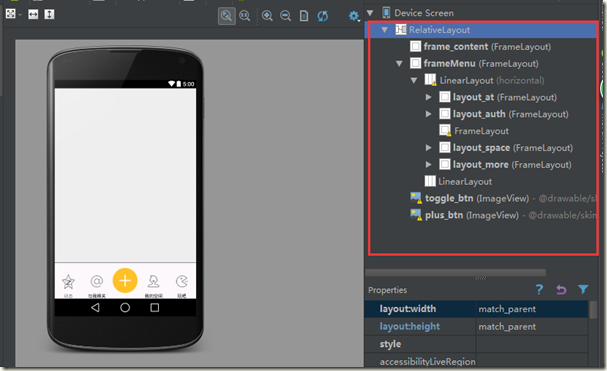
【分析】
Q1:布局分析:页面中创建两个FrameLayout,frame_content用于存放图片资源,frameMenu用于存放菜单信息
Q2:菜单分析:菜单的框架采用LinearLayout,这个LinearLayout的基础为FrameLayout,菜单项采用FrameLayout,依次创建了5个
Q3:中间(橘黄色)按钮分析:中间的图片在FrameLayout之外,所以不受FrameLayout的限制,故可以通过布局的方向来设定这两个图片的位置
Q4:菜单项的水平分割线:由于分割线隶属于FrameLayout,所以它的位置应该从左上角开始
android布局学习-使用FrameLayout和LinearLayout制作QQ空间底部导航栏的更多相关文章
- Android 布局学习之——Layout(布局)具体解释二(常见布局和布局參数)
[Android布局学习系列] 1.Android 布局学习之--Layout(布局)具体解释一 2.Android 布局学习之--Layout(布局)具体解释二(常见布局和布局參数) ...
- Android布局学习——android:gravity和android:layout_gravity的区别
[Android布局学习系列] 1.Android 布局学习之——Layout(布局)详解一 2.Android 布局学习之——Layout(布局)详解二(常见布局和布局参数) 3.And ...
- Android 布局学习之——Layout(布局)详解二(常见布局和布局参数)
[Android布局学习系列] 1.Android 布局学习之——Layout(布局)详解一 2.Android 布局学习之——Layout(布局)详解二(常见布局和布局参数) 3.And ...
- Android底部导航栏——FrameLayout + RadioGroup
原创文章,转载请注明出处http://www.cnblogs.com/baipengzhan/p/6285881.html Android底部导航栏有多种实现方式,本文详细介绍FrameLayout ...
- Android学习笔记- Fragment实例 底部导航栏的实现
1.要实现的效果图以及工程目录结构: 先看看效果图吧: 接着看看我们的工程的目录结构: 2.实现流程: Step 1:写下底部选项的一些资源文件 我们从图上可以看到,我们底部的每一项点击的时候都有不同 ...
- Android UI-仿微信底部导航栏布局
现在App基本的标配除了侧滑菜单,还有一个就是底部导航栏,常见的聊天工具QQ,微信,购物App都有底部导航栏,用户可以随便切换看不同的内容,说是情怀也好,用户体验也罢.我们开发的主要的还是讲的是如何如 ...
- Android之RadioGroup+ViewPager制作的底部导航栏
在日常开发中我们常常会用到类似微信或者QQ的底部导航.实现这样的效果有多种,今天就为大家介绍一种实现简单,可控性好的底部导航的实现方法. 首先创建activity_main.xml布局文件,里面主要由 ...
- AndroidStudio制作底部导航栏以及用Fragment实现切换功能
前言 大家好,给大家带来AndroidStudio制作底部导航栏以及用Fragment实现切换功能的概述,希望你们喜欢 学习目标 AndroidStudio制作底部导航栏以及用Fragment实现切换 ...
- Android应用底部导航栏(选项卡)实例
现在很多android的应用都采用底部导航栏的功能,这样可以使得用户在使用过程中随意切换不同的页面,现在我采用TabHost组件来自定义一个底部的导航栏的功能. 我们先看下该demo实例的框架图: 其 ...
随机推荐
- BZOJ 1096 【ZJOI2007】 仓库建设
Description L公司有N个工厂,由高到底分布在一座山上.如图所示,工厂1在山顶,工厂N在山脚.由于这座山处于高原内陆地区(干燥少雨),L公司一般把产品直接堆放在露天,以节省费用.突然有一天, ...
- Castle ActiveRecord 二级缓存使用 异常记录
在 本公司的 IBeamMDAA 框架下,如果是配置为本机调试时,AR的查询缓存工作正常,但如果部署到服务器上,工作不正常,二级缓存配置为使用 MemoryCahcheD 服务器,二级缓存没有能够根据 ...
- [转]考虑 PHP 5.0~5.6 各版本兼容性的 cURL 文件上传
FROM : https://segmentfault.com/a/1190000000725185 最近做的一个需求,要通过PHP调用cURL,以multipart/form-data格式上传文件. ...
- 在linux下运行java工程
在linux 服务器上运行JAVA工程需注意.1: 在linux 上: /etc/profile 设置classpath 配置正确的jar 路径.2: 把本地JAVA工程做成一个jar包.如:1. ...
- codevs1958 刺激
难度等级:黄金 1958 刺激 题目描述 Description saffah的一个朋友S酷爱滑雪,并且追求刺激(exitement,由于刺激过度导致拼写都缺了个字母),喜欢忽高忽低的感觉.现在S拿到 ...
- php数组函数,字符串,linux命令
1>> Linux常用命令一. 文件目录操作命令1. ls命令 命令格式:ls [选项] [目录名] 命令功能:列出目标目录中所有的子目录和文件.2. 命令格式:cd [目录名 ...
- 线段树(codevs1082)
type jd=record z,y,lc,rc,sum,toadd:int64; end; var tree:..] of jd; qzh:..] of int64; x:..] of int64; ...
- mysql 启动失败
1 mysql 启动时报:MySQL Daemon failed to start.并且启动失败 2 查看mysql log日志 less /var/log/mysqld.log 3 从两行erro ...
- 我的第一个DMZ方案实践
方案提出的初衷:外网需要定时和不定时推送数据到内网服务器(只要求数据到达内网,没有要求直接连接到内网) 为什么不是直连到内网:每个人第一想到的是不安全,是的,没错不安全.内网的应用和外网的应用最明显的 ...
- Android下的数据储存方式( 二)
在上一篇文章中我们介绍了SharedPreferences的使用方法. 今天我们继续介绍另一种储存数据的方式:使用内部储存和外部储存 每一个Android设备都拥有两个数据储存区域:外部储存和外部储存 ...