
站内搜索——Lucene +盘古分词
为了方便的学习站内搜索,下面我来演示一个MVC项目。
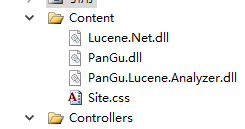
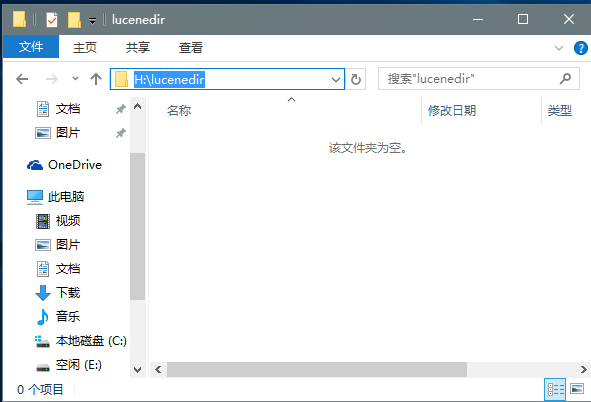
1.首先在项目中【添加引入】三个程序集和【Dict】文件夹,并新建一个【分词内容存放目录】
Lucene.Net.dll、PanGu.dll、PanGu.Lucene.Analyzer.dll
链接:http://pan.baidu.com/s/1eS6W8s6 密码:ds8b
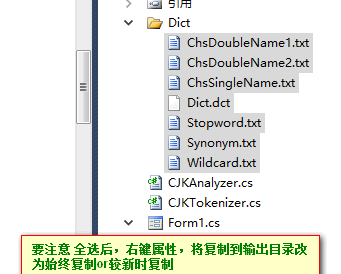
链接:链接:http://pan.baidu.com/s/1geYyDnt 密码:8rq4
2.建立Search控制器,并转到Index界面写入如下内容:
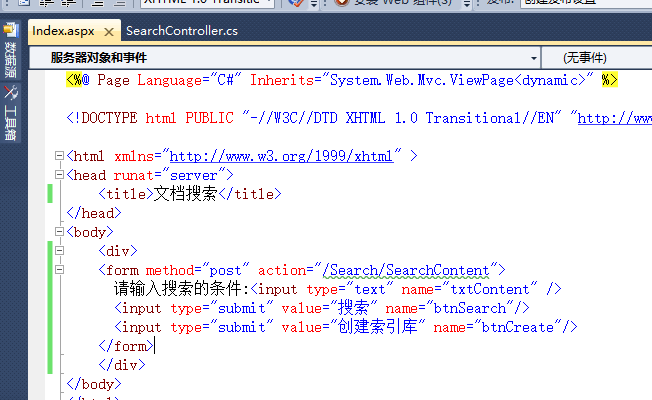
PS:VS有问题,波浪号由他去吧,,,
----------后台语句-------
->创建索引语句
      public ActionResult SearchContent()

        {

            //首先根据name区分是点击的哪个按钮

            if (!String.IsNullOrEmpty(Request.Form["btnSearch"]))//执行搜索

            {

            }

            else//创建索引

            {

                CreateSearchIndex();//调用创建索引语句

            }

            return Content("OK");

        }

        //创建索引语句

        public void CreateSearchIndex()

        {

            string indexPath = @"H:\lucenedir";//注意和磁盘上文件夹的大小写一致,否则会报错。将创建的分词内容放在该目录下

            FSDirectory directory = FSDirectory.Open(new DirectoryInfo(indexPath), new NativeFSLockFactory());

            bool isUpdate = IndexReader.IndexExists(directory);//判断索引库是否存在

            if (isUpdate)

            {

                //如果索引目录被锁定(比如索引过程中程序异常退出),则首先解锁

                //Lucene.Net在写索引库之前会自动加锁,在close的时候会自动解锁

                //不能多线程执行,只能处理意外被永远锁定的情况

                if (IndexWriter.IsLocked(directory))

                {

                    IndexWriter.Unlock(directory);//un-否定。强制解锁

                }

            }

            IndexWriter writer = new IndexWriter(directory, new PanGuAnalyzer(), !isUpdate, Lucene.Net.Index.IndexWriter.MaxFieldLength.UNLIMITED);

            //-------调用业务层拿到所有的数据

            Search.BLL.UserGUIDBll bll = new Search.BLL.UserGUIDBll();

            List<Search.Model.UserInfo> list=bll.SelectAll();

            foreach (UserInfo item in list)

            {

                Document document = new Document();//一条Document相当于一条记录

                document.Add(new Field("id",item.UserId.ToString(), Field.Store.YES, Field.Index.NOT_ANALYZED));//每个Document可以有自己的属性(字段),所有字段名都是自定义的,值都是string类型

                //想给用户展示什么就往词库里面添加什么

                document.Add(new Field("title",item.UserName, Field.Store.YES, Field.Index.ANALYZED, Lucene.Net.Documents.Field.TermVector.WITH_POSITIONS_OFFSETS));

                document.Add(new Field("content", item.UserContent, Field.Store.YES, Field.Index.ANALYZED, Lucene.Net.Documents.Field.TermVector.WITH_POSITIONS_OFFSETS));

                writer.AddDocument(document);

            }

            writer.Close();//会自动解锁

            directory.Close();//不要忘了Close,否则索引结果搜不到

        }
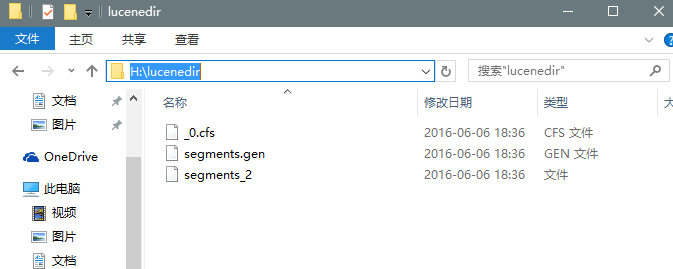
执行创建索引语句,将看到分词内容文件夹里面将多一些东西,这些就是用来以后检索的
->执行索引语句
    public ActionResult SearchContent()

        {

            //首先根据name区分是点击的哪个按钮

            if (!String.IsNullOrEmpty(Request.Form["btnSearch"]))//执行搜索

            {

              List<ViewSearchContentModel> recList=SearchBookContent();

              ViewData["searchList"] = recList;

              return View("Index");

            }

            else//创建索引

            {

               CreateSearchIndex();//调用创建索引语句

            }

            return Content("OK");

        }
SearchBookContent类:
   //执行索引语句

        public List<ViewSearchContentModel> SearchBookContent()

        {

            string indexPath = @"H:\lucenedir"; //lucene存数据的路径

             string searchTxt = Request.Form["txtContent"];//获取用户输入的内容

            //将用户输入的内容进行分词

             List<string> kw=SearchController.GetPanGuWord(searchTxt);

            //string kw = "没有";

            FSDirectory directory = FSDirectory.Open(new DirectoryInfo(indexPath), new NoLockFactory());

            IndexReader reader = IndexReader.Open(directory, true);

            IndexSearcher searcher = new IndexSearcher(reader);

            PhraseQuery query = new PhraseQuery();//查询条件

            //query.Add(new Term("msg", kw));//where contains("msg",kw)  这里的msg对应上面的msg

            foreach (string word in kw)//先用空格,让用户去分词,空格分隔的就是词“计算机 专业”

            {

                query.Add(new Term("content", word));//contains("msg",word)

            }

            query.SetSlop(100);//两个词的距离大于100(经验值)就不放入搜索结果,因为距离太远相关度就不高了

            TopScoreDocCollector collector = TopScoreDocCollector.create(1000, true);//盛放查询结果的容器

            searcher.Search(query, null, collector);//使用query这个查询条件进行搜索,搜索结果放入collector

            //collector.GetTotalHits()总的结果条数

            ScoreDoc[] docs = collector.TopDocs(0, collector.GetTotalHits()).scoreDocs;//从查询结果中取出第m条到第n条的数据

            List<ViewSearchContentModel> list = new List<ViewSearchContentModel>();

            for (int i = 0; i < docs.Length; i++)//遍历查询结果

            {

                ViewSearchContentModel viewModel = new ViewSearchContentModel();

                int docId = docs[i].doc;//拿到文档的id。因为Document可能非常占内存(DataSet和DataReader的区别)

                //所以查询结果中只有id,具体内容需要二次查询

                Document doc = searcher.Doc(docId);//根据id查询内容。放进去的是Document,查出来的还是Document

                viewModel.Id = doc.Get("id");

                viewModel.Title = doc.Get("title");

                viewModel.Content = doc.Get("content");

                list.Add(viewModel);

            }

            return list;

        }

        class SearchResult

        {

            public int Id { get; set; }

            public string Msg { get; set; }

        }

        //利用盘古分词对用户输入的内容进行分词

        public static List<string> GetPanGuWord(string str)

        {

            List<string> list=new List<string>();

            Analyzer analyzer = new PanGuAnalyzer();

            TokenStream tokenStream = analyzer.TokenStream("", new StringReader(str));

            Lucene.Net.Analysis.Token token = null;

            while ((token = tokenStream.Next()) != null)

            {

                list.Add(token.TermText());

               // Console.WriteLine(token.TermText());

            }

            return list;

        }
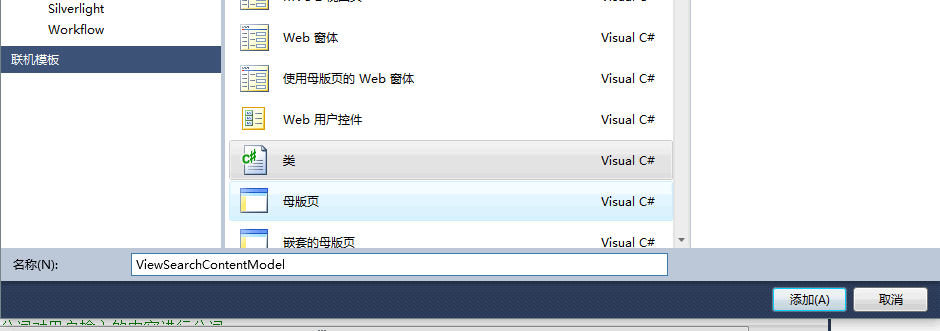
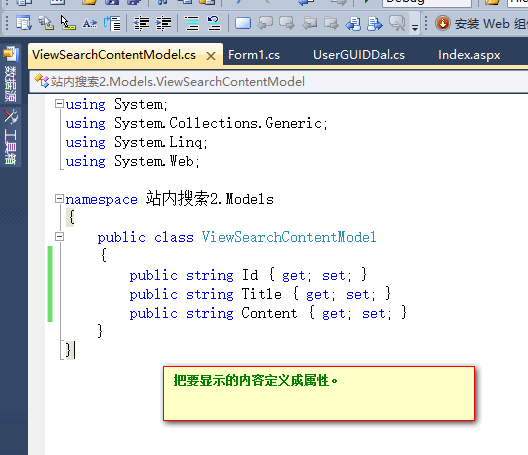
ViewSearchContentModel类:(这个类定义在MVC中的Model里面的,视图要展示啥数据,这里就定义什么)

->前台修改如下:
<%@ Page Language="C#" Inherits="System.Web.Mvc.ViewPage<dynamic>" %>

<!DOCTYPE html PUBLIC "-//W3C//DTD XHTML 1.0 Transitional//EN" "http://www.w3.org/TR/xhtml1/DTD/xhtml1-transitional.dtd">

<html xmlns="http://www.w3.org/1999/xhtml" >

<head runat="server">

    <title>文档搜索</title>

</head>

<body>

    <div>

    <form method="post" action="/Search/SearchContent">

      请输入搜索的条件:<input type="text" name="txtContent" />

      <input type="submit" value="搜索" name="btnSearch"/>

      <input type="submit" value="创建索引库" name="btnCreate"/>

    </form>

    <table>

    <tbody>

        <%if (ViewData["searchList"] != null)

      {

          foreach (站内搜索2.Models.ViewSearchContentModel item in (List<站内搜索2.Models.ViewSearchContentModel>)ViewData["searchList"])

          {%>

             <tr><td><%=item.Id%></td><td><%=item.Title%></td><td><%=item.Content%></td></tr>

        <%  }

      }

     %>

     </tbody>

    </table>

    </div>

</body>

</html>
-----这时基本搜索功能就实现了,接下来实现高亮显示-------
1.添加或引入PanGu.HighLight和PanGu.HighLight.pdb
链接:http://pan.baidu.com/s/1eS6W8s6 密码:ds8b
创建一个Common文件夹,并在里面建立一个WebCommon类
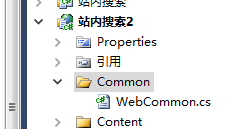
代码如下:(这个类中参数keyworkds就是要高亮显示的值,content就是返回的内容,这样在搜索结果中调用这个类就能实现高亮)
using System;

using System.Collections.Generic;

using System.Linq;

using System.Web;

using PanGu.HighLight;

using PanGu;

namespace 站内搜索2.Common

{

    public  class WebCommon

    {

        public static string CreateHighLight(string keywords, string content)

        {

            SimpleHTMLFormatter simpleHTMLFormatter = new PanGu.HighLight.SimpleHTMLFormatter("<font style='color:red'>", "</font>");

            Highlighter highlighter = new PanGu.HighLight.Highlighter(simpleHTMLFormatter, new Segment());

            //设置每个摘要的字符数

            highlighter.FragmentSize = 150;

            return highlighter.GetBestFragment(keywords, content);

        }

    }

}
在搜索结果中调用这个类:
    //  viewModel.Content = doc.Get("content");

                viewModel.Content = Common.WebCommon.CreateHighLight(Request["txtContent"], doc.Get("content"));
写到这先放张效果图吧:
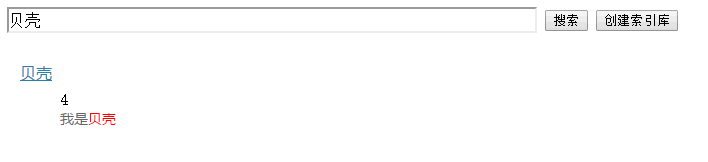
注意:有的时候我们使用razor引擎,会发生自动编码问题,为了正常显示,我们可以这样写:@MVCHtmlString.Create(item.Title)
JS侧栏分享代码:
<!-- JiaThis Button BEGIN -->

<script type="text/javascript" src="http://v3.jiathis.com/code/jiathis_r.js?move=0&btn=r4.gif" charset="utf-8"></script>

<!-- JiaThis Button END -->
最后再补充一下分词工具使用方式:
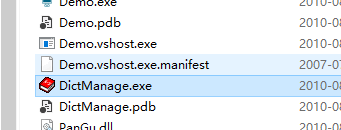
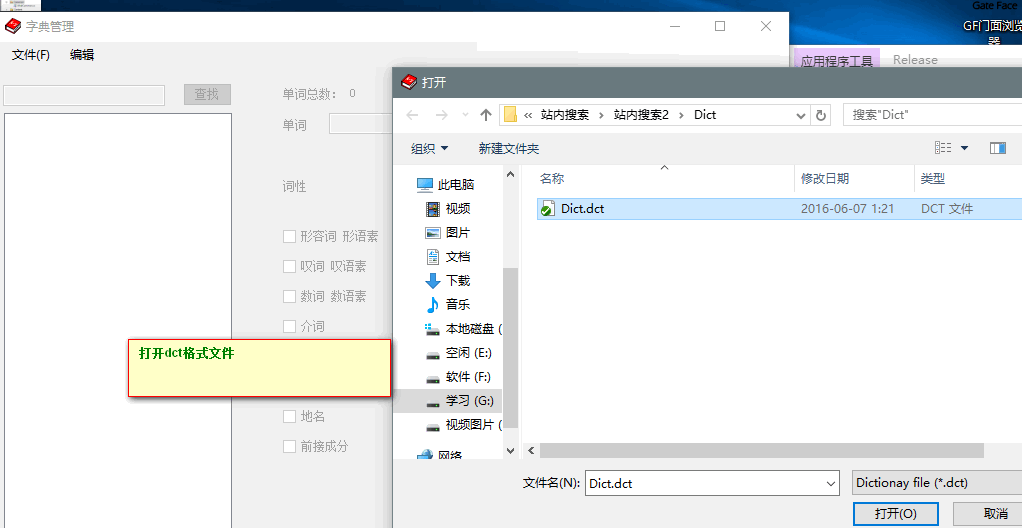
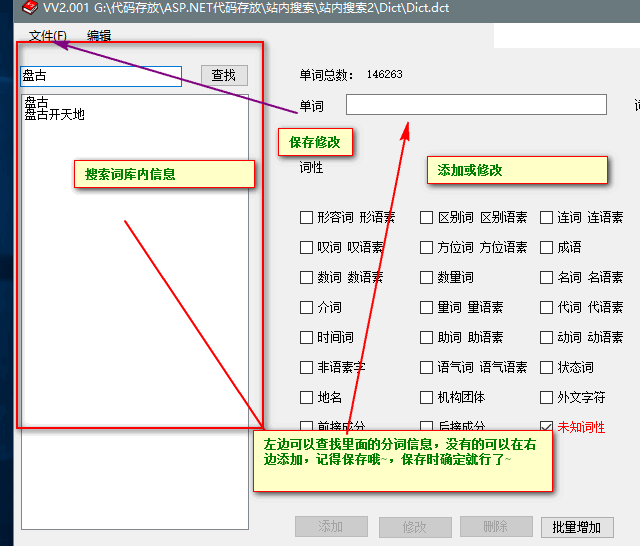
站内搜索源码下载:链接:http://pan.baidu.com/s/1o8IlAZK 密码:0gwf
站内搜索——Lucene +盘古分词的更多相关文章
- 完整的站内搜索Demo(Lucene.Net+盘古分词)
前言 首先自问自答几个问题,以让各位看官了解写此文的目的 什么是站内搜索?与一般搜索的区别? 很多网站都有搜索功能,很多都是用SQL语句的Like实现的,但是Like无法做到模糊匹配(例如我搜索“.n ...
- 完整的站内搜索实战应用(Lucene.Net+盘古分词)
首先自问自答几个问题,以让各位看官了解写此文的目的 什么是站内搜索?与一般搜索的区别? 多网站都有搜索功能,很多都是用SQL语句的Like实现的,但是Like无法做到模糊匹配(例如我搜索". ...
- Lucene.net站内搜索—2、Lucene.Net简介和分词
目录 Lucene.net站内搜索—1.SEO优化 Lucene.net站内搜索—2.Lucene.Net简介和分词Lucene.net站内搜索—3.最简单搜索引擎代码Lucene.net站内搜索—4 ...
- Lucene.net站内搜索—5、搜索引擎第一版实现
目录 Lucene.net站内搜索—1.SEO优化 Lucene.net站内搜索—2.Lucene.Net简介和分词Lucene.net站内搜索—3.最简单搜索引擎代码Lucene.net站内搜索—4 ...
- Lucene.net站内搜索—4、搜索引擎第一版技术储备(简单介绍Log4Net、生产者消费者模式)
目录 Lucene.net站内搜索—1.SEO优化 Lucene.net站内搜索—2.Lucene.Net简介和分词Lucene.net站内搜索—3.最简单搜索引擎代码Lucene.net站内搜索—4 ...
- Lucene.net站内搜索—3、最简单搜索引擎代码
目录 Lucene.net站内搜索—1.SEO优化 Lucene.net站内搜索—2.Lucene.Net简介和分词Lucene.net站内搜索—3.最简单搜索引擎代码Lucene.net站内搜索—4 ...
- 使用Lucene.NET实现简单的站内搜索
使用Lucene.NET实现简单的站内搜索 导入Lucene.NET 开发包 Lucene 是apache软件基金会一个开放源代码的全文检索引擎工具包,是一个全文检索引擎的架构,提供了完整的查询引擎和 ...
- Lucene.Net 站内搜索
Lucene.Net 站内搜索 一 全文检索: like查询是全表扫描(为性能杀手)Lucene.Net搜索引擎,开源,而sql搜索引擎是收费的Lucene.Net只是一个全文检索开发包(只是帮我们 ...
- 基于lucene.net 和ICTCLAS2014的站内搜索的实现1
Lucene.net是一个搜索引擎的框架,它自身并不能实现搜索.须要我们自己在当中实现索引的建立,索引的查找.全部这些都是依据它自身提供的API来实现.Lucene.net本身是基于java的,可是经 ...
随机推荐
- iOS解决隐藏导航栏后,打开照片选择器后导航栏不显示的问题以及更换导航栏背景色
问题描述: 遇到一种情况,在一个控制器上(隐藏了导航栏),打开照片选择器 UIImagePickerController后,照片选择器头部一片空白,且上滑相册时,信息会有错乱效果. 原因分析: 通过查 ...
- delphi 相对路径
..代表上级目录 .代表当前目录 \代表目录分隔 ..\..\表上上一级目录
- linux线程同步(5)-屏障
一.概述 barrier(屏障)与互斥量,读写锁,自旋锁不同,它不是用来保护临界区的.相反,它跟条 ...
- Machine Learning Algorithms Study Notes(2)--Supervised Learning
Machine Learning Algorithms Study Notes 高雪松 @雪松Cedro Microsoft MVP 本系列文章是Andrew Ng 在斯坦福的机器学习课程 CS 22 ...
- 扩展欧几里德算法 cogs.tk 2057. [ZLXOI2015]殉国
2057. [ZLXOI2015]殉国 ★☆ 输入文件:BlackHawk.in 输出文件:BlackHawk.out 评测插件时间限制:0.05 s 内存限制:256 MB [题目描 ...
- Codeforces Round #283 Div.2 D Tennis Game --二分
题意: 两个人比赛,给出比赛序列,如果为1,说明这场1赢,为2则2赢,假如谁先赢 t 盘谁就胜这一轮,谁先赢 s 轮则赢得整个比赛.求有多少种 t 和 s 的分配方案并输出t,s. 解法: 因为要知道 ...
- Vijos1680距离/openjudge2988计算字符串的距离[DP]
描述 设有字符串X,我们称在X的头尾及中间插入任意多个空格后构成的新字符串为X的扩展串,如字符串X为”abcbcd”,则字符串“abcb_c_”,“_a_bcbcd_”和“abcb_c_”都是X的扩展 ...
- XSS安全性过滤
XSS攻击很多发生在用户在可以输入的地方输入了不友好的内容,根本处理方法是在输入内容中进行过滤 PHP或者java,基本都有现成的jar包或者php框架,调用自动过滤用户的输入内容,避免了XSS 防御 ...
- 更改项目名或者多个项目时,发现多个"Home"匹配的Controller时,解决方法
[备份]异常信息:找到多个与名为“Home”的控制器匹配的类型.如果为此请求(“{controller}/{action}/{id}”)提供服务的 路由在搜索匹配此请求的控制器时没有指定命名空间,则会 ...
- box-shadow 的一些使用
1.只有左侧有阴影 box-shadow: -10px 0px 3px 1px #aaaaaa;