
C#编写一个计算器
编写一个计算器,练习在窗体上添加控件、调整控件的布局,设置或修改控件属性,编写事件处理程序的方法。
代码:
using System;

using System.Collections.Generic;

using System.ComponentModel;

using System.Data;

using System.Drawing;

using System.Linq;

using System.Text;

using System.Threading.Tasks;

using System.Windows.Forms;

namespace Lab07_1

{

    public partial class form1 : Form

    {

        double a = 0;

        double b = 0;

        bool c = false;

        string d;

        public form1()

        {

            InitializeComponent();

        }

        private void button1_Click(object sender, EventArgs e)

        {

            if (c == true)

            {

                textBox1.Text = "";

                c = false;

            }

            textBox1.Text += "1";

        }

        private void textBox1_TextChanged(object sender, EventArgs e)

        {

        }

        private void button5_Click(object sender, EventArgs e)

        {

            if (c == true)

            {

                textBox1.Text = "";

                c = false;

            }

            textBox1.Text += "5";

        }

        private void button13_Click(object sender, EventArgs e)

        {

            if (c == true)

            {

                textBox1.Text = "";

                c = false;

            }

            textBox1.Text += "0";

            if (d == "/")

            {

                textBox1.Clear();

                MessageBox.Show("除数不能为零", "错误提示", MessageBoxButtons.OK,

                MessageBoxIcon.Warning);

            }

        }

        private void button10_Click(object sender, EventArgs e)

        {

            c = true;

            b = double.Parse(textBox1.Text);

            d = "-";

        }

        private void 雨轩计算机_Load(object sender, EventArgs e)

        {

        }

        private void button2_Click(object sender, EventArgs e)

        {

            if (c == true)

            {

                textBox1.Text = "";

                c = false;

            }

            textBox1.Text += "2";

        }

        private void button7_Click(object sender, EventArgs e)

        {

            if (c == true)

            {

                textBox1.Text = "";

                c = false;

            }

            textBox1.Text += "7";

        }

        private void button8_Click(object sender, EventArgs e)

        {

            if (c == true)

            {

                textBox1.Text = "";

                c = false;

            }

            textBox1.Text += "8";

        }

        private void button9_Click(object sender, EventArgs e)

        {

            if (c == true)

            {

                textBox1.Text = "";

                c = false;

            }

            textBox1.Text += "9";

        }

        private void button4_Click(object sender, EventArgs e)

        {

            if (c == true)

            {

                textBox1.Text = "";

                c = false;

            }

            textBox1.Text += "4";

        }

        private void button6_Click(object sender, EventArgs e)

        {

            if (c == true)

            {

                textBox1.Text = "";

                c = false;

            }

            textBox1.Text += "6";

        }

        private void button3_Click(object sender, EventArgs e)

        {

            if (c == true)

            {

                textBox1.Text = "";

                c = false;

            }

            textBox1.Text += "3";

        }

        private void button14_Click(object sender, EventArgs e)

        {

            textBox1.Text = "";

        }

        private void button15_Click(object sender, EventArgs e)

        {

            c = true;

            b = double.Parse(textBox1.Text);

            d = "+";

        }

        private void button11_Click(object sender, EventArgs e)

        {

            c = true;

            b = double.Parse(textBox1.Text);

            d = "*";

        }

        private void button12_Click(object sender, EventArgs e)

        {

            c = true;

            b = double.Parse(textBox1.Text);

            d = "/";

        }

        private void button16_Click(object sender, EventArgs e)

        {

            switch (d)

            {

                case "+": a = b + double.Parse(textBox1.Text); break;

                case "-": a = b - double.Parse(textBox1.Text); break;

                case "*": a = b * double.Parse(textBox1.Text); break;

                case "/": a = b / double.Parse(textBox1.Text); break;

                case "平方": a = b * b; break;

                case "开方": a =Math.Sqrt(b); break;

                case "log": a = Math.Log10(b); break;

                case "ln": a = Math.Log(b); break;

            }

            textBox1.Text = a + "";

            c = true;

        }

        private void button20_Click(object sender, EventArgs e)

        {

            if (textBox1.Text == "") { MessageBox.Show("请先输入值再计算!", "错误提示", MessageBoxButtons.OK, MessageBoxIcon.Warning); }

            else

            {

                c = true;

                b = double.Parse(textBox1.Text);

                d = "ln";

            }

        }

        private void button17_Click(object sender, EventArgs e)

        {

            if (textBox1.Text == "") { MessageBox.Show("请先输入值再计算!", "错误提示", MessageBoxButtons.OK, MessageBoxIcon.Warning); }

            else

            {

                c = true;

                b = double.Parse(textBox1.Text);

                d = "平方";

            }

        }

        private void button18_Click(object sender, EventArgs e)

        {

            if (textBox1.Text == "") { MessageBox.Show("请先输入值再计算!", "错误提示", MessageBoxButtons.OK, MessageBoxIcon.Warning); }

            else

            {

                c = true;

                b = double.Parse(textBox1.Text);

                d = "开方";

            }

        }

        private void button19_Click(object sender, EventArgs e)

        {

            if (textBox1.Text == "") { MessageBox.Show("请先输入值再计算!", "错误提示", MessageBoxButtons.OK, MessageBoxIcon.Warning); }

            else

            {

                c = true;

                b = double.Parse(textBox1.Text);

                d = "log";

            }

        }

    }

}
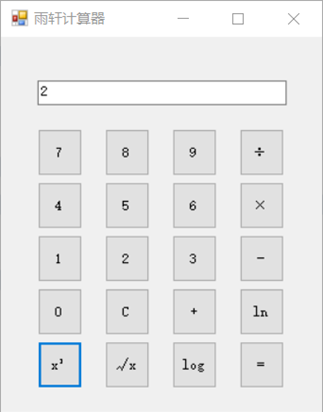
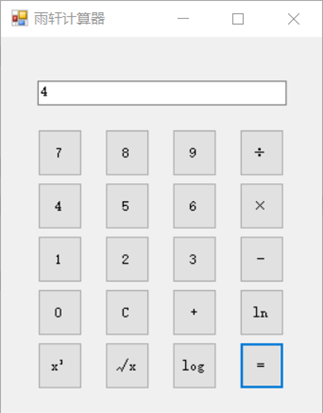
界面演示:
C#编写一个计算器的更多相关文章
- 用python编写一个计算器
# 1 - 2 * ((60-30 +(-40.0/5) * (9-2*5/3 + 7 /3*99/4*2998 +10 * 568/14 )) - (-4*3)/ (16-3*2)))# 通过Pyt ...
- [javascript] 编写一个计算器,实现加减法
1.代码 <script> function sum(){ //加法 var value1 = document.getElementById("num1").valu ...
- python 正则的使用 —— 编写一个简易的计算器
在 Alex 的博客上看到的对正则这一章节作业是编写一个计算器,要求能计算出下面的算式. 1 - 2 * ( (60-30 +(-40/5) * (9-2*5/3 + 7 /3*99/4*2998 + ...
- 编写一个通用的Makefile文件
1.1在这之前,我们需要了解程序的编译过程 a.预处理:检查语法错误,展开宏,包含头文件等 b.编译:*.c-->*.S c.汇编:*.S-->*.o d.链接:.o +库文件=*.exe ...
- CSharpGL(34)以从零编写一个KleinBottle渲染器为例学习如何使用CSharpGL
CSharpGL(34)以从零编写一个KleinBottle渲染器为例学习如何使用CSharpGL +BIT祝威+悄悄在此留下版了个权的信息说: 开始 本文用step by step的方式,讲述如何使 ...
- .NET Core RC2发布在即,我们试着用记事本编写一个ASP.NET Core RC2 MVC程序
在.NET Core 1.0.0 RC2即将正式发布之际,我也应应景,针对RC2 Preview版本编写一个史上最简单的MVC应用.由于VS 2015目前尚不支持,VS Code的智能感知尚欠火候,所 ...
- 网络爬虫:使用Scrapy框架编写一个抓取书籍信息的爬虫服务
上周学习了BeautifulSoup的基础知识并用它完成了一个网络爬虫( 使用Beautiful Soup编写一个爬虫 系列随笔汇总 ), BeautifulSoup是一个非常流行的Python网 ...
- 作业二:个人编程项目——编写一个能自动生成小学四则运算题目的程序
1. 编写一个能自动生成小学四则运算题目的程序.(10分) 基本要求: 除了整数以外,还能支持真分数的四则运算. 对实现的功能进行描述,并且对实现结果要求截图. 本题发一篇随笔,内容包括: 题 ...
- 用Java语言编写一个简易画板
讲了三篇概博客的概念,今天,我们来一点实际的东西.我们来探讨一下如何用Java语言,编写一块简易的画图板. 一.需求分析 无论我们使用什么语言,去编写一个什么样的项目,我们的第一步,总是去分析这个项目 ...
随机推荐
- QQ音乐官方定制精简版v1.3.6 纯净无广告
介绍 近期腾讯推出了QQ音乐简洁版.顾名思义,QQ音乐简洁版就是官方精简后的版本,没有内置任何广告.完全专注于听歌,不存在直播.K歌.短视频等花里胡哨的内容.如有违规,请删删.. 结尾附pc端 QQ音 ...
- springboot----四、yaml配置注入
四.yaml配置注入 4.1.配置文件 SpringBoot使用一个全局的配置文件 , 配置文件名称是固定的 application.properties 语法结构 :key=value applic ...
- Linux-本地日志服务管理(rsyslog基础)
目录 系统环境 1.常见的两种日志管理服务 1.1 RSYSLOG系统日志服务 1.2 ELK 2.RSYSLOG日志服务的相关知识 2.1 RSYSLOG日志消息级别 2.2 RSYSLOG日志服务 ...
- 【算法】经典的ML算法(后续结合工作实践完善心得)
18大数据挖掘的经典算法以及代码实现,涉及到了决策分类,聚类,链接挖掘,关联挖掘,模式挖掘等等方面,后面都是相应算法的博文链接,希望能够帮助大家学.目前追加了其他的一些经典的DM算法,在others的 ...
- Applied Social Network Analysis in Python 相关笔记3
如果是option2的话,答案选A. 这里节点s,从左边的选择,节点t从右边选择. 这里计算还是用以前的值,不用更新过的值.
- 29 面向对象编程 static 关键字
补充:static 代码 // static public class Student{ private static int age; // 静态的变量 多线程 private double sco ...
- 《Unity shader入门精要》复习<第13章 关于NDC坐标和深度/法线纹理>
分为三个地方讲解. NDC(Normalize Device Coordinates)归一化的设备坐标 NDC坐标是世界空间坐标通过MVP变换之后再进行归一化得到的坐标.只需要再一步变换就能得到屏幕空 ...
- django的request对象方法初识
1:request.post 拿到的是post请求发送过来的数据,可以将其看作是一个个的键值对 使用get方法可以通过key拿到值,如果该值是一个列表的话,get方法只能拿到列表的最后一个值,使用ge ...
- JDBC 使用详解
1.JDBC 编程步骤: 加载驱动程序; Class.forName(driverClass) 加载Mysql驱动:Class.forName("com.mysql.jdbc.Driver& ...
- 开启路由器的TCP拦截
TCP拦截即TCP intercept,大多数的路由器平台都引用了该功能,其主要作用就是防止SYN泛洪攻击.SYN攻击利用的是TCP的三次握手机制,攻击端利用伪造的IP地址向被攻击端发出请求,而被攻击 ...