
让Web API支持Protocol Buffers
简介
现在我们Web API项目基本上都是使用的Json作为通信的格式,随着移动互联网的兴起,Web API不仅其他系统可以使用,手机端也可以使用,但是手机端也有相对特殊的地方,网络通信除了wifi,还有蜂窝网络比如2G/3G,当手机处于这种网络环境下并且在一些偏僻或者有建筑物阻挡的地方,网络会变得非常差,之前我有测试过ProtoBuf和Json在序列化和反序列化上性能的对比,通过测试发现ProtoBuf在序列化和反序列化以及序列化后字节的长度和其他的框架相比都有很大的优势,所以这篇文章准备让Web API也支持Protocol Buffers。
实现
        public static void Register(HttpConfiguration config)

        {

            // Web API 配置和服务

            // Web API 路由

            config.MapHttpAttributeRoutes();

            config.Routes.MapHttpRoute(

                name: "DefaultApi",

                routeTemplate: "api/{controller}/{action}/{id}",   //修改路由规则

                defaults: new { id = RouteParameter.Optional }

            );

            config.Formatters.Add(new ProtoBufFormatter());

        }
 public class UserController : ApiController

    {

        /// <summary>

        /// 注册用户

        /// </summary>

        /// <param name="userDto"></param>

        /// <returns></returns>

        public string Regist(UserDto userDto)

        {

            if (!string.IsNullOrEmpty(userDto.UserName) && !string.IsNullOrEmpty(userDto.Password))

            {

                return "regist success";

            }

            return "regis error";

        }

        //登陆

        public string Login(UserLoginDto userLoginDto)

        {

            if (userLoginDto.UserName == "sa")

            {

                return "login success";

            }

            return "loign fail";

        }

        /// <summary>

        ///

        /// </summary>

        /// <param name="id"></param>

        /// <param name="userName"></param>

        /// <returns></returns>

        public UserDto Get(string userName)

        {

            if (!string.IsNullOrEmpty(userName))

            {

                return new UserDto()

                {

                    UserName = "sa",

                    Password = "",

                    Subscription = new List<string>() {"news", "picture"}

                };

            }

            return null;

        }

    }
 [ProtoContract]

    public class UserDto

    {

        [ProtoMember()]

        public string UserName { get; set; }

        [ProtoMember()]

        public string Password { get; set; }

        [ProtoMember()]

        public List<string> Subscription { get; set; }

    }

  [ProtoContract]

    public class UserLoginDto

    {

        [ProtoMember()]

        public string UserName { get; set; }

        [ProtoMember()]

        public string Password { get; set; }

    }

  static void Main(string[] args)

        {

            var client = new HttpClient { BaseAddress = new Uri("http://192.168.16.9:8090/") };

            client.DefaultRequestHeaders.Accept.Add(new MediaTypeWithQualityHeaderValue("application/x-protobuf"));

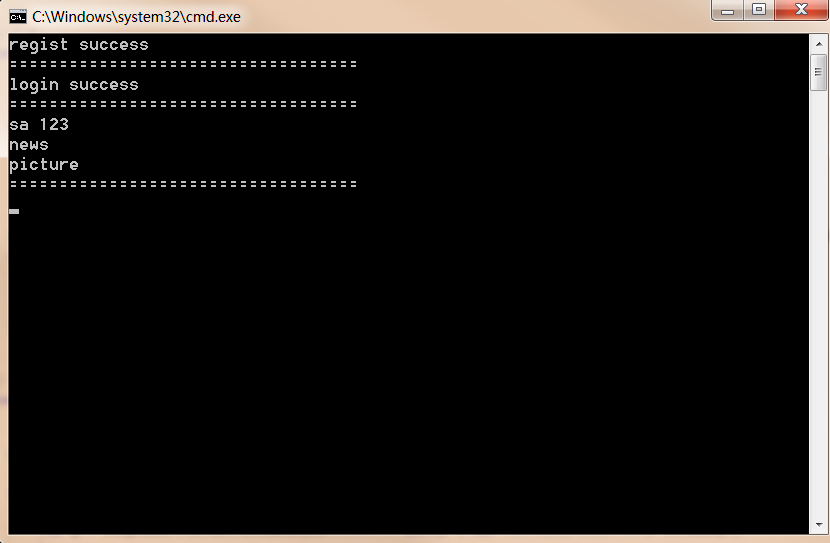
            Regist(client);

            Console.WriteLine("===================================");

            Login(client);

            Console.WriteLine("===================================");

            GetUser(client);

            Console.WriteLine("===================================");

            Console.ReadLine();

        }

        private static void Regist(HttpClient client)

        {

            //注册

            var userDto = new UserDto()

            {

                UserName = "sa",

                Password = "",

                Subscription = new List<string>() { "news", "picture" }

            };

            HttpResponseMessage response = client.PostAsync("api/User/Regist", userDto, new ProtoBufFormatter()).Result;

            if (response.IsSuccessStatusCode)

            {

                var p = response.Content.ReadAsAsync<string>(new[] { new ProtoBufFormatter() }).Result;

                Console.WriteLine(p);

            }

        }

        private static void Login(HttpClient client)

        {

            //登陆

            var userlogin = new UserLoginDto()

            {

                UserName = "sa",

                Password = "",

            };

            HttpResponseMessage response = client.PostAsync("api/User/login", userlogin, new ProtoBufFormatter()).Result;

            if (response.IsSuccessStatusCode)

            {

                var p = response.Content.ReadAsAsync<string>(new[] { new ProtoBufFormatter() }).Result;

                Console.WriteLine(p);

            }

        }

        private static void GetUser(HttpClient client)

        {

            HttpResponseMessage response = client.GetAsync("api/User/Get?userName=sa").Result;

            if (response.IsSuccessStatusCode)

            {

                var p = response.Content.ReadAsAsync<UserDto>(new[] { new ProtoBufFormatter() }).Result;

                Console.WriteLine(p.UserName + " " + p.Password);

                foreach (var s in p.Subscription)

                {

                    Console.WriteLine(s);

                }

            }

        }
让Web API支持Protocol Buffers的更多相关文章
- Go 支持Protocol Buffers的配置
安装 protoc (The protocol compiler)是由C++写的,支持的 C++.Java.Python.Objective-C.C#.JavaNano.JavaScript.Ruby ...
- 通过扩展让ASP.NET Web API支持JSONP
同源策略(Same Origin Policy)的存在导致了"源"自A的脚本只能操作"同源"页面的DOM,"跨源"操作来源于B的页面将会被拒 ...
- 通过扩展让ASP.NET Web API支持W3C的CORS规范
让ASP.NET Web API支持JSONP和W3C的CORS规范是解决"跨域资源共享"的两种途径,在<通过扩展让ASP.NET Web API支持JSONP>中我们 ...
- 让ASP.NET Web API支持POST纯文本格式(text/plain)的数据
今天在web api中遇到了这样一个问题,虽然api的参数类型是string,但只能接收post body中json格式的string,不能接收原始string. web api是这样定义的: pub ...
- 通过微软的cors类库,让ASP.NET Web API 支持 CORS
前言:因为公司项目需要搭建一个Web API 的后端,用来传输一些数据以及文件,之前有听过Web API的相关说明,但是真正实现的时候,感觉还是需要挺多知识的,正好今天有空,整理一下这周关于解决COR ...
- 通过扩展让ASP.NET Web API支持W3C的CORS规范(转载)
转载地址:http://www.cnblogs.com/artech/p/cors-4-asp-net-web-api-04.html CORS(Cross-Origin Resource Shari ...
- 让ASP.NET Web API支持$format参数的方法
在不使用OData的情况下,也可以让ASP.NET Web API支持$format参数,只要在WebApiConfig里添加如下三行红色粗体代码即可: using System; using Sys ...
- (转)通过扩展让ASP.NET Web API支持JSONP
原文地址:http://www.cnblogs.com/artech/p/3460544.html 同源策略(Same Origin Policy)的存在导致了“源”自A的脚本只能操作“同源”页面的D ...
- [转]让ASP.NET Web API支持$format参数的方法
本文转自:http://www.cnblogs.com/liuzhendong/p/4228592.html 在不使用OData的情况下,也可以让ASP.NET Web API支持$format参数, ...
随机推荐
- JS中的函数(二):函数参数(你可能不知道的参数传递)
前言: 函数分为有参有返回值,有参无返回值,无参无返回值,无参有返回值:那么对于无参数的函数你想使用函数的调用怎么办呢?如果你想封装一个代码,实现多种功能,但是形参大于实参或者实参大于形参又该如何?本 ...
- html的meta总结,html标签中meta属性使用介绍
引用:http://www.haorooms.com/post/html_meta_ds 前言 meta是html语言head区的一个辅助性标签.也许你认为这些代码可有可无.其实如果你能够用好meta ...
- 在sharepoint2013中如使用PowerView
在sharepoint2013中如使用PowerView 安装前提 Sql sqlserver 2012 sp1 Sharepoint2013 Sql server 2012 sp1 PowerPiv ...
- Gradle's dependency cache may be corrupt解决方法
问题描述: Error:Unable to find method 'com.google.common.cache.CacheBuilder.build(Lcom/google/common/cac ...
- 原生JS获取元素集合的子元素宽度
有些时候,在一个网页的ul li中,存在左右两个部分的内容,但是右边元素内容又是不固定,左边元素相对应的不能用固定宽度,所有需要我们动态的获取右边元素宽度,来赋值给左边元素的marginRight值. ...
- android 很详细的序列化过程Parcelable
直接上代码:注释都写的很清楚了. public class Entry implements Parcelable{ public int userID; public String username ...
- Android屏幕适配
安卓分辨率的相关知识 http://leoray.leanote.com/post/android-resolution Android内存占用公式 系统内存 = 像素宽 * 像素高 * 像素所占用的 ...
- 【代码笔记】iOS-忘记密码选择整体button
一,效果图. 二,工程图. 三,代码. RootViewController.h #import <UIKit/UIKit.h> @class BECheckBox; @interface ...
- JavaWeb结合七牛云存储搭建个人相册服务
JavaWeb结合七牛云存储搭建个人相册服务 一.引言1. 课程概述 相信很多人都知道网站一般会有很多图片,对于小型网站来说,图片放在网站服务器上不算什么,但当图片数量很大时,会造成服务器很臃肿,相应 ...
- 敏捷开发与jira
项目背景 项目是基于一套公司自主研发的平台做企业信息化的项目管理业务,经过两个里程碑的交付,已经在客户现场使用,每次版本都能按期交付,延迟较少,客户满意度也高. 项目开发过程采用的敏捷的方法,用类Sc ...