
Git代码提交规范
1. 引言
思想,因人而异,难以重复
写代码时,每个人的习惯是不一样的,所以,引入了代码规范,为了省力,引入了自动格式化代码工具,前端工程中比较典型的自动格式化代码工具如:Prettier · Opinionated Code Formatter
日常多人协作写代码时,需要不断提交、推送、拉取代码,提交代码时,需要输入一段Message来表述这次提交变更,思想因人而异,每个人写的Message都风格各异,所以,引入了提交规范,以及引入了提交规范辅助工具
可以查看一些经典开源项目的提交历史:
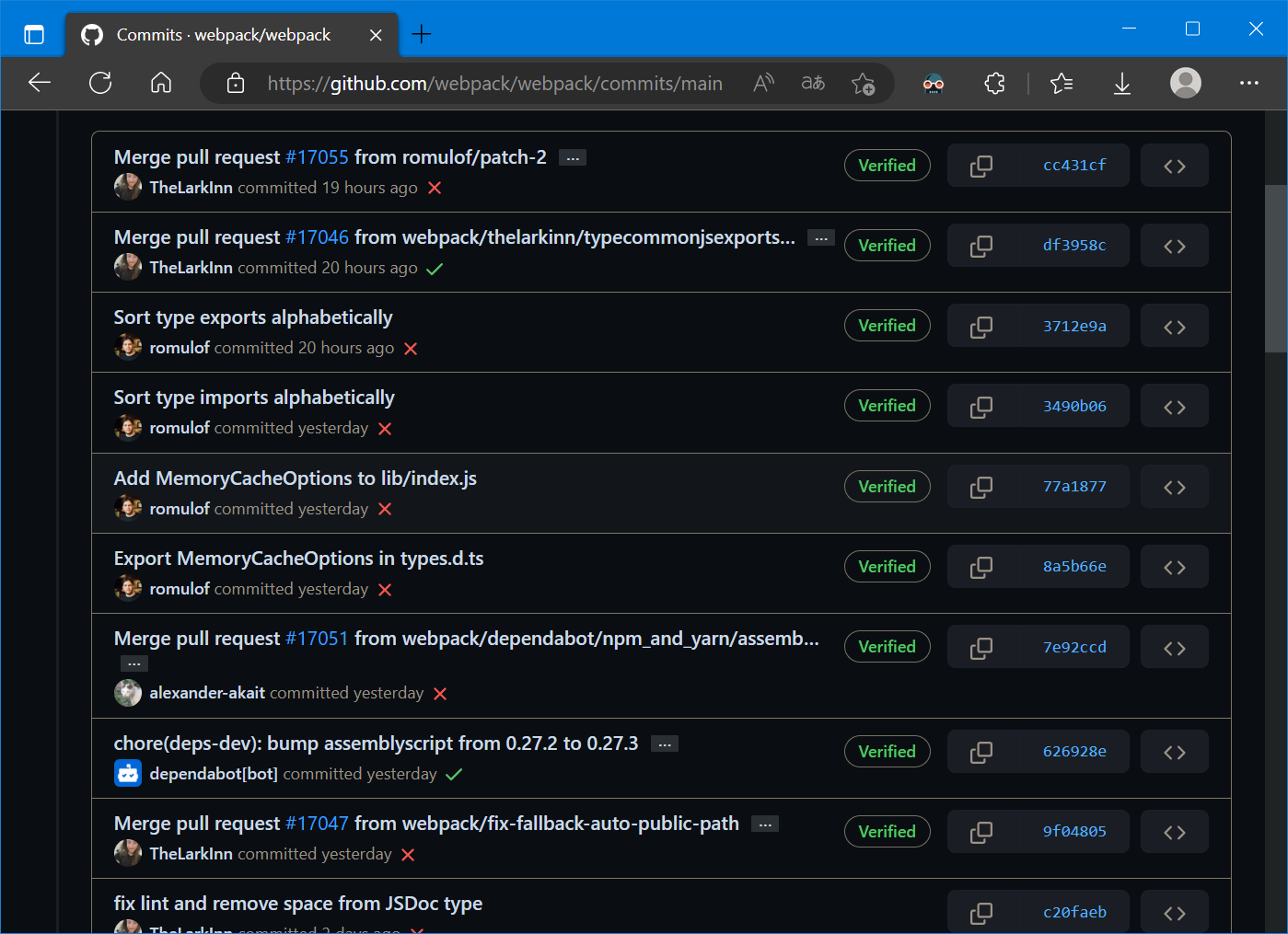
这些提交信息看起来比较易读且工整,表达信息较为明确,整体较为规范
Git是常用的版本控制工具,本文描述使用等工具实现Git代码提交规范
2. Git Hooks
如同其他许多的版本控制系统一样,Git 也具有在特定事件发生之前或之后执行特定脚本代码功能(从概念上类比,就与监听事件、触发器之类的东西类似),Git Hooks 就是那些在Git执行特定事件(如commit、push、receive等)后触发运行的脚本,挂钩是可以放置在挂钩目录中的程序,可在git执行的某些点触发动作
使用Git Hooks可以实现:
- 多人开发代码语法、规范强制统一
- commit message 格式化、是否符合某种规范
- 测试用例的检测
- 代码提交后的项目自动打包(git receive之后) 等
更为详细的Git Hooks介绍与使用可以参考:
3. Husky
使用Git Hooks可以实现代码格式化、提交信息规范化,但是需要手动编写脚本,而Husky就是简化编写这些脚本的工具
Husky的官网:Husky - Git hooks (typicode.github.io)
参考官网,可以快速使用Husky:
安装以及初始化:
npx husky-init && npm install
在项目中使用时,如果没有package.json文件会执行失败,需先执行npm init
执行完上述命令后,可以发现项目中出现了新的文件夹.husky,下面有一个pre-commit:
#!/usr/bin/env sh

. "$(dirname -- "$0")/_/husky.sh"

npm test
其作用主要是在commit之前执行npm test
为什么会执行这个命令呢?因为在<项目名>/.git/config 中新配置有:
hooksPath = .husky
即,Git Hooks的目录变更为.husky,Git处理时会自动应用该目录中的指定的命令(如,提交前执行npm test)
接下来,只需要安装代码格式化工具并在pre-commit中写入执行命令即可提交前自动格式化
4. ESLint
ESLint时常用的代码格式化工具,常用的还有Prettier
官网为:Find and fix problems in your JavaScript code - ESLint - Pluggable JavaScript Linter
参考官网的手册:Getting Started with ESLint - ESLint - Pluggable JavaScript Linter
可以快速的使用ESLint:
安装:
npm init @eslint/config
然后根据提示进行操作即可安装完成
格式化文件代码:
npx eslint yourfile.js
执行npx eslint <yourfile.js>即可格式化代码文件
此处,当然可以提交前格式化所以代码文件,但是,每次提交的文件修改只是部分,并不需要把所有的代码文件进行格式化操作
只需把提交修改的文件,即暂存区的文件进行格式化操作即可
5. lint-staged
见字识义,lint-staged工具就是对暂存区的代码文件进行格式化
GitHub站点为:okonet/lint-staged: — Run linters on git staged files (github.com)
根据站点的操作指南:okonet/lint-staged: — Run linters on git staged files (github.com)
可以快速的使用lint-staged:
安装:
npm install --save-dev lint-staged
配置参数:
配置参数可以参考示例:okonet/lint-staged: — Run linters on git staged files (github.com)
即,在 package.json 中添加"lint-staged": {},最后 package.json 形如
{

  "name": "My project",

  "version": "0.1.0",

  "scripts": {

    "my-custom-script": "linter --arg1 --arg2"

  },

  "lint-staged": {

      "*.{js,jsx}": "eslint"

  }

}
然后,在pre-commit中写入执行命令即可提交前自动格式化代码:
npx lint-staged
接下来提交规范化
6. commitlint
commitlint是一个检查提交是否符合规范的工具
官网为:commitlint - Lint commit messages
参考官网,可以快速的使用commitlint:
安装:
npm install @commitlint/cli @commitlint/config-conventional
配置:
echo "module.exports = {extends: ['@commitlint/config-conventional']}" > commitlint.config.js
注意:
- 如果
commitlint.config.js文件不是utf8编码,请保存为utf8编码 - 此命令不应使用CMD来执行
执行命令写入husky:
npx husky add .husky/commit-msg "npx --no -- commitlint --edit $1"
此时commitlint 具有默认的提交规范,参考:commitlint/@commitlint/config-conventional at master · conventional-changelog/commitlint (github.com)
7. Commitizen & cz-git
commitizen是基于Node.js的 git commit 命令行工具,辅助生成标准化规范化的 commit message,GitHub站点为:commitizen/cz-cli: The commitizen command line utility. #BlackLivesMatter (github.com)
cz-git:是一款工程性更强,轻量级,高度自定义,标准输出格式的 commitizen 适配器,官网为:快速开始 | cz-git (qbb.sh)
参考上述两个官方文档,可以快速的使用这两个工具:
安装:
npm install -D commitizen cz-git
配置:
修改 package.json 指定使用的适配器并添加 commit 指令:
{

  "scripts": {

	"commit": "git-cz"

  },

  "config": {

    "commitizen": {

      "path": "node_modules/cz-git"

    }

  }

}
此时,由于具有默认配置,在执行git add的情况下,直接运行npm run commit,就可以根据提示一步步的完善 commit msg 信息:
npm run commit

> git-hooks@1.0.0 commit

> git-cz

cz-cli@4.3.0, cz-git@1.6.1

? Select the type of change that you're committing: Use arrow keys or

type to search

> feat:     A new feature

  fix:      A bug fix

  docs:     Documentation only changes

  style:    Changes that do not affect the meaning of the code

  refactor: A code change that neither fixes a bug nor adds a feature

  perf:     A code change that improves performance

  test:     Adding missing tests or correcting existing tests

(Move up and down to reveal more choices)
当然,可以根据:配置模板 | cz-git (qbb.sh),进行进一步的配置
笔者从下面文档中复制了一份配置:
commitlint.config.js文件:
module.exports = {

  extends: ['@commitlint/config-conventional'],

  prompt: {

    messages: {

      type: '选择你要提交的类型 :',

      scope: '选择一个提交范围(可选):',

      customScope: '请输入自定义的提交范围 :',

      subject: '填写简短精炼的变更描述 :\n',

      body: '填写更加详细的变更描述(可选)。使用 "|" 换行 :\n',

      breaking: '列举非兼容性重大的变更(可选)。使用 "|" 换行 :\n',

      footerPrefixesSelect: '选择关联issue前缀(可选):',

      customFooterPrefix: '输入自定义issue前缀 :',

      footer: '列举关联issue (可选) 例如: #31, #I3244 :\n',

      generatingByAI: '正在通过 AI 生成你的提交简短描述...',

      generatedSelectByAI: '选择一个 AI 生成的简短描述:',

      confirmCommit: '是否提交或修改commit ?'

    },

    // prettier-ignore

    types: [

      { value: 'feat', name: '特性:       新增功能', emoji: ':sparkles:' },

      { value: 'fix', name: '修复:       修复缺陷', emoji: ':bug:' },

      { value: 'docs', name: '文档:       文档变更', emoji: ':memo:' },

      { value: 'style', name: '格式:       代码格式(不影响功能,例如空格、分号等格式修正)', emoji: ':lipstick:' },

      { value: 'refactor', name: '重构:     ️  代码重构(不包括 bug 修复、功能新增)', emoji: ':recycle:' },

      { value: 'perf', name: '性能:     ️  性能优化', emoji: ':zap:' },

      { value: 'test', name: '测试:       添加疏漏测试或已有测试改动', emoji: ':white_check_mark:' },

      { value: 'build', name: '构建:     ️  构建流程、外部依赖变更(如升级 npm 包、修改 vite 配置等)', emoji: ':package:' },

      { value: 'ci', name: '集成:       修改 CI 配置、脚本', emoji: ':ferris_wheel:' },

      { value: 'revert', name: '回退:     ️  回滚 commit', emoji: ':rewind:' },

      { value: 'chore', name: '其他:       对构建过程或辅助工具和库的更改(不影响源文件、测试用例)', emoji: ':hammer:' }

    ],

    useEmoji: true,

    emojiAlign: 'center',

    useAI: false,

    aiNumber: 1,

    themeColorCode: '',

    scopes: [],

    allowCustomScopes: true,

    allowEmptyScopes: true,

    customScopesAlign: 'bottom',

    customScopesAlias: 'custom',

    emptyScopesAlias: 'empty',

    upperCaseSubject: false,

    markBreakingChangeMode: false,

    allowBreakingChanges: ['feat', 'fix'],

    breaklineNumber: 100,

    breaklineChar: '|',

    skipQuestions: [],

    issuePrefixes: [{ value: 'closed', name: 'closed:   ISSUES has been processed' }],

    customIssuePrefixAlign: 'top',

    emptyIssuePrefixAlias: 'skip',

    customIssuePrefixAlias: 'custom',

    allowCustomIssuePrefix: true,

    allowEmptyIssuePrefix: true,

    confirmColorize: true,

    maxHeaderLength: Infinity,

    maxSubjectLength: Infinity,

    minSubjectLength: 0,

    scopeOverrides: undefined,

    defaultBody: '',

    defaultIssues: '',

    defaultScope: '',

    defaultSubject: ''

  }

}
此时在执行git add的情况下,运行npm run commit:
PS E:\Code\test\Git-hooks> npm run commit

> git-hooks@1.0.0 commit

> git-cz

cz-cli@4.3.0, cz-git@1.6.1

? 选择你要提交的类型 : Use arrow keys or type to search

❯ 特性:       新增功能

  修复:       修复缺陷

  文档:       文档变更

  格式:       代码格式(不影响功能,例如空格、分号等格式修正)

  重构:     ️  代码重构(不包括 bug 修复、功能新增)

  性能:     ️  性能优化

  测试:       添加疏漏测试或已有测试改动

(Move up and down to reveal more choices)
根据提示执行即可提交commit
8. 参考资料
[1] Git - githooks Documentation (git-scm.com)
[2] GitHook 工具 —— husky介绍及使用 - 较瘦 - 博客园 (cnblogs.com)
[3] Husky - Git hooks (typicode.github.io)
[4] Find and fix problems in your JavaScript code - ESLint - Pluggable JavaScript Linter
[5] okonet/lint-staged: — Run linters on git staged files (github.com)
[6] conventional-changelog/commitlint: Lint commit messages (github.com)
[7] commitlint - Lint commit messages
[8] commitizen/cz-cli: The commitizen command line utility. #BlackLivesMatter (github.com)
[9] cz-git | 一款工程性更强,轻量级,高度自定义,标准输出格式的 Commitizen 适配器 (qbb.sh)
Git代码提交规范的更多相关文章
- 常用git代码提交命令
知识点:本篇博客记录了日常开发中,所涉及到git代码提交命令 (一)初始化本地仓库,提交代码,提交到远程git远程仓库 git init //初始化本地仓库 git add . //将当前目 ...
- git代码提交步骤,教程
代码提交 代码提交一般有五个步骤: 1.查看目前代码的修改状态 2.查看代码修改内容 3.暂存需要提交的文件 4.提交已暂存的文件 5.同步到服务器 1. 查看目前代码的修改状态 提交代码之前 ...
- git代码提交与克隆
在工作中,越来越多的人会使用git来管理代码.下面简单的介绍一下git在工作中的使用流程 1.给你一个git地址,将代码拉下来基本操作流程如下: 1.1 git clone "项目地址&qu ...
- Git 日志提交规范
Commit messages的基本语法 当前业界应用的比较广泛的是 Angular Git Commit Guidelines 具体格式为: <type>: <subject> ...
- Git代码提交报错 (Your branch is up to date with 'origin/master)
一.前言 今天码云上提交自己本地的一个SpringBoot+Vue的小项目,由于前端代码提交第一次时候提交码云上文件夹下为空,于是自己将本地代码复制到码云拉取下来代码文件夹下,然而git add . ...
- git commit 代码提交规范
格式 type: description 1. type 类型 type 是 commit 的类别,只允许如下几种标识: fix: 修复bug add: 新功能 update: 更新 refactor ...
- Git Commit 提交规范
写好 Commit message 好处多多: 1.统一团队Git commit 日志风格 2.方便日后 Reviewing Code 3.帮助我们写好 Changelog 4.能很好的提升项目整体质 ...
- git代码提交方式
https://my.oschina.net/tearlight/blog/193921 <a>github的提交方式 (1)git add .----------------- ...
- gerrit管理下的git代码提交小技巧
1.提交代码git checkout targetbranch 切换至目标分支git pull origin targetbranch 拉取目标分支最新内容git add 修改文件git commit ...
- git代码提交步骤
常用的步骤: 1)假如本地想关联git仓库,那么先git init,git remote add origin [git地址] 2)假如是想直接从git仓库拉下来,那么git clone [git地 ...
随机推荐
- jooq简单使用
DSLContext首先简单的配置文件 <?xml version="1.0" encoding="UTF-8" standalone="yes ...
- 自行封装JDBCUtils
自己封装JDBCUtils package com.javasm.util; import com.javasm.bean.Emp; import com.javasm.constants.JDBCC ...
- curl: (35) SSL connect error的错误
1.先升级nss (Network Security Service, 网络安全服务) yum update nss如果没有nss,则需要安装nss服务 yum install nss 2.更新/安装 ...
- 去除Bigdecimal末尾的.00
String total = new BigDecimal("100.00").stripTrailingZeros().toPlainString();
- windows下配置JDK教程
1.思路: 首先要确定所要用的应用可以兼容哪个版本jdk,然后开始下载对应的版本,最后安装,配置环境变量,测试,部署完成. 2.jdk下载地址: 如果下载全新的jdk可以直接百度jdk官网下载 如果需 ...
- mysql查询近N天的数据
今天 select * from 表名 where to_days(时间字段名) = to_days(now()); 昨天 SELECT * FROM 表名 WHERE TO_DAYS( NOW( ) ...
- DVWA-Command Injection(命令执行)
命令执行漏洞,顾名思义,服务端在进行一些网站的操作.管理的时候,需要调用系统命令,如果对传入的命令参数没有进行一些过滤,可以直接执行服务器系统的命令终端 LOW 审计源码 <?php // 判断 ...
- Javaweb实践复习--MyBatis
增删改查操作 查询 查询所有数据 1.编写接口方法:Mapper接口------参数:无------结果:List 2.编写sql语句:SQL映射文件 一般情况下,若是用户实体类里面的变量名称与数据库 ...
- 设计模式(二十八)----综合应用-自定义Spring框架-Spring简单回顾
1 spring使用回顾 自定义spring框架前,先回顾一下spring框架的使用,从而分析spring的核心,并对核心功能进行模拟. 数据访问层.定义UserDao接口及其子实现类 public ...
- opengl helloworld vscode 通过glfw 绘制三角形
opengl helloworld vscode 调用glfw 绘制三角形 目录 opengl helloworld vscode 调用glfw 绘制三角形 打开 glfw.org, 我下的64 目录 ...