
laravel 7 登录
1:路由,展示登录表单
Route::group(['prefix'=>'day','namespace'=>'day18'],function (){

//    登录

    Route::get('login','ExamController@login');

});
2,HTML:
<!DOCTYPE HTML>
<html>
<head>
<meta charset="utf-8">
<link href="/static/static/h-ui/css/H-ui.min.css" rel="stylesheet" type="text/css" />
<link href="/static/static/h-ui.admin/css/H-ui.login.css" rel="stylesheet" type="text/css" />
<link href="/static/static/h-ui.admin/css/style.css" rel="stylesheet" type="text/css" />
<link href="/static/lib/Hui-iconfont/1.0.8/iconfont.css" rel="stylesheet" type="text/css" />
<title>后台登录 - H-ui.admin v3.1</title>
<link rel="stylesheet" href="http://apps.bdimg.com/libs/bootstrap/3.3.0/css/bootstrap.min.css">
</head>
<body>
<input type="hidden" id="TenantId" name="TenantId" value="" />
<div class="header"></div>
<div class="loginWraper">
<div id="loginform" class="loginBox">
<form class="form form-horizontal" action="{{url('day/dologin')}}" method="post">
@csrf
<div class="row cl">
<label class="form-label col-xs-3"><i class="Hui-iconfont"></i></label>
<div class="formControls col-xs-8">
<input id="" name="username" type="text" placeholder="账户" class="input-text size-L">
</div>
</div>
<div class="row cl">
<label class="form-label col-xs-3"><i class="Hui-iconfont"></i></label>
<div class="formControls col-xs-8">
<input id="" name="password" type="password" placeholder="密码" class="input-text size-L">
</div>
</div> <div class="row cl">
<div class="formControls col-xs-8 col-xs-offset-3">
<input name="" type="submit" class="btn btn-success radius size-L" value=" 登 录 ">
<input name="" type="reset" class="btn btn-default radius size-L" value=" 取 消 ">
</div>
</div>
</form>
{{-- 显示错误信息--}}
@if (count($errors) > 0)
<div class="alert alert-danger">
<ul>
@foreach ($errors->all() as $error)
<li>{{ $error }}</li>
@endforeach
</ul>
</div>
@endif
</div>
</div>
<div class="footer">Copyright 你的公司名称 by H-ui.admin v3.1</div>
<script type="text/javascript" src="/static/lib/jquery/1.9.1/jquery.min.js"></script>
<script type="text/javascript" src="/static/static/h-ui/js/H-ui.min.js"></script>
<!--此乃百度统计代码,请自行删除-->
<script>
var _hmt = _hmt || [];
(function() {
var hm = document.createElement("script");
hm.src = "https://hm.baidu.com/hm.js?080836300300be57b7f34f4b3e97d911";
var s = document.getElementsByTagName("script")[0];
s.parentNode.insertBefore(hm, s);
})();
</script> </body>
</html>
3:提交表单路由:
Route::group(['prefix'=>'day','namespace'=>'day18'],function (){

//    处理登录

    Route::post('dologin','ExamController@doLogin');

});
4:提交控制器验证
    public function doLogin(Request $request){
//        去除token
        $params=$request->except('_token');
//        验证非空
        $this->validate($request, [
            'username' => 'required',
            'password' => 'required'
        ], [
            'username.required' => '账号不可以为空',
            'password.required' => '密码不可以为空'
        ], $params);
//        匹配数据库
       $res=Admins::login($params);
//       验证账号和密码
       if ($res['username']!==$params['username']){
           return redirect(url('day/login'))->withErrors(['error'=>'账号错误']);
       }elseif ($res['password']!==md5($params['password'])){
           return redirect(url('day/login'))->withErrors(['error'=>'密码错误']);
       }else{
//           记录session通过put方法
           $request->session()->put('username', $res['username']);
//通过全局辅助函数
//           session(['username' => $res['username']);
//验证成功跳转首页
           return redirect(url('day/new'))->with('success','登录成功');
       }

    }
5:模型代码:
<?php

namespace App\models;

use Illuminate\Database\Eloquent\Model;

class Admins extends Model

{

    //链接表名

    protected $table = 'admins';

//验证数据

    public static function login($params)

    {
//验证账号

        return self::where('username',$params['username'])

            ->first();

    }

}
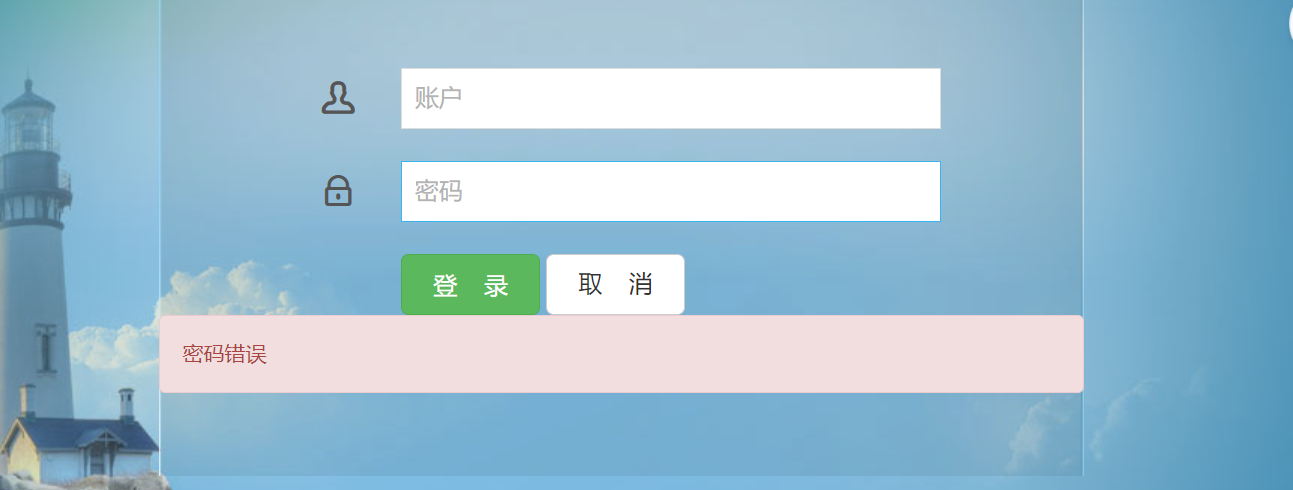
6:效果:
laravel 7 登录的更多相关文章
- laravel 用户名登录
laravel 用户名登录 默认登录设置为用户登录 laravel 5.3+ 修改文件(app\Http\Controllers\Auth\LoginController.php)增加 public ...
- Laravel 项目登录报错:The MAC is invalid.
在 Laravel 项目完成部署到服务器.数据库导入成功后 后台登录报错: 原因是 Laravel 的 APP_KEY 和 encrypt() 函数加密的问题.(encrypt() 是 Laravel ...
- Laravel —— 自定义登录
Laravel 中自带了 Auth 模块 默认用 email 登录,并有固定的表字段 有时需要根据项目需求,修改 Auth 功能 1.生成 Auth 执行 php artisan make:auth ...
- laravel 框架登录 实际操作
//登录中间件 Route::group(['middleware'=>'checkage'],function (){ Route::get('/mou/list','MouControlle ...
- 改造laravel的登录流程,仅使用一个token登录laravel
背景:最近使用lavavel来改造目前的系统,但是之前的老系统还不能立马下线,这时就出现了双系统共存的状态,需要解决的一个问题就是一次登录2个系统. 第一步 修改中间件App\Http\Middlew ...
- laravel记住登录、设置时间
laravel 自动登陆的时间改如何实现? 控制器 public function login(){ $email =Input::get('email');$password = Input::g ...
- laravel 框架登录 参考
一.登录功能1.书写登录路由Route::view('login','login');2.书写登录页面 视图层<form action="{{route('loginDo')}}&q ...
- Laravel 安装登录模块
cmd打开项目目录,执行如下代码即可 php artisan make:auth url访问
- Laravel登录验证碰到的坑 哈希验证匹配问题
用laravel 写登录验证 本来是用Crypt加密 添加用户到数据库的 后来验证密码 解密时一直报错 The payload is invaild 由于本人是laravel框架小白 自己思考许久未 ...
随机推荐
- 【h5游戏开发】egret引擎p2物理引擎 - 小球碰撞地面搞笑的物理现象
重力的方向和地面的问题 p2中默认的方向是从上到下,如果重力默认是正数的话,物体放到世界中是会从上面往下面飘的 p2中plane地面默认的方向是y轴的方向,而在p2中y轴的方向默认是从上往下 首先来看 ...
- HUWEI交换机如何判断环路故障
定义 以太网交换网络中为了提高网络可靠性,通常会采用冗余设备和冗余链路,然而现网中由于组网调整.配置修改.升级割接等原因,经常会造成数据或协议报文环形转发,不可避免的形成环路.如图1所示,三台设备两两 ...
- NOIP2020 部分简要题解
C 首先考虑 \(n = 2\) 怎么做. 可以发现的是我们一定要借助空柱子 \(n + 1\),并且两个柱子都必须要移动. 注意到此时本质上就是将两种球分类,于是我们考虑能否将一个柱子上两种颜色分开 ...
- python编写购物车
上次的学习又没有坚持下来,工作忙的不可开交,但我反思了一下还是自己没有下定决心好好学习,所以这次为期3个月的学习计划开始了,下面是这次学习后重新编写的购物车初版代码. 1 # 功能要求: 2 # 要求 ...
- Eclipse不能启动,提示:The Eclipse executable launcher was unable to locate its companion launcher jar
原因分析:JDK版本与eclipse不匹配 如jdk和eclipse版本号必须统一,64位都是64位,32位都是32位. jdk版本可以用命令,cmd进入命令窗口,然后输入java -version, ...
- 电脑预装Office2016打开Word时点击保存弹出“word无法启动转换器RECOVR32.CNV”对话框问题的修复方法
感谢大佬:https://blog.csdn.net/qq_41969790/article/details/85161701 1.问题描述:电脑预装的Office2016,家庭和学生版正版.每次打开 ...
- js注释和数据类型转换
单行注释 用来描述下面一个或多行代码的作用 // 这是一个变量var name = 'hm'; 多行注释 用来注释多条代码 /*var age = 18;var name = 'zs';console ...
- 今天带大家了解一下ICMP协议及基本使用
ICMP协议的介绍及基本使用 1.IP数据包头的格式 2.ICMP协议的功能介绍 3.ICMP的基本使用方法 1.在讲解ICMP协议之前,我们先来简单了解一下IP数据包格式如图所示: 2.好现在切入正 ...
- HEAAN新版学习
本篇文章对最新版的HEAAN库进行研究,老版的介绍见 HEAAN库学习 主要参考:slide-HEAAN.pdf HEAAN介绍 HEAAN是一个支持在加密的复数数组之间进行操作的库,方案的安全性取决 ...
- 实现基于MYSQL验证的vsftpd虚拟用户访问
一.配置mysql服务器 1.1 安装mysql # yum -y install mariadb-server # systemctl enable --now mariadb.service &a ...