
解决class path resource [applicationContext.xml] cannot be opened because it does not exist
在学习spring的过程出现class path resource [applicationContext.xml] cannot be opened because it does not exist
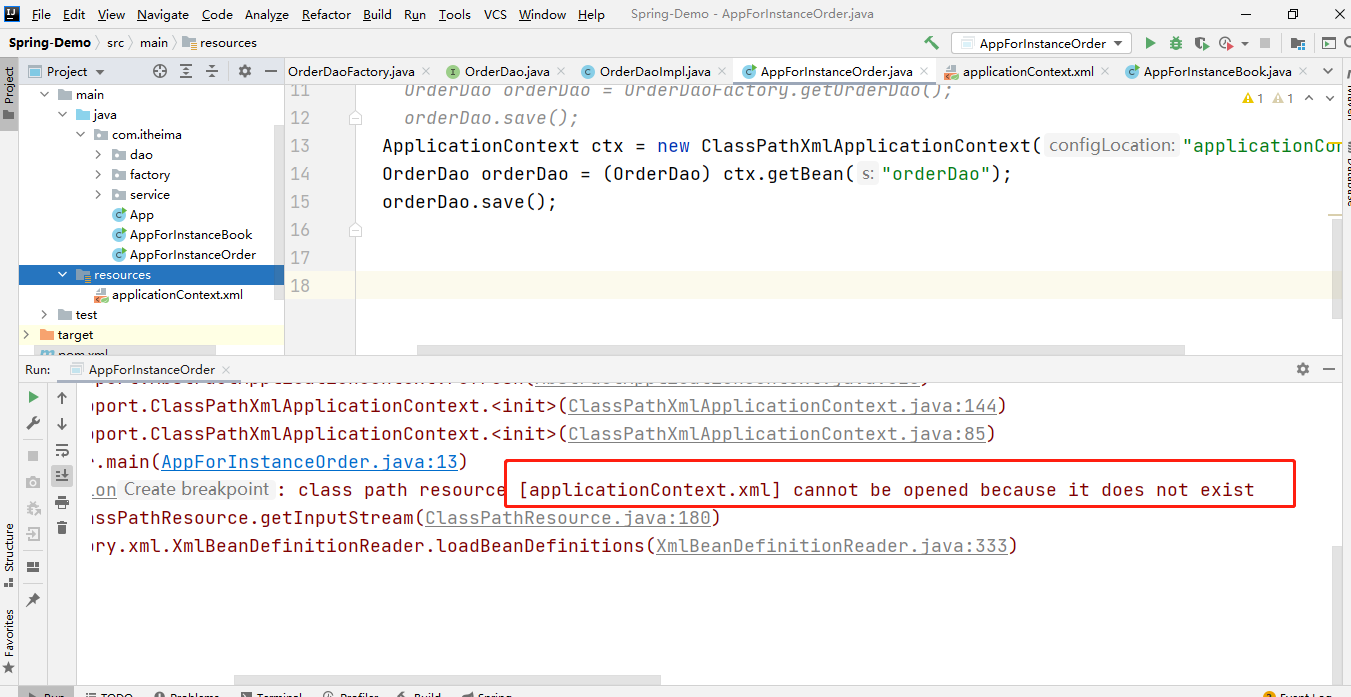
一直以为是路径的原因,怎么改始终不行
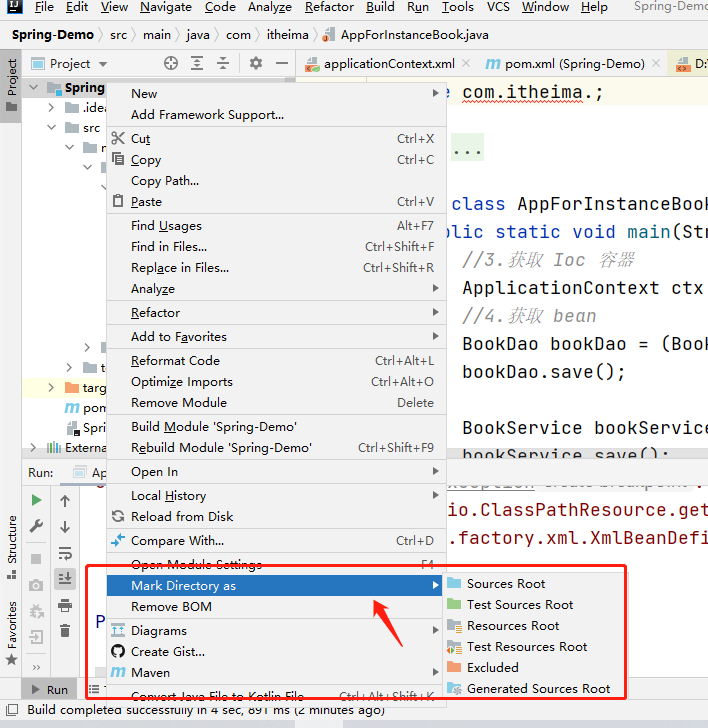
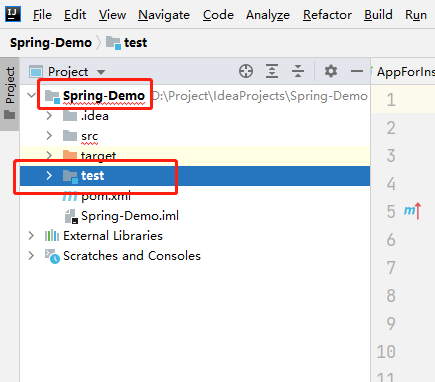
最后发现是因为自己又在原项目下建子模块(Module)的原因,重建项目才得以解决
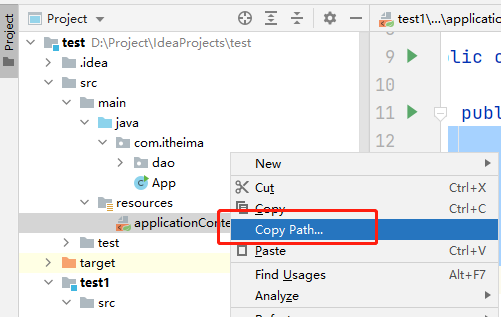
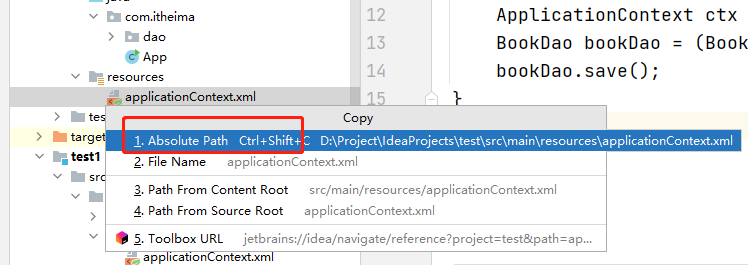
下面还有不用重建项目的解决办法:我们将 ClassPathXmlApplicationContext 换成 FileSystemXmlApplicationContext,然后复制xml文件的绝对路径即可。

解决class path resource [applicationContext.xml] cannot be opened because it does not exist的更多相关文章
- Spring报错:java.io.FileNotFoundException: class path resource [applicationContext.xml] cannot be opened because it does not exist
感谢:http://blog.chinaunix.net/uid-20681545-id-184633.html提供的解决方案,非常棒 ! 问题说明: 新建一个Spring项目,新建一个Bean类:H ...
- nested exception is java.io.FileNotFoundException: class path resource [applicationContext.xml] cannot be opened because it does not exist
org.apache.ibatis.exceptions.PersistenceException: ### Error building SqlSession. ### The error may ...
- class path resource [applicationContext.xml] cannot be opened because it does not exis
使用maven创建web工程,将spring配置文件applicationContext.xml放在src/resource下,用eclipse编译时提示class path resource [ap ...
- mybatis异常解决:class path resource [SqlMapConfig.xml] cannot be opened because it does not exist
解决方法: 缺失SqlMapConfig.xml文件.
- class path resource [config.xml] cannot be opened because it does not exist
初学Spring在用Resource rs=new ClassPathResource("applicationContext.xml");时老是遇到这个错误.后来发现用Appli ...
- Caused by: java.io.FileNotFoundException: class path resource [applicationContext.xml] cannot be ope
1.错误描述 java.lang.IllegalStateException: Failed to load ApplicationContext at org.springframework.tes ...
- org.springframework.beans.factory.BeanDefinitionStoreException: IOException parsing XML document from class path resource [applicationContext.xml]; nested exception is java.io.FileNotFoundException: c
//这个是 配置文件放错了地方 org.springframework.beans.factory.BeanDefinitionStoreException: IOException parsing ...
- parsing XML document from class path resource [applicationtext.xml]; nested exception is java.io.FileNotFoundException: class path resource [applicationtext.xml] cannot be opened because it does not e
控制台异常: parsing XML document from class path resource [applicationtext.xml]; nested exception is java ...
- aused by: org.springframework.beans.factory.BeanCreationException: Error creating bean with name 'sessionFactory' defined in class path resource [applicationContext.xml]: Invocation of init method fai
org.springframework.beans.factory.BeanCreationException: Error creating bean with name 'roleDaoImpl' ...
- Error creating bean with name 'sessionFactory' defined in class path resource [applicationContext.xml]: Invocation of init method failed; nested exception is org.hibernate.HibernateException: Unable t
spring与hibernate整合然后出现如下错误: org.springframework.beans.factory.BeanCreationException: Error creating ...
随机推荐
- python机器学习——随机森林算法
背景与原理: 首先我们需要知道集成学习的概念,所谓集成学习,就是使用一系列学习器进行学习,并且通过某种规则把这些学习器的学习结果整合起来从而获得比单个学习器学习效果更好的机器学习方法.这样的方法可以用 ...
- Day12-面向对象初识
面向对象编程 Java的核心思想就是OOP 一.面向过程&面向对象 面向过程思想: 步骤清晰简单,第一步做什么,第二步做什么...... 面对过程适合处理一些较为简单的问题 面向对象思想: 物 ...
- 基于docker搭建Jenkins+git+python+allure
实现方式 docker+jenkins+python 执行自动化框架,生成allure报告 1.服务器上安装docker(略) 2.创建jenkins容器 3.使用Dockerfile创建有接口自动化 ...
- C++ 函数参数与按值传递
C++ 函数参数与按值传递 C++ 通常安值传递参数,这意味着将数值参数传递给函数,而后者将其赋给一个新的变量. double volume = cube(side); 其中,side 是一个变量. ...
- Think in UNL其一
书中提到世界本质上为离散的,由一个一个对象组成.其实这个观点并不难理解,因为在公元前5世纪芝诺就有了类似的思考,著名的阿基里斯悖论早已经被推翻,现代物理学已经证明了时间和空间不是可以无限分割的,所以总 ...
- Navicat 通过ssh链接远程数据库
首先需要下载一个Navicat数据库管理工具,有了Navicat工具需要完成一下步骤就可以实现本地链接远程数据库了 一.打开Navicat,点击连接按钮,找到MySQL并点击 二.点击"常规 ...
- LINUX下的VSCODE-C/C++配置
LINUX下的VSCODE-C/C++配置 1.生成默认的任务文件 2.lunch.json,调整"configurations"里的成员,如下 ①添加 "preLaun ...
- vue3.0的生命周期函数
stetup(){}在 生命周期函数 系列中的优先级 〇setup(){ //优先级最高 处于created生命周期之前的函数,是无法访问data,methods中的数据是无法访问到的,setup中的 ...
- @DeclareParents声明对象的AOP
今天在使用@DeclareParents时,使用AspectJ拓展对象的接口 public interface Encoreable { void nextPerformance(); } @Comp ...
- linux下python程序部署
1.安装python 2.安装virtualenv https://blog.csdn.net/mulangren1988/article/details/59106682 3.指定virtualen ...