
win7实现tensorflow中的物体识别
实现条件:
1.win7
2.python
3.运行所需要的库:matplotlib、lxml、pillow、Cython
具体参考:https://github.com/tensorflow/models/blob/master/research/object_detection/g3doc/installation.md
4.object_detection包,下载地址:https://github.com/tensorflow/models
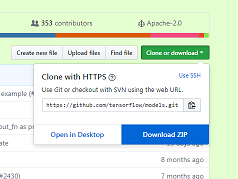
下载后解压 object_detection的位置在research文件夹中
5.编译好的protos文件,object_detection中的文件没有编译,编译好的文件下载地址:https://github.com/1529591487/Object-Detection
直接替换object_detection中的protos文件夹即可。
代码:
1.
import numpy as np

import os

import six.moves.urllib as urllib

import sys

import tarfile

import tensorflow as tf

import zipfile

from collections import defaultdict

from io import StringIO

from matplotlib import pyplot as plt

from PIL import Image

# 这里改成你下载的object_detection包的位置

sys.path.append(r"E:\学习资料\人工智能\models-master\research")

from object_detection.utils import ops as utils_ops

if tf.__version__ < '1.4.0':

  raise ImportError('Please upgrade your tensorflow installation to v1.4.* or later!')
2.
%matplotlib inline
3.
from object_detection.utils import label_map_util

from object_detection.utils import visualization_utils as vis_util
这里会有警告,但是不影响,如果要去掉警告的话,将models-master\research\object_detection\utils\visualization_utils.py 文件中的第26行改成
matplotlib.use('Agg',warn=False, force=True)
4.
# What model to download.

MODEL_NAME = 'ssd_mobilenet_v1_coco_2017_11_17'

MODEL_FILE = MODEL_NAME + '.tar.gz'

DOWNLOAD_BASE = 'http://download.tensorflow.org/models/object_detection/'

# Path to frozen detection graph. This is the actual model that is used for the object detection.

PATH_TO_CKPT = MODEL_NAME + '/frozen_inference_graph.pb'

# 这里的路径也需要修改

PATH_TO_LABELS = os.path.join(r'E:\学习资料\人工智能\models-master\research\object_detection\data', 'mscoco_label_map.pbtxt')

NUM_CLASSES = 90
5.
opener = urllib.request.URLopener()

opener.retrieve(DOWNLOAD_BASE + MODEL_FILE, MODEL_FILE)

tar_file = tarfile.open(MODEL_FILE)

for file in tar_file.getmembers():

  file_name = os.path.basename(file.name)

  if 'frozen_inference_graph.pb' in file_name:

    tar_file.extract(file, os.getcwd())
6.
detection_graph = tf.Graph()

with detection_graph.as_default():

  od_graph_def = tf.GraphDef()

  with tf.gfile.GFile(PATH_TO_CKPT, 'rb') as fid:

    serialized_graph = fid.read()

    od_graph_def.ParseFromString(serialized_graph)

    tf.import_graph_def(od_graph_def, name='')
7.
label_map = label_map_util.load_labelmap(PATH_TO_LABELS)

categories = label_map_util.convert_label_map_to_categories(label_map, max_num_classes=NUM_CLASSES, use_display_name=True)

category_index = label_map_util.create_category_index(categories)
8.
def load_image_into_numpy_array(image):

  (im_width, im_height) = image.size

  return np.array(image.getdata()).reshape(

      (im_height, im_width, 3)).astype(np.uint8)
9.
def run_inference_for_single_image(image, graph):

  with graph.as_default():

    with tf.Session() as sess:

      # Get handles to input and output tensors

      ops = tf.get_default_graph().get_operations()

      all_tensor_names = {output.name for op in ops for output in op.outputs}

      tensor_dict = {}

      for key in [

          'num_detections', 'detection_boxes', 'detection_scores',

          'detection_classes', 'detection_masks'

      ]:

        tensor_name = key + ':0'

        if tensor_name in all_tensor_names:

          tensor_dict[key] = tf.get_default_graph().get_tensor_by_name(

              tensor_name)

      if 'detection_masks' in tensor_dict:

        # The following processing is only for single image

        detection_boxes = tf.squeeze(tensor_dict['detection_boxes'], [0])

        detection_masks = tf.squeeze(tensor_dict['detection_masks'], [0])

        # Reframe is required to translate mask from box coordinates to image coordinates and fit the image size.

        real_num_detection = tf.cast(tensor_dict['num_detections'][0], tf.int32)

        detection_boxes = tf.slice(detection_boxes, [0, 0], [real_num_detection, -1])

        detection_masks = tf.slice(detection_masks, [0, 0, 0], [real_num_detection, -1, -1])

        detection_masks_reframed = utils_ops.reframe_box_masks_to_image_masks(

            detection_masks, detection_boxes, image.shape[0], image.shape[1])

        detection_masks_reframed = tf.cast(

            tf.greater(detection_masks_reframed, 0.5), tf.uint8)

        # Follow the convention by adding back the batch dimension

        tensor_dict['detection_masks'] = tf.expand_dims(

            detection_masks_reframed, 0)

      image_tensor = tf.get_default_graph().get_tensor_by_name('image_tensor:0')

      # Run inference

      output_dict = sess.run(tensor_dict,

                             feed_dict={image_tensor: np.expand_dims(image, 0)})

      # all outputs are float32 numpy arrays, so convert types as appropriate

      output_dict['num_detections'] = int(output_dict['num_detections'][0])

      output_dict['detection_classes'] = output_dict[

          'detection_classes'][0].astype(np.uint8)

      output_dict['detection_boxes'] = output_dict['detection_boxes'][0]

      output_dict['detection_scores'] = output_dict['detection_scores'][0]

      if 'detection_masks' in output_dict:

        output_dict['detection_masks'] = output_dict['detection_masks'][0]

  return output_dict
10.
IMAGE_SIZE = (36, 24)

#这里设置图片路径

mydir=r'E:\学习资料\人工智能\models-master\research\object_detection\test_images'

# mydir = 'G:\壁纸'

for filename in os.listdir(mydir):

    if os.path.splitext(filename)[1] == '.jpg':

        filepath=os.path.join(mydir, filename)

        print(filepath)

        image = Image.open(filepath)

  # the array based representation of the image will be used later in order to prepare the

  # result image with boxes and labels on it.

        image_np = load_image_into_numpy_array(image)

  # Expand dimensions since the model expects images to have shape: [1, None, None, 3]

        image_np_expanded = np.expand_dims(image_np, axis=0)

  # Actual detection.

        output_dict = run_inference_for_single_image(image_np, detection_graph)

  # Visualization of the results of a detection.

        vis_util.visualize_boxes_and_labels_on_image_array(

            image_np,

            output_dict['detection_boxes'],

            output_dict['detection_classes'],

            output_dict['detection_scores'],

            category_index,

            instance_masks=output_dict.get('detection_masks'),

            use_normalized_coordinates=True,

            line_thickness=8)

        fig1 = plt.gcf()

        plt.figure(figsize=IMAGE_SIZE)

        plt.imshow(image_np)
运行结果:

代码参考:https://github.com/tensorflow/models/blob/master/research/object_detection/object_detection_tutorial.ipynb
有些图片识别会失败,目前还没搞清楚,欢迎大家交流
win7实现tensorflow中的物体识别的更多相关文章
- 谷歌开源的TensorFlow Object Detection API视频物体识别系统实现教程
视频中的物体识别 摘要 物体识别(Object Recognition)在计算机视觉领域里指的是在一张图像或一组视频序列中找到给定的物体.本文主要是利用谷歌开源TensorFlow Object De ...
- 使用TensorFlow识别照片中的物体
1.环境ubuntu14.04.5 安装TensorFlow 官方文档:https://www.tensorflow.org/install/install_linux sudo pip instal ...
- Tensorflow object detection API 搭建物体识别模型(四)
四.模型测试 1)下载文件 在已经阅读并且实践过前3篇文章的情况下,读者会有一些文件夹.因为每个读者的实际操作不同,则文件夹中的内容不同.为了保持本篇文章的独立性,制作了可以独立运行的文件夹目标检测. ...
- Tensorflow object detection API 搭建物体识别模型(三)
三.模型训练 1)错误一: 在桌面的目标检测文件夹中打开cmd,即在路径中输入cmd后按Enter键运行.在cmd中运行命令: python /your_path/models-master/rese ...
- Tensorflow object detection API 搭建物体识别模型(一)
一.开发环境 1)python3.5 2)tensorflow1.12.0 3)Tensorflow object detection API :https://github.com/tensorfl ...
- Tensorflow object detection API 搭建物体识别模型(二)
二.数据准备 1)下载图片 图片来源于ImageNet中的鲤鱼分类,下载地址:https://pan.baidu.com/s/1Ry0ywIXVInGxeHi3uu608g 提取码: wib3 在桌面 ...
- 谷歌开源的TensorFlow Object Detection API视频物体识别系统实现(一)[超详细教程] ubuntu16.04版本
谷歌宣布开源其内部使用的 TensorFlow Object Detection API 物体识别系统.本教程针对ubuntu16.04系统,快速搭建环境以及实现视频物体识别系统功能. 本节首先介绍安 ...
- 对于谷歌开源的TensorFlow Object Detection API视频物体识别系统实现教程
本教程针对Windows10实现谷歌近期公布的TensorFlow Object Detection API视频物体识别系统,其他平台也可借鉴. 本教程将网络上相关资料筛选整合(文末附上参考资料链接) ...
- 谷歌开源的TensorFlow Object Detection API视频物体识别系统实现(二)[超详细教程] ubuntu16.04版本
本节对应谷歌开源Tensorflow Object Detection API物体识别系统 Quick Start步骤(一): Quick Start: Jupyter notebook for of ...
随机推荐
- Linux 操作系统 & High Tech
分享10大白帽黑客专用的 Linux 操作系统 - 51CTO.COMhttp://os.51cto.com/art/201905/597156.htm Ubuntu 创始人谈论为什么 Linux 在 ...
- flutter Dismissible 可以在拖动时隐藏的widget
import 'package:flutter/material.dart'; class DismissedAppPage extends StatefulWidget { @override St ...
- 十一、LoadRunner组成和工作原理
一.LoadRunner组成 虚拟用户发生器:Vuser Generator 压力调度和监控中心:Controller 压力生产器:Load Generator 压力结果分析工具:Analysis
- windows驱动程序中的预处理含义
#pragma code_seg(“PAGE”) 作用是将此部分代码放入分页内存中运行. #pragma code_seg() 将代码段设置为默认的代码段 #pragma code_seg(&q ...
- Spring cloud微服务安全实战-4-11Zuul网关安全开发(四)
限流,有个现成的开源项目可以帮助我们来做网关上的限流 用最新的这个版本 在pom.xml加入引用. 在限流的过程中需要存一些信息,可以存在数据库里 也可以存在redis里.这里我们演示存到数据库里 比 ...
- Spring cloud微服务安全实战-4-2微服务安全的新挑战
微服务的环境下,我的业务逻辑不再是在一个单一的进程里,而是分散了很多的进程里.订单.物流.库存.价格.每一个tomcat都是一个进程. 每一个进程,每一个tomcat都有自己的入口点.那么就导致我防范 ...
- bat函数调用 带返回值
bat 脚本之 使用函数 摘自:https://blog.csdn.net/peng_cao/article/details/73999076 综述 bat函数写法 bat函数调用 bat函数返回值 ...
- Qt编写自定义控件62-探探雷达
一.前言 随着移动互联网的盛行,现在手机APP大行其道,每个人的手机没有十几个APP都不好意思说自己是现代人,各种聊天.购物.直播.小视频等APP,有个陌生人社交的APP叫探探,本人用过几次,当然不是 ...
- 为什么在MySQL数据库中无法创建外键?(MyISAM和InnoDB详解)
问题描述:为什么在MySQL数据库中不能创建外键,尝试了很多次,既没有报错,也没有显示创建成功,真实奇了怪,这是为什么呢? 问题解决:通过查找资料,每次在MySQL数据库中创建表时默认的情况是这样的: ...
- 123457123456#0#-----com.tym.myNewShiZi45--前拼后广--识字tym
com.tym.myNewShiZi45--前拼后广--识字tym