
html/form表单常用属性认识
1、form表单常用属性练习
<style>
.form1 {
margin: auto;
height: 900px;
width: 500px;
text-align: center;
line-height: 40px;
letter-spacing: 2px;
border: 1px solid red;
} .img {
height: 50px;
width: 50px;
}
</style>
</head> <body>
<div class="form1">
<form action="">
<span>用 户 名:</span><input type="text" placeholder="请输入用户名"><br>
<span>密 码:</span><input type="password"><br>
<span>确认密码:</span><input type="password"><br>
<span>性 别:</span>
<input type="radio" name="radio" id="radio" value="nan" checked>
<label for="radio">男</label>
<input type="radio" name="radio" id="radio1">
<label for="radio1">女</label><br>
<span>爱好:</span>
<input type="checkbox" name="box1" id="box1">
<label for="box1">阅读</label>
<input type="checkbox" name="box2" id="box2">
<label for="box2">足球</label>
<input type="checkbox" name="box3" id="box3">
<label for="box3">游戏</label><br>
<span>电话号码:</span> <input type="tel" pattern="1\d{10}" title="请输入正确的手机号" maxlength="11" placeholder="请输入手机号"><br>
<span>邮箱:</span> <input type="email" title="请输入正确的邮箱" placeholder="请输入邮箱"><br>
<span>验证码:</span> <input type="text" placeholder="请输入验证码"><br>
<br>
<input type="submit" value="注册">
<input type="reset" value="重置"><br>
<br>
<span>颜色选择器</span> <input type="color"><br>
<span>日期</span> <input type="date" value="2019-11-12"><br>
<span>日期+时间</span> <input type="datetime-local" value="2018-11-12T00:23"><br>
<span>时间</span> <input type="time" value="00:20"><br>
<span>月份</span> <input type="month" value="2018-09"><br>
<span>周数</span> <input type="week" value="2019-W02"><br> <span>图片提交</span> <input type="image" src="img/安卓.png" class="img">
<h1>下拉列表</h1>
<select name="city" id="" size="1">
<optgroup label="第一">
<option value="nanchang">南昌</option>
<option value="nanchong">南充</option>
</optgroup>
<optgroup label="第二">
<option value="chengdu" selected >成都</option>
<option value="xizang">西藏</option>
</optgroup>
</select>
<input type="text" list="apple">
<datalist id="apple">
<option >西瓜</option>
<option >香蕉</option>
<option >草莓</option>
</datalist> </form>
</div>
</body>
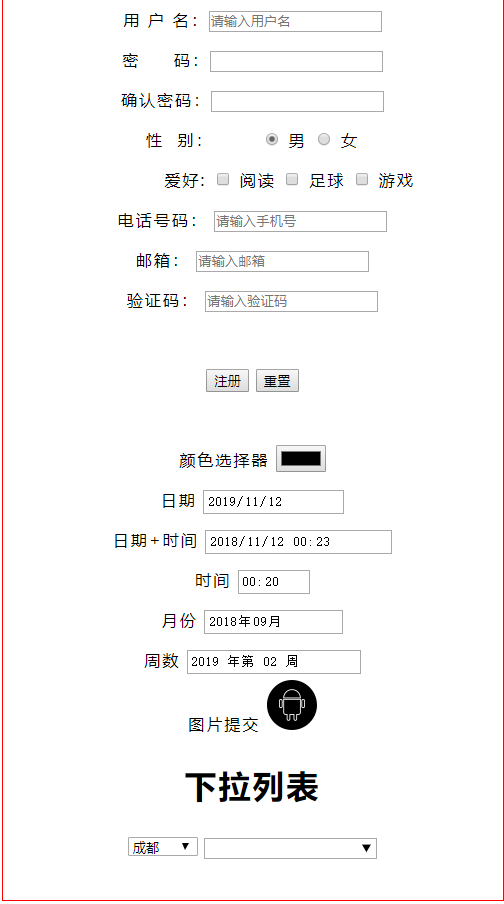
得到的效果是:
html/form表单常用属性认识的更多相关文章
- form表单的属性标签
form表单的常用标签 表单: <form id="" name="" method="post/get" action=" ...
- form表单的属性标签和练习
form表单的标签 做一个如下图的form表单: 我们的代码如下: <body leftmargin="400px" topmargin="200px"& ...
- HTML 和 form 表单常用标签
HTML和CSS 常用标签: p:段落,自动换行 span:和div类似,但是默认不换行 br:换行 hr:分割线 h1-h6:标题标签 a:超链接 瞄点:通过给a链接设置#XX作为链接,给需要链接的 ...
- html5中form表单新增属性以及改良的input标签元素的种类
在HTML5中,表单新增了一些属性,input标签也有了更多的type类型,有些实现了js才能实现的特效,但目前有些浏览器不能全部支持.下面是一些h5在表单和input标签上的一些改动. <!D ...
- form 表单 enctype 属性-(转自w3c)
<from action="xxx.xxx" enctype="multipart/form-data"></from> 在上传文件时必 ...
- Form 表单常用正则验证 (收藏)
1.^\d+$ //匹配非负整数(正整数 + 0) 2.^[0-9]*[1-9][0-9]*$ //匹配正整数 3.^((-\d+)|(0+))$ //匹配非正整数(负整数 + 0) 4.^-[0-9 ...
- javascript form表单常用的正则表达式
form验证时常用的几个正则表达式 座机: \d{3,4}-\d{7,8} 手机号: /^1[34578][0-9]{9}$/ (\86)?\s+1[34578]\d{0-9} (\+86)?\s*1 ...
- html5 form表单常用标签
<!DOCTYPE html> <html lang="en"> <head> <meta charset="UTF-8&quo ...
- Django之form表单常用字段与插件
from django.shortcuts import render,HttpResponse from django import forms from app01 import models f ...
随机推荐
- 十大经典排序算法最强总结(含JAVA代码实现)(转)
十大经典排序算法最强总结(含JAVA代码实现) 最近几天在研究排序算法,看了很多博客,发现网上有的文章中对排序算法解释的并不是很透彻,而且有很多代码都是错误的,例如有的文章中在“桶排序”算法中对每 ...
- ftp列出具体目录的所有目录,和目录按照文件类型列出
package com.haiyisoft.cAssistantWeb.util; import java.io.IOException; import java.io.PrintWriter; im ...
- AMBARI部署HADOOP集群(4)
通过 Ambari 部署 hadoop 集群 1. 打开 http://192.168.242.181:8080 登陆的用户名/密码是 : admin/admin 2. 点击 “LAUNCH INS ...
- 关于ansbile
YAML语法规则 规则一:缩进(一个缩进两空格,注意一定不用tab) 规则二:冒号(每个冒号后一定要有空格) 规则三:短横线 - (短横线后面要空格) 编写案例 ansible-playbook -- ...
- 阶段3 3.SpringMVC·_03.SpringMVC常用注解_1 RequestParam注解
新建param.jsp页面.里面一个a标签. 新建Controller 输出字符串 重新部署 传参数 接收这个username并输出 把username换成name 接收不到. 使用RequestPa ...
- 七十九:flask.Restful之flask-Restful标准化返回参数示例
接上一篇的代码和数据 对于复杂结构的数据如果只是定义单一结构的话返回的数据就没意义了,此时定义的数据结构需精确到所有数据的每一个字段有时候要返回的数据结构中,会有比较复杂的数据结构,证实后可以使用一些 ...
- docker批量删除容器、镜像(转载)
1.删除所有容器 docker rm `docker ps -a -q` 2.删除所有镜像 docker rmi `docker images -q` 3.按条件删除镜像 没有打标签 docker r ...
- kill-9 kill-15
kill -9 PID 是操作系统从内核级别强制杀死一个进程. kill -15 PID 可以理解为操作系统发送一个通知告诉应用主动关闭. kill -15 PID 效果是正常退出进程,退出前可以被阻 ...
- Cocos2d-x入门之旅
Cocos通过动作(Action)让精灵动起来,把数个动作组成序列(Sequence)就能让精灵做出连续的动作,在动作中我们可以改变精灵的位置,旋转角度,缩放比例,等等 动作(Action)# 首先我 ...
- 【Java】递归删除目录以及文件
public static void deleteDirectory(String path) { File pFile = new File(path); //若目录以及文件不存在,则终止继续执行方 ...