
阿里云服务器配置https(总结)
阿里云服务器配置https(总结)
一、总结
一句话总结:
1、下载https证书(可以在阿里云上)
2、在服务器上面开启443端口
3、配置apache服务器,443的加ssl,让80的重定向到443
4、安装mod_ssl模块:yum install mod_ssl
1、apache将http(80)链接跳转到https(443)?
RewriteCond配合RewriteRule来跳转:RewriteRule ^(.*)?$ https://%{SERVER_NAME}$1 [L,R]
<VirtualHost *:>

    RewriteEngine on

    RewriteCond %{SERVER_PORT} !^$

    RewriteRule ^(.*)?$ https://%{SERVER_NAME}$1 [L,R]

    ServerName www.fanrenyi.com

    ServerAlias fanrenyi.com

</VirtualHost>
2、阿里云上配置apache启示?
可以多参照阿里云上面提供的手册:阿里云https证书服务那里下载证书那里有怎么教你详细的做
3、https的端口号是多少?
443
二、阿里云服务器配置https
1、在阿里云上面下载https证书
具体怎么做可以参考以下网址或者百度
https://yq.aliyun.com/articles/720759?spm=a2c4e.11155472.0.0.24124494m4E2Hi
2、在服务器上面开启443端口
因为443是https默认端口

3、配置apache服务器
阿里云https证书服务那里下载证书那里有怎么教你详细的做


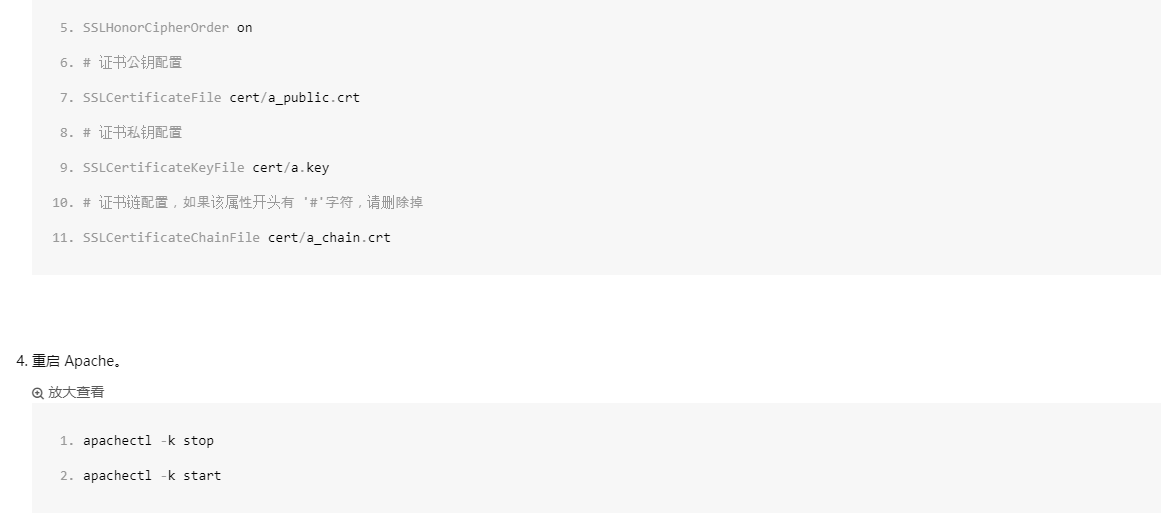
httpd-ssl.conf成功的配置:
Listen

AddType application/x-x509-ca-cert .crt

AddType application/x-pkcs7-crl .crl

SSLPassPhraseDialog  builtin

SSLSessionCache  "shmcb:logs/ssl_scache(512000)"

SSLSessionCacheTimeout

SSLUseStapling On

SSLStaplingCache "shmcb:logs/ssl_stapling(512000)"

# 添加 SSL 协议支持协议,去掉不安全的协议

SSLProtocol all -SSLv2 -SSLv3

SSLProxyProtocol -All +TLSv1. +TLSv1.

# 修改加密套件如下

SSLCipherSuite HIGH:!RC4:!MD5:!aNULL:!eNULL:!NULL:!DH:!EDH:!EXP:+MEDIUM

SSLProxyCipherSuite HIGH:!aNULL:!MD5:!3DES:!CAMELLIA:!AES128

SSLHonorCipherOrder on

SSLCompression off

Mutex sysvsem default

SSLStrictSNIVHostCheck on

#公钥

SSLCertificateFile cert/--------------------------.crt

#私钥

SSLCertificateKeyFile cert/---------------------------.key

#证书链文件

SSLCertificateChainFile cert/------------------------.crt

<VirtualHost _default_:>

SSLEngine on

#ServerName localhost

ServerName fanrenyi.com:

ServerAlias www.fanrenyi.com:

DocumentRoot ---------------------------------

#DocumentRoot /data/www/default

#<Directory /data/www/default>

<Directory ----------------------------------->

    SetOutputFilter DEFLATE

    Options FollowSymLinks

    AllowOverride All

    Order Deny,Allow

    Allow from All

    DirectoryIndex index.php index.html index.htm

</Directory>

</VirtualHost>
4、成功的效果

5、laravel项目中自动跳转到https中
将http(80)链接跳转到https(443):
<VirtualHost *:>

    RewriteEngine on

    RewriteCond %{SERVER_PORT} !^$

    RewriteRule ^(.*)?$ https://%{SERVER_NAME}$1 [L,R]

    ServerName www.fanrenyi.com

    ServerAlias fanrenyi.com

</VirtualHost>
6、记得安装mod_ssl
如果一开始只安装了httpd,还要安装mod_ssl才能开启SSL
所以记得yum install mod_ssl
三、参考:阿里云服务器上开启HTTPS(记录趟过的各种坑)
转自或参考:阿里云服务器上开启HTTPS(记录趟过的各种坑)
https://blog.csdn.net/nuc_badaomen/article/details/80452173
服务器环境:phpstudy
证书:从阿里云网站申请的免费证书,具体请自行百度
重要步骤:
1.确定服务器已经开启443端口,因为443是https默认端口,如何开启自行百度
2.开启apache相应配置
#修改httpd.conf文件
LoadModule ssl_module modules/mod_ssl.so
Include conf/extra/httpd-ssl.conf
LoadModule rewrite_module
#去掉上面三行前的"#"
保存退出
3.在apache目录下的httpd目录下新建一个cert目录,将证书放到该目录下
4.确定已开启openssl模块,通过phpinfo()可以查看是否开启
5.修改httpd-ssl.conf文件如下,其余的删除即可
Listen 443

<VirtualHost *:443>

DocumentRoot "网站根目录"

ServerName 域名:443

ErrorLog logs/ssl_error_log

TransferLog logs/ssl_access_log

LogLevel warn

<Directory "网站根目录">

    Options Indexes FollowSymLinks

    AllowOverride All

    Require all granted

</Directory>

SSLEngine on

SSLProtocol all -SSLv2

SSLCipherSuite HIGH:MEDIUM:!aNULL:!MD5:!SEED:!IDEA

[plain] view plain copy

#公钥

SSLCertificateFile /phpstudy/server/httpd/cert/public.pem

[plain] view plain copy

#私钥

SSLCertificateKeyFile /phpstudy/server/httpd/cert/xxxxxx.key

[plain] view plain copy

#证书链文件

SSLCertificateChainFile /phpstudy/server/httpd/cert/chain.pem

<Files ~ "\.(cgi|shtml|phtml|php3?)$">

    SSLOptions +StdEnvVars

</Files>

<Directory "/var/www/cgi-bin">

    SSLOptions +StdEnvVars

</Directory>

BrowserMatch "MSIE [2-5]" \

         nokeepalive ssl-unclean-shutdown \

         downgrade-1.0 force-response-1.0

CustomLog logs/ssl_request_log \

          "%t %h %{SSL_PROTOCOL}x %{SSL_CIPHER}x \"%r\" %b"

</VirtualHost>
6.重启apache即可,如不能正常启动请从第一步开始检查,是否每一步都正确
四、参考:apache2.4配置https
转自或参考:apache2.4配置https
https://www.cnblogs.com/jie-hu/p/8034226.html
1、获取证书
1.1 openssl生成SSL证书(自行百度)
1.2 腾讯云,阿里云,百度云等等都有提供免费的SSL证书
2、证书安装
编辑Apache根目录下 conf/httpd.conf 文件,找到#LoadModule ssl_module/mod_ssl.so 和 #Include conf/extra/httpd-ssl.conf,去掉前面的#号注释;
编辑Apache跟目录下 conf/extra/httpd-ssl.conf 文件,修改如下内容:
<VirtualHost *:443>

    DocumentRoot "/var/www/html"

    ServerName www.domain.com:443

    SSLEngine on

    SSLCertificateFile /usr/local/apache/conf/2_www.domain.com_cert.crt

    SSLCertificateKeyFile /usr/local/apache/conf/3_www.domain.com.key

    SSLCertificateChainFile /usr/local/apache/conf/1_root_bundle.crt

</VirtualHost>
配置完成后,重新启动 Apache 就可以使用https://www.domain.com来访问了。
注:
| 配置文件参数 | 说明 |
| SSLEngine on | 启用SSL功能 |
| SSLCertificateFile | 证书文件 |
| SSLCertificateKeyFile | 私钥文件 |
| SSLCertificateChainFile |
证书链文件 |
3、apache配置重定向
在.htaccess文件中加入如下代码:
<IfModule mod_rewrite.c>

RewriteEngine on

RewriteBase /

RewriteCond %{REQUEST_FILENAME} !-f

RewriteCond %{REQUEST_FILENAME} !-d

RewriteRule ^(.*)$ index.php [L,E=PATH_INFO:$1]

</IfModule>在.htaccess文件中加入如在.htaccess文件中加入如下代码:
<IfModule mod_rewrite.c>
RewriteEngine On
RewriteCond %{HTTPS} off
RewriteRule (.*) https://%{SERVER_NAME}/$1 [R,L]
RewriteCond %{REQUEST_FILENAME} !-f
RewriteCond %{REQUEST_FILENAME} !-d
RewriteRule . index.php</IfModule>
也可以利用php做https的跳转:
<?php if ($_SERVER["HTTPS"] <> "on")

    {

    $xredir="https://".$_SERVER["SERVER_NAME"].$_SERVER["REQUEST_URI"];

    header("Location: ".$xredir);

    }

?>
然后伪静态就正常去掉index.php功能:
<IfModule mod_rewrite.c>

RewriteEngine on

RewriteBase /

RewriteCond %{REQUEST_FILENAME} !-f

RewriteCond %{REQUEST_FILENAME} !-d

RewriteRule ^(.*)$ index.php [L,E=PATH_INFO:$1]

</IfModule>
配置完成后,http就可以重定向到https了。
4、遇到的问题
4.1 外网443端口被防火墙关闭
4.2 在windows Server 2012服务器上配置httpd-ssl.conf
阿里云服务器配置https(总结)的更多相关文章
- 阿里云服务器配置https(port443)后客户端 svn check out 失效解决办法
1. 客户端环境 1. 操作系统:Windows 7 2. svn客户端:TortoiseSVN 2. 服务端环境 1. 云服务平台:阿里云 2. 操作系统:Windows Server 2008 R ...
- 阿里云服务器配置https
第一步 在阿里云控制台找到申请ssl证书的地址(我申请的是阿里云免费的证书,申请完要等申请通过,可能要等待一两天) 第二步下载ssl nginx版本的证书 第三步上传证书(包含.key, .pem这两 ...
- 项目总结20:阿里云免费https证书申请
项目总结20:阿里云免费https证书申请 1. 登录阿里云控制台 www.aliyun.com,用账户信息登录 2. 在”产品与服务”搜索SSL,选择SSL证书 3. 点击购买证书 4. 选择” S ...
- 阿里云配置HTTPS
阿里云配置HTTPS 2018-05-29 16:00:56 by SemiconductorKING 最近申请域名配置了一下HTTPS协议,记录一下配置过程. 准备 备案过的域名,一个SSL证书(免 ...
- 阿里云服务器配置SSL证书成功开启Https(记录趟过的各种坑)
环境: 阿里云云服务器 Windows Server 2008 标准版 SP2 中文版(趁1212优惠买的一年的水货配置) 阿里云购买的域名(已备案.已解析) 服务器:phpstudy:php5 ...
- 阿里云服务器配置免费https服务
过程总述 购买服务器,购买域名,备案 申请ssl证书 DNS验证 上传证书,配置nginx 很关键,打开端口!!!阿里云的443端口默认是不打开的 1.购买服务器,域名,备案 服务器我是买的阿里云的, ...
- 在阿里云域名https配置(nginx为例)
如题: 在阿里云上注册了域名之后在阿里云域名控制台配置https: 1.在域名控制台选择要配置的域名,并在操作栏点击“解析” 2.在域名解析点击更多下的SSL进入到证书列表页,这里有收费的也有免费的, ...
- 阿里云配置 https 证书
阿里云配置中心 https://yundun.console.aliyun.com/?p=cas#/cas/home 证书审核通过后复制到 ecs scp /path/filename usernam ...
- 微信小程序阿里云服务器https搭建
已更新 2018-11-20 1.什么是https?HTTPS(全称:安全套接字层上的超文本传输协议),是以安全为目标的HTTP通道,简单讲是HTTP的安全版.即HTTP下加入SSL层,HTTPS ...
随机推荐
- STM8 LED
时钟分频寄存器(CLK_CKDIVR) 举例 int main() { CLK_HSIPrescalerConfig(CLK_PRESCALER_HSIDIV1); //高速内部时钟1分频 GPIO_ ...
- Linux文件(夹)属性
ll 或者 ls -lh 查看文件属性:
- [#Linux] CentOS 7 配置JDK后,eclipse无法启动,提示jdk路径错误。
解决方案:在eclipse的目录下创建一个jre文件夹,在jre文件夹里创建一个jdk的bin目录的链接 1.进入到eclipse目录下,右键在终端打开. 2.创建jre目录:mkdir j ...
- 关于ubuntu软件图标的问题
原因是这样的,有一次我更新我的IDEA之后,程序图标就不见了. 怎么说呢,就是以下显示的这样. 在Frequent中显示正常, 在All中却没有!!! 是的,它就是在一边有一边没有... 奇了怪了. ...
- 《Python编程:从入门到实践》第五章 if语句 习题答案
#5.1 major = 'Software Engineering' print("Is major =='Software Engineering'? I predict True.&q ...
- IDEA实用教程(三)
4. JDK环境的配置 1) 进入JDK配置界面 2) 创建JDK环境 3) 选择本地JDK的安装位置 4) 保存配置 点击右下角的Apply后,再点击OK保存配置
- Linux网络编程综合运用之MiniFtp实现(九)
上次中实现了FTP命令的映射来避免很多if....else的判断,这次主要是开始实现目录列表的传输,先看一下目前实现的: 数据连接创建好之后则开始进行目录列表的传输了,而要传输目录列表,首先要将目录列 ...
- jquery基础知识2
1.js和jquery对象的转换 js==>jquery对象 $(js对象) jquery==>js jq对象[index] jq对象.get(index) <!DOCTYPE ht ...
- CentOS升级Openssl至openssl-1.1.0
1.查看原版本 wget http://www.openssl.org/source/openssl-1.1.0c.tar.gz openssl version 2.解压安装tar zxf opens ...
- 【xsy1301】 原题的价值 组合数+斯特林数+FFT
题目大意:求$n\times2^{\frac{(n-1)(n-2)/2}{2}}\sum\limits_{i=0}^{n-1}\dbinom{n-1}{i}i^k$ 数据范围:$n≤10^9$,$k≤ ...