
android---动画入门(一)
android 动画分为两类,View Animation(视图动画)和property Animation(属性动画),View Animation(视图动画)包含了Tween Animation和Frame Animation, property Animation包含Value Animation和ObjectAnimation.
- View Animation(视图动画)
- Tween Animation
- Frame Animation
- property Animation(属性动画)
- Value Animation
- ObjectAnimation
Animation类是所有动画(scale,alpha,translate,rotate)的基类,所有派生自Animation的类都具有它的一些公用属性
- android:duration : 一次动画的时间
- android:fillBefore:动画结束是否恢复到开始前的状态,true 是
- android:fillAftre:动画结束是否保持结束时的状态,true 是
- android:fillEnable: 同 android:fillBefore
- android:repeatCount: 动画执行次数,(在set标签下无效,要设置到具体动画中)
- android:repeatMode:动画重复执行的模式:reverse 倒序回放,restart重新播放
- android:interpolator: 设置插值器
- android:startOffset: 延时多少毫秒开始动画
Tween Animation(补间动画)
- alpha 透明度渐变
- scale 放缩
- translate 移动
- rotate 旋转
- set 自定义组合动画
动画的调用方式有两种,xml标签实现和代码实现
(一):alpha 透明度渐变
alpha 动画特有的两个属性:
- android:fromAlpha="1" 动画开始时候的透明度,0~1:0表示完全透明,1表示完全不透明
- android:toAlpha="0.1" 动画结束时候的透明度
举个栗子:
 <?xml version="1.0" encoding="utf-8"?>

 <alpha xmlns:android="http://schemas.android.com/apk/res/android"

     android:fromAlpha="1"

     android:toAlpha="0.1"

     android:duration="2000"

     android:repeatCount="5"

     android:repeatMode="reverse"

     >

 </alpha>
(二):scale 放缩渐变
scale 动画特有的属性:
- android:fromXScale="1" 动画开始时,控件在X轴方向上的比例,1表示自身比例,0.5表示自身比例的一半,2表示自身的两倍
- android:toXScale="1.4" 动画结束时,控件在X轴方向上的比例,值同上
- android:fromYScale="0.4"
- android:toYScale="1.4"
- android:pivotX="50%" 缩放起始点X轴坐标,值有三种格式,数值,百分比,百分数p,具体含义在注里解释
- android:pivotY="50%" 缩放起始点Y轴坐标
注:缩放起始点:默认是控件左上角的点为起始点, 数值 表示 左上角坐标点+这个数值 为起始点,百分比 表示 左上角坐标点+ 自身宽度或高度的值的百分比,百分数p 表示左上角坐标点+这个控件的父控件的宽高乘以这个百分比
举个栗子:
 <?xml version="1.0" encoding="utf-8"?>

 <scale xmlns:android="http://schemas.android.com/apk/res/android"

     android:fromXScale="0.4"

     android:toXScale="1.4"

     android:fromYScale="0.4"

     android:toYScale="1.4"

     android:pivotX="50%"

     android:pivotY="50%"

     android:repeatCount="3"

     android:repeatMode="reverse"

     android:duration="3000"

     android:fillAfter="true"

     >

 </scale>
(二):translate 移动
translate 动画特有的属性:
- android:fromXDelta="0" X轴开始坐标
- android:toXDelta="80%p" X轴结束坐标, 值可以是数值,百分比,百分比p
- android:fromYDelta="0"
- android;toYDelta="80%"
举个栗子:
 <?xml version="1.0" encoding="utf-8"?>

 <translate xmlns:android="http://schemas.android.com/apk/res/android"

     android:fromXDelta="0"

     android:toXDelta="80%p"

     android:fromYDelta="0"

     android:toYDelta="80%p"

     android:duration="2000"

     android:repeatCount="3"

     android:repeatMode="reverse"

     android:startOffset="1000"

     >

 </translate>
(二):rotate 旋转渐变
rotate 动画特有的属性:
- android:fromDegrees="0" 动画开始旋转的角度,三点钟方向为0°,6点钟方向为90°
- android:toDegrees="180" 动画结束旋转的角度
- android:pivotX="50%" 旋转的圆心坐标
- android:pivotY="50%" 旋转的圆心坐标
举个栗子:
 <?xml version="1.0" encoding="utf-8"?>

 <rotate xmlns:android="http://schemas.android.com/apk/res/android"

     android:fromDegrees="0"

     android:toDegrees="180"

     android:visible="true"

     android:pivotX="50%"

     android:pivotY="50%"

     android:duration="2000"

     android:repeatCount="3"

     android:repeatMode="reverse"

     >

 </rotate>
(二):set 自定义动画组合
set 没有自己的特有属性,repeatCount属性不能直接再set标签下设置,设置无效,要设置在里面的具体动画中
举个栗子:
 <?xml version="1.0" encoding="utf-8"?>

 <set xmlns:android="http://schemas.android.com/apk/res/android"

     android:duration="2000"

     android:repeatMode="reverse"

     android:fillAfter="true"

     >

     <alpha

         android:fromAlpha="0.1"

         android:toAlpha="1"

         android:duration="5000"

         android:repeatCount="5"

         android:startOffset="1000"

         />

     <translate

         android:fromXDelta="0"

         android:toXDelta="10%"

         android:fromYDelta="0"

         android:toYDelta="0"

         android:repeatCount="3"

         android:repeatMode="reverse"/>

     <rotate

         android:fromDegrees="0"

         android:toDegrees="180"

         android:visible="true"

         android:pivotX="50%"

         android:pivotY="50%"

         android:duration="2000"

         android:repeatCount="3"

         android:repeatMode="reverse"/>

     <scale

         android:fromXScale="0.4"

         android:toXScale="1.4"

         android:fromYScale="0.4"

         android:toYScale="1.4"

         android:pivotX="50%"

         android:pivotY="50%"

         android:repeatCount="3"

         android:repeatMode="reverse"

         android:duration="3000"

         android:fillAfter="true"/>

 </set>
属性介绍完了我们来实现一下:
1.在android studio中创建 xml标签文件
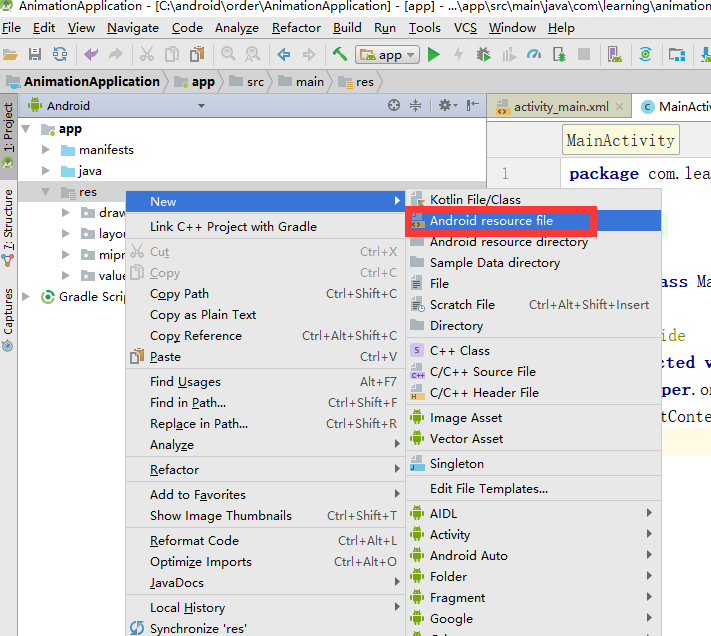

结果:

该文件也可以放在drawable目录下
2.以set举栗子:
- 准备xml标签文件set.xml
<?xml version="1.0" encoding="utf-8"?>

<set xmlns:android="http://schemas.android.com/apk/res/android"

    android:duration="3000"

    android:fillAfter="true">

    <alpha android:fromAlpha="1.0"

        android:toAlpha="0.1"/>

    <scale android:fromXScale="0"

        android:fromYScale="0"

        android:toYScale="1.4"

        android:toXScale="1.4"/>

    <translate android:fromYDelta="0"

        android:fromXDelta="0"

        android:toYDelta="0"

        android:toXDelta="50%"/>

    <rotate android:fromDegrees="0"

        android:toDegrees="90"

        />

</set>- 在布局中放一个TextView
<?xml version="1.0" encoding="utf-8"?>
<android.support.constraint.ConstraintLayout xmlns:android="http://schemas.android.com/apk/res/android"
xmlns:app="http://schemas.android.com/apk/res-auto"
xmlns:tools="http://schemas.android.com/tools"
android:layout_width="match_parent"
android:layout_height="match_parent"
tools:context="com.learning.animationapplication.MainActivity"> <TextView
android:id="@+id/tv"
android:layout_width="wrap_content"
android:layout_height="wrap_content"
android:text="Hello World!"
app:layout_constraintBottom_toBottomOf="parent"
app:layout_constraintLeft_toLeftOf="parent"
app:layout_constraintRight_toRightOf="parent"
app:layout_constraintTop_toTopOf="parent"
android:background="@android:color/holo_blue_bright"/> </android.support.constraint.ConstraintLayout>- 在Activity中加载动画
package com.learning.animationapplication;

import android.support.v7.app.AppCompatActivity;

import android.os.Bundle;

import android.view.animation.Animation;

import android.view.animation.AnimationUtils;

import android.widget.TextView;

public class MainActivity extends AppCompatActivity {

    private TextView tv;

    private Animation animation;

    @Override

    protected void onCreate(Bundle savedInstanceState) {

        super.onCreate(savedInstanceState);

        setContentView(R.layout.activity_main);

        tv = findViewById(R.id.tv);

        animation = AnimationUtils.loadAnimation(this, R.anim.set);//加载动画

        tv.startAnimation(animation);//启动动画,并且是立即启动

    }

}
代码实现,不用xml标签
举例:
android---动画入门(一)的更多相关文章
- Android动画Animation简单示例
Animation是Android给我们提供的一个可以实现动画效果的API,利用Animation我们可以实现一系列的动画效果,比如缩放动画,透明度动画,旋转动画,位移动画,布局动画,帧动画等等.An ...
- Android面试收集录16 Android动画总结
一.Android 动画分类 总的来说,Android动画可以分为两类,最初的传统动画和Android3.0 之后出现的属性动画: 传统动画又包括 帧动画(Frame Animation)和补间动画( ...
- Android动画效果之自定义ViewGroup添加布局动画
前言: 前面几篇文章介绍了补间动画.逐帧动画.属性动画,大部分都是针对View来实现的动画,那么该如何为了一个ViewGroup添加动画呢?今天结合自定义ViewGroup来学习一下布局动画.本文将通 ...
- Android动画效果之Property Animation进阶(属性动画)
前言: 前面初步认识了Android的Property Animation(属性动画)Android动画效果之初识Property Animation(属性动画)(三),并且利用属性动画简单了补间动画 ...
- Android动画效果之初识Property Animation(属性动画)
前言: 前面两篇介绍了Android的Tween Animation(补间动画) Android动画效果之Tween Animation(补间动画).Frame Animation(逐帧动画)Andr ...
- Android动画效果之Frame Animation(逐帧动画)
前言: 上一篇介绍了Android的Tween Animation(补间动画) Android动画效果之Tween Animation(补间动画),今天来总结下Android的另外一种动画Frame ...
- Android动画效果之Tween Animation(补间动画)
前言: 最近公司项目下个版本迭代里面设计了很多动画效果,在以往的项目中开发中也会经常用到动画,所以在公司下个版本迭代开始之前,抽空总结一下Android动画.今天主要总结Tween Animation ...
- [译]:Xamarin.Android开发入门——Hello,Android Multiscreen深入理解
原文链接:Hello, Android Multiscreen_DeepDive. 译文链接:Xamarin.Android开发入门--Hello,Android Multiscreen深入理解. 本 ...
- [译]:Xamarin.Android开发入门——Hello,Android深入理解
返回索引目录 原文链接:Hello, Android_DeepDive. 译文链接:Xamarin.Android开发入门--Hello,Android深入理解 本部分介绍利用Xamarin开发And ...
- [译]:Xamarin.Android开发入门——Hello,Android快速上手
返回索引目录 原文链接:Hello, Android_Quickstart. 译文链接:Xamarin.Android开发入门--Hello,Android快速上手 本部分介绍利用Xamarin开发A ...
随机推荐
- MYSQL复制原理及其流程
Mysql内建的复制功能是构建大型,高性能应用程序的基础.将Mysql的数据分布到多个系统上去,这种分布的机制,是通过将Mysql的某一台主机的数据复制到其他主机(slave)上,并重新执行一遍来实现 ...
- composer安装以及更新问题,配置中国镜像源。
配置国内镜像源 中国镜像源 https://pkg.phpcomposer.com/ composer 中文官网地址 http://www.phpcomposer.com/ 下载 Composer 安 ...
- 微机原理基础(四)—— MSC51
一.MCS51基本组成(STC89C52) CPU(8051CPU) + 存储器(4KB ROM/256B RAM)+外设(4组IO口,两个定时器,一个串口) 1.组成结构简图 ...
- ESXI的安装和部署
1. 实验拓扑图: 2. 实验要求 (1) 新建一台exsi主机,安装exsi5.5系统. 步骤: 1)新建虚拟机,导入光盘. 2)安装esxi系统 (2)在exsi主机中,配置IP地址为1 ...
- AJAX初步学习
AJAX(Asynchronous JavaScript and XML)即异步的JavaScript与XML技术,指的是一套综合了多项技术的浏览器端网页开发技术.其实就是为了解决传统页面同步刷新,消 ...
- Dubbo中Directory解析
Directory代表多个Invoker,可以把它看成List Directory接口 Directory接口继承了Node接口: 1234567 public interface Directory ...
- 【链表+启发式合并】Bzoj1483 [HNOI2009] 梦幻布丁
Description N个布丁摆成一行,进行M次操作.每次将某个颜色的布丁全部变成另一种颜色的,然后再询问当前一共有多少段颜色.例如颜色分别为1,2,2,1的四个布丁一共有3段颜色. Input 第 ...
- 作为比湖南还火的python网红,零基础要如何系统的开始学习呢?
Python(发音:英[?pa?θ?n],美[?pa?θɑ:n]),是一种面向对象.直译式电脑编程语言,也是一种功能强大的通用型语言,已经具有近二十年的发展历史,成熟且稳定.它包含了一组完善而且容易理 ...
- linux 搜索某个系统命令的位置
Which命令 功能简述which命令的作用是在PATH变量指定的路径中搜索某个系统命令的位置并且返回第一个搜索结果.也就是说使用which命令就可以看到某个系统命令是否存在以及执行的到底是哪一个位置 ...
- Jmeter-----【mac电脑】配置web浏览器的代理抓取请求
在测试中,不仅会涉及到APP中的数据测试,时常我们APP的数据需要与后台进行交互,因此我们不可避免的也需要对web进行接口测试,更准确的来说是使用web的接口来快速的帮我们实现App中所需的数据录入, ...