
关于.net导出数据到excel/word【占位符替换】
1】excel的占位符替换
效果如图
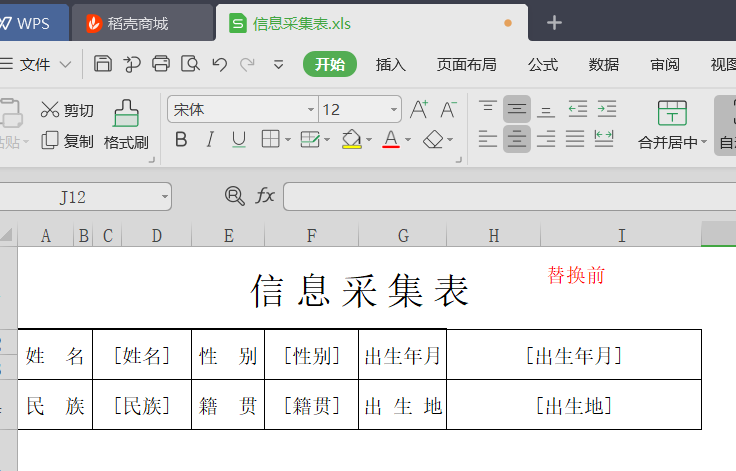

关键代码:
///savedFilePath需要保存的路径  templateDocPath模板路径  替换的关键字和值  格式  [姓名]$%$小王

public static void ReadExcel(string savedFilePath, string templateDocPath,  List<string> ReArray)

        {

            try

            {

                //加载可读可写文件流

                using (FileStream stream = new FileStream(templateDocPath, FileMode.Open, FileAccess.Read))

                {

                    IWorkbook workbook = WorkbookFactory.Create(stream);//使用接口,自动识别excel2003/2007格式

                    ISheet sheet = workbook.GetSheetAt();//得到里面第一个sheet

                    IRow row = null;

                    ICell cell = null;

                    //1读取符合条件的

                    Regex reg = new Regex(@"\[\S+?\]", RegexOptions.Singleline);

                    List<string> getList = new List<string>();

                    for (int i = sheet.FirstRowNum; i <= sheet.LastRowNum; i++)

                    {

                        row = sheet.GetRow(i);

                        for (int j = row.FirstCellNum; j < row.LastCellNum; j++)

                        {

                            cell = row.GetCell(j);

                            if (cell != null)

                            {

                                if (cell.CellType == NPOI.SS.UserModel.CellType.String)

                                {

                                    var currentCellVal = cell.StringCellValue;

                                    if (reg.IsMatch(currentCellVal))

                                    {

                                        MatchCollection listsCollection = reg.Matches(currentCellVal);

                                        for (int jNum = ; jNum < listsCollection.Count; jNum++)

                                        {

                                            var aa = listsCollection[jNum].Value;

                                            getList.Add(aa);

                                        }

                                    }

                                }

                            }

                        }

                    }

                    //2替换

                    for (int i = sheet.FirstRowNum; i <= sheet.LastRowNum; i++)

                    {

                        row = sheet.GetRow(i);

                        for (int j = row.FirstCellNum; j < row.LastCellNum; j++)

                        {

                            cell = row.GetCell(j);

                            if (cell != null)

                            {

                                foreach (var item in getList)

                                {

                                    string getX = cell.StringCellValue;

                                    if (getX.Contains(item))

                                    {

                                        foreach (var itemRa in ReArray)

                                        {

                                            var getValue = itemRa.Split(new string[] { "$%$" }, StringSplitOptions.None);

                                            if (item == getValue[])

                                            {

                                                getX = getX.Replace(item, getValue[]);

                                                cell.SetCellValue(getX);

                                            }

                                        }

                                    }

                                }

                                //删除没有的数据   此处是excel中需要替换的关键字,但是数据库替换中却没有的,用空值代替原来“[关键字]”

                                string getXNull = cell.StringCellValue;

                                MatchCollection listsCollection = reg.Matches(getXNull);

                                if (listsCollection.Count > )

                                {

                                    var valNull = getXNull;

                                    getXNull = getXNull.Replace(valNull, "");

                                    cell.SetCellValue(getXNull);

                                }

                            }

                        }

                    }

                    //新建一个文件流,用于替换后的excel保存文件。

                    FileStream success = new FileStream(savedFilePath, FileMode.Create);

                    workbook.Write(success);

                    success.Close();

                }

            }

            catch (Exception ex)

            {

            }

            finally

            {

            }

        }
2】word的占位符替换
 /// <summary>

        /// world自定义模板导出

        /// </summary>

        /// <param name="savedFilePath">保存路劲</param>

        /// <param name="templateDocPath">获取模板的路径</param>

        /// <param name="ReArray">需要替换的值    [姓名]$%$张三</param>

        ///

        public static void ReadWord(string savedFilePath, string templateDocPath, List<string> ReArray)

        {

            try

            {

                #region 进行替换

                Aspose.Words.Document doc = new Aspose.Words.Document(templateDocPath);

                DocumentBuilder builder = new DocumentBuilder(doc);

                foreach (var item in ReArray)

                {

                    var reA = item.Split(new string[] { "$%$" }, StringSplitOptions.None);

                    string oneValue = reA[];

                    string towValue = ToDBC(reA[]).Replace("\r", "<br/>");//\r和中文符号必须替换否则报错

                    doc.Range.Replace(oneValue, towValue, false, false);

                }

                doc.Save(savedFilePath);//也可以保存为1.doc 兼容03-07

                #endregion

            }

            catch (Exception ex)

            {

                throw;

            }

        }
3】excel的占位符替换=》多字段
效果图

        /// <summary>

        /// 根据模版导出Excel

        /// </summary>

        /// <param name="templateFile">模版路径(包含后缀)  例:"/Template/Exceltest.xls"</param>

        /// <param name="strFileName">文件名称(不包含后缀)  例:"Excel测试"</param>

        /// <param name="source">源DataTable</param>

        /// <param name="cellKes">需要导出的对应的列字段  例:string[] cellKes = { "name","sex" };</param>

        /// <param name="rowIndex">从第几行开始创建数据行,第一行为0</param>

        /// <returns>是否导出成功</returns>

        public static string ExportScMeeting(string templateFile, string strFileName, DataTable source, List<string> cellKes, int rowIndex)

        {

            templateFile = HttpContext.Current.Server.MapPath(templateFile);

            int cellCount = cellKes.Count();//总列数,第一列为0

            IWorkbook workbook = null;

            try

            {

                using (FileStream file = new FileStream(templateFile, FileMode.Open, FileAccess.Read))

                {

                    workbook = WorkbookFactory.Create(file);

                    //if (Path.GetExtension(templateFile) == ".xls")

                    //    workbook = new HSSFWorkbook(file);

                    //else if (Path.GetExtension(templateFile) == ".xlsx")

                    //    workbook = new XSSFWorkbook(file);

                }

                ISheet sheet = workbook.GetSheetAt();

                if (sheet != null && source != null && source.Rows.Count > )

                {

                    IRow row; ICell cell;

                    //获取需插入数据的首行样式

                    IRow styleRow = sheet.GetRow(rowIndex);

                    if (styleRow == null)

                    {

                        for (int i = , len = source.Rows.Count; i < len; i++)

                        {

                            row = sheet.CreateRow(rowIndex);

                            //创建列并插入数据

                            for (int index = ; index < cellCount; index++)

                            {

                                row.CreateCell(index)

                                    .SetCellValue(!(source.Rows[i][cellKes[index]] is DBNull) ? source.Rows[i][cellKes[index]].ToString() : string.Empty);

                            }

                            rowIndex++;

                        }

                    }

                    else

                    {

                        for (int i = , len = source.Rows.Count; i < len; i++)

                        {

                            row = sheet.CreateRow(rowIndex);

                            row.HeightInPoints = styleRow.HeightInPoints;

                            row.Height = styleRow.Height;

                            //创建列并插入数据

                            for (int index = ; index < cellCount; index++)

                            {

                                var tx = source.Rows[i][cellKes[index]];

                                var tc = styleRow.GetCell(index).CellType;

                                cell = row.CreateCell(index, styleRow.GetCell(index).CellType);

                                cell.CellStyle = styleRow.GetCell(index).CellStyle;

                                cell.SetCellValue(!(source.Rows[i][cellKes[index]] is DBNull) ? source.Rows[i][cellKes[index]].ToString() : string.Empty);

                            }

                            rowIndex++;

                        }

                    }

                }

                return NPOIExport(strFileName + "." + templateFile.Split('.')[templateFile.Split('.').Length - ], workbook);

            }

            catch (Exception ex)

            {

                return ex.Message;

            }

        }

                public static string NPOIExport(string fileName, IWorkbook workbook)

        {

            try

            {

                System.IO.MemoryStream ms = new System.IO.MemoryStream();

                workbook.Write(ms);

                HttpContext.Current.Response.Clear();

                HttpContext.Current.Response.ClearHeaders();

                HttpContext.Current.Response.Cache.SetCacheability(System.Web.HttpCacheability.Private);

                HttpContext.Current.Response.Buffer = true;

                HttpContext.Current.Response.ContentEncoding = System.Text.Encoding.UTF8;

                HttpContext.Current.Response.AddHeader("Content-Disposition", string.Format("attachment; filename={0}", fileName));

                HttpContext.Current.Response.ContentType = "application/ms-excel";

                HttpContext.Current.Response.BinaryWrite(ms.ToArray());

                HttpContext.Current.Response.Flush();

                HttpContext.Current.Response.End();

                ms.Close();

                ms.Dispose();

                return "导出成功";

            }

            catch (Exception ex)

            {

                return "导出失败";

            }

        }
另外,需要引用的using也一同贴图
using Aspose.Words;

using NPOI.HSSF.UserModel;

using NPOI.SS.UserModel;

using NPOI.XSSF.UserModel;

using System;

using System.Collections;

using System.Collections.Generic;

using System.Data;

using System.IO;

using System.Linq;

using System.Reflection;

using System.Text.RegularExpressions;

using System.Web;
4】关于换行符
此处 如果 Environment.NewLine 、<br/> \n 无效,则建议使用下列换行符 ,但先必须引用 using Aspose.Words;
using Aspose.Words;
换行符:ControlChar.LineBreak
列:string ts="测试1"+ControlChar.LineBreak +"测试2";
关于.net导出数据到excel/word【占位符替换】的更多相关文章
- NPOI导出数据到Excel
NPOI导出数据到Excel 前言 Asp.net操作Excel已经是老生长谈的事情了,可下面我说的这个NPOI操作Excel,应该是最好的方案了,没有之一,使用NPOI能够帮助开发者在没有安装微 ...
- word模板导出的几种方式:第一种:占位符替换模板导出(只适用于word中含有表格形式的)
1.占位符替换模板导出(只适用于word中含有表格形式的): /// <summary> /// 使用替换模板进行到处word文件 /// </summary> public ...
- python 导出数据到excel 中,一个好用的导出数据到excel模块,XlsxWriter
最近公司有项目需要导出数据到excel,首先想到了,tablib,xlwt,xlrd,xlwings,win32com[还可以操作word],openpyxl,等模块但是 实际操作中tablib 写入 ...
- Delphi 导出数据至Excel的7种方法【转】
一; delphi 快速导出excel uses ComObj,clipbrd; function ToExcel(sfilename:string; ADOQuery:TADOQuery): ...
- java代码导出数据到Excel、js导出数据到Excel(三)
jsp内容忽略,仅写个出发按钮: <button style="width: 100px" onclick="expertExcel()&quo ...
- 导出数据到Excel表格
开发工具与关键技术:Visual Studio 和 ASP.NET.MVC,作者:陈鸿鹏撰写时间:2019年5月25日123下面是我们来学习的导出数据到Excel表格的总结首先在视图层写导出数据的点击 ...
- Delphi 导出数据至Excel的7种方法
一; delphi 快速导出excel uses ComObj,clipbrd; function ToExcel(sfilename:string; ADOQuery:TADOQuery):bool ...
- ASP导出数据到excel遇到的一些问题
一直用动易平台的ASP做新闻发布网站,直到现在才接触导出数据到Excel的问题,目的在于公司要统计各部门的投稿量,要做这么个东西,实现起来是挺简单的,但是第一次做,还是费了一些功夫的,特此记录一下 主 ...
- 1.ASP.NET MVC使用EPPlus,导出数据到Excel中
好久没写博客了,今天特地来更新一下,今天我们要学习的是如何导出数据到Excel文件中,这里我使用的是免费开源的Epplus组件. 源代码下载:https://github.com/caofangshe ...
随机推荐
- python爬虫人门(10)Scrapy框架之Downloader Middlewares
设置下载中间件(Downloader Middlewares) 下载中间件是处于引擎(crawler.engine)和下载器(crawler.engine.download())之间的一层组件,可以有 ...
- Tomcat PermGen space的解决方案
Tomcat报告 Caused by: java.lang.OutOfMemoryError: PermGen space异常 内存溢出PermGen space的全称是Permanent Gener ...
- Render
render 渲染元素 元素是React应用程序的最小构建块 "根"DOM节点,它内部的所有内容都将由React DOM进行管理 仅使用React构建的App程序通常具有单个Dom ...
- centos6 安装配置ss笔记
2018-05-17 centos6 安装配置ss笔记 操作环境:Centos 6 x86_64 bbr 服务器地址:美国 1.准备VPS 在https://www.bwh1.net可购买,购买时已默 ...
- SSM-MyBatis-14:Mybatis中智能标签
------------吾亦无他,唯手熟尔,谦卑若愚,好学若饥------------- 谈论到智能,有什么要想的没有? 我下面放张图 相信都见过这个吧,你在之前没有学习过框架的时候怎么写的,动态sq ...
- Centos7 环境下 tty 终端 中文乱码 问题
最近有同学问我 Centos 方面的一些操作, 由于我已经好多年不用Centos了所以比较生疏,这些年来一直都是用Ubuntu的,不得不说Ubuntu是我用过的这么多Linux系统中操作最舒服的了, ...
- codeforces 982D Shark
题意: 给出一个数组,删除大于等于k的数字,使得其满足以下条件: 1.剩余的连续的段,每一段的长度相等: 2.在满足第一个条件的情况下,段数尽可能多: 3.在满足前两个条件的情况下,k取最小的. 求k ...
- Java 并行与并发
Java 并行与并发 注意两个词:并行(Concurrent) 并发(Parallel) 并行:是逻辑上同时发生,指在某一个时间内同时运行多个程序 并发:是物理上同时发生,指在某一个时间点同时运行多个 ...
- app与手机其他软件交互测试
针对智能终端应用的服务等级划分方式及实时特性所提出的测试方法.交叉测试又叫事件或冲突测试,是指一个功能正在执行过程中,同时另外一个事件或操作对该过程进行干扰的测试.如:App在前/后台运行状态时与来电 ...
- 究竟谁在绑架中国的4G政策?
2009年中国正式发放3G牌照以来,尽管在开始阶段受到了应用不足的困扰,但是随着智 能手机的迅速推广,3G移动通信也开始在中国得到了飞速的发展.就在消费者以及市场 逐步接受并广泛应用该技术之际,4G通 ...