
canvas之刮刮乐
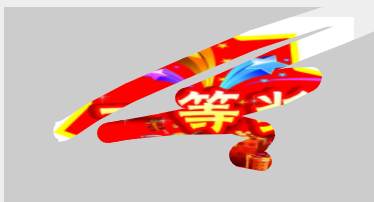
效果图:
代码:
 <!DOCTYPE html>

 <html lang="en">

 <head>

     <meta charset="UTF-8">

     <meta name="viewport" content="width=device-width, initial-scale=1.0">

     <meta http-equiv="X-UA-Compatible" content="ie=edge">

     <title>刮刮乐</title>

     <style>

         .canvasBox {

             width: 400px;

             height: 200px;

             margin: 100px auto;

         }

         #canvas1 {

             background-repeat: no-repeat;

             background-position: center;

             background-size: 300px 180px;

         }

     </style>

 </head>

 <body>

     <div class="canvasBox">

         <canvas width="" height= id="canvas1"></canvas>

     </div>

     <script>

         var oCanvas = document.getElementById('canvas1');

         var ctx = oCanvas.getContext('2d');

         var w = oCanvas.width;

         var h = oCanvas.height;

         var lastPoint = {};

         var nowPoint = {};

         var lastPointX, lastPointY;

         var nowPointX, nowPointY;

         function init() {

             ctx.fillStyle = '#ccc';

             ctx.fillRect(, , w, h);

             var r = Math.random(),

                 oImg = new Image();

             if (r < 0.5) {

                 oImg.src = './1.png';

             } else {

                 oImg.src = './2.jpg';

             }

             oImg.onload = function () {

                 oCanvas.style.backgroundImage = 'url(' + oImg.src + ')';

                 ctx.globalCompositeOperation = 'destination-out';

                 document.addEventListener('mousedown', downFun, false);

             }

         }

         init();

         function downFun(e) {

             lastPointX = e.clientX - oCanvas.offsetLeft;

             lastPointY = e.clientY - oCanvas.offsetTop;

             oCanvas.addEventListener('mousemove', moveFun, false);

             document.addEventListener('mouseup', upFun, false);

         }

         function moveFun(e) {

             nowPointX = e.clientX - oCanvas.offsetLeft;

             nowPointY = e.clientY - oCanvas.offsetTop;

             ctx.beginPath();

             ctx.fillStyle = 'transpatent';

             ctx.lineWidth = ;

             ctx.moveTo(lastPointX, lastPointY);

             ctx.lineTo(nowPointX, nowPointY);

             ctx.stroke();

             ctx.arc(nowPointX, nowPointY, , , Math.PI * , );

             ctx.closePath();

             ctx.fill();

             lastPointX = nowPointX;

             lastPointY = nowPointY;

         }

         function upFun() {

             oCanvas.removeEventListener('mousemove', moveFun, false);

             document.removeEventListener('mouseup', upFun, false);

             clearAll();

         }

         function clearAll() {

             var d = ctx.getImageData(, , w, h),

                 c = ,

                 len = d.data.length;

             for (var i = ; i < len; i += ) {

                 if (d.data[i] === ) {

                     c++;

                 }

             }

             if (c > w * h * 0.7) {

                 ctx.clearRect(, , w, h);

             }

         }

     </script>

 </body>

 </html>
一开始鼠标滑动太快会导致两点之间产生空白,后面通过记录鼠标移动前后两点的位置,使用stroke画线即可
 ctx.lineWidth = 20;

 ctx.moveTo(lastPointX, lastPointY);

 ctx.lineTo(nowPointX, nowPointY);

 ctx.stroke();
当刮开一定的面积时就自动全部展示出来
canvas之刮刮乐的更多相关文章
- 游戏的套路你知道吗? H5 Canvas刮刮乐
玩游戏的人 很多时候都会遇到翻牌子 开宝箱. 总有人傻傻的在哪里还纠结很久到底点哪一个! 纠结 指不定翻哪一个会多一点,你明明看到那个卡片的奖项多 . 那我就告诉你好了 其实很多时候在你点开那个 ...
- H5 Canvas刮刮乐
玩游戏的人 很多时候都会遇到翻牌子 开宝箱. 总有人傻傻的在哪里还纠结很久到底点哪一个! 纠结 指不定翻哪一个会多一点,你明明看到那个卡片的奖项多 . 那我就告诉你好了 其实很多时候在你点开那个 ...
- canvas刮刮乐
这周有点迷茫,不知道干嘛了,一天天就过去了!我在博客右侧公告栏加了qq交流,各位有好的主题,或者有趣的技术,欢迎交流!今天突发奇想,就写了2个h5 canvas的demo玩玩! demo一:刮刮乐 舍 ...
- 【Android界面实现】使用Canvas对象实现“刮刮乐”效果
在淘宝.京东等电商举办活动的时候,常常能够看到在移动client推出的各种刮奖活动,而这样的活动也受到了非常多人的喜爱.从client的体验来说,这样的效果应该是通过网页来实现的,那么,我们使用And ...
- HTML5 CSS3 诱人的实例 :canvas 模拟实现电子彩票刮刮乐
转载请标明出处:http://blog.csdn.net/lmj623565791/article/details/34089553 今天给大家带来一个刮刮乐的小例子~基于HTML5 canvas的, ...
- canvas刮刮乐游戏等
裁剪 ctx.clip():当前路径外的区域不再绘制 <canvas id="cans" width=500 height=500></canvas> &l ...
- canvas 写一个刮刮乐抽奖
<!DOCTYPE html> <html> <head> <meta charset="UTF-8"> <title> ...
- 用Canvas画一个刮刮乐
Canvas 通过 JavaScript 来绘制 2D图形.Canvas 是逐像素进行渲染的.开发者可以通过javascript脚本实现任意绘图.Canvas元素是HTML5的一部分,允许脚本语言动态 ...
- canvas刮刮乐效果(pc端&H5、zepto-touchmove)
一.html <div id="canvasArea" style="width:300px;height:200px;position:relative;&quo ...
随机推荐
- lightoj 1033【区间DP/LCS】
题意: 给你一个长度<=100的字符串. 然后你可以在任何位置插入字符,问最少插入几个构成回文. 思路: 1.长度-LCS: 2.区间DP; 我保证小的区间是一个回文,然后枚举区间,构成大区间, ...
- python __builtins__ set类 (60)
60.'set', 转换为集合类型 class set(object) | set() -> new empty set object | set(iterable) -> new se ...
- bzoj 1003: [ZJOI2006]物流运输【spfa+dp】
预处理出ans[i][j]为i到j时间的最短路,设f[i]为到i时间的最小代价,转移显然就是 f[i]=min(f[j-1]+ans[j][i]*(i-j+1)+k); #include<ios ...
- spring简介、容器、IOC
对IOC的理解: 在平时的java应用开发中,我们要实现某一个功能或者说是完成某个业务逻辑时至少需要两个或以上的对象来协作完成,在没有使用Spring的时候,每个对象在需要使用他的合作对象时,自己均要 ...
- android 7.0 应用间文件共享FileProvider
1.官方教程 Android 7.0 以后安全系数提高,应用间文件共享要使用FileProvider.原来的 file:/// Uri 替换为 content://Uri https://devel ...
- [已读]编写可维护的javascript
13年4月份出版,作者是大名鼎鼎的Zakas,他的另两本书<javascript高级程序设计>与<高性能javascript>你一定听过或者读过. 这本书重点讲了编码风格和编码 ...
- pscp多线程传输文件
前面说过pscp不支持多线程,所以在此特地实现了一个 程序分三个部分: 1.初始化各种参数,涉及getopt函数的使用 2.重新定义scp,实现传递IP然后远程拷贝 3.启动多线程调用scp,涉及多线 ...
- 使用JS移除select的某些选项
var arrvalue = new Array("1", "3", "4", "5", "6", ...
- <meta>详解
一.元数据和<meta> 元数据是描述以提供关于其他数据的数据,在<meta>中,html document是被描述的数据,meta标签中包括的数据是描述html docume ...
- filter和map的使用
if ( this.dataAggridvue.filter( item => item.Accepted == true && item.InvoiceGroupCode != ...