
HarmonyOS运动开发:如何绘制运动速度轨迹
前言
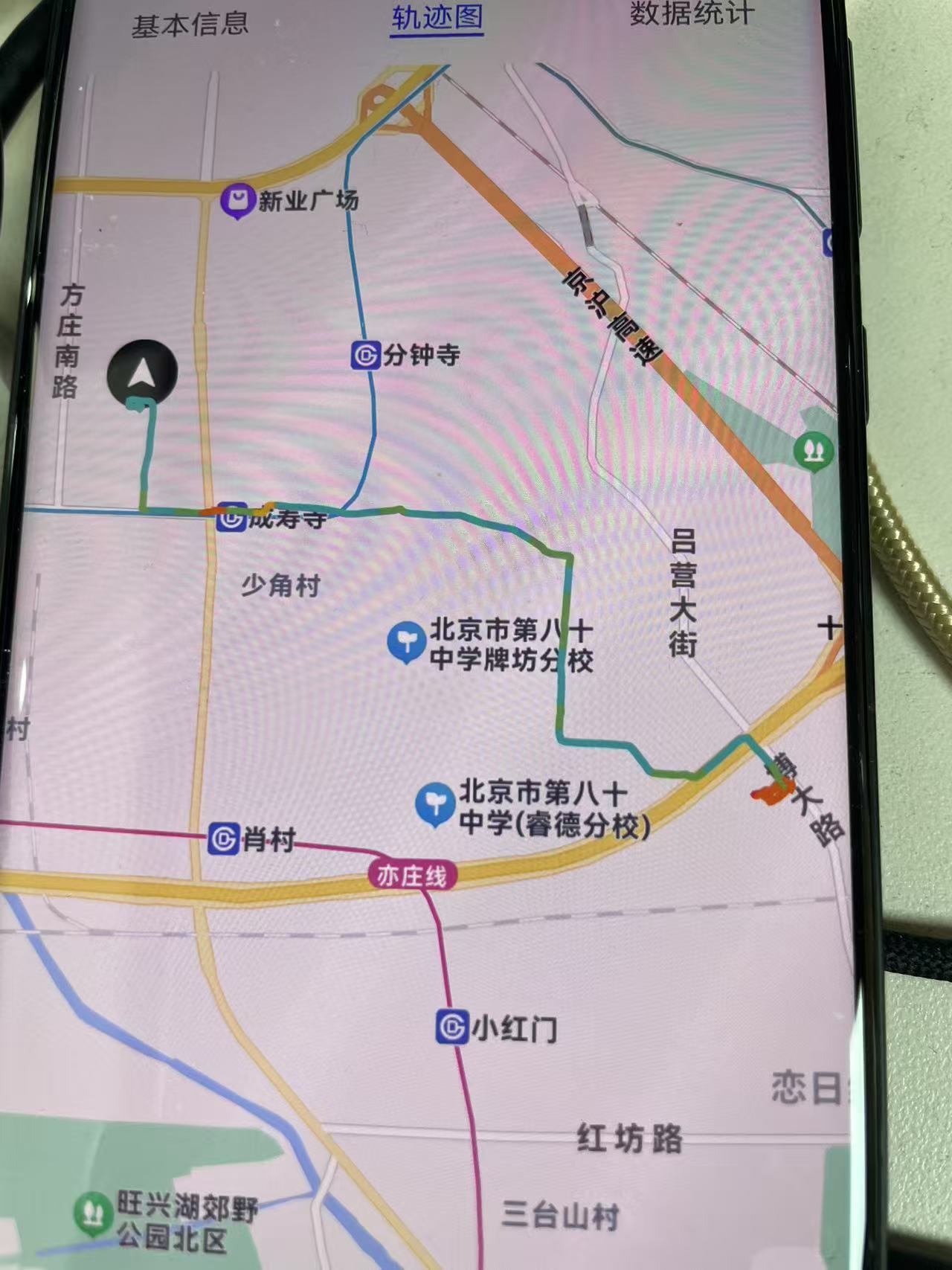
在户外运动应用中,绘制运动速度轨迹不仅可以直观地展示用户的运动路线,还能通过颜色变化反映速度的变化,帮助用户更好地了解自己的运动状态。然而,如何在鸿蒙系统中实现这一功能呢?本文将结合实际开发经验,深入解析从数据处理到地图绘制的全过程,带你一步步掌握如何绘制运动速度轨迹。
一、核心工具:轨迹颜色与优化
绘制运动速度轨迹的关键在于两个工具类:PathGradientTool和PathSmoothTool。这两个工具类分别用于处理轨迹的颜色和优化轨迹的平滑度。
1.轨迹颜色工具类:PathGradientTool
PathGradientTool的作用是根据运动速度为轨迹点分配颜色。速度越快,颜色越接近青色;速度越慢,颜色越接近红色。以下是PathGradientTool的核心逻辑:
export class PathGradientTool {

  /**

   * 获取路径染色数组

   * @param points 路径点数据

   * @param colorInterval 取色间隔,单位m,范围20-2000,多长距离设置一次颜色

   * @returns 路径染色数组

   */

  static getPathColors(points: RunPoint[], colorInterval: number): string[] | null {

    if (!points || points.length < 2) {

      return null;

    }

    let interval = Math.max(20, Math.min(2000, colorInterval));

    const pointsSize = points.length;

    const speedList: number[] = [];

    const colorList: string[] = [];

    let index = 0;

    let lastDistance = 0;

    let lastTime = 0;

    let maxSpeed = 0;

    let minSpeed = 0;

    // 第一遍遍历:收集速度数据

    points.forEach(point => {

      index++;

      if (point.totalDistance - lastDistance > interval) {

        let currentSpeed = 0;

        if (point.netDuration - lastTime > 0) {

          currentSpeed = (point.netDistance - lastDistance) / (point.netDuration - lastTime);

        }

        maxSpeed = Math.max(maxSpeed, currentSpeed);

        minSpeed = minSpeed === 0 ? currentSpeed : Math.min(minSpeed, currentSpeed);

        lastDistance = point.netDistance;

        lastTime = point.netDuration;

        // 为每个间隔内的点添加相同的速度

        for (let i = 0; i < index; i++) {

          speedList.push(currentSpeed);

        }

        // 添加屏障

        speedList.push(Number.MAX_VALUE);

        index = 0;

      }

    });

    // 处理剩余点

    if (index > 0) {

      const lastPoint = points[points.length - 1];

      let currentSpeed = 0;

      if (lastPoint.netDuration - lastTime > 0) {

        currentSpeed = (lastPoint.netDistance - lastDistance) / (lastPoint.netDuration - lastTime);

      }

      for (let i = 0; i < index; i++) {

        speedList.push(currentSpeed);

      }

    }

    // 确保速度列表长度与点数一致

    if (speedList.length !== points.length) {

      // 调整速度列表长度

      if (speedList.length > points.length) {

        speedList.length = points.length;

      } else {

        const lastSpeed = speedList.length > 0 ? speedList[speedList.length - 1] : 0;

        while (speedList.length < points.length) {

          speedList.push(lastSpeed);

        }

      }

    }

    // 生成颜色列表

    let lastColor = '';

    let hasBarrier = false;

    for (let i = 0; i < speedList.length; i++) {

      const speed = speedList[i];

      if (speed === Number.MAX_VALUE) {

        hasBarrier = true;

        continue;

      }

      const color = PathGradientTool.getAgrSpeedColorHashMap(speed, maxSpeed, minSpeed);

      if (hasBarrier) {

        hasBarrier = false;

        if (color.toUpperCase() === lastColor.toUpperCase()) {

          colorList.push(PathGradientTool.getBarrierColor(color));

          continue;

        }

      }

      colorList.push(color);

      lastColor = color;

    }

    // 确保颜色列表长度与点数一致

    if (colorList.length !== points.length) {

      if (colorList.length > points.length) {

        colorList.length = points.length;

      } else {

        const lastColor = colorList.length > 0 ? colorList[colorList.length - 1] : '#FF3032';

        while (colorList.length < points.length) {

          colorList.push(lastColor);

        }

      }

    }

    return colorList;

  }

  /**

   * 根据速度定义不同的颜色区间来绘制轨迹

   * @param speed 速度

   * @param maxSpeed 最大速度

   * @param minSpeed 最小速度

   * @returns 颜色值

   */

  private static getAgrSpeedColorHashMap(speed: number, maxSpeed: number, minSpeed: number): string {

    const range = maxSpeed - minSpeed;

    if (speed <= minSpeed + range * 0.2) { // 0-20%区间配速

      return '#FF3032';

    } else if (speed <= minSpeed + range * 0.4) { // 20%-40%区间配速

      return '#FA7B22';

    } else if (speed <= minSpeed + range * 0.6) { // 40%-60%区间配速

      return '#F5BE14';

    } else if (speed <= minSpeed + range * 0.8) { // 60%-80%区间配速

      return '#7AC36C';

    } else { // 80%-100%区间配速

      return '#00C8C3';

    }

  }

}
2.轨迹优化工具类:PathSmoothTool
PathSmoothTool的作用是优化轨迹的平滑度,减少轨迹点的噪声和冗余。以下是PathSmoothTool的核心逻辑:
export class PathSmoothTool {

  private mIntensity: number = 3;

  private mThreshhold: number = 0.01;

  private mNoiseThreshhold: number = 10;

  /**

   * 轨迹平滑优化

   * @param originlist 原始轨迹list,list.size大于2

   * @returns 优化后轨迹list

   */

  pathOptimize(originlist: RunLatLng[]): RunLatLng[] {

    const list = this.removeNoisePoint(originlist); // 去噪

    const afterList = this.kalmanFilterPath(list, this.mIntensity); // 滤波

    const pathoptimizeList = this.reducerVerticalThreshold(afterList, this.mThreshhold); // 抽稀

    return pathoptimizeList;

  }

  /**

   * 轨迹线路滤波

   * @param originlist 原始轨迹list,list.size大于2

   * @returns 滤波处理后的轨迹list

   */

  kalmanFilterPath(originlist: RunLatLng[], intensity: number = this.mIntensity): RunLatLng[] {

    const kalmanFilterList: RunLatLng[] = [];

    if (!originlist || originlist.length <= 2) return kalmanFilterList;

    this.initial(); // 初始化滤波参数

    let lastLoc = originlist[0];

    kalmanFilterList.push(lastLoc);

    for (let i = 1; i < originlist.length; i++) {

      const curLoc = originlist[i];

      const latLng = this.kalmanFilterPoint(lastLoc, curLoc, intensity);

      if (latLng) {

        kalmanFilterList.push(latLng);

        lastLoc = latLng;

      }

    }

    return kalmanFilterList;

  }

  /**

   * 单点滤波

   * @param lastLoc 上次定位点坐标

   * @param curLoc 本次定位点坐标

   * @returns 滤波后本次定位点坐标值

   */

  kalmanFilterPoint(lastLoc: RunLatLng, curLoc: RunLatLng, intensity: number = this.mIntensity): RunLatLng | null {

    if (this.pdelt_x === 0 || this.pdelt_y === 0) {

      this.initial();

    }

    if (!lastLoc || !curLoc) return null;

    intensity = Math.max(1, Math.min(5, intensity));

    let filteredLoc = curLoc;

    for (let j = 0; j < intensity; j++) {

      filteredLoc = this.kalmanFilter(lastLoc.longitude, filteredLoc.longitude, lastLoc.latitude, filteredLoc.latitude);

    }

    return filteredLoc;

  }

  轨迹抽稀

• @param inPoints 待抽稀的轨迹list

• @param threshHold 阈值

• @returns 抽稀后的轨迹list

/

private reducerVerticalThreshold(inPoints:RunLatLng[],threshHold:number):RunLatLng[]{

if(!inPoints||inPoints.length<=2)return inPoints||[];

    const ret: RunLatLng[] = [];

    for (let i = 0; i < inPoints.length; i++) {

      const pre = this.getLastLocation(ret);

      const cur = inPoints[i];

      if (!pre || i === inPoints.length - 1) {

        ret.push(cur);

        continue;

      }

      const next = inPoints[i + 1];

      const distance = this.calculateDistanceFromPoint(cur, pre, next);

      if (distance > threshHold) {

        ret.push(cur);

      }

    }

    return ret;

}

/

• 轨迹去噪

• @param inPoints 原始轨迹list

• @returns 去噪后的轨迹list

/

removeNoisePoint(inPoints:RunLatLng[]):RunLatLng[]{

if(!inPoints||inPoints.length<=2)return inPoints||[];

    const ret: RunLatLng[] = [];

    for (let i = 0; i < inPoints.length; i++) {

      const pre = this.getLastLocation(ret);

      const cur = inPoints[i];

      if (!pre || i === inPoints.length - 1) {

        ret.push(cur);

        continue;

      }

      const next = inPoints[i + 1];

      const distance = this.calculateDistanceFromPoint(cur, pre, next);

      if (distance < this.mNoiseThreshhold) {

        ret.push(cur);

      }

    }

    return ret;

}

/

• 获取最后一个位置点

/

private getLastLocation(points:RunLatLng[]):RunLatLng|null{

if(!points||points.length===0)return null;

return points[points.length-1];

}

/

• 计算点到线的垂直距离

/

private calculateDistanceFromPoint(p:RunLatLng,lineBegin:RunLatLng,lineEnd:RunLatLng):number{

const A=p.longitude-lineBegin.longitude;

const B=p.latitude-lineBegin.latitude;

const C=lineEnd.longitude-lineBegin.longitude;

const D=lineEnd.latitude-lineBegin.latitude;

const dot=A * C+B * D;

const len_sq=C * C+D * D;

const param=dot/len_sq;

    let xx: number, yy: number;

    if (param < 0 || (lineBegin.longitude === lineEnd.longitude && lineBegin.latitude === lineEnd.latitude)) {

      xx = lineBegin.longitude;

      yy = lineBegin.latitude;

    } else if (param > 1) {

      xx = lineEnd.longitude;

      yy = lineEnd.latitude;

    } else {

      xx = lineBegin.longitude + param * C;

      yy = lineBegin.latitude + param * D;

    }

    const point = new RunLatLng(yy, xx);

    return this.calculateLineDistance(p, point);

}

/

• 计算两点之间的距离

/

private calculateLineDistance(point1:RunLatLng,point2:RunLatLng):number{

const EARTH_RADIUS=6378137.0;

const lat1=this.rad(point1.latitude);

const lat2=this.rad(point2.latitude);

const a=lat1-lat2;

const b=this.rad(point1.longitude)-this.rad(point2.longitude);

const s=2 * Math.asin(Math.sqrt(Math.pow(Math.sin(a/2),2)+

Math.cos(lat1) * Math.cos(lat2) * Math.pow(Math.sin(b/2),2)));

return s * EARTH_RADIUS;

}

/

• 角度转弧度

/

private rad(d:number):number{

return d * Math.PI/180.0;

}

/

• 轨迹抽稀(同时处理源数据)

• @param inPoints 待抽稀的轨迹list

• @param sourcePoints 源数据list,与inPoints一一对应

• @param threshHold 阈值

• @returns 包含抽稀后的轨迹list和对应的源数据list

/

reducerVerticalThresholdWithSource(inPoints:RunLatLng[],sourcePoints:T[],threshHold:number=this.mThreshhold):PointSource{

if(!inPoints||!sourcePoints||inPoints.length<=2||inPoints.length!==sourcePoints.length){

return{points:inPoints||[],sources:sourcePoints||[]};

}

    const retPoints: RunLatLng[] = [];

    const retSources: T[] = [];

    for (let i = 0; i < inPoints.length; i++) {

      const pre = this.getLastLocation(retPoints);

      const cur = inPoints[i];

      if (!pre || i === inPoints.length - 1) {

        retPoints.push(cur);

        retSources.push(sourcePoints[i]);

        continue;

      }

      const next = inPoints[i + 1];

      const distance = this.calculateDistanceFromPoint(cur, pre, next);

      if (distance > threshHold) {

        retPoints.push(cur);

        retSources.push(sourcePoints[i]);

      }

    }

    return { points: retPoints, sources: retSources };

}

}
二、绘制运动速度轨迹
有了上述两个工具类后,我们就可以开始绘制运动速度轨迹了。以下是绘制轨迹的完整流程:
1.准备轨迹点数据
首先,将原始轨迹点数据转换为RunLatLng数组,以便后续处理:
// 将轨迹点转换为 RunLatLng 数组进行优化

let tempTrackPoints = this.record!.points.map(point => new RunLatLng(point.latitude, point.longitude));
2.优化轨迹点
使用PathSmoothTool对轨迹点进行优化,包括去噪、滤波和抽稀,为保证源数据正确,我这里只做了抽稀:
// 轨迹优化

const pathSmoothTool = new PathSmoothTool();

const optimizedPoints = pathSmoothTool.reducerVerticalThresholdWithSource<RunPoint>(tempTrackPoints, this.record!.points);
3.转换为地图显示格式
将优化后的轨迹点转换为地图所需的LatLng格式:
// 将优化后的点转换为 LatLng 数组用于地图显示

this.trackPoints = optimizedPoints.points.map(point => new LatLng(point.latitude, point.longitude));
4.获取轨迹颜色数组
使用PathGradientTool根据速度为轨迹点生成颜色数组:
// 获取轨迹颜色数组

const colors = PathGradientTool.getPathColors(optimizedPoints.sources, 100);
5.绘制轨迹线
将轨迹点和颜色数组传递给地图组件,绘制轨迹线:
if (this.trackPoints.length > 0) {

  // 设置地图中心点为第一个点

  this.mapController.setMapCenter({

    lat: this.trackPoints[0].lat,

    lng: this.trackPoints[0].lng

  }, 15);

  // 创建轨迹线

  this.polyline = new Polyline({

    points: this.trackPoints,

    width: 5,

    join: SysEnum.LineJoinType.ROUND,

    cap: SysEnum.LineCapType.ROUND,

    isGradient: true,

    colorList: colors

  });

  // 将轨迹线添加到地图上

  this.mapController.addOverlay(this.polyline);

}
三、代码核心点梳理
1.轨迹颜色计算
PathGradientTool根据速度区间为轨迹点分配颜色。速度越快,颜色越接近青色;速度越慢,颜色越接近红色。颜色的渐变通过getGradient方法实现。
2.轨迹优化
PathSmoothTool通过卡尔曼滤波算法对轨迹点进行滤波,减少噪声和冗余点。轨迹抽稀通过垂直距离阈值实现,减少轨迹点数量,提高绘制性能。
3.地图绘制
使用百度地图组件(如Polyline)绘制轨迹线,并通过colorList实现颜色渐变效果。地图中心点设置为轨迹的起点,确保轨迹完整显示。
四、总结与展望
通过上述步骤,我们成功实现了运动速度轨迹的绘制。轨迹颜色反映了速度变化,优化后的轨迹更加平滑且性能更优。
HarmonyOS运动开发:如何绘制运动速度轨迹的更多相关文章
- MATLAB中绘制质点轨迹动图并保存成GIF
工作需要在MATLAB中绘制质点轨迹并保存成GIF以便展示. 绘制质点轨迹动图可用comet和comet3命令,使用例子如下: t = 0:.01:2*pi;x = cos(2*t).*(cos(t) ...
- Python学习(一) —— matplotlib绘制三维轨迹图
在研究SLAM时常常需要对其输出的位姿进行复现以检测算法效果,在ubuntu系统中使用Python可以很好的完成相关的工作. 一. Ubuntu下Python的使用 在Ubuntu下使用Python有 ...
- 使用python绘制根轨迹图
最近在学自动控制原理,发现根轨迹这一张全是绘图的,然而书上教的全是使用matlab进行计算机辅助绘图.但国内对于使用python进行这种绘图的资料基本没有,后来发现python-control包已经将 ...
- 鸿蒙HarmonyOS应用开发落地实践,Harmony Go 技术沙龙落地北京
12月26日,华为消费者BG软件部开源中心与51CTO Harmony OS技术社区携手,共同主办了主题为"Harmony OS 应用开发落地实践"的 Harmony Go 技术沙 ...
- 它来了,它来了,HarmonyOS应用开发在线体验来了
接下来是我们的两分钟科普,一分钟玩转HarmonyOS应用开发在线体验,一分钟简单了解"一次开发.多设备部署"的原理.萌新的开发者也能第一时间掌握,往下看吧~ 一分钟玩转Harmo ...
- IOS开发中绘制地图线路
地图应用经常会涉及到线路的绘制问题,ios下可以使用MKMapView进行地图开发,使用 MKOverlayView进行线路的绘制. 使用MKMapView添加MKMap.framework 和Cor ...
- 前言「HarmonyOS应用开发基础篇」
场景一.随着智能设备种类的不断增多,我们基本上每人都有好几台智能设备,比如智能手机,平板,耳机,音响,穿戴设备等等.这些设备都具有独立性,偶尔的组合也是我们通过手动去搭配,并且不一定能够完全组合在一起 ...
- HarmonyOS应用开发-Component体系介绍(一)
目录: 1. Component的内部类/接口 2. Component方法简介 3.总结 在HarmonyOS的UI框架中,Component为用户界面提供基本组件,Component类位于ohos ...
- javascript运动系列第六篇——轨迹和投掷
× 目录 [1]运动轨迹 [2]拖拽轨迹 [3]投掷 前面的话 一般地,不同的运动形式会产生不同的轨迹.但仅凭肉眼去识别运动轨迹,其实并不是很直观.因此,在页面中显示运动轨迹,是一个重要的问题.物体初 ...
- opencv学习之旅_绘制跟踪轨迹
如何将运动物体的轨迹画出来 我的想法是先:用CAMSHIFT跟踪物体,这个函数会返回一个track_box,将box的中心提取出来,然后以这个中心在另外的图像上画出来,然后将这张图像处理,提取轮廓,提 ...
随机推荐
- 大数据之路Week10_day05 (JavaAPI 操作Redis 第一阶段)
刚开始学习JavaAPI的时候,主要是对redis中的字符串,字节位图,列表,集合,有序集合进行操作,并能够完成简单的需求. package com.wyh.redis; import org.jun ...
- “未能加载工具箱项xxx,将从工具箱中将其删除”提示出现原因及解决方案
https://www.thinbug.com/q/27289366 https://social.msdn.microsoft.com/Forums/vstudio/en-US/77e10b58-4 ...
- JUC相关知识点总结
Java JUC(java.util.concurrent)是Java并发编程的核心工具包,提供了丰富的并发工具类和框架.以下是JUC的主要知识点,按难易程度分类,供你参考: 1. 基础概念与工具类 ...
- vue-element-admin安装趟坑
1.下载源码 2.执行 npm install --registry=https://registry.npm.taobao.org 如果遇到"git ls-remote -h -t&quo ...
- NCS开发学习笔记-基础篇-前言
nRF5 SDK 与 nRF Connect SDK 目前Nordic有2套并存的SDK:老的nRF5 SDK和新的nRF Connect SDK(简称NCS),两套SDK相互独立. nRF5 SDK ...
- k8s 报错: node(s) didn't match Pod's node affinity.
前言 k8s集群中,有pod出现了 Affinity ,使用 kubectl describe pod 命令,发现了报错 2 node(s) didn't match Pod's node affin ...
- Mac下打开进入/usr/local等隐藏目录
教程 Mac下/usr/local目录默认是对于Finder是隐藏,如果需要到/usr/local下去,打开Finder,然后使用command+shift+G,在弹出的目录中填写/usr/local ...
- 基于SLAM系统建图仿真,完成定位仿真
博客地址:https://www.cnblogs.com/zylyehuo/ 基于SLAM系统完成建图仿真,详见之前的博客 基于Gazebo搭建移动机器人,并结合SLAM系统完成建图仿真 - zyly ...
- 使用LLaMA-Factory训练LLM大模型并用ollama调用
环境搭建 系统环境 需要Nvidia显卡,至少8G显存,且专用显存与共享显存之和大于20G 建议将非安装版的环境文件都放到非系统盘,方便重装或移植 以Windows11为例,非安装环境文件都放在 E ...
- C# using 别名
场景重现 当using的多个库出现类名重复的情况时... 解决办法 使用类的完全限定名称,例如: // 不需要using,避免using名称重复导致的异常 // 使用类的完全限定名称,俗称全名. Sy ...