
SpringBoot(十四)-- 整合Swagger2
1.pom依赖
        <dependency>

           <groupId>io.springfox</groupId>

           <artifactId>springfox-swagger2</artifactId>

           <version>2.2.2</version>

        </dependency>

        <dependency>

           <groupId>io.springfox</groupId>

           <artifactId>springfox-swagger-ui</artifactId>

           <version>2.2.2</version>

        </dependency>
2.Swagger配置类
增加@EnableSwagger2和@Configuration注解
    import org.springframework.context.annotation.Bean;

    import org.springframework.context.annotation.Configuration;

    import springfox.documentation.builders.ApiInfoBuilder;

    import springfox.documentation.builders.PathSelectors;

    import springfox.documentation.builders.RequestHandlerSelectors;

    import springfox.documentation.service.ApiInfo;

    import springfox.documentation.spi.DocumentationType;

    import springfox.documentation.spring.web.plugins.Docket;

    import springfox.documentation.swagger2.annotations.EnableSwagger2;

    /**

     * ClassName:SwaggerConfig

     * Date:     2017年12月5日 上午11:54:54

     * @author   xbq

     * @version

     * @since    JDK 1.8

     */

    @Configuration

    @EnableSwagger2

    public class SwaggerConfig {

        @Bean

        public Docket createRestApi() {

            return new Docket(DocumentationType.SWAGGER_2)

                    .apiInfo(apiInfo())

                    .select()

                    .apis(RequestHandlerSelectors.basePackage("com.rxwx.controller"))

                    .paths(PathSelectors.any())

                    .build();

        }

        private ApiInfo apiInfo() {

            return new ApiInfoBuilder()

                    .title("springboot利用swagger构建api文档")

                    .description("简单优雅的restfun风格,http://www.cnblogs.com/xbq8080")

                    .termsOfServiceUrl("http://www.cnblogs.com/xbq8080")

                    .contact("小葱拌豆腐~")

                    .version("1.0")

                    .build();

        }

    }
通过@Configuration注解,让Spring来加载该类配置,@EnableSwagger2注解来启用Swagger2。
再通过createRestApi函数创建Docket的Bean之后,apiInfo()用来创建该Api的基本信息(这些基本信息会展现在文档页面中)。select()函数返回一个ApiSelectorBuilder实例用来控制哪些接口暴露给Swagger来展现,本例采用指定扫描的包路径来定义,Swagger会扫描该包下所有Controller定义的API,并产生文档内容(除了被@ApiIgnore注解的API)。
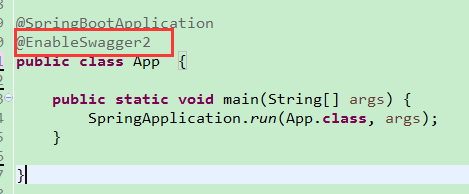
3.启动类加上注解
@EnableSwagger2
4.在控制层 增加 注解
例如:
    /**

     * 用户控制器

     */

    @RestController

    @RequestMapping(value = "/user")

    @Api("用户信息相关api")

    public class UserController {

        @Autowired

        UserService userService;

        /**

         * register:(注册).

         * @param nickName

         * @param password

         * @param phone

         * @return

         */

        @ApiOperation(value="用户注册", notes="用户注册")

        @ApiImplicitParams({

            @ApiImplicitParam(paramType="query", name="nickName", dataType="String", required=true, value="用户的姓名"),

            @ApiImplicitParam(paramType="query", name="password", dataType="String", required=true, value="用户的密码"),

            @ApiImplicitParam(paramType="query", name="phone", dataType="String", required=true, value="用户的电话")

        })

        @RequestMapping(value = "/register", method = RequestMethod.GET)

        public Object register( String nickName, String password, String phone) {

            if(StringUtils.isEmpty(nickName)){

                return Result.error("-100","nickName为空");

            }

            if(StringUtils.isEmpty(password)){

                return Result.error("-100","password为空");

            }

            if(StringUtils.isEmpty(nickName)){

                return Result.error("-100","phone为空");

            }

            User user = new User();

            user.setNickName(nickName);

            user.setPassword(MD5Util.generateMD5(password));

            user.setPhone(phone);

            try {

                userService.insert(user);

            } catch (Exception e) {

                logger.error(e.getMessage(),e);

                return Result.error("-100","注册错误");

            }

            return Result.success("success");

        }

        /**

         * login:(登录).

         * @author xbq

         * Date:2017年11月23日下午6:00:09

         *

         * @param nickName

         * @param password

         * @return

         */

        @ApiOperation(value="用户登录", notes="用户登录")

        @ApiImplicitParams({

            @ApiImplicitParam(paramType="query", name="nickName", dataType="String", required=true, value="用户的姓名"),

            @ApiImplicitParam(paramType="query", name="password", dataType="String", required=true, value="用户的密码")

        })

        @RequestMapping(value = "/login", method = RequestMethod.GET)

        public Object login(String nickName , String password) {

            if(StringUtils.isEmpty(nickName)){

                return Result.error("-100","nickName为空");

            }

            if(StringUtils.isEmpty(password)){

                return Result.error("-100","password为空");

            }

            // 根据用户名查询密码

            User userResult = null;

            try {

                userResult = userService.findUserByIdOrName(null, nickName);

            } catch (Exception e1) {

                logger.error(e1.getMessage(),e1);

                return Result.error("-100","根据用户名查询用户密码错误");

            }

            if(userResult == null) {

                return Result.error("-100","不存在该用户名");

            }

            // 将数据库中的密码 和 界面传来的密码进行验证

            boolean flag = MD5Util.verify(password, userResult.getPassword());

            if(!flag) {

                return Result.error("-100","密码错误");

            }

            User user = null;

            try {

                User userParam = new User();

                userParam.setNickName(nickName);

                user = userService.findUser(userParam);

            } catch (Exception e) {

                logger.error(e.getMessage(),e);

                return Result.error("-100","根据用户名查询用户错误");

            }

            if(user == null) {

                return Result.error("-100","用户名或密码错误");

            }

            // 生成token

            String token = System.currentTimeMillis() + "";

            user.setToken(token);

            return Result.success(user);

        }

        /**

         * account:(查询账户信息).

         * @author xbq

         * Date:2017年11月23日下午6:00:18

         *

         * @param id

         * @return

         */

        @ApiOperation(value="获取指定id用户的详细信息", notes="根据user的id来获取用户详细信息")

        @ApiImplicitParam(paramType="query", name="id", dataType="Integer", required=true, value="用户id")

        @RequestMapping(value = "/account", method = RequestMethod.GET)

        public Object account(Integer id){

            User user = null;

            try {

                user = userService.findUserByIdOrName(id ,null);

            } catch (Exception e) {

                e.printStackTrace();

            }

            UserDetail target = new UserDetail();

            org.springframework.beans.BeanUtils.copyProperties(user, target);

            return Result.success(target);

        }

    }
完成上述代码后,打包Spring Boot程序并启动,打开浏览器访问:http://localhost:8080/swagger-ui.html,就能看到前文所展示的RESTful API的页面。
SpringBoot(十四)-- 整合Swagger2的更多相关文章
- springboot(十四):springboot整合shiro-登录认证和权限管理(转)
springboot(十四):springboot整合shiro-登录认证和权限管理 .embody{ padding:10px 10px 10px; margin:0 -20px; border-b ...
- springboot笔记08——整合swagger2
Swagger是什么? Swagger是一个RESTFUL 接口的文档在线自动生成和功能测试的框架.利用swagger2的注解可以快速的在项目中构建Api接口文档,并且提供了测试API的功能. Spr ...
- SpringBoot进阶教程(七十四)整合ELK
在上一篇文章<SpringBoot进阶教程(七十三)整合elasticsearch >,已经详细介绍了关于elasticsearch的安装与使用,现在主要来看看关于ELK的定义.安装及使用 ...
- springboot(十四):springboot整合shiro-登录认证和权限管理
这篇文章我们来学习如何使用Spring Boot集成Apache Shiro.安全应该是互联网公司的一道生命线,几乎任何的公司都会涉及到这方面的需求.在Java领域一般有Spring Security ...
- SpringBoot进阶教程(二十四)整合Redis
缓存现在几乎是所有中大型网站都在用的必杀技,合理的利用缓存不仅能够提升网站访问速度,还能大大降低数据库的压力.Redis提供了键过期功能,也提供了灵活的键淘汰策略,所以,现在Redis用在缓存的场合非 ...
- springboot(十四):springboot整合mybatis
org.springframework.web.HttpMediaTypeNotSupportedException: Content type 'multipart/form-data;bounda ...
- 从零开始的SpringBoot项目 ( 四 ) 整合mybatis
一.创建一个SpringBoot项目 从零开始的SpringBoot项目 ( 二 ) 使用IDEA创建一个SpringBoot项目 二.引入相关依赖 <!--mysql数据库驱动--> & ...
- SpringBoot(十四)_springboot使用内置定时任务Scheduled的使用(一)
为什么使用定时? 日常工作中,经常会用到定时任务,比如各种统计,并不要求实时性.此时可以通过提前设置定时任务先把数据跑出来,后续处理起来更方便. 本篇文章主要介绍 springboot内置定时任务. ...
- springboot(十四)-分库分表-自动配置
上一节我们是手动配置数据源的,直接在java代码里写数据库的东西,这操作我个人是不喜欢的.我觉得这些东西就应该出现在application.yml文件中. 还有,万一我们的项目在使用之后,突然需要改变 ...
- SpringBoot(十四):SpringCloud初步认识
SpringCloud是一个基于SpringBoot实现的云应用开发工具,它为开发人员提供了一些工具来快速构建分布式系统中的一些常见模式(例如配置管理.服务发现.断路器.智能路由.微代理.控制总线.一 ...
随机推荐
- AFN和GCD并行同步问题
链接: GCD 中组队列group与Afnetworking的结合使用 使用AFNetworking3.0实现接口异步并发 从并发编程到GCD浅述之一----任务.队列.线程复用.AFN3.0同步请求 ...
- history.pushState无刷新改变url
通过history.pushState无刷新改变url 背景 在浏览器中改变地址栏url,将会触发页面资源的重新加载,这使得我们可以在不同的页面间进行跳转,得以浏览不同的内容.但随着单页应用的增多,越 ...
- bat遍历目录
方法一: for /r D:\要遍历的目录\ %%i (*.exe) do ( echo %%i ) 方法二: set DestPath=D:\你的目录\ rem 你的后缀 set Dest ...
- .NET:race conditions
race conditions (when an anomalous result occurs due to an unexpected critical dependence on the tim ...
- 使用promise 和 generator来管理工作流
根据p219的代码改编 示例代码如下 function oneStep(value){ return new Promise(function(resolve, reject){ resolve('o ...
- AndroidStudio下加入百度地图的使用(四)——路线规划
上一章中我们已经完成了API常用的方法及常量属性的使用,这一章向大家介绍一下地图的重要功能-路线规划. (1) 定义API中的路线查询类: RoutePlanSearch mSearch = Rout ...
- he canvas has been tainted by cross-origin data and tainted canvases may not be exported
来自: https://ourcodeworld.com/articles/read/182/the-canvas-has-been-tainted-by-cross-origin-data-and- ...
- 实现一个原子的正整数类:AtomicPositiveInteger
import java.util.concurrent.atomic.AtomicInteger; public class AtomicPositiveInteger extends Number ...
- Android学习笔记(五一):服务Service(上)- IntentService
转自 http://blog.csdn.net/flowingflying/article/details/7616333 对于需要长期运行,例如播放音乐.长期和服务器的连接,即使已不是屏幕当前的ac ...
- C#.NET使用Task,await,async,异步执行控件耗时事件(event),不阻塞UI线程和不跨线程执行UI更新,以及其他方式比较
使用Task,await,async,异步执行事件(event),不阻塞UI线程和不跨线程执行UI更新 使用Task,await,async 的异步模式 去执行事件(event) 解决不阻塞UI线程和 ...