
Python常用模块—— Colorama模块
简介
Python的Colorama模块,可以跨多终端,显示字体不同的颜色和背景,只需要导入colorama模块即可,不用再每次都像linux一样指定颜色。
1. 安装colorama模块
pip install colorama
2. 常用格式常数
Fore是针对字体颜色,Back是针对字体背景颜色,Style是针对字体格式
Fore: BLACK, RED, GREEN, YELLOW, BLUE, MAGENTA, CYAN, WHITE, RESET.

Back: BLACK, RED, GREEN, YELLOW, BLUE, MAGENTA, CYAN, WHITE, RESET.

Style: DIM, NORMAL, BRIGHT, RESET_ALL
注意,颜色RED,GREEN都需要大写,先指定是颜色和样式是针对字体还是字体背景,然后再添加颜色,颜色就是英文单词指定的颜色
from colorama import Fore, Back, Style

print(Fore.RED + 'some red text')

print(Back.GREEN + 'and with a green background')

print(Style.DIM + 'and in dim text')

print(Style.RESET_ALL)

print('back to normal now')
输出结果

# 记得要及时关闭colorma的作用范围

# 如果不关闭的话,后面所有的输出都会是你指定的颜色

print(Style.RESET_ALL)
3.Init关键字参数:
init()接受一些* * kwargs覆盖缺省行为,
autoreset是自动恢复到默认颜色
init(autoreset = False):
init(wrap=True):The default behaviour is to convert if on Windows and output is to a tty (terminal).
在windows系统终端输出颜色要使用init(wrap=True)
#!/usr/bin/env python

#encoding: utf-8

from colorama import init, Fore, Back, Style

if __name__ == "__main__":

    init(autoreset=True)    #  初始化,并且设置颜色设置自动恢复

    print(Fore.RED + 'some red text')

    print(Back.GREEN + 'and with a green background')

    print(Style.DIM + 'and in dim text')

    # 如果未设置autoreset=True,需要使用如下代码重置终端颜色为初始设置

    #print(Fore.RESET + Back.RESET + Style.RESET_ALL)  autoreset=True

    print('back to normal now')
输出结果
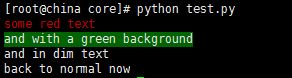
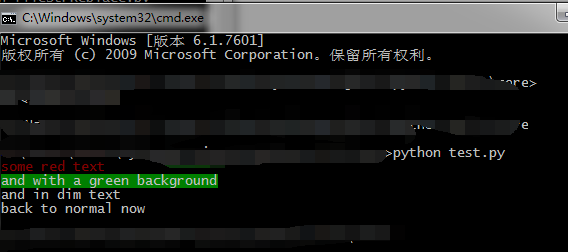
4.使用实例
import sys

import os

import random

import string

from colorama import Fore,Style,init

import platform

def print_arg(arg):

    """

    打印参数

    :param arg:

    :return:

    """

    for ind, val in enumerate(arg):

        if ind == 0:

            print_color(Fore.YELLOW,r"------执行%s输入参数为--------"% val)

        else:

            print(val, end=",")

def print_color(color, mes=""):

    """

     获得系统平台

     windows终端需要设置

     init(wrap=True)

    :param color:

    :param mes:

    :return:

    """

    v_system = platform.system()

    if v_system != 'Windows':

        print(color+mes)

    else:

        # init(wrap=True)

        print(color+mes)

# 获得系统参数

v_arg = sys.argv

init(autoreset=True)  # 初始化,并且设置颜色设置自动恢复

# print_color(Fore.YELLOW+platform.system())

if len(v_arg) != 4:

    # print(platform.system())

    print_arg(v_arg)

    print_color(Fore.RED,"---参数输入错误--")

    print_color(Fore.RED, "fileStrReplace.py 文件名 旧字符串 新字符串")

else:

    f_name = v_arg[1].strip()

    old_str = v_arg[2].strip()  # 旧字符

    new_str = v_arg[3].strip()  # 替换的新字符

    f_new_name = "%s.new" % f_name

    replace_count = 0  # 字符替换次数

    if not os.path.exists(f_name):

        print_color(Fore.YELLOW, "%s文件不存在" % f_name)

    else:

        f_new = open(f_new_name, 'w')

        f = open(f_name, "r",)

        for line in f:  # 读取大文件

            if old_str in line:

                new_line = line.replace(old_str, new_str)  # 字符替换

                replace_count += 1

            else:

                new_line = line

            f_new.write(new_line)  # 内容写新文件

        f.close()

        f_new.close()

        if replace_count == 0:

            print_color(Fore.YELLOW,"字符%s不存在" % (old_str))

        else:

            bak_f = f_name + ''.join(random.sample(string.digits, 6))

            os.rename(f_name, bak_f)  # 备份旧文件

            os.rename(f_new_name, f_name)  # 把新文件名字改成原文件的名字,就把之前的覆盖掉了

            print_color(Fore.GREEN, "文件替换成功,[字符%s替换%s]共%s次,源文件备份[%s]" % (old_str,new_str, replace_count,bak_f))

# print_color(Style.RESET_ALL)  # 还原默认颜色
Python常用模块—— Colorama模块的更多相关文章
- Python常用内建模块
Python常用内建模块 datetime 处理日期和时间的标准库. 注意到datetime是模块,datetime模块还包含一个datetime类,通过from datetime import da ...
- python常用内建模块 collections,bs64,struct,hashlib,itertools,contextlib,xml
# 2 collections 是Python内建的一个集合模块,提供了许多有用的集合类. # 2.1 namedtuple #tuple可以表示不变集合,例如,一个点的二维坐标就可以表示成: p ...
- Python 常用内建模块(time ,datetime)
1,在Python中,与时间处理有关的模块就包括:time,datetime以及calendar. 2,在Python中,通常有这几种方式来表示时间:1)时间戳 2)格式化的时间字符串 3)元组(st ...
- python常用命令—查看模块所在位置
环境:ipython3 交互式解释器 语法: import 模块名 模块名.__file__ 功能: 查看模块的所在位置 例:
- python常用函数及模块
原文来源于博客园和CSDN 1.计算函数 abs()--取绝对值 max()--取序列最大值,包括列表.元组 min()--取序列最小值 len()--取长度 divmod(a,b)---取a//b除 ...
- Python 常用内建模块(os, sys,random)
一.os 模块 1,操作系统与环境变量 import osprint(os.name) #操作系统类型,如果是posix 说明系统是linux unix 或 mac os x :如果是nt 就是win ...
- python常用内建模块——datetime
datetime是python处理日期和时间的标准库. 获取当前日期和时间 >>>from datetime import datetime >>>now = da ...
- collections(python常用内建模块)
文章来源:https://www.liaoxuefeng.com/wiki/897692888725344/973805065315456 collections collections是Python ...
- Python常用内建模块和第三方库
目录 内建模块 1 datetime模块(处理日期和时间的标准库) datetime与timestamp转换 str与datetime转换 datetime时间加减,使用timedelta这个类 转 ...
随机推荐
- 使用JavaMail发送邮件-从FTP读取图片并添加到邮件正文发送
业务分析: 最近工作需要,需要从FTP读取图片内容,添加到邮件正文发送.发送邮件正文,添加附件采用Spring的MimeMessageHelper对象来完成,添加图片也将采用MimeMessageHe ...
- 如何将 jar 包导入Maven 本地仓库
案例:oracle jar包由于在maven 远程仓库中找不到,需要先将oracle jar 文件下载到本地,然后导入maven本地仓库,就可以通过 pom 进行依赖 例如:下载后的 jar 地址 D ...
- 深入JVM之类的加载过程
类的加载—连接—初始化 加载:查找并加载类的字节码文件,从硬盘到内存. 类的加载指的是将类的.class文件中的二进制数据读入到内存中,将其放在运行时数据区的方法区内,然后在堆区创建一个java.la ...
- pipeline-安全测试
代码安全检查 需要安装SonarQube(版本6.7,安装了Findbugs插件) MySQL >=5.6,笔者安装的是MySQL 5.7版本 Jenkins需要安装下列插件: SonarQub ...
- [leetcode]282. Expression Add Operators 表达式添加运算符
Given a string that contains only digits 0-9 and a target value, return all possibilities to add bin ...
- 【CSS】自定义checkbox样式
修改原生checkbox样式. 效果 原理 1.利用CSS3属性 appearance. 该属性(强制)更改(改变)默认(原生)样式. Firefox 支持替代的 -moz-appearance 属性 ...
- PHP开发——变量
变量的概念 l 变量是临时存储数据的容器: l 变量是存储内存当中: l 我们现实中有很多数据:姓名.性别.年龄.学历等: l 在计算机中,用变量来代替一个一个的数据: l 我们可以把计算机 ...
- 快速创建IIS站点并设置权限
net user WebSiteUser WebSiteUserWebSiteUser /add /yWMIC Path Win32_UserAccount Where Name="Web ...
- python 06函数
python中函数定义方法: def test(x): "The function definitions" x+=1 return x def:定义函数的关键字test:函数名( ...
- SPOJ - AMR11B
题目链接:https://www.spoj.com/problems/AMR11B/en/ 题目大意就是要你求图形覆盖的格点数,标记每个图形里的未标记格点(包括边界),总标记数就是覆盖的总格点数. # ...