
caffe提取每一层中的特征,在matlab或python查看
参考博客:
http://blog.csdn.net/abc8730866/article/details/52522843
http://blog.csdn.net/lijiancheng0614/article/details/48180331
编译出extract_features.exe模块
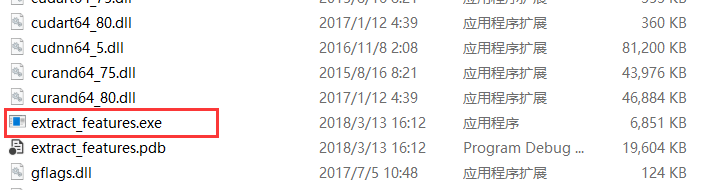
在×64、Release模式下编译生成extract_features.exe
将某一层的特征向量生成lmdb文件
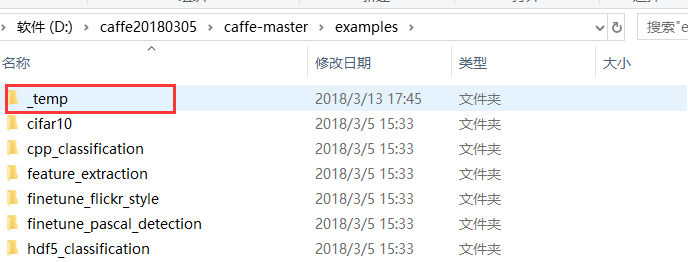
在caffe工程的examples下新建一个文件夹,命名为_temp
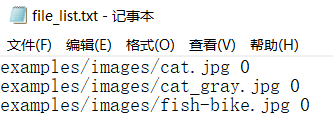
将examples\images下的图片写成一个文本文档,命名为file_list.txt,放在_temp文件夹下
将examples/eature_extraction/imagenet_val.prototxt复制到之前新建的_temp文件夹。
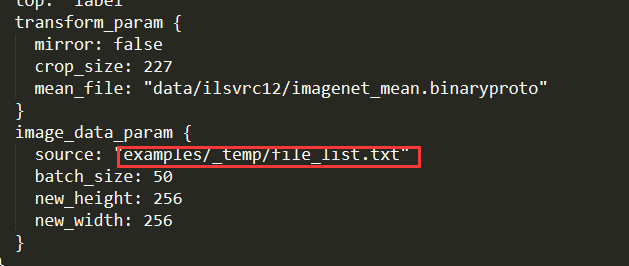
打开imagenet_val.prototxt,修改以下file_list.txt的路径,对应准确即可:
在models\bvlc_reference_caffenet目录中,下载bvlc_reference_caffenet.caffemodel文件
在caffe根目录下,新建bat脚本,
Build\x64\Release\extract_features.exe models/bvlc_reference_caffenet/bvlc_reference_caffenet.caffemodel examples/_temp/imagenet_val.prototxt fc7 examples/_temp/features 10 lmdb
pause
可以在examples/_temp/features中生成提取的lmdb文件

将lmdb文件转化为mat文件
feat_helper_pb2.py
# Generated by the protocol buffer compiler.  DO NOT EDIT!

from google.protobuf import descriptor

from google.protobuf import message

from google.protobuf import reflection

from google.protobuf import descriptor_pb2

# @@protoc_insertion_point(imports)

DESCRIPTOR = descriptor.FileDescriptor(

  name='datum.proto',

  package='feat_extract',

  serialized_pb='\n\x0b\x64\x61tum.proto\x12\x0c\x66\x65\x61t_extract\"i\n\x05\x44\x61tum\x12\x10\n\x08\x63hannels\x18\x01 \x01(\x05\x12\x0e\n\x06height\x18\x02 \x01(\x05\x12\r\n\x05width\x18\x03 \x01(\x05\x12\x0c\n\x04\x64\x61ta\x18\x04 \x01(\x0c\x12\r\n\x05label\x18\x05 \x01(\x05\x12\x12\n\nfloat_data\x18\x06 \x03(\x02')

_DATUM = descriptor.Descriptor(

  name='Datum',

  full_name='feat_extract.Datum',

  filename=None,

  file=DESCRIPTOR,

  containing_type=None,

  fields=[

    descriptor.FieldDescriptor(

      name='channels', full_name='feat_extract.Datum.channels', index=0,

      number=1, type=5, cpp_type=1, label=1,

      has_default_value=False, default_value=0,

      message_type=None, enum_type=None, containing_type=None,

      is_extension=False, extension_scope=None,

      options=None),

    descriptor.FieldDescriptor(

      name='height', full_name='feat_extract.Datum.height', index=1,

      number=2, type=5, cpp_type=1, label=1,

      has_default_value=False, default_value=0,

      message_type=None, enum_type=None, containing_type=None,

      is_extension=False, extension_scope=None,

      options=None),

    descriptor.FieldDescriptor(

      name='width', full_name='feat_extract.Datum.width', index=2,

      number=3, type=5, cpp_type=1, label=1,

      has_default_value=False, default_value=0,

      message_type=None, enum_type=None, containing_type=None,

      is_extension=False, extension_scope=None,

      options=None),

    descriptor.FieldDescriptor(

      name='data', full_name='feat_extract.Datum.data', index=3,

      number=4, type=12, cpp_type=9, label=1,

      has_default_value=False, default_value="",

      message_type=None, enum_type=None, containing_type=None,

      is_extension=False, extension_scope=None,

      options=None),

    descriptor.FieldDescriptor(

      name='label', full_name='feat_extract.Datum.label', index=4,

      number=5, type=5, cpp_type=1, label=1,

      has_default_value=False, default_value=0,

      message_type=None, enum_type=None, containing_type=None,

      is_extension=False, extension_scope=None,

      options=None),

    descriptor.FieldDescriptor(

      name='float_data', full_name='feat_extract.Datum.float_data', index=5,

      number=6, type=2, cpp_type=6, label=3,

      has_default_value=False, default_value=[],

      message_type=None, enum_type=None, containing_type=None,

      is_extension=False, extension_scope=None,

      options=None),

  ],

  extensions=[

  ],

  nested_types=[],

  enum_types=[

  ],

  options=None,

  is_extendable=False,

  extension_ranges=[],

  serialized_start=29,

  serialized_end=134,

)

DESCRIPTOR.message_types_by_name['Datum'] = _DATUM

class Datum(message.Message):

  __metaclass__ = reflection.GeneratedProtocolMessageType

  DESCRIPTOR = _DATUM

  # @@protoc_insertion_point(class_scope:feat_extract.Datum)

# @@protoc_insertion_point(module_scope)
lmdb2mat.py
import lmdb

import feat_helper_pb2

import numpy as np

import scipy.io as sio

import time

def main(argv):

    lmdb_name = sys.argv[1]

    print "%s" % sys.argv[1]

    batch_num = int(sys.argv[2]);

    batch_size = int(sys.argv[3]);

    window_num = batch_num*batch_size;

    start = time.time()

    if 'db' not in locals().keys():

        db = lmdb.open(lmdb_name)

        txn= db.begin()

        cursor = txn.cursor()

        cursor.iternext()

        datum = feat_helper_pb2.Datum()

        keys = []

        values = []

        for key, value in enumerate( cursor.iternext_nodup()):

            keys.append(key)

            values.append(cursor.value())

    ft = np.zeros((window_num, int(sys.argv[4])))

    for im_idx in range(window_num):

        datum.ParseFromString(values[im_idx])

        ft[im_idx, :] = datum.float_data

    print 'time 1: %f' %(time.time() - start)

    sio.savemat(sys.argv[5], {'feats':ft})

    print 'time 2: %f' %(time.time() - start)

    print 'done!'

if __name__ == '__main__':

    import sys

    main(sys.argv)
将这个两个文件放在_temp文件夹中(位置可随意放置),cmd打开python,进入到该目录,
python lmdb2mat.py features 1 10 4096 features_fc7.mat
在ubantu下命令的格式的参考,
LMDB=./examples/_temp/features_fc7 # lmdb文件路径

BATCHNUM=1

BATCHSIZE=10

# DIM=290400 # feature长度,conv1

# DIM=43264 # conv5

DIM=4096

OUT=./examples/_temp/features_fc7.mat #mat文件保存路径

python ./lmdb2mat.py $LMDB $BATCHNUM $BATCHSIZE $DIM $OUT
可生成一个mat文件,
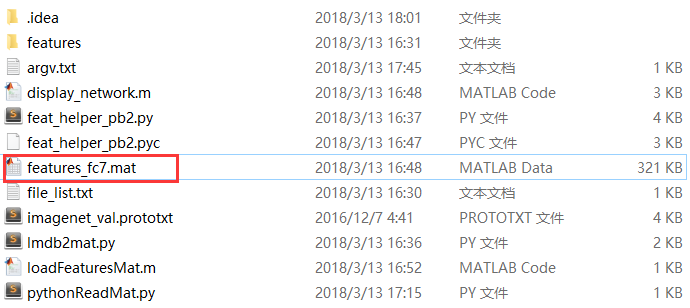
新建matlab函数及脚本,对该mat文件进行可视化
display_network.m
function [h, array] = display_network(A, opt_normalize, opt_graycolor, cols, opt_colmajor)

% This function visualizes filters in matrix A. Each column of A is a

% filter. We will reshape each column into a square image and visualizes

% on each cell of the visualization panel.

% All other parameters are optional, usually you do not need to worry

% about it.

% opt_normalize: whether we need to normalize the filter so that all of

% them can have similar contrast. Default value is true.

% opt_graycolor: whether we use gray as the heat map. Default is true.

% cols: how many columns are there in the display. Default value is the

% squareroot of the number of columns in A.

% opt_colmajor: you can switch convention to row major for A. In that

% case, each row of A is a filter. Default value is false.

warning off all

if ~exist('opt_normalize', 'var') || isempty(opt_normalize)

    opt_normalize= true;

end

if ~exist('opt_graycolor', 'var') || isempty(opt_graycolor)

    opt_graycolor= true;

end

if ~exist('opt_colmajor', 'var') || isempty(opt_colmajor)

    opt_colmajor = false;

end

% rescale

A = A - mean(A(:));

if opt_graycolor, colormap(gray); end

% compute rows, cols

[L M]=size(A);

sz=sqrt(L);

buf=;

if ~exist('cols', 'var')

    if floor(sqrt(M))^ ~= M

        n=ceil(sqrt(M));

        while mod(M, n)~= && n<1.2*sqrt(M), n=n+; end

        m=ceil(M/n);

    else

        n=sqrt(M);

        m=n;

    end

else

    n = cols;

    m = ceil(M/n);

end

array=-ones(buf+m*(sz+buf),buf+n*(sz+buf));

if ~opt_graycolor

    array = 0.1.* array;

end

if ~opt_colmajor

    k=;

    for i=:m

        for j=:n

            if k>M,

                continue;

            end

            clim=max(abs(A(:,k)));

            if opt_normalize

                array(buf+(i-)*(sz+buf)+(:sz),buf+(j-)*(sz+buf)+(:sz))=reshape(A(:,k),sz,sz)'/clim;

            else

                array(buf+(i-)*(sz+buf)+(:sz),buf+(j-)*(sz+buf)+(:sz))=reshape(A(:,k),sz,sz)'/max(abs(A(:)));

            end

            k=k+;

        end

    end

else

    k=;

    for j=:n

        for i=:m

            if k>M,

                continue;

            end

            clim=max(abs(A(:,k)));

            if opt_normalize

                array(buf+(i-)*(sz+buf)+(:sz),buf+(j-)*(sz+buf)+(:sz))=reshape(A(:,k),sz,sz)'/clim;

            else

                array(buf+(i-)*(sz+buf)+(:sz),buf+(j-)*(sz+buf)+(:sz))=reshape(A(:,k),sz,sz)';

            end

            k=k+;

        end

    end

end

if opt_graycolor

    h=imagesc(array);

else

    h=imagesc(array,'EraseMode','none',[- ]);

end

axis image off

drawnow;

warning on all
在该目录下,新建脚本,调用该函数
nsample = ;

% num_output = ; % conv1

% num_output = ; % conv5

num_output = ; % fc7

load features_fc7.mat

width = size(feats, );

nmap = width / num_output;

for i =  : nsample

    feat = feats(i, :);

    feat = reshape(feat, [nmap num_output]);

    figure('name', sprintf('image #%d', i));

    display_network(feat);

end
在python中读取该mat文件
import scipy.io

matfile = 'features_fc7.mat'

data = scipy.io.loadmat(matfile)
caffe提取每一层中的特征,在matlab或python查看的更多相关文章
- caffe:使用C++来提取任意一张图片的特征(从内存读取数据)
0x00 关于使用C++接口来提取特征,caffe官方提供了一个extract_features.cpp的例程,但是这个文件的输入是blob数据,即使输入层使用的是ImageData,也需要在depl ...
- caffe:使用C++来提取任意一张图片的特征
0x00 关于使用C++接口来提取特征,caffe官方提供了一个extract_features.cpp的例程,但是这个文件的输入是blob数据,即使输入层使用的是ImageData,也需要在depl ...
- 深度CTR预估模型中的特征自动组合机制演化简史 zz
众所周知,深度学习在计算机视觉.语音识别.自然语言处理等领域最先取得突破并成为主流方法.但是,深度学习为什么是在这些领域而不是其他领域最先成功呢?我想一个原因就是图像.语音.文本数据在空间和时间上具有 ...
- 【转】风控中的特征评价指标(三)——KS值
转自:https://zhuanlan.zhihu.com/p/79934510 风控业务背景 在风控中,我们常用KS指标来评估模型的区分度(discrimination).这也是风控模型同学最为追求 ...
- SharePoint 部署时报错: 未能提取此解决方案中的cab文件
在vs里右击SharePoint项目,选择"部署",结果报错: Error occurred in deployment step 'Add Solution':Fail to e ...
- PHP提取身份证号码中的生日并验证是否成年的函数
php 提取身份证号码中的生日日期以及确定是否成年的一个函数.可以同时确定15位和18位的身份证,经本人亲测,非常好用,分享函数代码如下: <?php //用php从身份证中提取生日,包括15位 ...
- php提取身份证号码中的生日日期以及验证是否为未成年人的函数
php 提取身份证号码中的生日日期以及确定是否成年的一个函数.可以同时确定15位和18位的身份证,经本人亲测,非常好用,分享函数代码如下: <?php //用php从身份证中提取生日,包括15位 ...
- 提取PPT文件中的Vba ProjectStg Compressed Atom。Extract PPT VBA Compress Stream
http://msdn.microsoft.com/en-us/library/cc313106(v=office.12).aspx 微软文档 PartI ********************* ...
- C#如何提取.txt文件中的每个字符串
C#如何提取.txt文件中的每个字符串,并将其存放到一个类中. 将其中的编号 菜名 价格 分别存入不同的数组中. 注:在用ReadLine读取一行信息时为什么读取的中文字符变成了乱码. 20 满意答案 ...
随机推荐
- 2016CCPC长春 - B/D/F/H/I/J/K - (待补)
目录: B - Fraction D - Triangle F - Harmonic Value Description H - Sequence I I - Sequence II B题:HDU 5 ...
- [07-01]http网页提示含义
出现较多的一些网页代码提示的意思: 100 - 继续. 101 - 切换协议. 110 重新启动标记答复. 120 服务已就绪,在 nnn 分钟后开始. 125 数据连接已打开,正在开始传输. 150 ...
- JavaScript将字典序升序排列类似php中的ksort函数
/** * 将json数据进行排序 * @param {*jason} data */ export function JsonSort(jsonData) { try { let tempJsonO ...
- LeetCode 448 Find All Numbers Disappeared in an Array 解题报告
题目要求 Given an array of integers where 1 ≤ a[i] ≤ n (n = size of array), some elements appear twice a ...
- Python静态方法(staticmethod)和类方法(classmthod)
Python静态方法(staticmethod)和类方法(classmthod)翻了翻之前的笔记,也刚好看到一篇不错的blog,关于静态方法和类方法的,方便以后查阅,就写在这里了,废话不多说,直接上代 ...
- phpstorm 破解版
原链接https://blog.csdn.net/gu_wen_jie/article/details/79136475
- cherry-pick多个commitid时的顺序说明
有的时候,我们在一个分支上提交了几个commit,然后我们会需要提交到其他分支上,一般情况下,我们会采用的merge的方式来合并分支,另外一种方式是只需要其中几个提交时,我们会cherry-pick到 ...
- windows下cmd无法使用telnet命令解决方法 (原)
telnet不是内部或者外部命令,也不是可运行程序-----解决办法: (win7为例) 控制面板 --- > 程序(小图标下直接到[程序和功能]) --- >程序和功能 --- > ...
- reactjs中使用高德地图计算两个经纬度之间的距离
第一步下载依赖 npm install --save react-amap 第二步,在组件中使用 import React, { Component } from 'react' import { L ...
- 《linux就该这么学》第三节课 第二节命令笔记
命令笔记 (随笔原创,借鉴请修改) linux系统中一切都是文件 2.4 系统状态的命令: ifconfig : 查看系统网卡信息,包括网卡名称,ip地址,掩码,mac地址,收到数据包大 ...