
vim创建程序文件自动添加头部注释/自动文件头注释与模板定义
Vim 自动文件头注释与模板定义
- 在vim的配置文件.vimrc添加一些配置可以实现创建新文件时自动添加文件头注释,输入特定命令可以生成模板。
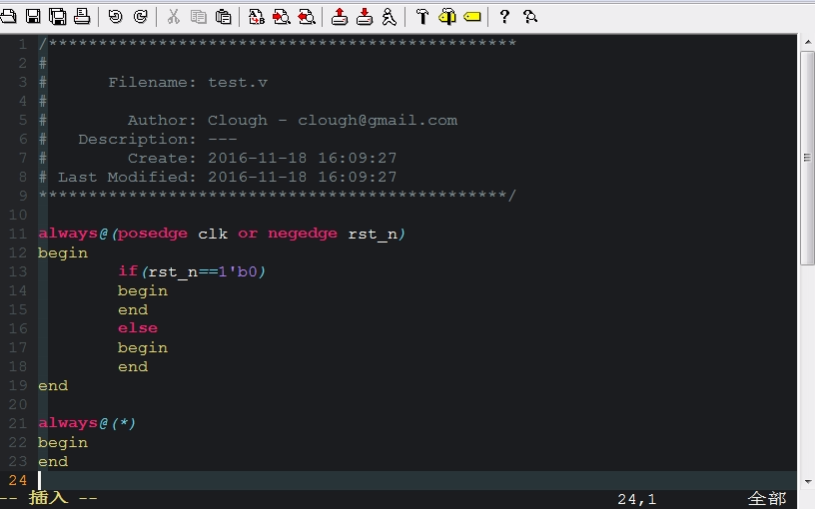
使用方法
- 插入模式输入模式输入seqlogic[Enter]创建时序逻辑框架
- 新创建一个文件 gvim test.c 自动添加头部注释
- F2映射文件头注释,命令行模式文件内按F2自动添加
- F11映射注释,命令模式按F11出现注释行
Verilog模板生成
vim中输入seqlogic或者comlogic点击回车即可替代为模板
"###################    verilog   ##########################

:ab seqlogic always@(posedge clk or negedge rst_n)<Enter>begin<Enter>if(rst_n==1'b0)<Enter>begin<Enter>end<Enter>else<Enter>begin<Enter>end<Enter>end

"生成时序逻辑框架块

:ab comlogic always@(*)<Enter>begin<Enter>end

"生成组合逻辑框架块

"###################    verilog   ##########################
文件头注释自动生成
"###################    set file head start  #########################

"autocmd创建新文件自动调用setfilehead()函数

autocmd BufNewFile *.v,*.sv,*.cpp,*.c,*.h exec ":call Setfilehead()"

func Setfilehead()

    call append(0, '/***********************************************')

    call append(1, '#')

    call append(2, '#      Filename: '.expand("%"))

    call append(3, '#')

    call append(4, '#        Author: Clough - clough@gmail.com')

    call append(5, '#   Description: ---')

    call append(6, '#        Create: '.strftime("%Y-%m-%d %H:%M:%S"))

    call append(7, '# Last Modified: '.strftime("%Y-%m-%d %H:%M:%S"))

    call append(8, '***********************************************/')

"    call append(9, '')

endfunc

"map F2 to creat file head comment

"映射F2快捷键,生成后跳转至第10行,然后使用o进入vim的插入模式

map <F2> :call Setfilehead()<CR>:10<CR>o

"###################    set file head end   ##########################
文件内部注释快捷键生成
"###################    set comment start  #########################

func SetComment()

    call append(line(".")  , '//**************** comment start ********************')

    call append(line(".")+1, '//**************** comment end   ********************')

endfunc

"映射F11快捷键,生成后跳转至下行,然后使用O进入vim的插入模式

map <F11> :call SetComment()<CR>j<CR>O

"###################    set comment end   ##########################
修改 ~/.vimrc,在文件最后添加以下内容:
" 当新建 .h .c .hpp .cpp .mk .sh等文件时自动调用SetTitle 函数

autocmd BufNewFile *.[ch],*.hpp,*.cpp,Makefile,*.mk,*.sh exec ":call SetTitle()"

" 加入注释

func SetComment()

    call setline(1,"/*================================================================")

    call append(line("."),   "*   Copyright (C) ".strftime("%Y")." Sangfor Ltd. All rights reserved.")

    call append(line(".")+1, "*   ")

    call append(line(".")+2, "*   文件名称:".expand("%:t"))

    call append(line(".")+3, "*   创 建 者:LuZhenrong")

    call append(line(".")+4, "*   创建日期:".strftime("%Y年%m月%d日"))

    call append(line(".")+5, "*   描    述:")

    call append(line(".")+6, "*")

    call append(line(".")+7, "================================================================*/")

    call append(line(".")+8, "")

    call append(line(".")+9, "")

endfunc

" 加入shell,Makefile注释

func SetComment_sh()

    call setline(3, "#================================================================")

    call setline(4, "#   Copyright (C) ".strftime("%Y")." Sangfor Ltd. All rights reserved.")

    call setline(5, "#   ")

    call setline(6, "#   文件名称:".expand("%:t"))

    call setline(7, "#   创 建 者:LuZhenrong")

    call setline(8, "#   创建日期:".strftime("%Y年%m月%d日"))

    call setline(9, "#   描    述:")

    call setline(10, "#")

    call setline(11, "#================================================================")

    call setline(12, "")

    call setline(13, "")

endfunc

" 定义函数SetTitle,自动插入文件头

func SetTitle()

    if &filetype == 'make'

        call setline(1,"")

        call setline(2,"")

        call SetComment_sh()

    elseif &filetype == 'sh'

        call setline(1,"#!/system/bin/sh")

        call setline(2,"")

        call SetComment_sh()

    else

         call SetComment()

         if expand("%:e") == 'hpp'

          call append(line(".")+10, "#ifndef _".toupper(expand("%:t:r"))."_H")

          call append(line(".")+11, "#define _".toupper(expand("%:t:r"))."_H")

          call append(line(".")+12, "#ifdef __cplusplus")

          call append(line(".")+13, "extern \"C\"")

          call append(line(".")+14, "{")

          call append(line(".")+15, "#endif")

          call append(line(".")+16, "")

          call append(line(".")+17, "#ifdef __cplusplus")

          call append(line(".")+18, "}")

          call append(line(".")+19, "#endif")

          call append(line(".")+20, "#endif //".toupper(expand("%:t:r"))."_H")

         elseif expand("%:e") == 'h'

          call append(line(".")+10, "#pragma once")

         elseif &filetype == 'c'

          call append(line(".")+10,"#include \"".expand("%:t:r").".h\"")

         elseif &filetype == 'cpp'

          call append(line(".")+10, "#include \"".expand("%:t:r").".h\"")

         endif

    endif

endfunc
vim创建程序文件自动添加头部注释/自动文件头注释与模板定义的更多相关文章
- sublime 设置新建文件自动添加author(作者)等文件头信息
很多时候, sublime 自带自动添加文件头信息, 但是并不是我们想要比如下面这样的:新建一个python文件 自动添加的author 信息== 上面并不是我想要的, 我想要下面这样的效果:== 这 ...
- Visual Studio+VAssistX自动添加注释,函数头注释,文件头注释
转载:http://blog.csdn.net/xzytl60937234/article/details/70455777 在VAssistX中为C++提供了比较规范注释模板,用这个注释模板为编写的 ...
- vim自动添加C C++ sh文件头
set foldenable set foldmethod=manual set fencs=utf-8,ucs-bom,shift-jis,gb18030,gbk,gb2312,cp936 set ...
- Visual Studio 20**自动添加头部注释信息
关于Visual Studio 20**自动添加头部注释信息 作为一个万年潜水党,不关这一篇文章技术含量如何,也算是一个好的开始吧. 在日常的开发中我们经常需要为类库添加注释和版权等信息,这样 ...
- Visual Studio自动添加头部注释
VS2013 自动添加头部注释 1.找到VS2013的安装目录 下文以安装目录 C:\Program Files (x86)\Microsoft Visual Studio 12.0 为例 2.修改C ...
- Vim 自动文件头注释与模板定义
Vim 自动文件头注释与模板定义 在vim的配置文件.vimrc添加一些配置可以实现创建新文件时自动添加文件头注释,输入特定命令可以生成模板. 使用方法 插入模式输入模式输入seqlogic[Ente ...
- pycharm新建py文件时,自动补充文件头注释信息
步骤: 1.File -->Settings 2.选择 File and Code Templates -> Files -> Python Script 文件头注释信息代码样式: ...
- 《从零开始学Swift》学习笔记(Day 57)——Swift编码规范之注释规范:文件注释、文档注释、代码注释、使用地标注释
原创文章,欢迎转载.转载请注明:关东升的博客 前面说到Swift注释的语法有两种:单行注释(//)和多行注释(/*...*/).这里来介绍一下他们的使用规范. 1.文件注释 文件注释就在每一个文件开头 ...
- 使用korofileheader插件vs code添加文件头注释和函数注释
korofileheadervs code添加文件头注释和函数注释1.extensions搜索fileheader,安装koroFileHeader2.设置:edit=>perference=& ...
随机推荐
- jqGrid时间转换
colModel: [ { label: '注册时间', name: 'createDate', index: 'create_date', width: 80, formatter:function ...
- AWS免费套餐服务器部署NETCORE网站
之前的linode充了5美元,一个月就用完了,还是创建的最便宜的服务器的!!! 以前一直想用用aws的所谓的免费套餐服务器的,现在linode过期了,可以试着用用了 下面是我的操作流程,包含错误及解决 ...
- FFmpeg: FFmepg中的sws_scale() 函数分析
FFmpeg中的 sws_scale() 函数主要是用来做视频像素格式和分辨率的转换,其优势在于:可以在同一个函数里实现:1.图像色彩空间转换, 2:分辨率缩放,3:前后图像滤波处理.不足之处在于:效 ...
- Mac安装minikube
安装过程 先安装minikube,使用下面命令(由于墙的问题,所以指定国内的地址) curl -Lo minikube http://kubernetes.oss-cn-hangzhou.aliyun ...
- oracle去掉字符串中所有指定字符
Select Replace(字段名,'指定字符','替换字符') From 表名 --例: select replace('de.5d','.','') from dual --显示结果:de5d ...
- hdoj:2058
#include <iostream> #include <cmath> #include <vector> using namespace std; stru ...
- springMVC 返回时间格式转换
<mvc:annotation-driven> <mvc:message-converters> <bean class="org.springframewor ...
- python学习小记
python HTTP请求示例: # coding=utf-8 # more materials: http://docs.python-requests.org/zh_CN/latest/user/ ...
- [微信小程序] 微信小程序开发初步探索
1.开发文档 https://developers.weixin.qq.com/miniprogram/dev/ app.json配置:https://developers.weixin.qq.com ...
- SAP MDM 简介 --- MDM 实施方法论 - 企业的SOA 数据总线基础
SAP NetWeaver Master Data Management (MDM) ,SAP NetWeaver 主数据管理,MDM可以进行数据合并,降低数据维护成本,确保跨系统的数据一致性,加快业 ...