
使用UIVisualEffectView创建毛玻璃效果
UIVisuaEffectView :继承自UIView,可以看成是专门用于处理毛玻璃效果的视图,只要我们将这个特殊的View添加到其他视图(eg. ImageView )上面,被该UIVisuaEffectView遮盖的部分看起来就有了毛玻璃效果。使用UIVisuaEffectView有一点需要特别注意,不要在UIVisuaEffectView实例化View上面直接添加subViews,应该将需要添加的子视图添加到其contentView上。同时,尽量避免将UIVisualEffectView对象的alpha值设置为小于1.0的值,因为创建半透明的视图会导致系统在离屏渲染时去对UIVisualEffectView对象及所有的相关的子视图做混合操作,比较消耗性能。
效果截图:
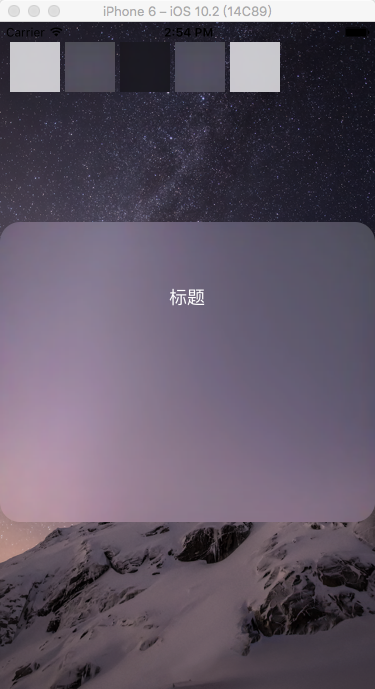
实现代码:
ViewController.h
#import <UIKit/UIKit.h>

@interface ViewController : UIViewController

@property (nonatomic, strong) UIImageView *imageView;

@property (nonatomic, strong) UIVisualEffectView *effectView;

@property (nonatomic, strong) UIVisualEffect *effect;

@end
ViewController.m
#import "ViewController.h"

static int blurTag = ;

@interface ViewController ()

@end

@implementation ViewController

- (void)viewDidLoad {

    [super viewDidLoad];

    // Do any additional setup after loading the view, typically from a nib.

    //添加ImageView

    self.imageView = [[UIImageView alloc] initWithFrame:[[UIScreen mainScreen] bounds]];

    [self.imageView setImage:[[UIImage alloc] initWithContentsOfFile:[[NSBundle mainBundle] pathForResource:@"" ofType:@"png"]]];

    [self.view addSubview:self.imageView];

    //显示所有可用的模糊效果

    CGFloat startX = ;

    CGFloat startY = ;

    CGFloat startW = ;

    CGFloat startH = ;

    {//UIBlurEffectStyleExtraLight

        UIVisualEffect *effect = [UIBlurEffect effectWithStyle:UIBlurEffectStyleExtraLight];

        UIVisualEffectView *effectView = [[UIVisualEffectView alloc] initWithEffect:effect];

        [effectView setFrame:CGRectMake(startX, startY, startW, startH)];

        effectView.tag = blurTag;

        [self.view addSubview:effectView];

        UITapGestureRecognizer *gesture = [[UITapGestureRecognizer alloc] initWithTarget:self action:@selector(tapAction:)];

        effectView.userInteractionEnabled = YES;

        [effectView addGestureRecognizer:gesture];

    }

    {//UIBlurEffectStyleLight

        UIVisualEffect *effect = [UIBlurEffect effectWithStyle:UIBlurEffectStyleLight];

        UIVisualEffectView *effectView = [[UIVisualEffectView alloc] initWithEffect:effect];

        [effectView setFrame:CGRectMake(startX + (startW + ), startY, startW, startH)];

        effectView.tag = blurTag + ;

        [self.view addSubview:effectView];

        UITapGestureRecognizer *gesture = [[UITapGestureRecognizer alloc] initWithTarget:self action:@selector(tapAction:)];

        effectView.userInteractionEnabled = YES;

        [effectView addGestureRecognizer:gesture];

    }

    {//UIBlurEffectStyleDark

        UIVisualEffect *effect = [UIBlurEffect effectWithStyle:UIBlurEffectStyleDark];

        UIVisualEffectView *effectView = [[UIVisualEffectView alloc] initWithEffect:effect];

        [effectView setFrame:CGRectMake(startX + (startW + )*, startY, startW, startH)];

        effectView.tag = blurTag + ;

        [self.view addSubview:effectView];

        UITapGestureRecognizer *gesture = [[UITapGestureRecognizer alloc] initWithTarget:self action:@selector(tapAction:)];

        effectView.userInteractionEnabled = YES;

        [effectView addGestureRecognizer:gesture];

    }

//    {//UIBlurEffectStyleExtraDark

//        UIVisualEffect *effect = [UIBlurEffect effectWithStyle:UIBlurEffectStyleExtraDark];

//        UIVisualEffectView *effectView = [[UIVisualEffectView alloc] initWithEffect:effect];

//        [effectView setFrame:CGRectMake(startX + (startW + 5)*3, startY, startW, startH)];

//        [self.view addSubview:effectView];

//    }

    {//UIBlurEffectStyleRegular

        UIVisualEffect *effect = [UIBlurEffect effectWithStyle:UIBlurEffectStyleRegular];

        UIVisualEffectView *effectView = [[UIVisualEffectView alloc] initWithEffect:effect];

        [effectView setFrame:CGRectMake(startX + (startW + )*, startY, startW, startH)];

        effectView.tag = blurTag + ;

        [self.view addSubview:effectView];

        UITapGestureRecognizer *gesture = [[UITapGestureRecognizer alloc] initWithTarget:self action:@selector(tapAction:)];

        effectView.userInteractionEnabled = YES;

        [effectView addGestureRecognizer:gesture];

    }

    {//UIBlurEffectStyleProminent

        UIVisualEffect *effect = [UIBlurEffect effectWithStyle:UIBlurEffectStyleProminent];

        UIVisualEffectView *effectView = [[UIVisualEffectView alloc] initWithEffect:effect];

        [effectView setFrame:CGRectMake(startX + (startW + )*, startY, startW, startH)];

        effectView.tag = blurTag + ;

        [self.view addSubview:effectView];

        UITapGestureRecognizer *gesture = [[UITapGestureRecognizer alloc] initWithTarget:self action:@selector(tapAction:)];

        effectView.userInteractionEnabled = YES;

        [effectView addGestureRecognizer:gesture];

    }

    //添加UIVisualEffectView

    self.effect = [UIBlurEffect effectWithStyle:UIBlurEffectStyleExtraLight ];

    self.effectView = [[UIVisualEffectView alloc] initWithEffect:self.effect];

    self.effectView.layer.cornerRadius = ;

    self.effectView.layer.masksToBounds = YES;

    [self.effectView setFrame:CGRectMake(, , , )];

    [self.view addSubview:self.effectView];

    UIButton *btn = [[UIButton alloc] initWithFrame:CGRectMake(, , , )];

    [btn setTitle:@"标题" forState:UIControlStateNormal];

    [self.effectView.contentView addSubview:btn];

}

- (void)tapAction:(UITapGestureRecognizer *)gesture{

    NSInteger tag = gesture.view.tag - blurTag;

    switch (tag) {

        case :

            [self.effectView setEffect:[UIBlurEffect effectWithStyle:UIBlurEffectStyleExtraLight]];

            break;

        case :

            [self.effectView setEffect:[UIBlurEffect effectWithStyle:UIBlurEffectStyleLight]];

            break;

        case :

            [self.effectView setEffect:[UIBlurEffect effectWithStyle:UIBlurEffectStyleDark]];

            break;

        case :

            [self.effectView setEffect:[UIBlurEffect effectWithStyle:UIBlurEffectStyleRegular]];

            break;

        case :

            [self.effectView setEffect:[UIBlurEffect effectWithStyle:UIBlurEffectStyleProminent]];

            break;

        default:

            break;

    }

}

- (void)didReceiveMemoryWarning {

    [super didReceiveMemoryWarning];

    // Dispose of any resources that can be recreated.

}

@end
参考链接:
http://www.jianshu.com/p/d115836ed3fa
使用UIVisualEffectView创建毛玻璃效果的更多相关文章
- Swift 之模糊效果(毛玻璃效果,虚化效果)的实现
前言: 之前项目中有用到过Objective-C的的模糊效果,感觉很是不错,而且iOS8之后官方SDK也直接提供了可以实现毛玻璃效果的三个类:UIBlurEffect.UIVibrancyEffect ...
- iOS 实现毛玻璃效果
话说苹果在iOS7.0之后,很多系统界面都使用了毛玻璃效果,增加了界面的美观性,比如下图的通知中心界面; 但是其iOS7.0的SDK并没有提供给开发者实现毛玻璃效果的API,所以很多人都是通过一些别人 ...
- iOS 实现简单的毛玻璃效果
最近在整理导航栏的渐隐渐现效果,整理过程中偶然学会了图片的毛玻璃效果实现,很简单,不多说了,先上图看看效果对比, 这是原图, 这是加了效果后的,创建图片的代码就不上了,下面看下添加效果的代码: // ...
- iOS开发探索-高斯模糊&毛玻璃效果
iOS开发中有的时候需要将图片设置模糊,来实现特定的效果获取更好的用户体验, iOS7之后半透明模糊效果得到大范围使用的比较大,现在也可以看到很多应用局部用到了图片模糊效果,可以通过高斯模糊和毛玻璃效 ...
- iOS 毛玻璃效果的实现方法
iOS开发中有的时候需要将图片设置模糊,来实现特定的效果获取更好的用户体验, iOS7之后半透明模糊效果得到大范围使用的比较大,现在也可以看到很多应用局部用到了图片模糊效果,可以通过高斯模糊和毛玻璃效 ...
- iOS模糊效果(毛玻璃效果)的实现
前一段时间项目中用到毛玻璃效果,那时对UIBlurEffect类和 UIVisualEffectView这两个类做了一部分了解.但当时并没有去特别的深入研究,直到项目做完后,才静下心来好好研究了一番. ...
- iOS开发小技巧--实现毛玻璃效果的方法
一.美工出图 二.第三方框架 -- DRNRealTimeBlur,框架继承自UIView.使用方法:创建UIView直接继承自框架的View,就有了毛玻璃效果 三.CoreImage -- 图片加高 ...
- iOS_自定义毛玻璃效果
http://www.2cto.com/kf/201408/329969.html 最终效果图: 关键代码: UIImage分类代码 ? 1 2 3 4 5 6 7 8 9 10 11 12 13 1 ...
- iOS_自己定义毛玻璃效果
终于效果图: 关键代码: UIImage分类代码 // // UIImage+BlurGlass.h // 帅哥_团购 // // Created by beyond on 14-8-30. // C ...
随机推荐
- 九度OJ 1002:Grading
时间限制:1 秒 内存限制:32 兆 特殊判题:否 提交:18410 解决:4753 题目描述: Grading hundreds of thousands of Graduate Entrance ...
- Is this its limit?
import sys import os curPath = os.path.abspath(os.path.dirname(__file__)) rootPath = os.path.split(c ...
- Java编程中的一些常见问题汇总
转载自 http://macrochen.iteye.com/blog/1393502 每天在写Java程序,其实里面有一些细节大家可能没怎么注意,这不,有人总结了一个我们编程中常见的问题.虽然一般 ...
- Linux kernel config and makefile system
转载自:http://blog.csdn.net/dreamxu/article/details/6125545 http://www-900.ibm.com/developerWorks/cn/li ...
- CryptoJS加密
<script type="text/javascript" src="CryptoJS/core.min.js"></script>& ...
- Java并发之BlockingQueue
一.Queue Queue是队列接口是 Collection的子接口.除了基本的 Collection操作外,队列还提供其他的插入.提取和检查操作.每个方法都存在两种形式:一种抛出异常(操作失败时 ...
- mysql 自连接查询数据
今天项目BOSS提了个sql语句需求,我听得稀里糊涂,没办法,一步步讨论.实践,最终搞定. 先上建表语句: /* Navicat MySQL Data Transfer Source Server : ...
- 深度问答之提取语料,导入了yml模块
根据目录下的yml文件循环创建同名文件夹,并从yml文件读取问答并给每个文件夹写入question和answer文件 #!/usr/bin/env python # coding:utf8 # aut ...
- JQuery 双击动态编辑
$(this).append(input); $("input#temp").focus(); $("inp ...
- 事件监听机制——列出指定目录内容、添加Dialog对话框
事件监听机制理解与Dialog练习 利用Java语言,仿照我的电脑目录进行打开目录,输入文件路径,查看该路径下所有的文件,设置两个文本框,一个转到按钮,当点击转到按钮时,查看路径是否正确,若正确在第二 ...