
Entity Framework Code-First(12):Configure One-to-Many
Configure One-to-Many Relationship:
Here, we will learn how to configure One-to-Many relationship between two entities in code-first. Take an example of Student and Standard (grade) entities where one Standard can include many Students. So the relation between Student and Standard entities would be one-to-many.
Visit Entity Relationship section to understand how EF manages one-to-one, one-to-many, and many-to-many relationships between the entities.
Configure One-to-Many relationship using DataAnnotations:
Consider the following Student and Standard entity.
public class Student

{

    public Student() { }

    public int StudentId { get; set; }

    public string StudentName { get; set; }

    public virtual Standard Standard { get; set; }

}

public class Standard

{

    public Standard()

    {

        Students = new List<Student>();

    }

    public int StandardId { get; set; }

    public string Description { get; set; }

    public virtual ICollection<Student> Students { get; set; }

}
In the above example, Student entity includes navigation property Standard and Standard entity includes collection property for Student. This is the default convention to form one-to-many relationship.
We do not need to configure for one-to-many relationships either using DataAnnotations or Fluent API, if entity classes follow this convention.
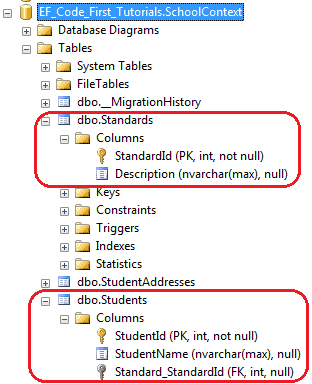
EF code-first would create one-to-many relationship by adding Standard_StandardId column in the student table as shown below.
Entity includes ForeignKey Id property:
It is recommended to include foreign key property in an entity class. For example, if Student entity includes StandardId property which automatically becomes foreignkey property because it follows the convention for foreignkey <Type Name>Id.
If foreignkey property name is not as per the convention, for example, Student entity uses different name of foreignkey for Standard entity than StandardId then we need to apply ForeignKey attribute on a property.
For example, the following Student entity includes StandardRefId property.
public class Student

{

    public Student() { }

    public int StudentId { get; set; }

    public string StudentName { get; set; }

        public int StdandardRefId { get; set; }

    [ForeignKey("StandardRefId")]

    public virtual Standard Standard { get; set; }

}

public class Standard

{

    public Standard()

    {

        StudentsList = new List<Student>();

    }

    public int StandardId { get; set; }

    public string Description { get; set; }

    public virtual ICollection<Student> Students { get; set; }

}
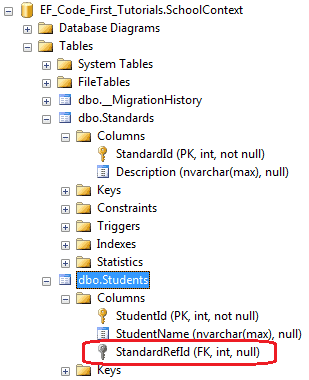
In the above example, ForeignKey attribute is applied on Standard navigation property to specify foreignkey property name for Standard property. So now, EF will create StandardRefId column as a FK as shown below.
Configure One-to-Many relationship using Fluent API:
Here, we will learn configure One-to-Many relationship between Student and Standard entities using Fluent API.
Let’s configure one-to-many for following Student and Standard entities.
public class Student

{

    public Student(){ }

    public int StudentId { get; set; }

    public string StudentName { get; set; }

    public int StandardId { get; set; }

    public virtual Standard Standard { get; set; }

}

public class Standard

{

    public Standard()

    {

        StudentsList = new List<Student>();

    }

    public int StandardId { get; set; }

    public string Description { get; set; }

    public virtual ICollection<Student> Students { get; set; }

}
Now, you can configure one-to-many as shown below.
protected override void OnModelCreating(DbModelBuilder modelBuilder)

{

        //one-to-many

        modelBuilder.Entity<Student>()

                    .HasRequired<Standard>(s => s.Standard) // Student entity requires Standard

                    .WithMany(s => s.Students); // Standard entity includes many Students entities

}
Suppose Student and Standard entity class doesn't follow Code-First conventions for foreign key. Student class will include a different foreign key name for Standard than StandardId.
public class Student

{

    public Student(){ }

    public int StudentId { get; set; }

    public string StudentName { get; set; }

    //StdId is not following code first conventions name

    public int StdId { get; set; }

    public virtual Standard Standard { get; set; }

}

public class Standard

{

    public Standard()

    {

        StudentsList = new List<Student>();

    }

    public int StandardId { get; set; }

    public string Description { get; set; }

    public virtual ICollection<Student> Students { get; set; }

}
So now, you can use Fluent API to configure a One-to-Many relationship using Student entity classes, as shown below.
protected override void OnModelCreating(DbModelBuilder modelBuilder)

{

        //one-to-many

        modelBuilder.Entity<Student>()

                    .HasRequired<Standard>(s => s.Standard)

                    .WithMany(s => s.Students)

                    .HasForeignKey(s => s.StdId);

}
As you can see, modelBuilder.Entity<Student>().HasRequired<Standard>(s => s.Standard) specifies that Student entity requires NotNull Standard navigation property. .WithMany(s => s.Students).HasForeignKey(s => s.StdId) specifies that the other side of Student (means Standard entity ) can include many Students in Students collection property and foreign key is StdId.
Another possible way: We can also start with Standard entity.
protected override void OnModelCreating(DbModelBuilder modelBuilder)

{

        //configure one-to-many

        modelBuilder.Entity<Standard>()

                    .HasMany<Student>(s => s.Students) Standard has many Students

                    .WithRequired(s => s.Standard)  Student require one Standard

                    .HasForeignKey(s => s.StdId);Student includes specified foreignkey property name for Standard

}
The code shown above will create the following database:
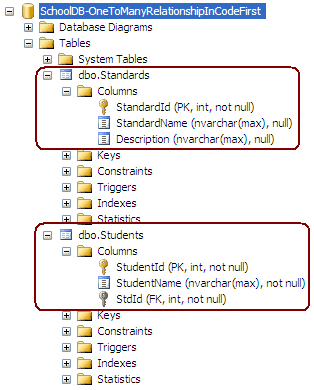
Notice that StdId is Not Null column. So you must assign Standard with Student entity every time you add or update Student.
Nullable foreign key for one-to-many relationship.
Use HasOptional method instead of HasRequired method to make foreign key column nullable.
protected override void OnModelCreating(DbModelBuilder modelBuilder)

{

        //one-to-many

        modelBuilder.Entity<Student>()

                    .HasOptional<Standard>(s => s.Standard)

                    .WithMany(s => s.Students)

                    .HasForeignKey(s => s.StdId);

}
Learn how to configure many-to-many relationship in the next section.
Entity Framework Code-First(12):Configure One-to-Many的更多相关文章
- Entity Framework Tutorial Basics(12):Model First
Model First development with Entity Framework: In the Model First approach, you create Entities, rel ...
- Entity Framework Code first(转载)
一.Entity Framework Code first(代码优先)使用过程 1.1Entity Framework 代码优先简介 不得不提Entity Framework Code First这个 ...
- Entity Framework Code First (三)Data Annotations
Entity Framework Code First 利用一种被称为约定(Conventions)优于配置(Configuration)的编程模式允许你使用自己的 domain classes 来表 ...
- Entity Framework Code First (二)Custom Conventions
---------------------------------------------------------------------------------------------------- ...
- Entity Framework Code First (一)Conventions
Entity Framework 简言之就是一个ORM(Object-Relational Mapper)框架. Code First 使得你能够通过C#的类来描述一个模型,模型如何被发现/检测就是通 ...
- Entity Framework Tutorial Basics(11):Code First
Code First development with Entity Framework: Entity Framework supports three different development ...
- Entity Framework Code First (七)空间数据类型 Spatial Data Types
声明:本文针对 EF5+, Visual Studio 2012+ 空间数据类型(Spatial Data Types)是在 EF5 中引入的,空间数据类型表现有两种: Geography (地理学上 ...
- Entity Framework Code First (四)Fluent API - 配置属性/类型
上篇博文说过当我们定义的类不能遵循约定(Conventions)的时候,Code First 提供了两种方式来配置你的类:DataAnnotations 和 Fluent API, 本文将关注 Flu ...
- Entity Framework Code First (八)迁移 Migrations
创建初始模型和数据库 在开始使用迁移(Migrations)之前,我们需要一个 Project 和一个 Code First Model, 对于本文将使用典型的 Blog 和 Post 模型 创建一个 ...
- Entity Framework Code First (六)存储过程
声明:本文只针对 EF6+ 默认情况下,Code First 对实体进行插入.更新.删除操作是直接在表上进行的,从 EF6 开始你可以选择使用存储过程(Stored Procedures) 简单实体映 ...
随机推荐
- vim 的visual可视模式
一,在普通模式下面可以按v或者V进入可视模式下,选择内容: v 可以选择光标位置到光标结束的字符,包括行: V 选择光标位置行到光标结束的所在行的之间的所有行,选择的是个矩形: CTRL+v 选择块:
- LINQ 学习路程 -- 查询例子
IList<Student> studentList = new List<Student>() { , StudentName = , StandardID = } , , ...
- Codeforces Round #250 (Div. 2) A, B, C
A. The Child and Homework time limit per test 1 second memory limit per test 256 megabytes input sta ...
- 2015年SCI收录遥感期刊28种目录
链接地址:http://blog.sciencenet.cn/blog-57081-928025.html
- Linux课程---11、Linux中软件安装和调试
Linux课程---11.Linux中软件安装和调试 一.总结 一句话总结: 启动过程:1.安装软件,2.修改配置文件,3.启动服务 查看过程:4.查看进程,5.查看端口 关闭过程:6.关闭软件,7. ...
- spring boot: 一般注入说明(四) Profile配置,Environment环境配置 @Profile注解
1.通过设定Environment的ActiveProfile来设置当前context所需要的环境配置,在开发中使用@Profile注解类或方法,达到不同情况下选择实例化不同的Bean. 2.使用jv ...
- 有關WCF一個自認爲比較經典的博客
无废话WCF入门教程四[WCF的配置文件] (http://www.cnblogs.com/iamlilinfeng/archive/2012/10/02/2710224.html) -------- ...
- Python中深拷贝与浅拷贝区别
浅拷贝, list值是可变的,str值不可变,只能重新赋值 a=b=c='wjx'print(a,b,c)c= 'jmy'#重新赋值了,所以内存分配了新的地址print(a,b,c)print(id( ...
- hdu--2111--Saving HDU(贪心)
#include<iostream> #include<vector> #include<algorithm> using namespace std; struc ...
- [Codeforces 204E] Little Elephant and Strings
[题目链接] https://codeforces.com/contest/204/problem/E [算法] 首先构建广义后缀自动机 对于自动机上的每个节点 , 维护一棵平衡树存储所有它所匹配的字 ...