
Entity Framework Tutorial Basics(12):Model First
Model First development with Entity Framework:
In the Model First approach, you create Entities, relationships, and inheritance hierarchies directly on the design surface of EDMX and then generate database from your model.
So, in the Model First approach, add new ADO.NET Entity Data Model and select Empty EF Designer model in Entity Data Model Wizard.
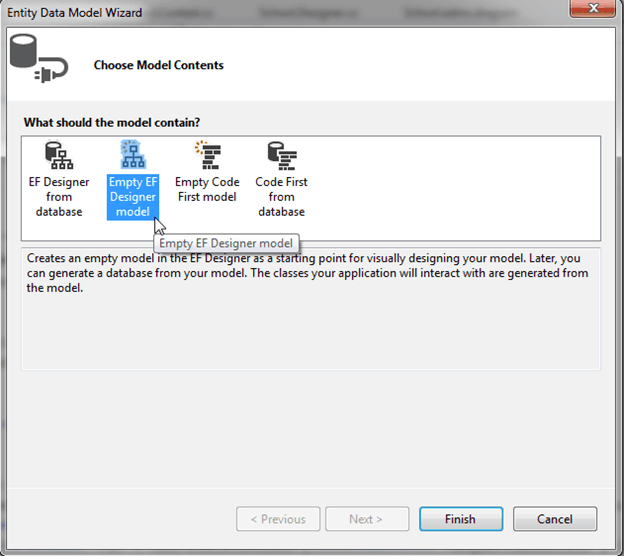
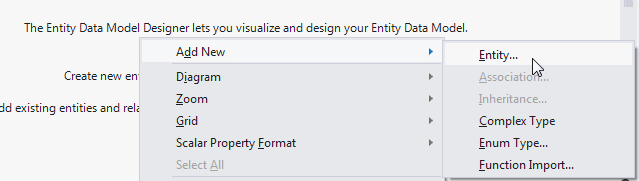
You can create an entity, association and inheritance on an empty designer by right clicking on designer surface -> Add New -> Entity.
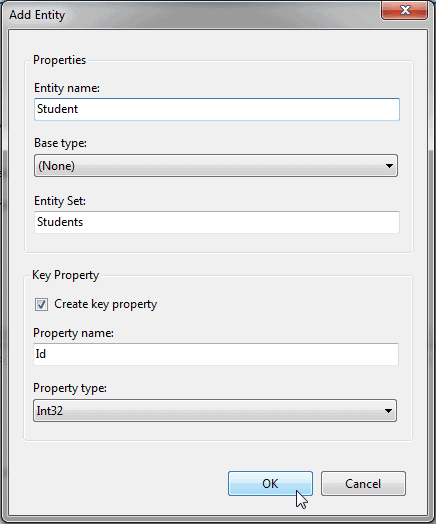
In the Add Entity dialogue, enter name of the entity. Also you can change the default settings for Entity set and key property. We will keep the default settings as it is. Click OK to generate an entity.
You can also add properties in the generated entity by right clicking on entity - > Add New -> Scalar property.
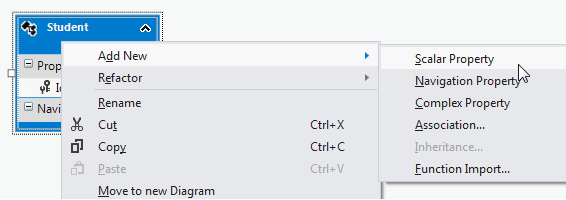
Enter the name of scalar property as shown below.
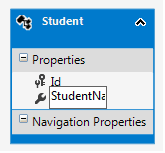
In the same way, you can add other entities and associations using toolbox.
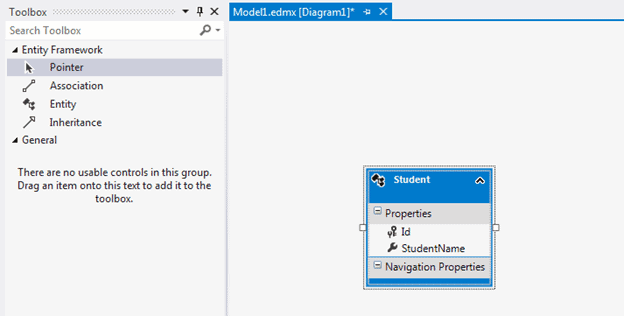
After creating the required entities, associations, and inheritance on the design surface of the empty model, you can use the designer's context menu option 'Generate database from model' to generate DDL script.
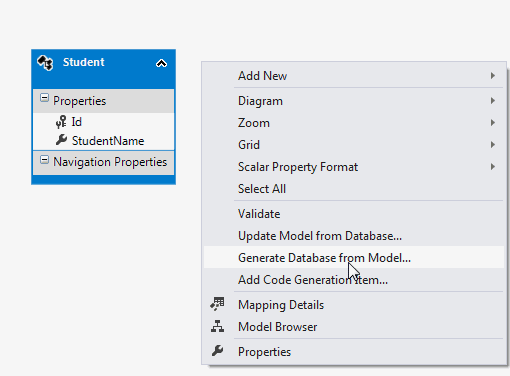
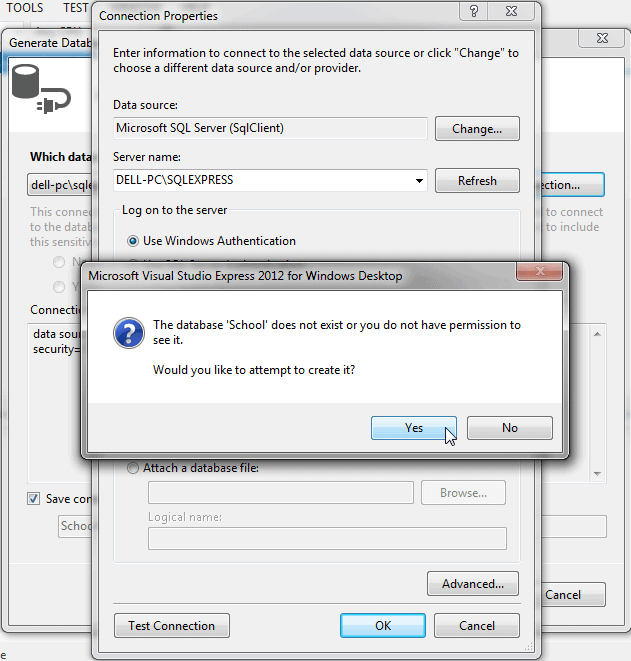
This will open Generate Database Wizard. You can select existing database or create a new connection by clicking on New Connection.. Select database server and enter the name of the database to create and then click OK. It will ask you for the confirmation for creating a new database. Click Yes to create a database.
Click Next to generate DDL for the DB model as shown below.
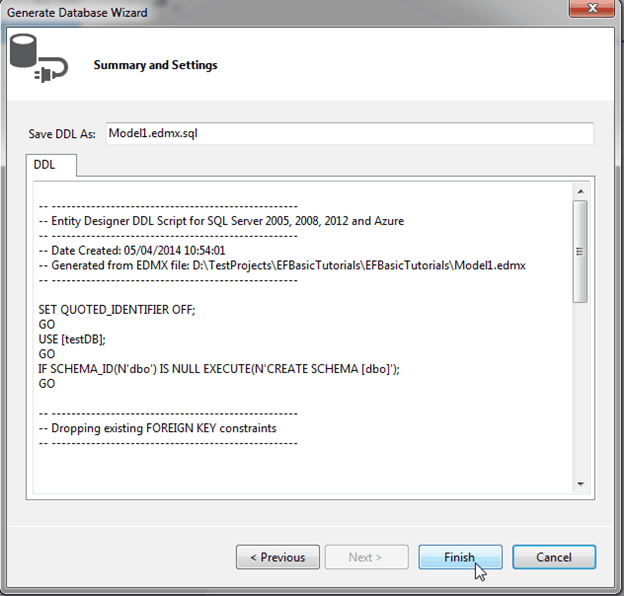
This will add ModelName.edmx.sql file in the project. You can execute DDL scripts in Visual Studio by opening .sql file -> right click -> Execute.
Now, you can generate context class and entities by right clicking on the designer and selecting Add Code Generation Item..
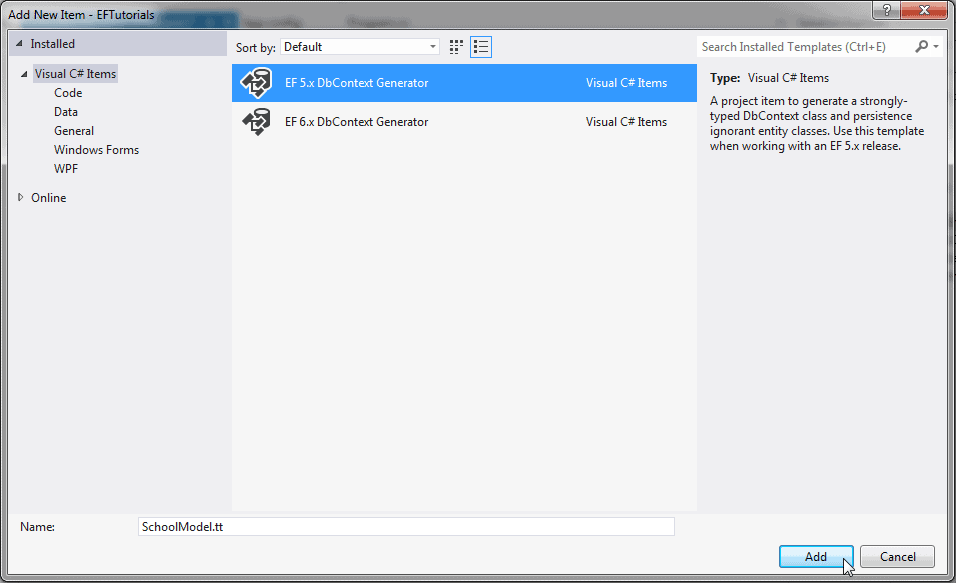
This will add (ModelName).Context.tt and (ModelName).tt with context class and entity classes as shown below.
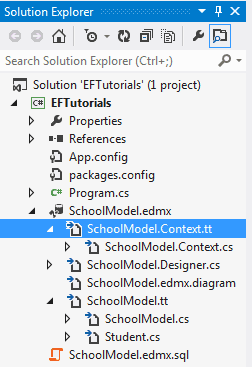
So, in this way, you can design your DB model and then generate a database and classes based on the model. This is called the Model-First approach.
Visit MSDN for detailed information on Model-First approach.
Entity Framework Tutorial Basics(12):Model First的更多相关文章
- Entity Framework Tutorial Basics(6):Model Browser
Model Browser: We have created our first Entity Data Model for School database in the previous secti ...
- Entity Framework Tutorial Basics(1):Introduction
以下系列文章为Entity Framework Turial Basics系列 http://www.entityframeworktutorial.net/EntityFramework5/enti ...
- Entity Framework Tutorial Basics(4):Setup Entity Framework Environment
Setup Entity Framework Environment: Entity Framework 5.0 API was distributed in two places, in NuGet ...
- Entity Framework Tutorial Basics(43):Download Sample Project
Download Sample Project: Download sample project for basic Entity Framework tutorials. Sample projec ...
- Entity Framework Tutorial Basics(42):Colored Entity
Colored Entity in Entity Framework 5.0 You can change the color of an entity in the designer so that ...
- Entity Framework Tutorial Basics(41):Multiple Diagrams
Multiple Diagrams in Entity Framework 5.0 Visual Studio 2012 provides a facility to split the design ...
- Entity Framework Tutorial Basics(37):Lazy Loading
Lazy Loading: One of the important functions of Entity Framework is lazy loading. Lazy loading means ...
- Entity Framework Tutorial Basics(36):Eager Loading
Eager Loading: Eager loading is the process whereby a query for one type of entity also loads relate ...
- Entity Framework Tutorial Basics(34):Table-Valued Function
Table-Valued Function in Entity Framework 5.0 Entity Framework 5.0 supports Table-valued functions o ...
随机推荐
- 使用手势对UIImageView进行缩放、旋转和移动(转)
原文地址:http://blog.csdn.net/crazy_frog/article/details/8664108 // 添加所有的手势 - (void) addGestureRecognize ...
- OpenCV教程【001 Mat显示图片】
#include <opencv2\opencv.hpp> #include <iostream> #include <string> using namespac ...
- inndb索引原理
###详解b+树如上图,是一颗b+树,关于b+树的定义可以参见B+树,这里只说一些重点,浅蓝色的块我们称之为一个磁盘块,可以看到每个磁盘块包含几个数据项(深蓝色所示)和指针(黄色所示),如磁盘块1包含 ...
- 大鱼吃小鱼(运用stack的模拟)
个人心得:这一题在暑假集训的周测里做到过,当时就死模拟,然后卡了很久很久才做对.现在发现运用stack其实非常方便, 将向左向右游动的鱼分开,则往后走只要往右移动的就放入stack,往左的时候就与st ...
- Python学习笔记 - 用VSCode写python的正确姿势
最近在学习python,之前一直用notepad++作为编辑器,偶然发现了VScode便被它的颜值吸引.用过之后发现它启动快速,插件丰富,下载安装后几乎不用怎么配置就可以直接使用,而且还支持markd ...
- hihoCoder#1122(二分图最大匹配之匈牙利算法)
时间限制:10000ms 单点时限:1000ms 内存限制:256MB 描述 上一回我们已经将所有有问题的相亲情况表剔除了,那么接下来要做的就是安排相亲了.因为过年时间并不是很长,所以姑姑希望能够尽可 ...
- linux 在vi文件中添加行号
方法一: 1.显示当前行行号,在VI的命令模式下输入 :nu 2.显示所有行号,在VI的命令模式下输入 :set nu 方法二: 使用vi编辑~/.vimrc文件,在该文件中加入一行"set ...
- 【转】 Pro Android学习笔记(八三):了解Package(2):包签名过程
目录(?)[-] 类比例子 数字签名 文章转载只能用于非商业性质,且不能带有虚拟货币.积分.注册等附加条件.转载须注明出处:http://blog.csdn.net/flowingflying/ 在W ...
- Android逆向基础知识Smali
什么是Smali: 我们用工具反编译一些APP的时候,会看到一个smali文件夹,里面其实就是每个Java类所对应的smali文件.Android虚拟机Dalvik并不是执行java虚拟机JVM编译后 ...
- 前端seo小结,网页代码优化
seo的目的:提高网站流量 search engine optimization 搜索引擎优化seo search engine marketing 搜索引擎营销sem 权重10个等级 等级越大,权重 ...