
day09作业
一.填空题
1.方法 2.堆内存 3.构造方法 4.this 5.this 6.static 7.使用类名进行访问 8.package import class 9.关键字 10.lang
二.选择题
1.D 2.B 3.D 4.AC 5.AC
三.判断题
1.√ 2.× 3.√ 4.× 5.√ 6.× 7.√
四.
1.构造方法的作用是给对象进行初始化。
特点:1.方法名与类名相同(大小写也一致)
2.没有返回值类型,连void也没有
3.没有具体的返回值return
注意事项:
1.如果我们没有给出构造方法,系统将自动给出一个无参构造方法。
2.如果我们给出了构造方法,系统将不会提供默认的无参构造方法。
可以不写return语句。
2.setXxx()方法和构造方法
3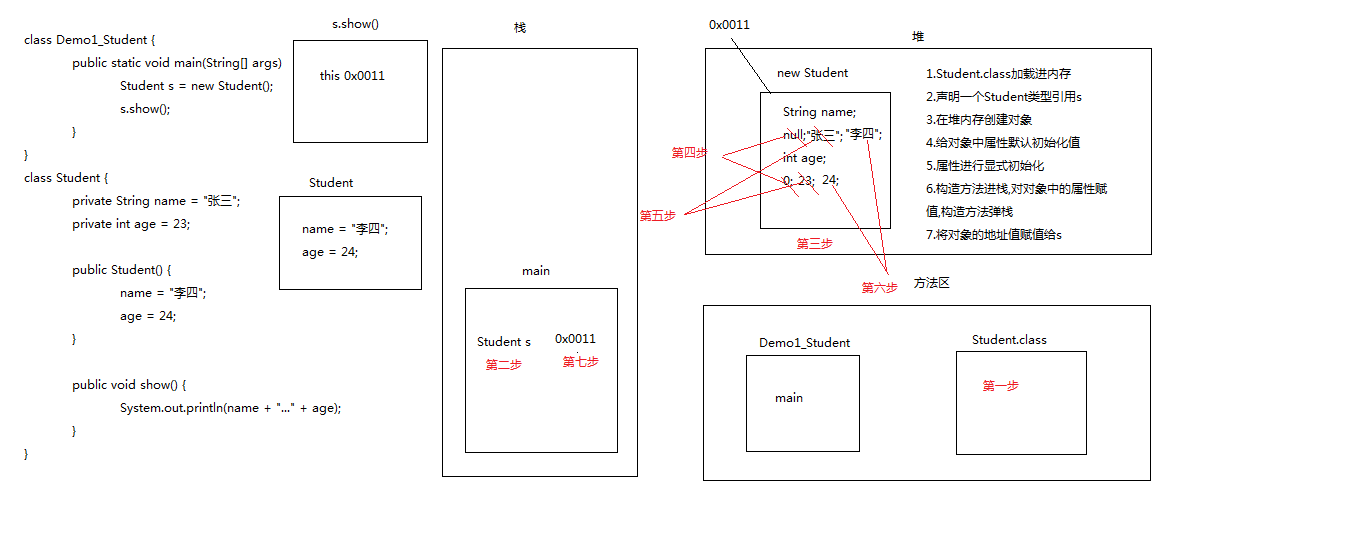
4.a. 随着类的加载而加载
b:优先于对象存在
c:被类的所有对象共享
d.可以通过类名调用
当对象出现共享数据时,该数据用static修饰。
5.public static void main(String[] args){}
public : 被jvm调用,所以权限要足够大
static : 被jvm调用,不需要创建对象,直接类名.调用即可
void : 被jvm调用,不需要有任何的返回值
main : 只有这样写才能被jvm识别,main不是关键字
String[] args : 以前是用来接收键盘录入的
class Test13_Vehicle {

    public static void main(String[] args) {

        Vehicle a = new Vehicle();

        a.setSpeed(10);

        a.setSize(10);

        System.out.println(a.speedUp() + " " + a.speedDown());

    }

}

class Vehicle {

    private int speed;

    private int size;

    public Vehicle(){}

    public Vehicle(int speed,int size){

        this.speed = speed;

        this.size = size;

    }

    public void setSpeed(int speed){

        this.speed = speed;

    }

    public int getSpeed(){

        return speed;

    }

    public void setSize(int size){

        this.size = size;

    }

    public int getSize(){

        return size;

    }

    public int speedUp(){

        return speed += 1;

    }

    public int speedDown(){

        return speed -= 1;

    }

}
class Test10_Person {

    public static void main(String[] args) {

        Person p = new Person();

        p.setName("张三");

        p.setAge(24);

        p.display();

    }

}

class Person {

    private String name;

    private int age;

    public Person(){}

    public Person(String name,int age){

        this.name = name;

        this.age = age;

    }

    public void setName(String name){

        this.name = name;

    }

    public String getName(){

        return name;

    }

    public void setAge(int age){

        this.age = age;

    }

    public int getAge(){

        return age;

    }

    public void display(){

        System.out.println("姓名:" + name + " " + "年龄:" + age);

    }

}
class Test11_Circle {

    public static void main(String[] args) {

        Circle c = new Circle(1.5);

        System.out.println(c.getArea() + " " + c.getPerimeter());

    }

}

class Circle {

    private double radius;

    public Circle(){}

    public Circle(double radius){

        this.radius = radius;

    }

    public void setRadius(double radius){

        this.radius = radius;

    }

    public double getRadius(){

        return radius;

    }

    public double getArea(){

        return 3.14 * radius * radius;

    }

    public double getPerimeter(){

        return 2 * 3.14 * radius;

    }

}
class Test12_Network {

    public static void main(String[] args) {

        Network a = new Network("Mike","123456","123456");

        System.out.println("用户ID:" + a.getId() + " " + "用户密码:" + a.getPassword() + " " + "用户邮箱:" + a.getEmail() + "@gameschool.com");

    }

}

class Network {

    private String id;

    private String password;

    private String email;

    public Network(){}

    public Network(String id,String password,String email){

        this.id = id;

        this.password = password;

        this.email = email;

    }

    public void setId(String id){

        this.id = id;

    }

    public String getId(){

        return id;

    }

    public void setPassword(String password){

        this.password = password;

    }

    public String getPassword(){

        return password;

    }

    public void setEmail(String Email){

        this.email = email;

    }

    public String getEmail(){

        return email;

    }

}
class Test14_Calculaion {

    public static void main(String[] args) {

        Calculaion n = new Calculaion(10);

        System.out.println(n.add() + " " + n.sub() + " " + n.times() + " " + n.div());

    }

}

class Calculaion {

    private int num;

    public Calculaion(){}

    public Calculaion(int num){

        this.num = num;

    }

    public void setNum(int num){

        this.num = num;

    }

    public int getNum(){

        return num;

    }

    public int add(){

        return num += 2;

    }

    public int sub(){

        return num -= 2;

    }

    public int times(){

        return num *= 2;

    }

    public int div(){

        return num /= 2;

    }

}
class Test15_Draw {

    public static void main(String[] args) {

        Draw p = new Draw(10,3);

        p.drawTrian();

        p.drawRec();

        p.drawPra();

    }

}

class Draw {

    private int count;

    private int lines;

    public Draw(){}

    public Draw(int count,int lines){

        this.count = count;

        this.lines = lines;

    }

    public void setCount(){

        this.count = count;

    }

    public int getCount(){

        return count;

    }

    public void setLines(){

        this.lines = lines;

    }

    public int getLines(){

        return lines;

    }

    public void drawTrian(){

        int m = 0;

        a:for (int i = 0;i < lines ;i++ ) {

            for (int k = 0;k < lines - i ;k++ ) {

                System.out.print(" ");

            }

            for (int j = 1;j <= 2 * i - 1 ;j++ ) {

                System.out.print("*");

                m++;

                if (m == count) {

                    break a;

                }

            }

            System.out.println();

        }

    }

    public void drawRec(){

        int row = count / lines;

        int m = 0;

        a:for (int i = 0;i < lines ;i++ ) {

            for (int j = 0;j <= row ;j++ ) {

                System.out.print("*");

                m++;

                if (m == count) {

                    break a;

                }

            }

            System.out.println();

        }

    }

    public void drawPra(){

        int row = count / lines;

        int m = 0;

        a:for (int i = 0;i < lines ;i++ ) {

            for (int j = 1;j < i ;j++ ) {

                System.out.print(" ");

            }

            for (int k = 0;k <= row;k++ ) {

                System.out.print("*");

                m++;

                if (m == count) {

                    break a;

                }

            }

            System.out.println();

        }

    }

}
class Test16_Fridge {

    public static void main(String[] args) {

        Fridge f = new Fridge();

        f.setBrand("海尔");

        f.setHorsepower("100匹");

        f.setTemperature("零下5℃");

        f.heat();

        f.refrigeration();

        f.ventilate();

    }

}

class Fridge {

    private String brand;

    private String horsepower;

    private String temperature;

    public Fridge(){}

    public Fridge(String brand,String horsepower,String temperature){

        this.brand = brand;

        this.horsepower = horsepower;

        this.temperature = temperature;

    }

    public void setBrand(String brand){

        this.brand = brand;

    }

    public String getBrand(){

        return brand;

    }

    public void setHorsepower(String horsepower){

        this.horsepower = horsepower;

    }

    public String getHorsepower(){

        return horsepower;

    }

    public void setTemperature(String temperature){

        this.temperature = temperature;

    }

    public String getTemperature(){

        return temperature;

    }

    public void heat(){

        System.out.println("加热");

    }

    public void refrigeration(){

        System.out.println("制冷");

    }

    public void ventilate(){

        System.out.println("通风");

    }

}
day09作业的更多相关文章
- python day09作业答案
2. def lst(input): lst2=[] count=0 for i in range(0,len(input)): if i %2!=0: lst2.append(input[i]) r ...
- python day09作业
- day09作业—函数进阶
# 2.写函数,接收n个数字,求这些参数数字的和.(动态传参) def func1(*args): sum = 0 for i in args: sum += i print(sum) func1(1 ...
- day09 作业
简述定义函数的三种方式 空函数.无参函数.有参函数 简述函数的返回值 函数内部代码经过一系列的逻辑处理返回的结果 函数没有返回值,默认返回None 函数可以通过return返回出返回值 return可 ...
- day09作业01用户登录与验证
import timeLoginTime = time.asctime( time.localtime(time.time()) )print ("time %s" % Login ...
- python 作业
Linux day01 计算机硬件知识整理 作业要求:整理博客,内容如下 编程语言的作用及与操作系统和硬件的关系 应用程序->操作系统->硬件 cpu->内存->磁盘 cpu与 ...
- DSB
Linux day01 计算机硬件知识整理 作业要求:整理博客,内容如下 编程语言的作用及与操作系统和硬件的关系 应用程序->操作系统->硬件 cpu->内存->磁盘 cpu与 ...
- Python异常处理和进程线程-day09
写在前面 上课第九天,打卡: 最坏的结果,不过是大器晚成: 一.异常处理 - 1.语法错误导致的异常 - 这种错误,根本过不了python解释器的语法检测,必须在程序运行前就修正: - 2.逻辑上的异 ...
- python开发学习-day09(队列、多路IO阻塞、堡垒机模块、mysql操作模块)
s12-20160312-day09 *:first-child { margin-top: 0 !important; } body>*:last-child { margin-bottom: ...
随机推荐
- 一、spark错误
1. 17/07/17 15:34:55 ERROR yarn.ApplicationMaster: User class threw exception: java.lang.Unsupported ...
- 解题:POI 2014 Ant colony
题面 既然我们只知道最后数量为$k$的蚂蚁会在特殊边上被吃掉,不妨逆着推回去,然后到达每个叶节点的时候就会有一个被吃掉的蚂蚁的区间,然后二分一下就好啦 #include<cstdio> # ...
- bzoj2757【scoi2012】Blinker的仰慕者
题目描述 Blinker 有非常多的仰慕者,他给每个仰慕者一个正整数编号.而且这些编号还隐藏着特殊的意义,即编号的各位数字之积表示这名仰慕者对Blinker的重要度. 现在Blinker想知道编号介于 ...
- 阿里云 邮件发送(Python)
#coding:utf8 from smtplib import SMTP_SSL from email.header import Header from email.mime.text impor ...
- Java入门:Java环境变量PATH、CLASSPATH、JAVA_HOME
一些初学者在用java HelloWorld指令运行程序的时候出现: Exception in thread "main" java.lang.NoClassDefFoundErr ...
- Jenkins+Maven+SVN
准备环境: CentOS7 JDK1.7.9.0_79 Maven3.3.9 Jenkins2.5.0 1.配置jdk环境变量 2.安装maven(否则在创建job时没有maven选项) unzip ...
- Java基础-面向对象第一特性之封装(Encapsulation)
Java基础-面向对象第一特性之封装(Encapsulation) 作者:尹正杰 版权声明:原创作品,谢绝转载!否则将追究法律责任. 一.理解什么是面向过程和面向对象 面向过程与面向对象都是我们编程中 ...
- [Java] 集合框架原理之二:锁、原子更新、线程池及并发集合
java.util.concurrent 包是在 Java5 时加入的,与 concurrent 的相关的有 JMM及 AbstractQueuedSynchronizer (AQS),两者是实现 c ...
- jsp中jsp:forward 与 redirect区别
部分转载:http://hi.baidu.com/168zlf/item/2f4b2ad4351b881c20e2500c 在网上看到一些帖子,总结了一些区别,可以从以下几个方面来看: 1.从地址栏显 ...
- python安装pymssql
安装pymssql pip install pymssql 关于python安装pymssql报错export PYMSSQL_BUILD_WITH_BUNDLED_FREETDS=1 然后再 pip ...