
Android-------------fragment的学习
一、fragment的静态使用
1.使用步骤:
a.继承fragment 重写onCreatevVew()的回调方法
b.设置Fragment的布局
c.在Activity中声明Fragment 使用方式与控件相同
2.代码展示:
 a.继承fragment   重写onCreatevVew()的回调方法
public class TileFragment extends Fragment {
    @Nullable
    @Override
    public View onCreateView(@NonNull LayoutInflater inflater, @Nullable ViewGroup container, @Nullable Bundle savedInstanceState) {
        return inflater.inflate(R.layout.tilefragment, null);
    }
}
b.设置Fragment的布局<LinearLayout xmlns:android="http://schemas.android.com/apk/res/android"
    android:layout_width="match_parent"
    android:layout_height="50dp"
    android:orientation="horizontal">      //忘记写会有控件覆盖,会报错的

    <ImageView
        android:id="@+id/iv_bck"
        android:layout_width="35dp"
        android:layout_height="35dp"
        android:src="@mipmap/ic_launcher" />

    <TextView
        android:gravity="center"
        android:layout_marginLeft="10dp"
        android:layout_width="match_parent"
        android:layout_height="match_parent"
        android:text="我是标题"
        />
</LinearLayout>

c.在Activity中声明Fragment  使用方式与控件相同
<LinearLayout xmlns:android="http://schemas.android.com/apk/res/android"
    xmlns:app="http://schemas.android.com/apk/res-auto"
    xmlns:tools="http://schemas.android.com/tools"
    android:layout_width="match_parent"
    android:layout_height="match_parent"
    android:orientation="vertical"        //这个忘写会报错误,很难找出来的
    tools:context=".MainActivity">

    <fragment
        android:name="com.example.zhang.myapplication.TileFragment" ----------->引用标签来静态加载fragment的数据
        android:layout_width="match_parent"
        android:layout_height="50dp"></fragment>
</LinearLayout>

二、fragment的动态使用
  a.创建Fragment的管理器对象
  b.获取Fragment的事物对象并开启
  c.调用事物的动态方法:动态的添加、动态的删除、动态的替换
  d.提交事物

  在xml文件中的代码,在布局文件中写好布局并设置ID,通过FragmentTransation.add去动态添加
  <LinearLayout
    android:orientation="vertical"
    android:layout_width="match_parent"
    android:layout_height="50dp"
    android:id="@+id/fragment_tile"
    />
  <LinearLayout
    android:orientation="vertical"
    android:layout_width="match_parent"
    android:layout_height="match_parent"
    android:id="@+id/frag_content"
    />
  //获得FragmentManager的对象
  FragmentManager manager = getSupportFragmentManager();
  //获取Fragment的事物对象并开始
  FragmentTransaction transaction = manager.beginTransaction();
  //动态添加fragment (add remove replace)
  transaction.add(R.id.fragment_tile, new TileFragment());
  transaction.add(R.id.frag_content, new ContentFragment());
  //提交获得的事物
  transaction.commit();

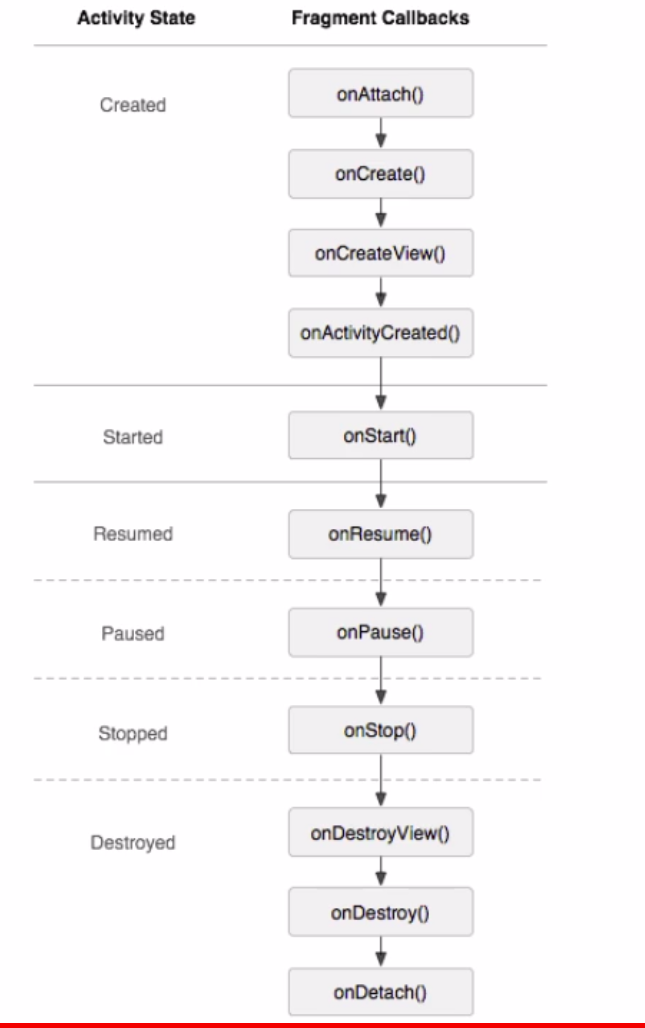
三、Fragment的生命周期
  1.第一次启动app的时候
    onAttach:activity与fragment的产生关联时候进行回调
    onCreateView : 用户第一次绘制界面
    onActivityCreate : fragment与activity创建成功进行回调

2.切换其他fragment的时候

3.返回第一次启动的fragment的时候

4.按home键的时候

5.home键之后再重新返回当前界面

6.按back键的时候

7.fragment和activity的生命周期
Android-------------fragment的学习的更多相关文章
- android fragment 博客 学习记录
转载请标明出处:http://blog.csdn.net/lmj623565791/article/details/37992017 上篇博客中已经介绍了Fragment产生原因,以及一些基本的用法和 ...
- Android Fragment应用实战
现在Fragment的应用真的是越来越广泛了,之前Android在3.0版本加入Fragment的时候,主要是为了解决Android Pad屏幕比较大,空间不能充分利用的问题,但现在即使只是在手机上, ...
- Android Fragment应用实战,使用碎片向ActivityGroup说再见
转载请注明出处:http://blog.csdn.net/guolin_blog/article/details/13171191 现在Fragment的应用真的是越来越广泛了,之前Android在3 ...
- 【转】基于Android Fragment功能的例子
原文网址:http://blog.csdn.net/eyu8874521/article/details/8252216 通过最近空闲时候对Fragment的学习,尝试着写了一个小Demo,将在开发的 ...
- 基于Android Fragment功能的样例
通过近期空暇时候对Fragment的学习,尝试着写了一个小Demo,将在开发的时候能经常使用到的Fragment知识放在一起,写过了这个Demo对Android Fragment的了解更加深入了,以后 ...
- Android编程权威指南笔记3:Android Fragment讲解与Android Studio中的依赖关系,如何添加依赖关系
Android Fragment 当我在学习时,了解了Fragment词汇 Fragment是一种控制器对象,我就把所了解的简单说一下.activity可以派fragment完成一些任务,就是管理用户 ...
- 【Android自学日记】【转】Android Fragment 真正的完全解析(下)
上篇博客中已经介绍了Fragment产生原因,以及一些基本的用法和各种API,如果你还不了解,请看:Android Fragment 真正的完全解析(上). 本篇将介绍上篇博客提到的:如何管理Frag ...
- Android Fragment使用(四) Toolbar使用及Fragment中的Toolbar处理
Toolbar作为ActionBar使用介绍 本文介绍了在Android中将Toolbar作为ActionBar使用的方法. 并且介绍了在Fragment和嵌套Fragment中使用Toolbar作为 ...
- Android Fragment使用(三) Activity, Fragment, WebView的状态保存和恢复
Android中的状态保存和恢复 Android中的状态保存和恢复, 包括Activity和Fragment以及其中View的状态处理. Activity的状态除了其中的View和Fragment的状 ...
- Android Fragment使用(二) 嵌套Fragments (Nested Fragments) 的使用及常见错误
嵌套Fragment的使用及常见错误 嵌套Fragments (Nested Fragments), 是在Fragment内部又添加Fragment. 使用时, 主要要依靠宿主Fragment的 ge ...
随机推荐
- PhpStorm 2017 激活办法
最新版PhpStorm 2017正式版改进了PHP 7支持,改进代码完成功能.PhpStorm 绝对是PHP开发最好的开发工具. phpstorm已经升级到2017.1,原注册码失效,2017.1.2 ...
- PLSQL导入导出表的正确步骤
PLSQL导入导出表的正确步骤 原来总是直接 tools->import talbes->Oracle Import结果发现有的时候会出错:有的表不能正确导入, 导出步骤: 1 tools ...
- JavaScript 闭包的例子
例子出自<<JavaScript权威指南>>, 加上个人的理解和总结, 欢迎交流! /********************************************* ...
- 一个 图片 滚动 飞入的css特效
@keyframes bounceInLeft { from, 60%, 75%, 90%, to {animation-timing-function: cubic-bezier(0.215, 0. ...
- 19. Fight over Fox-hunting 猎狐引发的冲突
. Fight over Fox-hunting 猎狐引发的冲突 ① Foxes and farmers have never got on well.These small dog-like ani ...
- Django入门指南-第9章:静态文件设置(完结)
http://127.0.0.1:8000 #下一步是告诉Django在哪里可以找到静态文件.打开settings.py,拉到文件的底部,在STATIC_URL后面添加以下内容: STATICFILE ...
- UVaLive 6525 Attacking rooks (二分图最大匹配)
题意:给定一个 n * n的图,X是卒, . 是空位置,让你放尽量多的车,使得他们不互相攻击. 析:把每行连续的 . 看成X集体的一个点,同理也是这样,然后求一个最大匹配即可. 代码如下: #prag ...
- UVaLive 2531 The K-League (网络流)
题意:有 n 个队伍进行比赛,每个队伍比赛数目是一样的,每场恰好一个胜一个负,给定每个队伍当前胜的场数败的数目,以及两个队伍剩下的比赛场数,问你冠军队伍可能是哪些队. 析:对每个队伍 i 进行判断是不 ...
- LA 3708 && POJ 3154 Graveyard (思维)
题意:在周长为10000的圆上等距分布着n个雕塑,现在又加入m个,现在让m+n个等距分布,那就得移动一些原有的雕塑,问你移动的最少总距离是多少. 析:首先我们可以知道,至少有一个雕塑是可以不用移动的, ...
- x+y+z=n的正整数解
题:x+y+z=n,其中(n>=3),求x,y,z的正整数解的个数根据图象法:x>=1,y>=1,x+y<=n-1