
”Metro UI之磁贴(二)
也来“玩”Metro UI之磁贴(二)
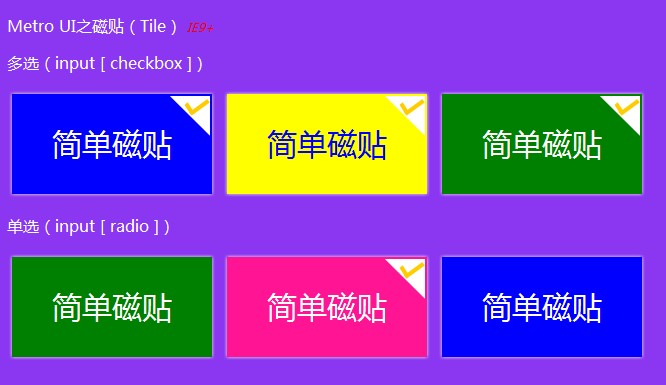
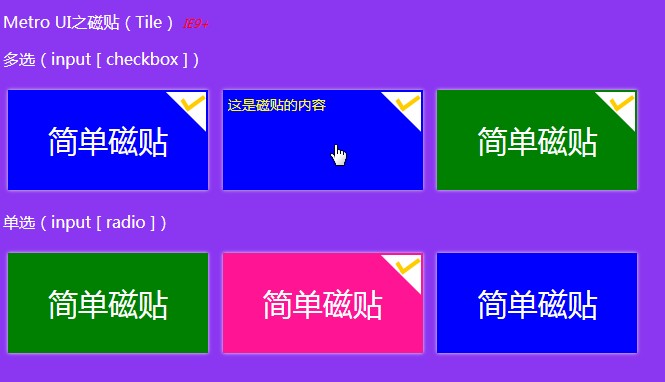
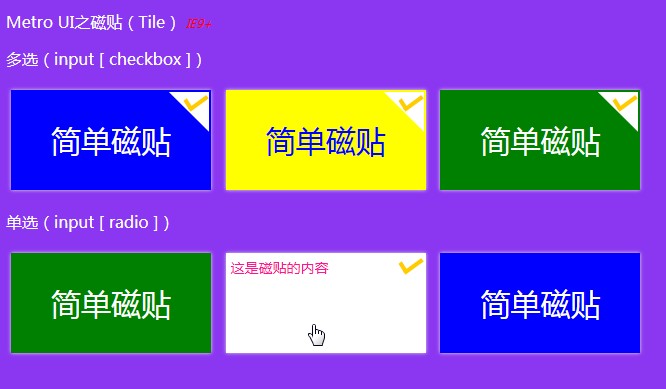
继昨天的“也来“玩”Metro UI之磁贴(一)”之后,还不过瘾,今天继续“玩”吧——今天把单选的功能加进来,还有磁贴的内容,还加了发光效果(CSS3,IE9+浏览器),当然,还是纯CSS,真的要感谢“现代”浏览器~~,废话少说,先上图,然后代码……
效果图:
鼠标经过时显示内容:

代码来了:):

1 <!DOCTYPE html>
2
3 <html>
4 <head>
5 <meta name="viewport" content="width=device-width" />
6 <title>Metro UI之磁贴(Tile)</title>
7 <style type='text/css'>
8 body {
9 font-family: '微软雅黑';
10 background-color: #8b37f1;
11 }
12
13 p {
14 color: white;
15 }
16
17
18 .tile {
19 display: inline-block;
20 width: 200px;
21 height: 100px;
22 margin: 5px;
23 padding: 0;
24 overflow: hidden;
25 background-color: blue;
26 color: white;
27 font-family: '微软雅黑';
28 font-size: 30px;
29 vertical-align: middle;
30 cursor: pointer !important;
31 box-shadow: 0px 0px 5px #eee;
32 }
33
34 .tile label {
35 width: 200px;
36 height: 100px;
37 display: block;
38 }
39
40 .tile .title {
41 display: inline-block;
42 height: 100px;
43 width: 200px;
44 line-height: 100px;
45 vertical-align: middle;
46 text-align: center;
47 }
48
49 .tile .content {
50 position: relative;
51 height: 100px;
52 padding: 5px;
53 display: block;
54 word-wrap: break-word;
55 word-break: break-all;
56 font-family: '微软雅黑';
57 font-size: 14px;
58 }
59
60 .tile:hover {
61 -moz-box-shadow: 0px 0px 5px #ddd;
62 -webkit-box-shadow: 0px 0px 5px #ddd;
63 box-shadow: 0px 0px 5px #ddd;
64 }
65
66 .tile:hover .content {
67 margin-top: -100px;
68 }
69
70 .tile input[type='checkbox'], .tile input[type='radio'] {
71 width: 40px;
72 height: 40px;
73 margin: 0;
74 padding: 0;
75 float: right;
76 position: relative;
77 outline: none !important;
78 border: 0 !important;
79 top: 0;
80 right: 0;
81 display: none;
82 }
83
84 .tile .symbol {
85 display: inline-block !important;
86 width: 40px;
87 height: 40px;
88 position: relative;
89 top: 2px;
90 right: 2px;
91 float: right;
92 margin-bottom: -40px;
93 z-index: 10000;
94 }
95
96 .tile input[type='checkbox']:checked ~ .symbol, .tile input[type='radio']:checked ~ .symbol {
97 background-image: url('../Images/tile_selected_symbol.png');
98 }
99
100 /*颜色*/
101 .tile-blue {
102 background-color: blue;
103 color: white;
104 }
105
106 .tile-blue .content {
107 background-color: white;
108 color: blue;
109 }
110
111 .tile-yellow {
112 background-color: yellow;
113 color: blue;
114 }
115
116 .tile-yellow .content {
117 background-color: blue;
118 color: yellow;
119 }
120
121 .tile-green {
122 background-color: green;
123 color: white;
124 }
125
126 .tile-green .content {
127 background-color: white;
128 color: green;
129 }
130
131 .tile-pink {
132 background-color: deeppink;
133 color: white;
134 }
135
136 .tile-pink .content {
137 background-color: white;
138 color: deeppink;
139 }
140
141 </style>
142 </head>
143 <body>
144 <p>
145 Metro UI之磁贴(Tile) <span style="font-style:italic; font-size:12px; color:red;">IE9+</span>
146 </p>
147 <p>多选(input [ checkbox ])</p>
148 <div class="tile tile-blue">
149 <label>
150 <input type="checkbox" />
151 <span class="symbol">
152 </span><!--这个地方“<span class="symbol"></span>”刚才被编辑器直接过滤掉,也过于“智能”了吧,不是所有的空标签就真的是没有用的……好吧,这样“<span class="symbol"> </span>”,终于把效果效果保住了——这可是关系到钩钩的——无钩怎么火?有”钩“才火嘛 :) -->
153             <span class="title">

154                 简单磁贴

155             </span>

156             <span class="content">这是磁贴的内容</span>

157         </label>

158     </div>

159     <div class="tile tile-yellow">

160         <label>

161             <input type="checkbox" />

162             <span class="symbol">

163             </span>

164             <span class="title">

165                 简单磁贴

166             </span>

167             <span class="content">这是磁贴的内容</span>

168         </label>

169     </div>

170

171     <div class="tile tile-green">

172         <label>

173             <input type="checkbox" />

174             <span class="symbol">

175             </span>

176             <span class="title">

177                 简单磁贴

178             </span>

179             <span class="content">这是磁贴的内容</span>

180         </label>

181     </div>

182

183     <p>单选(input [ radio ])</p>

184     <div class="tile tile-green">

185         <label>

186             <input type="radio" name="tile_radio" />

187             <span class="symbol">

188

189             </span>

190             <span class="title">

191                 简单磁贴

192             </span>

193             <span class="content">这是磁贴的内容</span>

194         </label>

195     </div>

196     <div class="tile tile-pink">

197         <label>

198             <input type="radio" name="tile_radio" />

199             <span class="symbol">

200             </span>

201             <span class="title">

202                 简单磁贴

203             </span>

204             <span class="content">这是磁贴的内容</span>

205         </label>

206     </div>

207     <div class="tile tile-blue">

208         <label>

209             <input type="radio" name="tile_radio" />

210             <span class="symbol">

211             </span>

212             <span class="title">

213                 简单磁贴

214             </span>

215             <span class="content">这是磁贴的内容</span>

216         </label>

217     </div>

218 </body>

219 </html>
在线“玩玩”或者Fork一份自己的:
Metro UI之磁贴(Tile) IE9+
多选(input [ checkbox ])
单选(input [ radio ])
觉得可以的请推荐哦:)
”Metro UI之磁贴(二)的更多相关文章
- 也来“玩”Metro UI之磁贴(二)
继昨天的“也来“玩”Metro UI之磁贴(一)”之后,还不过瘾,今天继续“玩”吧——今天把单选的功能加进来,还有磁贴的内容,还加了发光效果(CSS3,IE9+浏览器),当然,还是纯CSS,真的要感谢 ...
- 也来“玩”Metro UI之磁贴
也来“玩”Metro UI之磁贴 Win8出来已有一段时间了,个人是比较喜欢Metro UI的.一直以来想用Metro UI来做个自己的博客,只是都没有空闲~~今天心血来潮,突然想自己弄一个磁贴玩玩, ...
- 也来“玩”Metro UI之磁贴(一)
Win8出来已有一段时间了,个人是比较喜欢Metro UI的.一直以来想用Metro UI来做个自己的博客,只是都没有空闲~~今天心血来潮,突然想自己弄一个磁贴玩玩,动手……然后就有了本篇. Win8 ...
- 磁贴界面颜色 Metro UI Colors
http://www.oschina.net/p/metro-ui-colors 介绍 包含了磁贴界面(Metro UI)使用的颜色集合(浅绿色,绿色,深绿色,品红,紫色等).可以查看每一种颜色的各种 ...
- Bootstrap看厌了?试试Metro UI CSS吧
(此文章同时发表在本人微信公众号"dotNET每日精华文章",欢迎右边二维码来关注.) 题记:Bootstrap作为一款超级流行的前端框架,已经成为很多人的首选,不过有时未免有点审 ...
- Metro UI 界面完全解析 (转载)
Metro在微软的内部开发名称为“ typography-based design language”(基于排版的设计语言).它最早出现在微软电子百科全书95,此后微软又有许多知名产品使用了Metro ...
- GitHub 上受欢迎的 Android UI Library 整理二
通知 https://github.com/Tapadoo/Alerter ★2528 - 克服Toast和Snackbar的限制https://github.com/wenmingvs/Notify ...
- 7 款免费的 Metro UI 模板
#1 – Free Metro Ui Style template by Asif Aleem 很棒的蓝色调 Metro UI 管理模板 #2: Metro-Bootstrap by TalksLab ...
- iOS开发~UI布局(二)storyboard中autolayout和size class的使用详解
一.概要:前一篇初步的描述了size class的概念,那么实际中如何使用呢,下面两个问题是我们一定会遇到的: 1.Xcode6中增加了size class,在storyboard中如何使用? 2.a ...
随机推荐
- Android Volley彻底解决(三),定制自己Request
转载请注明出处:http://blog.csdn.net/guolin_blog/article/details/17612763 经过前面两篇文章的学习,我们已经掌握了Volley各种Request ...
- CSS3+HTML5特效9 - 简单的时钟
原文:CSS3+HTML5特效9 - 简单的时钟 效果演示(加快了100倍) 实现原理 利用CSS3的transform-origin 及 transform 完成以上效果. 代码及说 ...
- 从头学起android<AutoCompleteTextView文章提示文本框.十九.>
文章提示可以很好的帮助用户输入信息,以方便.在Android它也设置有类似特征,而要实现这个功能需要依靠android.widget.AutoCompleteTextView完毕,此类的继承结构例如以 ...
- C#中设计Fluent API
C#中设计Fluent API 我们经常使用的一些框架例如:EF,Automaper,NHibernate等都提供了非常优秀的Fluent API, 这样的API充分利用了VS的智能提示,而且写出来的 ...
- 关于SelectedItems的问题
在做俄罗斯方块的时候写了以下一段代码: private void listView1_SelectedIndexChanged(object sender, EventArgs e) { ...
- hdu1047 Integer Inquiry 多次大数相加
转载请注明出处:http://blog.csdn.net/u012860063 题目链接:http://acm.hdu.edu.cn/showproblem.php?pid=1047 Problem ...
- MVC4 学习笔记01
1 . ASP.NET MVC 中 ActionResult 和 ViewResult 在使用上的区别是什么?要注意什么吗? ActionResult 是一个抽象(abstract)类,ViewRes ...
- Web神器WebStorm 8.0测试版发放(慧都独家)
WebStorm 8.0测试版的发放,标志着WebStorm规划构建的发展成熟. 此次WebStorm 8.0测试版的主要变化是支持高级的AngularJS和集成Spy-js JavaScript跟踪 ...
- NHibernate 数据查询之QueryOver<T>
NHibernate 数据查询之QueryOver<T> 一.限制运算符 Where:筛选序列中的项目WhereNot:反筛选序列中的项目 二.投影运算符 Select:创建部分序列的 ...
- vs 中一些快捷键
本文用于记录一些vs中快捷键,以便提高编程效率. 首先小坦克的博客介绍的十几个快捷键挺不错的,还有动画演示.可以跳过去看看. 自己也记录一些自己想用的吧: 1. ctr + W + E 出现error ...