
也来“玩”Metro UI之磁贴(二)
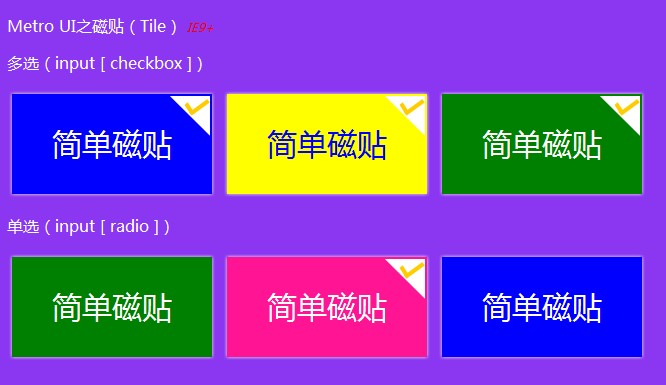
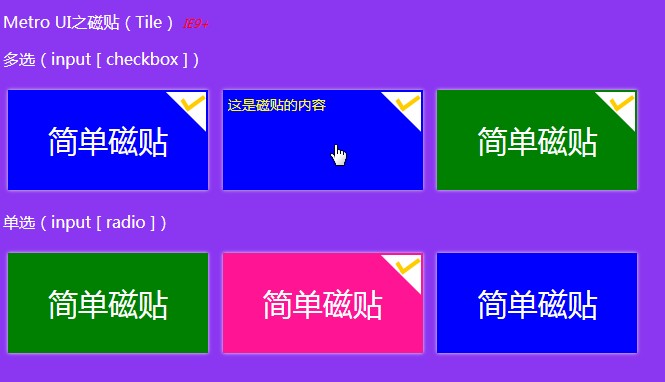
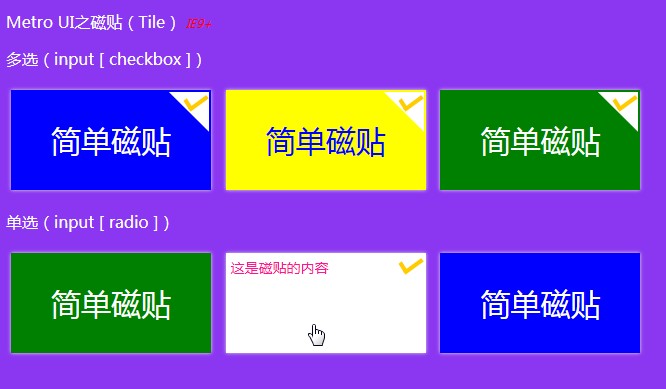
继昨天的“也来“玩”Metro UI之磁贴(一)”之后,还不过瘾,今天继续“玩”吧——今天把单选的功能加进来,还有磁贴的内容,还加了发光效果(CSS3,IE9+浏览器),当然,还是纯CSS,真的要感谢“现代”浏览器~~,废话少说,先上图,然后代码……
效果图:
鼠标经过时显示内容:

代码来了:):
<!DOCTYPE html> <html>
<head>
<meta name="viewport" content="width=device-width" />
<title>Metro UI之磁贴(Tile)</title>
<style type='text/css'>
body {
font-family: '微软雅黑';
background-color: #8b37f1;
} p {
color: white;
} .tile {
display: inline-block;
width: 200px;
height: 100px;
margin: 5px;
padding: 0;
overflow: hidden;
background-color: blue;
color: white;
font-family: '微软雅黑';
font-size: 30px;
vertical-align: middle;
cursor: pointer !important;
box-shadow: 0px 0px 5px #eee;
} .tile label {
width: 200px;
height: 100px;
display: block;
} .tile .title {
display: inline-block;
height: 100px;
width: 200px;
line-height: 100px;
vertical-align: middle;
text-align: center;
} .tile .content {
position: relative;
height: 100px;
padding: 5px;
display: block;
word-wrap: break-word;
word-break: break-all;
font-family: '微软雅黑';
font-size: 14px;
} .tile:hover {
-moz-box-shadow: 0px 0px 5px #ddd;
-webkit-box-shadow: 0px 0px 5px #ddd;
box-shadow: 0px 0px 5px #ddd;
} .tile:hover .content {
margin-top: -100px;
} .tile input[type='checkbox'], .tile input[type='radio'] {
width: 40px;
height: 40px;
margin: 0;
padding: 0;
float: right;
position: relative;
outline: none !important;
border: 0 !important;
top: 0;
right: 0;
display: none;
} .tile .symbol {
display: inline-block !important;
width: 40px;
height: 40px;
position: relative;
top: 2px;
right: 2px;
float: right;
margin-bottom: -40px;
z-index: 10000;
} .tile input[type='checkbox']:checked ~ .symbol, .tile input[type='radio']:checked ~ .symbol {
background-image: url('../Images/tile_selected_symbol.png');
} /*颜色*/
.tile-blue {
background-color: blue;
color: white;
} .tile-blue .content {
background-color: white;
color: blue;
} .tile-yellow {
background-color: yellow;
color: blue;
} .tile-yellow .content {
background-color: blue;
color: yellow;
} .tile-green {
background-color: green;
color: white;
} .tile-green .content {
background-color: white;
color: green;
} .tile-pink {
background-color: deeppink;
color: white;
} .tile-pink .content {
background-color: white;
color: deeppink;
} </style>
</head>
<body>
<p>
Metro UI之磁贴(Tile) <span style="font-style:italic; font-size:12px; color:red;">IE9+</span>
</p>
<p>多选(input [ checkbox ])</p>
<div class="tile tile-blue">
<label>
<input type="checkbox" />
<span class="symbol">
</span><!--这个地方“<span class="symbol"></span>”刚才被编辑器直接过滤掉,也过于“智能”了吧,不是所有的空标签就真的是没有用的……好吧,这样“<span class="symbol"> </span>”,终于把效果效果保住了——这可是关系到钩钩的显示-->
             <span class="title">

                 简单磁贴

             </span>

             <span class="content">这是磁贴的内容</span>

         </label>

     </div>

     <div class="tile tile-yellow">

         <label>

             <input type="checkbox" />

             <span class="symbol">

             </span>

             <span class="title">

                 简单磁贴

             </span>

             <span class="content">这是磁贴的内容</span>

         </label>

     </div>

     <div class="tile tile-green">

         <label>

             <input type="checkbox" />

             <span class="symbol">

             </span>

             <span class="title">

                 简单磁贴

             </span>

             <span class="content">这是磁贴的内容</span>

         </label>

     </div>

     <p>单选(input [ radio ])</p>

     <div class="tile tile-green">

         <label>

             <input type="radio" name="tile_radio" />

             <span class="symbol">

             </span>

             <span class="title">

                 简单磁贴

             </span>

             <span class="content">这是磁贴的内容</span>

         </label>

     </div>

     <div class="tile tile-pink">

         <label>

             <input type="radio" name="tile_radio" />

             <span class="symbol">

             </span>

             <span class="title">

                 简单磁贴

             </span>

             <span class="content">这是磁贴的内容</span>

         </label>

     </div>

     <div class="tile tile-blue">

         <label>

             <input type="radio" name="tile_radio" />

             <span class="symbol">

             </span>

             <span class="title">

                 简单磁贴

             </span>

             <span class="content">这是磁贴的内容</span>

         </label>

     </div>

 </body>

 </html>
在线“玩玩”或者Fork一份自己的:
Metro UI之磁贴(Tile) IE9+
多选(input [ checkbox ])
单选(input [ radio ])
觉得可以的请推荐哦:)
也来“玩”Metro UI之磁贴(二)的更多相关文章
- 也来“玩”Metro UI之磁贴
也来“玩”Metro UI之磁贴 Win8出来已有一段时间了,个人是比较喜欢Metro UI的.一直以来想用Metro UI来做个自己的博客,只是都没有空闲~~今天心血来潮,突然想自己弄一个磁贴玩玩, ...
- 也来“玩”Metro UI之磁贴(一)
Win8出来已有一段时间了,个人是比较喜欢Metro UI的.一直以来想用Metro UI来做个自己的博客,只是都没有空闲~~今天心血来潮,突然想自己弄一个磁贴玩玩,动手……然后就有了本篇. Win8 ...
- ”Metro UI之磁贴(二)
也来“玩”Metro UI之磁贴(二) 继昨天的“也来“玩”Metro UI之磁贴(一)”之后,还不过瘾,今天继续“玩”吧——今天把单选的功能加进来,还有磁贴的内容,还加了发光效果(CSS3,IE9+ ...
- 磁贴界面颜色 Metro UI Colors
http://www.oschina.net/p/metro-ui-colors 介绍 包含了磁贴界面(Metro UI)使用的颜色集合(浅绿色,绿色,深绿色,品红,紫色等).可以查看每一种颜色的各种 ...
- Bootstrap看厌了?试试Metro UI CSS吧
(此文章同时发表在本人微信公众号"dotNET每日精华文章",欢迎右边二维码来关注.) 题记:Bootstrap作为一款超级流行的前端框架,已经成为很多人的首选,不过有时未免有点审 ...
- Metro UI 界面完全解析 (转载)
Metro在微软的内部开发名称为“ typography-based design language”(基于排版的设计语言).它最早出现在微软电子百科全书95,此后微软又有许多知名产品使用了Metro ...
- GitHub 上受欢迎的 Android UI Library 整理二
通知 https://github.com/Tapadoo/Alerter ★2528 - 克服Toast和Snackbar的限制https://github.com/wenmingvs/Notify ...
- 7 款免费的 Metro UI 模板
#1 – Free Metro Ui Style template by Asif Aleem 很棒的蓝色调 Metro UI 管理模板 #2: Metro-Bootstrap by TalksLab ...
- iOS开发~UI布局(二)storyboard中autolayout和size class的使用详解
一.概要:前一篇初步的描述了size class的概念,那么实际中如何使用呢,下面两个问题是我们一定会遇到的: 1.Xcode6中增加了size class,在storyboard中如何使用? 2.a ...
随机推荐
- (转)ASIC设计中各个阶段需要注意的问题——节选
ASIC 的复杂性不断提高,同时工艺在不断地改进,如何在较短的时间内开发一个稳定的可重用的ASIC芯片的设计,并且一次性流片成功,这需要一个成熟的ASIC 的设计方法和开发流程.本文结合NCveril ...
- 51nod 1526 分配笔名
题目来源: CodeForces 基准时间限制:1 秒 空间限制:131072 KB 分值: 320 难度:7级算法题. 班里有n个同学.老师为他们选了n个笔名.现在要把这些笔名分配给每一个同学,每一 ...
- 实用IMX6开发板来袭, 方便开发板方便你
这是迅为电子推出的一款IMX6Q开发板是Freescale Cortex-a9四核处理器,采用底板加核心板形式,稳定耐用,拆卸非常的方便,同一底板兼容四种核心板,分别为四核商业级,四核工业级,双核商业 ...
- SQL——SQL语言全部关键字详解
http://blog.csdn.net/quinnnorris/article/details/71056445 数据库中我们做常用的就是SQL基本查询语言,甚至有些人认为数据库就是SQL,SQL就 ...
- 关于CSS3三角的实现
1,向上的三角 ;; ;; </html> 3,向左的三角 ;; </html> 4,向右的三角 ;; ...
- 系统学习爬虫_2_urllib
什么是urllib urlopen urllib.request.urlopen(url, data=None, [timeout, ]*, cafile=None, capath=None, cad ...
- ios之UIImageView
UIImageView,顾名思义,是用来放置图片的.使用Interface Builder设计界面时,当然可以直接将控件拖进去并设置相关属性,这就不说了,这里讲的是用代码. 1.创建一个UIImage ...
- minGw64编译Qt时遇到too many sections问题
minGw64编译Qt时遇到too many sections问题: 修改\Src\qtbase\mkspecs\win32-g++\qmake.conf中 QMAKE_CFLAGS ...
- (61)zabbix网络发现规则配置实战/详解
开始配置.首先,我们需要定义发现规则,用于扫描.步骤如下 第一步 Configuration >>Discovery>>Create rule,编辑网络发现规则 如上配置,za ...
- Linux内核——进程管理之CFS调度器(基于版本4.x)
<奔跑吧linux内核>3.2笔记,不足之处还望大家批评指正 建议阅读博文https://www.cnblogs.com/openix/p/3262217.html理解linux cfs调 ...