
keras框架的CNN手写数字识别MNIST
参考:林大贵.TensorFlow+Keras深度学习人工智能实践应用[M].北京:清华大学出版社,2018.
首先在命令行中写入 activate tensorflow和jupyter notebook,运行如下代码。当然,事先准备好MNIST数据集。
 # coding: utf-8

 # In[4]:

 from keras.datasets import mnist

 from keras.utils import np_utils

 import numpy as np

 np.random.seed(10)

 # In[5]:

 (x_train,y_train),(x_test,y_test)=mnist.load_data()

 # In[6]:

 x_train4d = x_train.reshape(x_train.shape[0],28,28,1).astype('float32')

 x_test4d = x_test.reshape(x_test.shape[0],28,28,1).astype('float32')

 # In[7]:

 x_train4d_normalize = x_train4d/255

 x_test4d_normalize = x_test4d/255

 # In[8]:

 y_train_oneHot = np_utils.to_categorical(y_train)

 y_test_oneHot = np_utils.to_categorical(y_test)

 # In[9]:

 from keras.models import Sequential

 from keras.layers import Dense,Dropout,Flatten,Conv2D,MaxPooling2D

 # In[10]:

 model = Sequential()

 # In[11]:

 model.add(Conv2D(filters = 16,

                  kernel_size = (5,5),

                  padding = 'same',

                  input_shape = (28,28,1),

                  activation = ('relu')

                 ))

 # In[12]:

 model.add(MaxPooling2D(pool_size=(2,2)))

 # In[13]:

 model.add(Conv2D(filters = 36,

                 kernel_size = (5,5),

                 padding = 'same',

                 activation = 'relu'))

 # In[14]:

 model.add(MaxPooling2D(pool_size=(2,2)))

 # In[15]:

 model.add(Dropout(0,255))

 # In[16]:

 model.add(Flatten())

 # In[17]:

 model.add(Dense(128,activation = 'relu'))

 # In[18]:

 model.add(Dropout(0.5))

 # In[19]:

 model.add(Dense(10,activation = 'sigmoid'))

 # In[20]:

 print(model.summary())

 # In[21]:

 model.compile(loss='categorical_crossentropy',

              optimizer = 'adam',

              metrics = ['accuracy'])

 # In[22]:

 train_history = model.fit(x = x_train4d_normalize,

                          y = y_train_oneHot,

                          validation_split = 0.2,

                          epochs = 10,

                          batch_size = 300,

                          verbose = 2)

 # In[23]:

 import matplotlib.pyplot as plt

 def show_train_history(train_history,train,validation):

     plt.plot(train_history.history[train])

     plt.plot(train_history.history[validation])

     plt.title('Train_History')

     plt.ylabel(train)

     plt.xlabel('Epoch')

     plt.legend(['train','validation'], loc = 'upper left')

     plt.show()

 # In[24]:

 show_train_history(train_history,'acc','val_acc')

 # In[25]:

 show_train_history(train_history,'loss','val_loss')

 # In[26]:

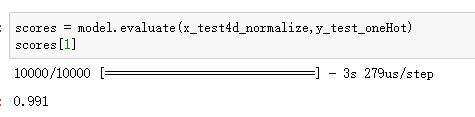
 scores = model.evaluate(x_test4d_normalize,y_test_oneHot)

 scores[1]

 # In[27]:

 def plot_image_labels_prediction(images,labels,prediction,idx,num=10):

     fig = plt.gcf()

     fig.set_size_inches(12,24)

     if num>50 : num = 50

     for i in range(0,num):

         ax = plt.subplot(10,5,1+i)

         ax.imshow(images[idx],cmap='binary')

         title = "lable="+str(labels[idx])

         if len(prediction)>0:

             title+=",predict="+str(prediction[idx])

         ax.set_title(title,fontsize=10)

         ax.set_xticks([]);ax.set_yticks([])

         idx+=1

     plt.show()

 # In[28]:

 prediction = model.predict_classes(x_test4d_normalize)

 # In[29]:

 plot_image_labels_prediction(x_test,

                              y_test,

                              prediction,

                              0,

                             50)

 # In[30]:

 import pandas as pd

 # In[31]:

 pd.crosstab(y_test,

             prediction,

            rownames=['label'],

            colnames=['predict'])

 # In[ ]:
卷积神经网络简介:https://www.cnblogs.com/bai2018/p/10413889.html
产生如下神经网络:
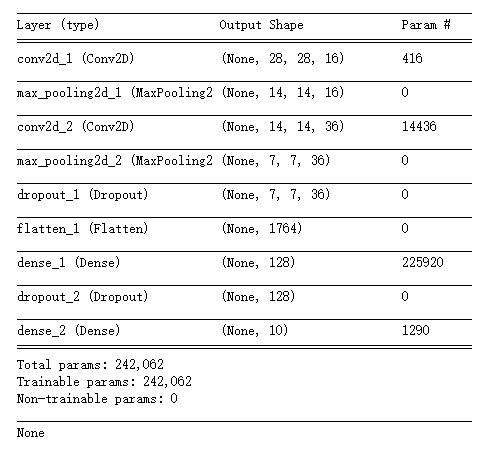
其中加入的dropout层用于避免过度拟合。在每次迭代时,随机舍弃一部分的训练样本。
训练效果较好。
林大贵.TensorFlow+Keras深度学习人工智能实践应用[M].北京:清华大学出版社,2018.
keras框架的CNN手写数字识别MNIST的更多相关文章
- keras框架的MLP手写数字识别MNIST,梳理?
keras框架的MLP手写数字识别MNIST 代码: # coding: utf-8 # In[1]: import numpy as np import pandas as pd from kera ...
- TensorFlow 之 手写数字识别MNIST
官方文档: MNIST For ML Beginners - https://www.tensorflow.org/get_started/mnist/beginners Deep MNIST for ...
- Keras cnn 手写数字识别示例
#基于mnist数据集的手写数字识别 #构造了cnn网络拟合识别函数,前两层为卷积层,第三层为池化层,第四层为Flatten层,最后两层为全连接层 #基于Keras 2.1.1 Tensorflow ...
- CNN 手写数字识别
1. 知识点准备 在了解 CNN 网络神经之前有两个概念要理解,第一是二维图像上卷积的概念,第二是 pooling 的概念. a. 卷积 关于卷积的概念和细节可以参考这里,卷积运算有两个非常重要特性, ...
- 卷积神经网络CNN 手写数字识别
1. 知识点准备 在了解 CNN 网络神经之前有两个概念要理解,第一是二维图像上卷积的概念,第二是 pooling 的概念. a. 卷积 关于卷积的概念和细节可以参考这里,卷积运算有两个非常重要特性, ...
- kaggle 实战 (2): CNN 手写数字识别
文章目录 Tensorflow 官方示例 CNN 提交结果 Tensorflow 官方示例 import tensorflow as tf mnist = tf.keras.datasets.mnis ...
- pytorch CNN 手写数字识别
一个被放弃的入门级的例子终于被我实现了,虽然还不太完美,但还是想记录下 1.预处理 相比较从库里下载数据集(关键是经常失败,格式也看不懂),更喜欢直接拿图片,从网上找了半天,最后从CSDN上下载了一个 ...
- keras基于卷积网络手写数字识别
import time import keras from keras.utils import np_utils start = time.time() (x_train, y_train), (x ...
- Tensorflow手写数字识别---MNIST
MNIST数据集:包含数字0-9的灰度图, 图片size为28x28.训练样本:55000,测试样本:10000,验证集:5000
随机推荐
- Codeforces Beta Round #40 (Div. 2)
Codeforces Beta Round #40 (Div. 2) http://codeforces.com/contest/41 A #include<bits/stdc++.h> ...
- @RequestMapping使用须知
----------------------siwuxie095 @RequestMapping 使用须知 使用 @RequestMapping 注解映射请求路径 即 你可以使用 @RequestMa ...
- robotium—只有apk文件的测试
把ppt的内容总结一下,并把问题说明一下: 把基本步骤搞出来,用notepad的程序吧,直接安装apk,就当做是不知道源码就好啦! 直接用自己的手机上就行啦!! 一.重签名: 步骤: 1.直接运行re ...
- Django具体操作(四)
自定义模板语法的标签 首先在django的项目中创建app并且在settings中添加了APP的名称. 在app添加templatetags模块(名字是固定的,也就是说,必须要这样) 如图如何自定义呢 ...
- echarts横向柱状图如果想打开网址
代码: var data = eval(data); var xList = new Array(); var yList = new Array(); var urlList = new Array ...
- java 基础之--java动态代理
1.抽象角色:声明真实对象与代理对象的共同接口: 2.代理角色:相当于中介的作用,bridge,内部包含对真实角色的reference,在执行真实操作对象时,附加其他操作,相当于对真实角色的封装: 3 ...
- 流(Stream)、文件(File)和IO
读取控制台输入 Java 的控制台输入由 System.in 完成. 为了获得一个绑定到控制台的字符流,你可以把 System.in 包装在一个 BufferedReader 对象中来创建一个字符流. ...
- webpack(一) 安装使用
(一)webpack的安装 webpack是基于node.js,因此需要安装node.js. 安装好node.js 后,全局安装webpack,命令如下 npm install webpack -g ...
- CALL transaction 的用法-传内表
使用memory (这个方法和第二种方式的区别是可以传输复选框的值) data: wfbomcom type rc29n. move-corresponding bom_key to wfbomc ...
- Find Amir CodeForces 805C
http://codeforces.com/contest/805/problem/C 题意:有n个学校,学校的编号是从1到n,从学校i到学校j的花费是(i+j)%(n+1),让你求遍历完所有学校的最 ...