
kaggle 实战 (2): CNN 手写数字识别
文章目录
Tensorflow 官方示例
import tensorflow as tf

mnist = tf.keras.datasets.mnist

(x_train, y_train),(x_test, y_test) = mnist.load_data()

x_train, x_test = x_train / 255.0, x_test / 255.0

model = tf.keras.models.Sequential([

  tf.keras.layers.Flatten(input_shape=(28, 28)),

  tf.keras.layers.Dense(512, activation=tf.nn.relu),

  tf.keras.layers.Dropout(0.2),

  tf.keras.layers.Dense(10, activation=tf.nn.softmax)

])

model.compile(optimizer='adam',

              loss='sparse_categorical_crossentropy',

              metrics=['accuracy'])

model.fit(x_train, y_train, epochs=5)

model.evaluate(x_test, y_test)
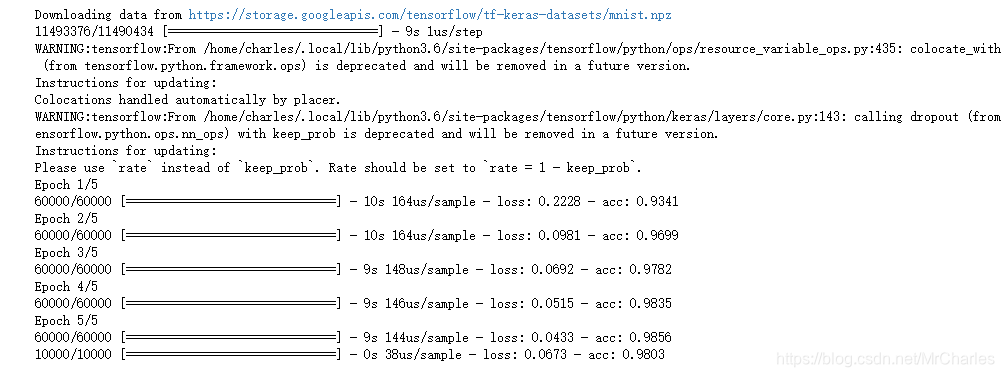
这个本身精度不高,我们可以改变结构提升精度
CNN
from __future__ import division, print_function, absolute_import

# Import MNIST data

from tensorflow.examples.tutorials.mnist import input_data

mnist = input_data.read_data_sets("/tmp/data/", one_hot=False)

import tensorflow as tf

import matplotlib.pyplot as plt

import numpy as np

# Training Parameters

learning_rate = 0.001

num_steps = 2000

batch_size = 128

# Network Parameters

num_input = 784 # MNIST data input (img shape: 28*28)

num_classes = 10 # MNIST total classes (0-9 digits)

dropout = 0.25 # Dropout, probability to drop a unit

# Create the neural network

def conv_net(x_dict, n_classes, dropout, reuse, is_training):

    # Define a scope for reusing the variables

    with tf.variable_scope('ConvNet', reuse=reuse):

        # TF Estimator input is a dict, in case of multiple inputs

        x = x_dict['images']

        # MNIST data input is a 1-D vector of 784 features (28*28 pixels)

        # Reshape to match picture format [Height x Width x Channel]

        # Tensor input become 4-D: [Batch Size, Height, Width, Channel]

        x = tf.reshape(x, shape=[-1, 28, 28, 1])

        # Convolution Layer with 32 filters and a kernel size of 5

        conv1 = tf.layers.conv2d(x, 32, 5, activation=tf.nn.relu)

        # Max Pooling (down-sampling) with strides of 2 and kernel size of 2

        conv1 = tf.layers.max_pooling2d(conv1, 2, 2)

        # Convolution Layer with 64 filters and a kernel size of 3

        conv2 = tf.layers.conv2d(conv1, 64, 3, activation=tf.nn.relu)

        # Max Pooling (down-sampling) with strides of 2 and kernel size of 2

        conv2 = tf.layers.max_pooling2d(conv2, 2, 2)

        # Flatten the data to a 1-D vector for the fully connected layer

        fc1 = tf.contrib.layers.flatten(conv2)

        # Fully connected layer (in tf contrib folder for now)

        fc1 = tf.layers.dense(fc1, 1024)

        # Apply Dropout (if is_training is False, dropout is not applied)

        fc1 = tf.layers.dropout(fc1, rate=dropout, training=is_training)

        # Output layer, class prediction

        out = tf.layers.dense(fc1, n_classes)

    return out

# Define the model function (following TF Estimator Template)

def model_fn(features, labels, mode):

    # Build the neural network

    # Because Dropout have different behavior at training and prediction time, we

    # need to create 2 distinct computation graphs that still share the same weights.

    logits_train = conv_net(features, num_classes, dropout, reuse=False, is_training=True)

    logits_test = conv_net(features, num_classes, dropout, reuse=True, is_training=False)

    # Predictions

    pred_classes = tf.argmax(logits_test, axis=1)

    pred_probas = tf.nn.softmax(logits_test)

    # If prediction mode, early return

    if mode == tf.estimator.ModeKeys.PREDICT:

        return tf.estimator.EstimatorSpec(mode, predictions=pred_classes)

    # Define loss and optimizer

    loss_op = tf.reduce_mean(tf.nn.sparse_softmax_cross_entropy_with_logits(

        logits=logits_train, labels=tf.cast(labels, dtype=tf.int32)))

    optimizer = tf.train.AdamOptimizer(learning_rate=learning_rate)

    train_op = optimizer.minimize(loss_op, global_step=tf.train.get_global_step())

    # Evaluate the accuracy of the model

    acc_op = tf.metrics.accuracy(labels=labels, predictions=pred_classes)

    # TF Estimators requires to return a EstimatorSpec, that specify

    # the different ops for training, evaluating, ...

    estim_specs = tf.estimator.EstimatorSpec(

      mode=mode,

      predictions=pred_classes,

      loss=loss_op,

      train_op=train_op,

      eval_metric_ops={'accuracy': acc_op})

    return estim_specs

# Build the Estimator

model = tf.estimator.Estimator(model_fn)

# Define the input function for training

input_fn = tf.estimator.inputs.numpy_input_fn(

    x={'images': mnist.train.images}, y=mnist.train.labels,

    batch_size=batch_size, num_epochs=None, shuffle=True)

# Train the Model

model.train(input_fn, steps=num_steps)

# Evaluate the Model

# Define the input function for evaluating

input_fn = tf.estimator.inputs.numpy_input_fn(

    x={'images': mnist.test.images}, y=mnist.test.labels,

    batch_size=batch_size, shuffle=False)

# Use the Estimator 'evaluate' method

model.evaluate(input_fn)

import pandas as pd # data processing, CSV file I/O (e.g. pd.read_csv)

#test=pd.read_csv('./input/test.csv')

import numpy

from numpy import genfromtxt

my_data = numpy.double(genfromtxt('./input/test.csv', delimiter=','))

# Prepare the input data

input_fn = tf.estimator.inputs.numpy_input_fn(

    x={'images': numpy.float32(my_data[1:,:])}, shuffle=False)

# Use the model to predict the images class

preds2 = list(model.predict(input_fn))

Submission = pd.DataFrame({

        "ImageId": range(1, len(preds2)+1),

        "Label": preds2

    })

Submission.to_csv("cnnMnistSubmission.csv", index=False)

Submission.head(5)
提交结果

kaggle 实战 (2): CNN 手写数字识别的更多相关文章
- Kaggle竞赛丨入门手写数字识别之KNN、CNN、降维
引言 这段时间来,看了西瓜书.蓝皮书,各种机器学习算法都有所了解,但在实践方面却缺乏相应的锻炼.于是我决定通过Kaggle这个平台来提升一下自己的应用能力,培养自己的数据分析能力. 我个人的计划是先从 ...
- CNN 手写数字识别
1. 知识点准备 在了解 CNN 网络神经之前有两个概念要理解,第一是二维图像上卷积的概念,第二是 pooling 的概念. a. 卷积 关于卷积的概念和细节可以参考这里,卷积运算有两个非常重要特性, ...
- 卷积神经网络CNN 手写数字识别
1. 知识点准备 在了解 CNN 网络神经之前有两个概念要理解,第一是二维图像上卷积的概念,第二是 pooling 的概念. a. 卷积 关于卷积的概念和细节可以参考这里,卷积运算有两个非常重要特性, ...
- Keras cnn 手写数字识别示例
#基于mnist数据集的手写数字识别 #构造了cnn网络拟合识别函数,前两层为卷积层,第三层为池化层,第四层为Flatten层,最后两层为全连接层 #基于Keras 2.1.1 Tensorflow ...
- pytorch CNN 手写数字识别
一个被放弃的入门级的例子终于被我实现了,虽然还不太完美,但还是想记录下 1.预处理 相比较从库里下载数据集(关键是经常失败,格式也看不懂),更喜欢直接拿图片,从网上找了半天,最后从CSDN上下载了一个 ...
- keras框架的CNN手写数字识别MNIST
参考:林大贵.TensorFlow+Keras深度学习人工智能实践应用[M].北京:清华大学出版社,2018. 首先在命令行中写入 activate tensorflow和jupyter notebo ...
- kaggle 实战 (1): PCA + KNN 手写数字识别
文章目录 加载package read data PCA 降维探索 选择50维度, 拆分数据为训练集,测试机 KNN PCA降维和K值筛选 分析k & 维度 vs 精度 预测 生成提交文件 本 ...
- 深度学习之PyTorch实战(3)——实战手写数字识别
上一节,我们已经学会了基于PyTorch深度学习框架高效,快捷的搭建一个神经网络,并对模型进行训练和对参数进行优化的方法,接下来让我们牛刀小试,基于PyTorch框架使用神经网络来解决一个关于手写数字 ...
- keras和tensorflow搭建DNN、CNN、RNN手写数字识别
MNIST手写数字集 MNIST是一个由美国由美国邮政系统开发的手写数字识别数据集.手写内容是0~9,一共有60000个图片样本,我们可以到MNIST官网免费下载,总共4个.gz后缀的压缩文件,该文件 ...
随机推荐
- zabbix--添加host
在client配置好zabbix_agent后,如果server端没配置自动发现,那就需要创建添加host. 首先找到地方.Configuration--Hosts--Create Host 创建ho ...
- 【转】从SOA到微服务,企业分布式应用架构在云原生时代如何重塑
摘要: SOA 采用中心化的服务总线架构,解耦了业务逻辑和服务治理逻辑:微服务架构回归了去中心化的点对点调用方式,在提升敏捷性和可伸缩性的同时,也牺牲了业务逻辑和服务治理逻辑解耦所带来的灵活性. 为了 ...
- 使用tensorboard报错 ImportError: No module named past.builtins
安装 future pip install future conda install future
- activemq启动失败修改Linux服务器名称
查找问题步骤: 1. /usr/local/apache-activemq-5.9.1/data/activemq.log 看一下这个.log后缀的启动日志,可以将它下载下来再看. 先尝试修改配置文 ...
- gitj基础2
回滚版本 git reset --hard HEAD^ 回滚上一个版本 git reset --hard 版本号(或者版本号前6位) 回滚到指定版本 如果修改版本了,也关 ...
- wordpress非弹窗表单多文件上传插件
插件名:Drag and Drop Multiple File Upload - Contact Form 7 (ps:如果是弹窗表单,不要使用这个插件Drag and Drop Multiple F ...
- TYVJ1061 Mobile Service
P1061 Mobile Service 时间: 1000ms / 空间: 131072KiB / Java类名: Main 描述 一个公司有三个移动服务员.如果某个地方有一个请求,某个员工必须赶到那 ...
- NOIp2018集训test-10-15 (bike day1)
B 君的第一题 求斐波那契数列模n的循环节. 1.暴力bsgs,毕姥爷好像说循环节最大是6*n还是多少的,反之比较小,直接bsgs这题是可以过的.但是我非常蠢重载运算符的时候把相等返回成了小于,然后根 ...
- NX二次开发-UFUN将实体放入STL文件中函数UF_STD_put_solid_in_stl_file
NX9+VS2012 #include <uf.h> #include <uf_obj.h> #include <uf_modl.h> #include <u ...
- C++ string的大小写转换【转载】
转载自https://www.cnblogs.com/balingybj/p/4678850.html 将一个string转换成大写或者小写,是项目中经常需要做的事情,但string类里并 没有提供这 ...