
keras框架的CNN手写数字识别MNIST
参考:林大贵.TensorFlow+Keras深度学习人工智能实践应用[M].北京:清华大学出版社,2018.
首先在命令行中写入 activate tensorflow和jupyter notebook,运行如下代码。当然,事先准备好MNIST数据集。
 # coding: utf-8

 # In[4]:

 from keras.datasets import mnist

 from keras.utils import np_utils

 import numpy as np

 np.random.seed(10)

 # In[5]:

 (x_train,y_train),(x_test,y_test)=mnist.load_data()

 # In[6]:

 x_train4d = x_train.reshape(x_train.shape[0],28,28,1).astype('float32')

 x_test4d = x_test.reshape(x_test.shape[0],28,28,1).astype('float32')

 # In[7]:

 x_train4d_normalize = x_train4d/255

 x_test4d_normalize = x_test4d/255

 # In[8]:

 y_train_oneHot = np_utils.to_categorical(y_train)

 y_test_oneHot = np_utils.to_categorical(y_test)

 # In[9]:

 from keras.models import Sequential

 from keras.layers import Dense,Dropout,Flatten,Conv2D,MaxPooling2D

 # In[10]:

 model = Sequential()

 # In[11]:

 model.add(Conv2D(filters = 16,

                  kernel_size = (5,5),

                  padding = 'same',

                  input_shape = (28,28,1),

                  activation = ('relu')

                 ))

 # In[12]:

 model.add(MaxPooling2D(pool_size=(2,2)))

 # In[13]:

 model.add(Conv2D(filters = 36,

                 kernel_size = (5,5),

                 padding = 'same',

                 activation = 'relu'))

 # In[14]:

 model.add(MaxPooling2D(pool_size=(2,2)))

 # In[15]:

 model.add(Dropout(0,255))

 # In[16]:

 model.add(Flatten())

 # In[17]:

 model.add(Dense(128,activation = 'relu'))

 # In[18]:

 model.add(Dropout(0.5))

 # In[19]:

 model.add(Dense(10,activation = 'sigmoid'))

 # In[20]:

 print(model.summary())

 # In[21]:

 model.compile(loss='categorical_crossentropy',

              optimizer = 'adam',

              metrics = ['accuracy'])

 # In[22]:

 train_history = model.fit(x = x_train4d_normalize,

                          y = y_train_oneHot,

                          validation_split = 0.2,

                          epochs = 10,

                          batch_size = 300,

                          verbose = 2)

 # In[23]:

 import matplotlib.pyplot as plt

 def show_train_history(train_history,train,validation):

     plt.plot(train_history.history[train])

     plt.plot(train_history.history[validation])

     plt.title('Train_History')

     plt.ylabel(train)

     plt.xlabel('Epoch')

     plt.legend(['train','validation'], loc = 'upper left')

     plt.show()

 # In[24]:

 show_train_history(train_history,'acc','val_acc')

 # In[25]:

 show_train_history(train_history,'loss','val_loss')

 # In[26]:

 scores = model.evaluate(x_test4d_normalize,y_test_oneHot)

 scores[1]

 # In[27]:

 def plot_image_labels_prediction(images,labels,prediction,idx,num=10):

     fig = plt.gcf()

     fig.set_size_inches(12,24)

     if num>50 : num = 50

     for i in range(0,num):

         ax = plt.subplot(10,5,1+i)

         ax.imshow(images[idx],cmap='binary')

         title = "lable="+str(labels[idx])

         if len(prediction)>0:

             title+=",predict="+str(prediction[idx])

         ax.set_title(title,fontsize=10)

         ax.set_xticks([]);ax.set_yticks([])

         idx+=1

     plt.show()

 # In[28]:

 prediction = model.predict_classes(x_test4d_normalize)

 # In[29]:

 plot_image_labels_prediction(x_test,

                              y_test,

                              prediction,

                              0,

                             50)

 # In[30]:

 import pandas as pd

 # In[31]:

 pd.crosstab(y_test,

             prediction,

            rownames=['label'],

            colnames=['predict'])

 # In[ ]:
卷积神经网络简介:https://www.cnblogs.com/bai2018/p/10413889.html
产生如下神经网络:
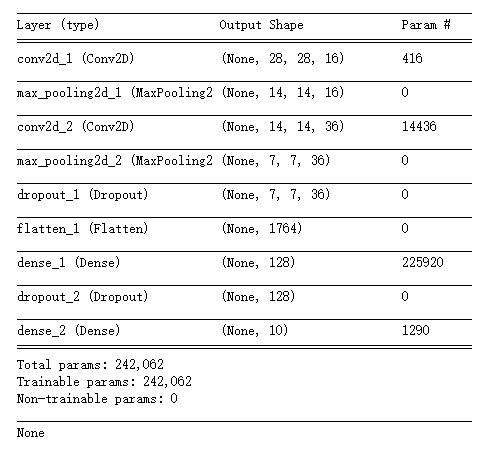
其中加入的dropout层用于避免过度拟合。在每次迭代时,随机舍弃一部分的训练样本。
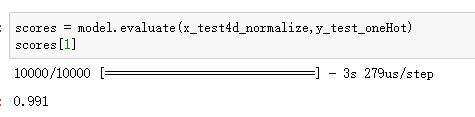
训练效果较好。
林大贵.TensorFlow+Keras深度学习人工智能实践应用[M].北京:清华大学出版社,2018.
keras框架的CNN手写数字识别MNIST的更多相关文章
- keras框架的MLP手写数字识别MNIST,梳理?
keras框架的MLP手写数字识别MNIST 代码: # coding: utf-8 # In[1]: import numpy as np import pandas as pd from kera ...
- TensorFlow 之 手写数字识别MNIST
官方文档: MNIST For ML Beginners - https://www.tensorflow.org/get_started/mnist/beginners Deep MNIST for ...
- Keras cnn 手写数字识别示例
#基于mnist数据集的手写数字识别 #构造了cnn网络拟合识别函数,前两层为卷积层,第三层为池化层,第四层为Flatten层,最后两层为全连接层 #基于Keras 2.1.1 Tensorflow ...
- CNN 手写数字识别
1. 知识点准备 在了解 CNN 网络神经之前有两个概念要理解,第一是二维图像上卷积的概念,第二是 pooling 的概念. a. 卷积 关于卷积的概念和细节可以参考这里,卷积运算有两个非常重要特性, ...
- 卷积神经网络CNN 手写数字识别
1. 知识点准备 在了解 CNN 网络神经之前有两个概念要理解,第一是二维图像上卷积的概念,第二是 pooling 的概念. a. 卷积 关于卷积的概念和细节可以参考这里,卷积运算有两个非常重要特性, ...
- kaggle 实战 (2): CNN 手写数字识别
文章目录 Tensorflow 官方示例 CNN 提交结果 Tensorflow 官方示例 import tensorflow as tf mnist = tf.keras.datasets.mnis ...
- pytorch CNN 手写数字识别
一个被放弃的入门级的例子终于被我实现了,虽然还不太完美,但还是想记录下 1.预处理 相比较从库里下载数据集(关键是经常失败,格式也看不懂),更喜欢直接拿图片,从网上找了半天,最后从CSDN上下载了一个 ...
- keras基于卷积网络手写数字识别
import time import keras from keras.utils import np_utils start = time.time() (x_train, y_train), (x ...
- Tensorflow手写数字识别---MNIST
MNIST数据集:包含数字0-9的灰度图, 图片size为28x28.训练样本:55000,测试样本:10000,验证集:5000
随机推荐
- 九 configparser模块
配置文件如下: # 注释1 ; 注释2 [section1] k1 = v1 k2:v2 user=egon age=18 is_admin=true salary=31 [section2] k1 ...
- Java之成员访问控制
Java中数据成员.方法成员有四种访问控制.
- ionic创建工程中遇到异常、错误及解决方法
1. 创建工程——download failed ionic start myApp tabs 遇到如下错误 Downloading--Failed! Error:Timeout of 25000ms ...
- WISH开发API
https://merchant.wish.com/documentation/api#api http://wishquan.com/
- [剑指Offer]快排
快排 看到一篇博文提到"东拆西补"的思想,非常贴切了. 这里采用传统的方法,没有采用剑指Offer书上的方法. 细节很多,需巩固. 其他知识点 生成一个范围内随机数 见代码,这里为 ...
- swift4.2 打印所有系统字体
func showAllFonts(){ let familyNames = UIFont.familyNames var index:Int = 0 for familyName in family ...
- java 线程Thread 技术--线程状态与同步问题
线程技术第三篇: 线程的状态: 1. 创建状态: 当用new 操作符创建一个新的线程对象时,该线程就处于创建状态,系统不为它分配资源 2.可运行状态:当线程调用start 方法将为线程分配必须的系统资 ...
- Java面试基础知识(2)
1.一个".java"源文件中是否可以包括多个类(不是内部类)?有什么限制? 可以有多个类,但只能有一个public的类,并且public的类名必须与文件名相一致. 2.说说& ...
- 39-java中Arrays.sort 和 collections.sort()总结
总结一下java 中的两种排序工具: Arrays.sort() : 主要针对 数组类型排序,如果数组里面的元素是对象,要按对象属性排序的话,需要重写 Comparator() 函数,重写里面的 i ...
- WorkerMan源码分析 - 实现最简单的原型
之前一直认为workerman源码理解起很复杂,这段时间花了3个下午研究,其实只要理解 php如何守护化进程.信号.多进程.libevent扩展使用,对于如何实现就比较轻松了. 相关代码都在githu ...