
C# 监测每个方法的执行次数和占用时间(测试3)
原文:http://www.cnblogs.com/RicCC/archive/2010/03/15/castle-dynamic-proxy.html
在Nuget引用 Castle.DynamicProxy 和 Newtonsoft.Json 这个
操作日志的作用:
可用来分析方法的执行效率
分析方法执行效率慢的原因
根据传入的参数测试,找到运行瓶颈问题
拦截器:
    /// <summary>

    /// 拦截器

    /// </summary>

    public class CallingLogInterceptor : IInterceptor

    {

        private DateTime dt { get; set; }

        private TimeSpan ts { get; set; }

        /// <summary>

        /// 方法执行前

        /// </summary>

        /// <param name="invocation"></param>

        private void PreProceed(IInvocation invocation)

        {

            dt = DateTime.Now;

        }

        /// <summary>

        /// 方法执行后

        /// </summary>

        /// <param name="invocation"></param>

        private void PostProceed(IInvocation invocation)

        {

            ts = DateTime.Now - dt;

            MethodOperationInfo.Add(invocation, ts.TotalMilliseconds);

        }

        /// <summary>

        /// 拦截

        /// </summary>

        /// <param name="invocation"></param>

        public void Intercept(IInvocation invocation)

        {

            this.PreProceed(invocation);

            invocation.Proceed();//调用

            this.PostProceed(invocation);

        }

    }
操作日志:
    /// <summary>

    /// 操作日志

    /// </summary>

    public class MethodOperationInfo

    {

        public string NameSpaceName { get; set; }

        public string ClassName { get; set; }

        public string MethodName { get; set; }

        public string Parameters { get; set; }

        public string ParameterTypes { get; set; }

        public double TotalMilliseconds { get; set; }

        public int ExecuteNumber { get; set; }

        public static List<MethodOperationInfo> list = new List<MethodOperationInfo>();//存放 详细信息

        public static Dictionary<string, MethodOperationInfo> dic = new Dictionary<string, MethodOperationInfo>();//存放 统计信息

        /// <summary>

        /// 保证数据长度相同

        /// </summary>

        /// <param name="obj"></param>

        /// <param name="len"></param>

        /// <param name="afterFill">后填充/前填充</param>

        /// <returns></returns>

        public static string GetSameLenString(object obj, int len, bool afterFill = true)

        {

            string name = obj.ToString();

            int count = len - name.Length;

            if (afterFill)

            {

                for (int i = ; i < count; i++)

                {

                    name += " ";

                }

                return name;

            }

            else

            {

                string value = "";

                for (int i = ; i < count; i++)

                {

                    value += " ";

                }

                value += name;

                return value;

            }

        }

        /// <summary>

        /// 获取方法的参数类型

        /// 如:(System.String, System.Object, System.Int32)

        /// </summary>

        /// <param name="invocation"></param>

        /// <returns></returns>

        public static string GetParameterTypes(IInvocation invocation)

        {

            MethodInfo mInfo = invocation.Method;

            ParameterInfo[] pInfos = mInfo.GetParameters();

            string str = "";

            str += "(";

            for (int j = ; j < pInfos.Length; j++)

            {

                var p = pInfos[j];

                string pTypeName = $"{p.ParameterType.ToString()}, ";

                if (p.ParameterType.IsGenericType && (p.ParameterType.GetGenericTypeDefinition() == typeof(Nullable<>)))

                {

                    pTypeName = $"{Nullable.GetUnderlyingType(p.ParameterType).Name}?, ";

                }

                str += pTypeName;

            }

            str = str.TrimEnd(' ').TrimEnd(',');

            str += ")";

            return str;

        }

        /// <summary>

        /// 获取方法的参数

        /// </summary>

        /// <param name="invocation"></param>

        /// <returns></returns>

        public static string GetParameter(IInvocation invocation)

        {

            string Parameters = "";//参数

            if ((invocation.Arguments != null) && (invocation.Arguments.Length > ))

            {

                Parameters = JsonConvert.SerializeObject(invocation.Arguments);

            }

            return Parameters;

        }

        /// <summary>

        /// 添加信息

        /// </summary>

        /// <param name="invocation"></param>

        /// <param name="TotalMilliseconds"></param>

        public static void Add(IInvocation invocation, double TotalMilliseconds)

        {

            string NameSpaceName = invocation.TargetType.Namespace;

            string ClassName = invocation.TargetType.Name;

            string MethodName = invocation.Method.Name;//方法名

            string ParameterTypes = GetParameterTypes(invocation);

            string Parameters = GetParameter(invocation);//参数

            //添加到 list

            var model = new MethodOperationInfo

            {

                NameSpaceName = NameSpaceName,

                ClassName = ClassName,

                MethodName = MethodName,

                ParameterTypes = ParameterTypes,

                Parameters = Parameters,

                TotalMilliseconds = TotalMilliseconds,

                ExecuteNumber =

            };

            list.Add(model);

            //添加到 dictionary

            string key = MethodName + ParameterTypes;

            if (dic.ContainsKey(key))

            {

                dic[key].TotalMilliseconds += TotalMilliseconds;

                dic[key].ExecuteNumber += ;

            }

            else

            {

                dic.Add(key, model.MemberwiseClone() as MethodOperationInfo);

            }

        }

        /// <summary>

        /// 显示日志

        /// </summary>

        /// <param name="ShowDetailRecord">是否显示详情记录-比较占用时间</param>

        /// <param name="IsFilter">是否开启过滤</param>

        public static void Show(bool ShowDetailRecord = true, bool IsFilter = false)

        {

            StringBuilder sb = new StringBuilder();

            DateTime beforDT = DateTime.Now;

            List<string> list_Show_Method = new List<string>() { "GetSingle_Value1" };//可改为配置参数

            //每个方法-耗时

            string str = "";

            double TotalMilliseconds = ;

            foreach (var item in dic)

            {

                TotalMilliseconds += item.Value.TotalMilliseconds;

                str += $"命名空间:{GetSameLenString(item.Value.NameSpaceName, 40)}     ";

                str += $"类名:{GetSameLenString(item.Value.ClassName, 30)}     ";

                str += $"方法:{GetSameLenString(item.Key, 80)}     ";

                str += $"次数:{GetSameLenString(item.Value.ExecuteNumber, 10)}     ";

                str += $"耗时:{GetSameLenString(item.Value.TotalMilliseconds, 10, false) }毫秒     ";

                str += $"\r\n";

            }

            sb.Append(str + "\r\n\r\n");

            //方法-总耗时

            str = "";

            str += $"所有方法-耗时:{TotalMilliseconds}毫秒    ";

            str += $"{TotalMilliseconds / 1000}秒    ";

            str += $"{(TotalMilliseconds / 1000 / 60).ToString("f2")}分钟    ";

            str += $"当前时间:{DateTime.Now}    ";

            sb.Insert(, str + "\r\n\r\n");

            //方法每次-耗时

            if (ShowDetailRecord)

            {

                for (int i = ; i < list.Count; i++)

                {

                    Console.WriteLine($"处理数据-当前行:{list.Count - i}");

                    var item = list[i];

                    //数据过滤

                    if (IsFilter && !list_Show_Method.Contains(item.MethodName))

                    {

                        continue;

                    }

                    sb.Append($"命名空间:{GetSameLenString(item.NameSpaceName, 40)}     ");

                    sb.Append($"类名:{GetSameLenString(item.ClassName, 30)}     ");

                    sb.Append($"方法:{GetSameLenString(item.MethodName + item.ParameterTypes, 80)}     ");

                    sb.Append($"次数:{GetSameLenString(item.ExecuteNumber, 10)}     ");

                    sb.Append($"耗时:{GetSameLenString(item.TotalMilliseconds, 10, false) }毫秒     ");

                    sb.Append($"参数:{GetSameLenString(item.Parameters, 50)}     ");

                    sb.Append($"\r\n");

                }

            }

            //计算日志-耗时

            sb.Insert(, $"计算日志-耗时:{DateTime.Now.Subtract(beforDT).TotalSeconds.ToString("#0.00000")}秒 \r\n\r\n");

            System.IO.File.WriteAllText($"LOG_{DateTime.Now.ToString("yyyyMMddHHmmssfff")}.txt", sb.ToString());

            Console.WriteLine("完成!");

        }

    }
测试类:
    /// <summary>

    /// 测试类1

    /// </summary>

    public class Class5_test1

    {

        public virtual void test1()

        {

            System.Threading.Thread.Sleep( * );

            int num = ;

            for (int i = ; i < ; i++)

            {

                num += ;

            }

            test1();

            test1(, );

            test1(, "");

        }

        public virtual void test1(int i) { }

        public virtual void test1(int i, int j) { }

        public virtual void test1(int i, string j) { }

    }
入口:
    class Class5

    {

        static void Main(string[] args)

        {

            ProxyGenerator generator = new ProxyGenerator();//代理

            CallingLogInterceptor interceptor = new CallingLogInterceptor();//定义 拦截器

            Class5_test1 entity = generator.CreateClassProxy<Class5_test1>(interceptor);

            //SensorRecordService entity = generator.CreateClassProxy<SensorRecordService>(interceptor);

            DateTime beforDT1 = DateTime.Now;//开始时间

            try

            {

                entity.test1();

                //entity.DealWithSensorRecord(74619, 174619);

                //int start = Convert.ToInt32(GetAppSetting("start_Id"));

                //int end = Convert.ToInt32(GetAppSetting("end_Id"));

                //for (int i = start; i < end;)

                //{

                //    int start_Id = i;

                //    i = i + 10000;

                //    int end_Id = i > end ? end : i;

                //    Console.WriteLine($"开始计算:start_Id:{start_Id} end_Id:{end_Id}");

                //    entity.DealWithSensorRecord(start_Id, end_Id);

                //}

            }

            catch (Exception ex)

            {

                Console.WriteLine(ex.Message);

            }

            MethodOperationInfo.Show();

            TimeSpan ts = DateTime.Now.Subtract(beforDT1);

            string str = $"总共耗时:{ts.TotalSeconds.ToString()}秒  或  {ts.TotalMinutes.ToString("f3")}分";

            System.IO.File.AppendAllText("1.txt", $"{str}\r\n\r\n");

            Console.WriteLine(str);

            Console.WriteLine("操作完成!");

            Console.ReadLine();

        }

        /// <summary>

        /// 获取 配置文件信息

        /// </summary>

        /// <param name="key"></param>

        /// <returns></returns>

        public static string GetAppSetting(string key)

        {

            return ConfigurationManager.OpenExeConfiguration(ConfigurationUserLevel.None).AppSettings.Settings[key].Value;

        }

    }
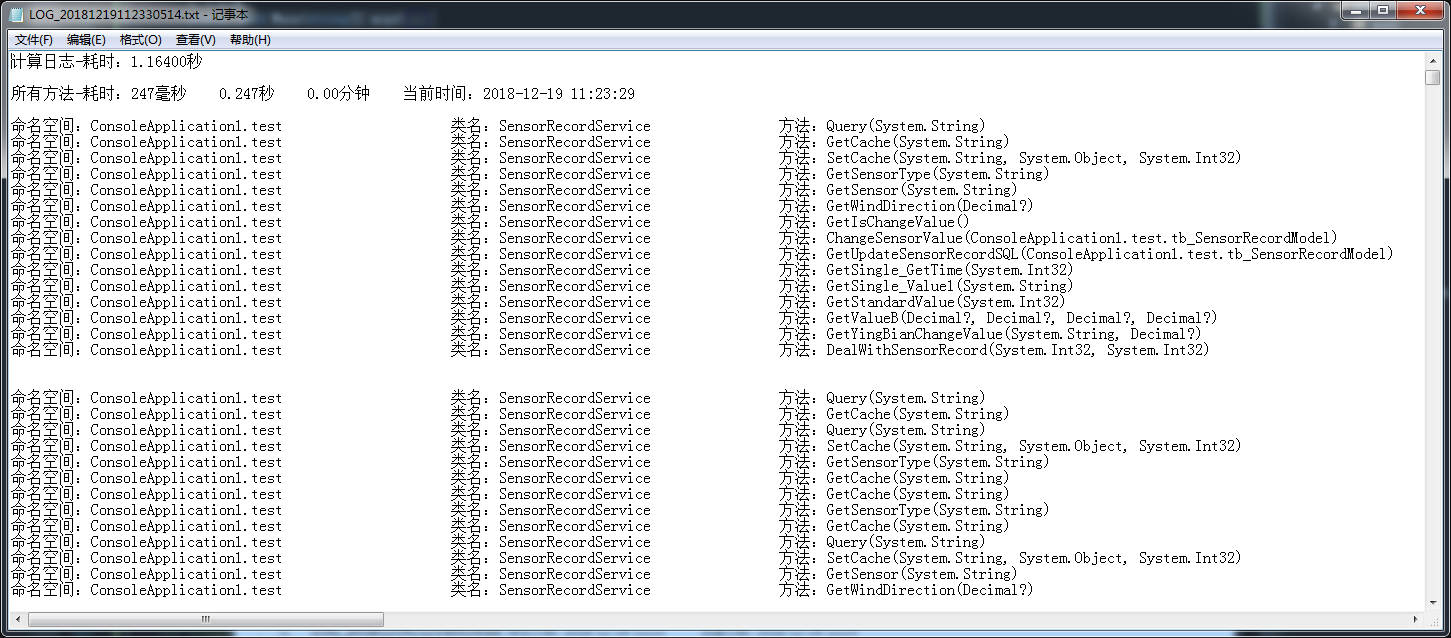
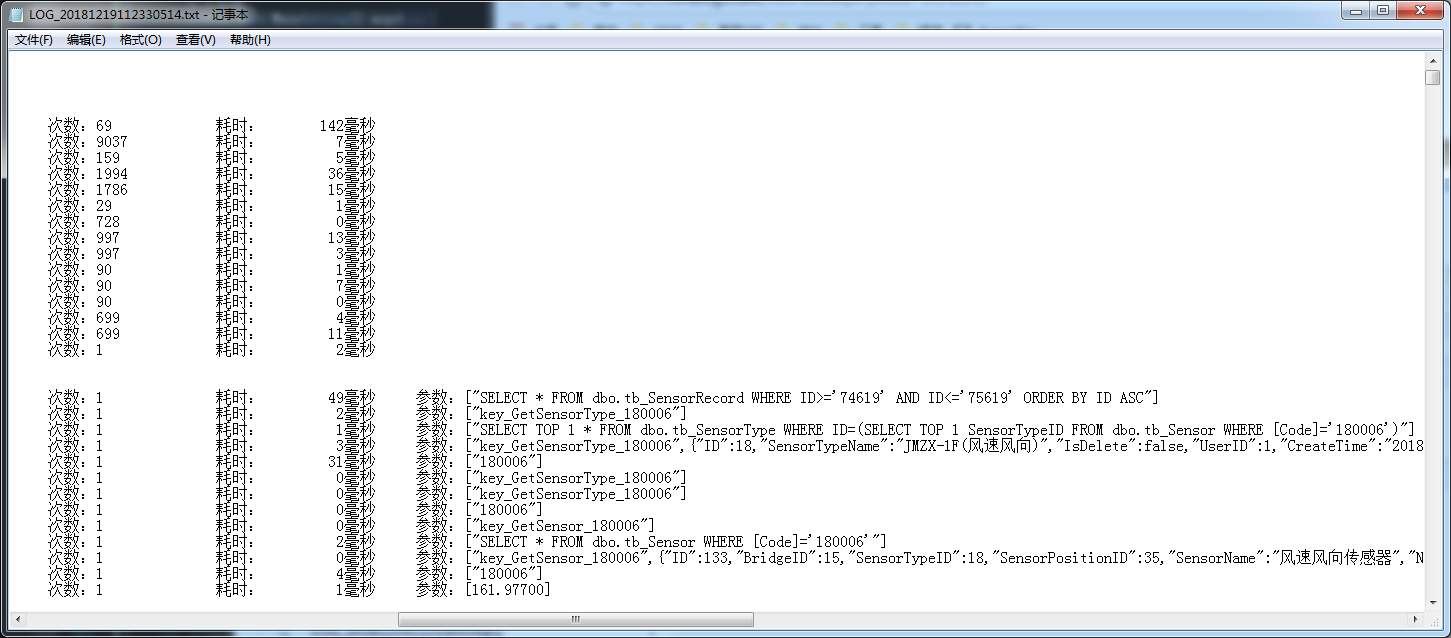
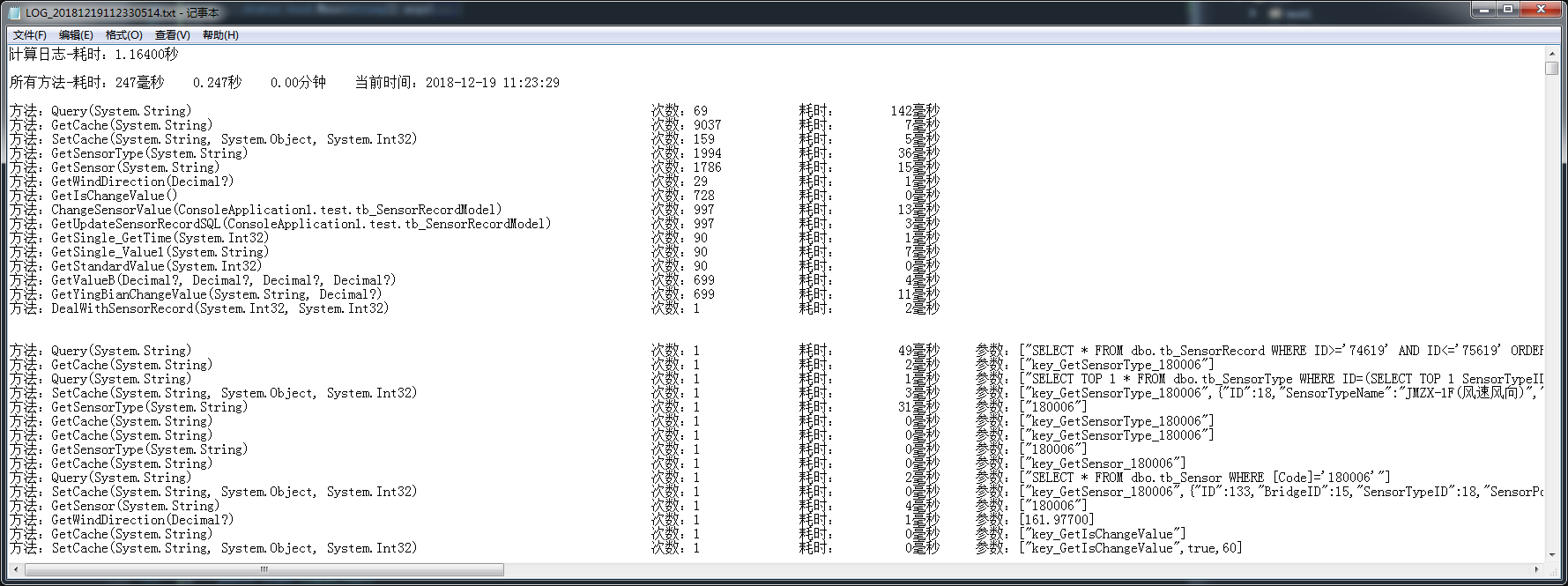
会往Debug写入一个日志文件。
预览效果1:
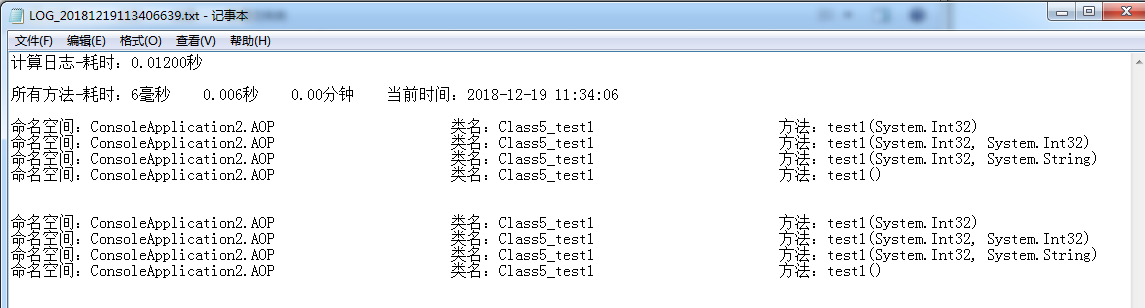
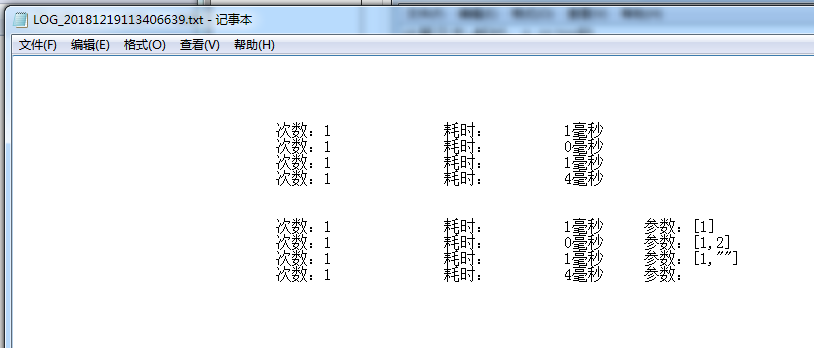
预览效果2:
预览效果3:(删掉了命名空间和类名)
C# 监测每个方法的执行次数和占用时间(测试3)的更多相关文章
- C# 监测每个方法的执行次数和占用时间(测试4)
今天也要做这个功能,就百度一下,结果搜索到了自己的文章.一开始还没注意,当看到里面的一个注释的方法时,一开始还以为自己复制错了代码,结果仔细一看网页的文章,我去,原来是自己写的,写的确实不咋地. 把自 ...
- C# 监测每个方法的执行次数和占用时间(测试2)
在Nuget引用 Castle.DynamicProxy 和 Newtonsoft.Json 这个 原文:http://www.cnblogs.com/RicCC/archive/2010/03/15 ...
- C# 监测每个方法的执行次数和占用时间(测试1)
在Nuget引用 Castle.DynamicProxy 和 Newtonsoft.Json 这个 原文:http://www.cnblogs.com/RicCC/archive/2010/03/15 ...
- C# 监测每个方法的执行次数和占用时间(测试5)
又找到了一个bug 测试的类: public class Class11_1 { public virtual List<int> test2_1(List<tb_SensorRec ...
- 事件之onTouch方法的执行过程 及和 onClick执行发生冲突的解决办法
转载:http://blog.csdn.net/jiangwei0910410003/article/details/17504315#quote 博主推荐: 风萧兮兮易水寒,“天真”一去兮不复还.如 ...
- Android中onTouch方法的执行过程以及和onClick执行发生冲突的解决办法
$*********************************************************************************************$ 博主推荐 ...
- ORACLE查看SQL的执行次数/频率
在ORACLE数据库应用调优中,一个SQL的执行次数/频率也是常常需要关注的,因为某个SQL执行太频繁,要么是由于应用设计有缺陷,需要在业务逻辑上做出优化处理,要么是业务特殊性所导致.如果执行频繁的S ...
- PLSQL_查询SQL的执行次数和频率(案例)
2014-12-25 Created By BaoXinjian
- PLSQL_监控有些SQL的执行次数和频率
原文:PLSQL_监控有些SQL的执行次数和频率 2014-12-25 Created By 鲍新建
随机推荐
- navicat创建存储过程的小问题
再简单的东西长时间不用了就会出错,特此即时的记录下来,以便以后参考! 转自:http://blog.csdn.net/winy_lm/article/details/49690633 以下为navic ...
- vue使用树形控件z-tree,动态添加数据,默认展开第一行
环境:vue 2.9.3; webpack; 插件:z-tree,jquery(cnpm install xxxx) 问题;由于数据量比较多,需要动态加载数据,默认第一次请求的数据是最高一级,然后子集 ...
- WPF 自定义分页控件二
一:添加自定义分页控件,命名为KDataPagerTwo: public class KDataPagerTwo : Control, INotifyPropertyChanged { static ...
- 使用Fiddler获取手机app数据
参考资料:https://www.jianshu.com/p/9e05a2522758 Fiddler下载地址 https://www.telerik.com/download/fiddler
- 28.Mongodb问题解决
mongodb问题配置解决: 之前官网下载msi文件安装总是出现问题,这次使用zip压缩包直接解压使用(较为省力). 链接:https://pan.baidu.com/s/1G-jh7CXD1gCz8 ...
- spring 之 lookup-method & replaced-method II
显然, lookup-method 的name 对应的方法 是可以有方法参数的, 但是, 我发现, 参数无法传递, 传过去的参数好像被丢入了黑洞一般... 非常奇怪. lookup-method 的n ...
- shell doc
参考: http://c.biancheng.net/view/1114.html
- Appium -选择、操作元素4
webvie的测试 混合(Hybrid)应用 一部分是原生界面和代码,而一部分是内嵌网页 比如微信.支付宝 内嵌了一个浏览器内核,由浏览器内核实现的 安卓应用中的内嵌的展示网页内容的模块,我们称之为w ...
- element(vue.js)+django 整合
近期开始接触Python,从web开发入门.尝试Django与vue整合,大概分3个阶段: 1.基于Django开发web后端 2.基于element开发好前端 3.前后端整合 参考:https:// ...
- IIS asp 401.1错误
asp程序使用非匿名帐户运行时因用户名前带了计算机名会导致出现401.1错误,只要直接输入用户名即可,不要带计算机名.