
Vue2.5开发去哪儿网App 第五章笔记 上
1.css动画原理

        .fade-enter{

            opacity: 0;

        }

        .fade-enter-active{

            transition: opacity 2s;

        }
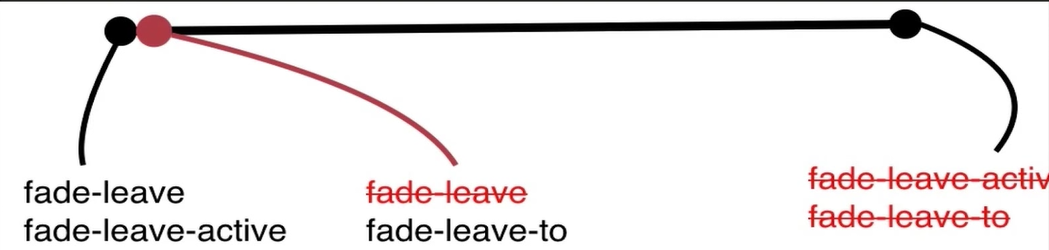
.fade-leave-to{

    opacity: 0;

}

.fade-leave-active{

    transition: opacity 2s;

}
<!DOCTYPE html>

<html lang="en">

<head>

    <meta charset="UTF-8">

    <title>vue中css动画原理</title>

    <script src="../../vue.js"></script>

    <style>

        .fade-enter{

            opacity: 0;

        }

        .fade-enter-active{

            transition: opacity 2s;

        }

        .fade-leave-to{

            opacity: 0;

        }

        .fade-leave-active{

            transition: opacity 2s;

        }

    </style>

</head>

<body>

<div id="app">

    <transition name="fade">

        <div v-if="show">hello world</div>

    </transition>

    <button @click="handleCLick">click me</button>

</div>

<script>

    var vm = new Vue({

        el:"#app",

        data:{

            show:true,

        },

        methods:{

            handleCLick:function () {

                this.show = !this.show

            }

        }

    })

</script>

</body>

</html>
2.使用animate.css库
animate.css 提供了大量的动画效果,官网:https://daneden.github.io/animate.css/?
使用animate.css 需要在transition 标签中自定义 属性名字,例如:
enter-active-class="animated hinge"
leave-active-class="animated jello"
<!DOCTYPE html>

<html lang="en">

<head>

    <meta charset="UTF-8">

    <title>使用animate-css库</title>

    <script src="../../vue.js"></script>

    <link rel="stylesheet" href="../../animate.css">

</head>

<body>

<div id="app">

    <!--使用animate-css 自定义名字  animated开头-->

    <transition enter-active-class="animated hinge"

                leave-active-class="animated jello">

        <div v-if="show">hello world</div>

    </transition>

    <button @click="handleCLick">click me</button>

</div>

<script>

    var vm = new Vue({

        el:"#app",

        data:{

            show:true,

        },

        methods:{

            handleCLick:function () {

                this.show = !this.show

            }

        }

    })

</script>

</body>

</html>
在第一次进入页面时,附带效果
在transition 中添加属性:
appear

appear-active-class="animated hinge"
3. 同时使用过渡和动画
<!DOCTYPE html>

<html lang="en">

<head>

    <meta charset="UTF-8">

    <title>同时使用过渡和动画</title>

    <script src="../../vue.js"></script>

    <link rel="stylesheet" href="../../animate.css">

    <style>

        .fade-enter,.fade-leave-to{

            opacity: 0;

        }

        .fade-leave-active,

        .fade-enter-active{

            transition: opacity 3s;

        }

    </style>

</head>

<body>

<div id="app">

    <!--:duration 自定义时长,-->

    <!--例如:设置出场入场动画时间-->

    <!--:duration=“{enter:5000,leave:10000}”-->

    <!--appear  appear-active-class:初次动画-->

    <!--type 确定哪种为时长为准-->

    <transition enter-active-class="animated hinge fade-enter-active"

                leave-active-class="animated jello fade-leave-active"

                appear

                name="fade"

                type="transition"

                appear-active-class="animated hinge">

        <div v-if="show">hello world</div>

    </transition>

    <button @click="handleCLick">click me</button>

</div>

<script>

    var vm = new Vue({

        el:"#app",

        data:{

            show:true,

        },

        methods:{

            handleCLick:function () {

                this.show = !this.show

            }

        }

    })

</script>

</body>

</html>
4.js动画与Velocity-js结合
<!--动画钩子-->

<!--显示:-->

<!--before-enter(el)-->

<!--enter(el,done)  done为回调函数-->

<!--after-enter-->

<!--隐藏:-->

<!--before-leave-->

<!--after-leave-->

<!--leave-->
绑定事件:
    <transition name="fade"

    @before-enter="handleBeforEnter"

    @enter="handleEnter"

    @after-enter="handleafterEnter"

                @leave="handleLeave"

    >

        <div v-show="show">hello world</div>

    </transition>
处理事件:
            handleCLick:function () {

                this.show = !this.show

            },

            handleBeforEnter:function (el) {

                el.style.color = 'red'

            },

            handleEnter:function (el,done) {

                setTimeout(()=>{

                    // 执行结束后,执行done

                    el.style.color = 'yellow'

                },2000)

                setTimeout(()=>{

                    done()

                },4000)

            },

            handleafterEnter:function (el) {

                el.style.color = 'black'

            }
<!DOCTYPE html>

<html lang="en">

<head>

    <meta charset="UTF-8">

    <title>js动画与Velocity-js结合</title>

    <script src="../../vue.js"></script>

    <script src="../../velocity.js"></script>

</head>

<body>

<!--动画钩子-->

<!--显示:-->

<!--before-enter(el)-->

<!--enter(el,done)  done为回调函数-->

<!--after-enter-->

<!--隐藏:-->

<!--before-leave-->

<!--after-leave-->

<!--leave-->

<div id="app">

    <transition name="fade"

    @before-enter="handleBeforEnter"

    @enter="handleEnter"

    @after-enter="handleafterEnter"

                @leave="handleLeave"

    >

        <div v-show="show">hello world</div>

    </transition>

    <button @click="handleCLick">click me</button>

</div>

<script>

    var vm = new Vue({

        el:"#app",

        data:{

            show:true,

        },

        methods:{

            handleCLick:function () {

                this.show = !this.show

            },

            handleBeforEnter:function (el) {

                el.style.color = 'red'

            },

            handleEnter:function (el,done) {

                setTimeout(()=>{

                    // 执行结束后,执行done

                    el.style.color = 'yellow'

                },2000)

                setTimeout(()=>{

                    done()

                },4000)

            },

            handleafterEnter:function (el) {

                el.style.color = 'black'

            }

        }

    })

</script>

</body>

</html>
使用 Velocity.js
<!DOCTYPE html>

<html lang="en">

<head>

    <meta charset="UTF-8">

    <title>js动画与Velocity-js结合</title>

    <script src="../../vue.js"></script>

    <script src="../../velocity.js"></script>

</head>

<body>

<!--动画钩子-->

<!--显示:-->

<!--before-enter(el)-->

<!--enter(el,done)  done为回调函数-->

<!--after-enter-->

<!--隐藏:-->

<!--before-leave-->

<!--after-leave-->

<!--leave-->

<div id="app">

    <transition name="fade"

    @before-enter="handleBeforEnter"

    @enter="handleEnter"

    @after-enter="handleafterEnter"

    >

        <div v-show="show">hello world</div>

    </transition>

    <button @click="handleCLick">click me</button>

</div>

<script>

    var vm = new Vue({

        el:"#app",

        data:{

            show:true,

        },

        methods:{

            handleCLick:function () {

                this.show = !this.show

            },

            handleBeforEnter:function (el) {

                el.style.opacity = 0;

            },

            handleEnter:function (el,done) {

                Velocity(el,

                    {opacity:1},

                    {   duration:1000,

                        complete:done

                    })

            },

            handleafterEnter:function (el) {

                console.log('动画结束')

            }

        }

    })

</script>

</body>

</html>
Vue2.5开发去哪儿网App 第五章笔记 上的更多相关文章
- Vue2.5开发去哪儿网App 第五章笔记 下
1. 多个元素或组件的过渡 多个元素的过渡: <style> .v-enter,.v-leace-to{ opacity: 0; } .v-enter-active,.v-leave-ac ...
- Vue2.5开发去哪儿网App 第四章笔记 上
一 . 组件细节知识点 1. 解决组件在h5中编码规范 例如 : table , ul , ol 等等 <table> <tbody> <row></r ...
- Vue2.5开发去哪儿网App 第三章笔记 上
1. vue 生命周期函数 每个 Vue 实例在被创建之前都要经过一系列的初始化过程.例如,实例需要配置数据观测(data observer).编译模版.挂载实例到 DOM ,然后在数据变化时更新 ...
- Vue2.5开发去哪儿网App 第四章笔记 下
1.解决非父子组件之间的传值问题 非父子组件传值(Bus/总线/发布订阅模式/观察者模式) 给 Vue类上挂在一个属性,然后创建vue实例时,实例就拥有了这个属性 Vue.prototype.bus ...
- Vue2.5开发去哪儿网App 第三章笔记 下
1.样式的绑定 我们可以传给 v-bind:class 一个对象,以动态地切换 class 例如: :class="{activated:isactivated}" 上面的语法 ...
- Vue2.5 开发去哪儿网App
Vue2.5开发去哪儿网App 技术栈和主要框架
- Vue2.5开发去哪儿网App 首页开发
主页划 5 个组件,即 header icon swiper recommend weekend 一. header区域开发 1. 安装 stylus npm install stylus --s ...
- Vue2.5开发去哪儿网App 城市列表开发之 Vuex实现数据共享及高级使用
一,数据共享 1. 安装: npm install vuex --save 2. 在src目录下 新建state文件夹,新建index.js文件 3. 创建一个 store import Vue f ...
- Vue2.5开发去哪儿网App 从零基础入门到实战项目
第1章 课程介绍本章主要介绍课程的知识大纲,学习前提,讲授方式及预期收获. 1-1 课程简介 试看第2章 Vue 起步本章将快速讲解部分 Vue 基础语法,通过 TodoList 功能的编写,在熟悉基 ...
随机推荐
- ajax from 提交
$.ajax({ cache: true, type: "POST", url:aj ...
- 牛客训练五:炫酷路途(c++与dp)
题目链接:传送门 思路:每隔2^i(0<=i<=INF)就有一条路径,所以可以将从头到尾的路线视为一个有向图, 将ai,bi以此输入,然后将路径从小到大排序,不断更新路径. __built ...
- ORACLE 导入的问题
1.导入报错 我将ORACLE12.2 导出的文件,导入到ORACLE12.1 . IMP-00010: 不是有效的导出文件, 标头验证失败 解决办法: 修改 dmp 文件版本,使用UEDITOR打开 ...
- idea的maven项目不知道为啥下载不下来jar包,看本地仓库只是下载了一下xml文件,没有jar包问题
确认了私服上的jar包能直接下载下来,而且jar包是正常的:但是就是不能通过idea下载,通过idea下载到本地仓库的只生成了.lastUpdated文件,检查了setting.xml文件.网络,私服 ...
- 第四章,java面向对象特性
4.1 特性 封装,继承, 多态(编译时:方法的重载,同一个类里面不同方法可以用同一个方法名只是传入参数不同, 运行时多态:基础类提供一个接口,在编译时只调用基础类的接口,在运行时才确定到底是哪一个子 ...
- 第24章:MongoDB-聚合操作--MapReduce
①MapReduce 在MongoDB的聚合框架中,还可以使用MapReduce,它非常强大和灵活,但具有一定的复杂性,专门用于实现一些复杂的聚合功能. MongoDB中的MapReduce使用Jav ...
- UVa 10828 Back to Kernighan-Ritchie (数学期望 + 高斯消元)
题意:给定一个 n 个结点的有向图,然后从 1 结点出发,从每个结点向每个后继结点的概率是相同的,当走到一个没有后继结点后,那么程序终止,然后问你经过每个结点的期望是次数是多少. 析:假设 i 结点的 ...
- linux下禁用SELinux
http://chenzhou123520.iteye.com/blog/1313582 如何开启或关闭SELinux RedHat的 /etc/sysconfig/selinux 在新版本中的Red ...
- 17、文件IO详解及实例
上篇文章已经讲过了文件系统的一些基本的概念,这里首先对文件IO进行详细的学习,文件IO也称为系统调用IO,是操作系统为"用户态"运行的进程和硬件交互提供的一组接口,即操作系统内核留 ...
- 查询指定网段可用IP脚
方法一:linux命令 1.fping安装: yum install fping 2.fping使用: fping -g ~~~~~~~~~~~~~~~~~~~~~~~~~~~~~~~~~~~~~~~ ...