
Vue2.5开发去哪儿网App 城市列表开发之 Vuex实现数据共享及高级使用
一,数据共享
1. 安装:
npm install vuex --save
2. 在src目录下 新建state文件夹,新建index.js文件
3. 创建一个 store
import Vue from 'vue'

import Vuex from 'vuex'

Vue.use(Vuex)

export default new Vuex.Store({

  state: {

    city: '上海'

  }

})
4.main.js中创建根实例时,传入store
import store from './store'
......
new Vue({

  el: '#app',

  router,

  store,

  components: { App },

  template: '<App/>'

})
......
5.然后子组件使用:
//获取城市名
{{this.$store.state.city}}
二,数据的修改
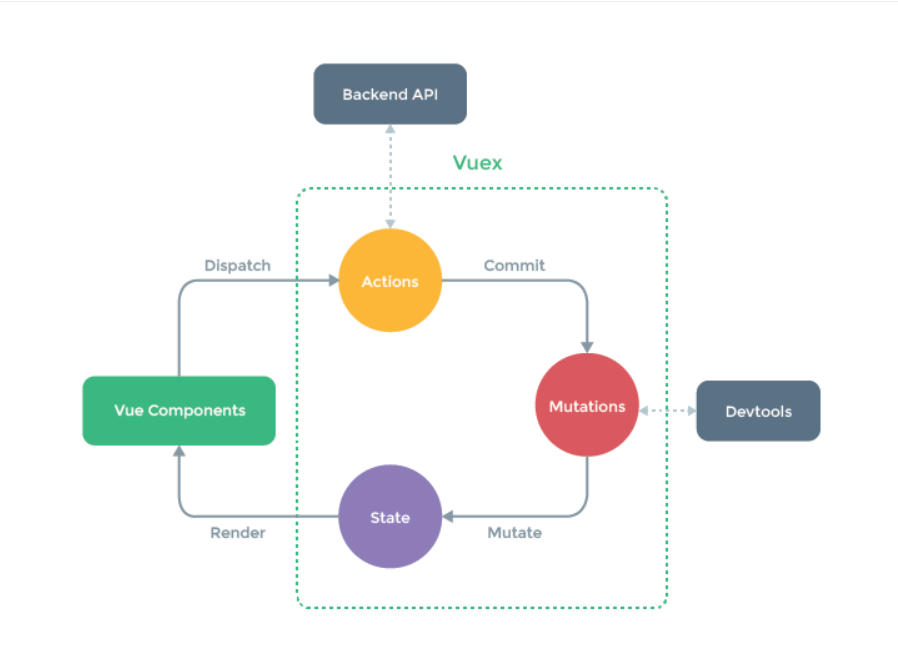
1. 给每个城市绑定一个方法:
@click="HandleCity(城市名)"
HandleCity (value) {
// 派发一个citychange city的 action
this.$store.dispatch('citychanged',value)
}
2. 在Index.js中:
  actions: {
    //ctx上下文

    citychanged (ctx, cityname) {

      ctx.commit('citychanged', cityname)

    }

  }
mutations: {
//改变数据
  citychanged (state, city) {
    state.city = city
  }
}
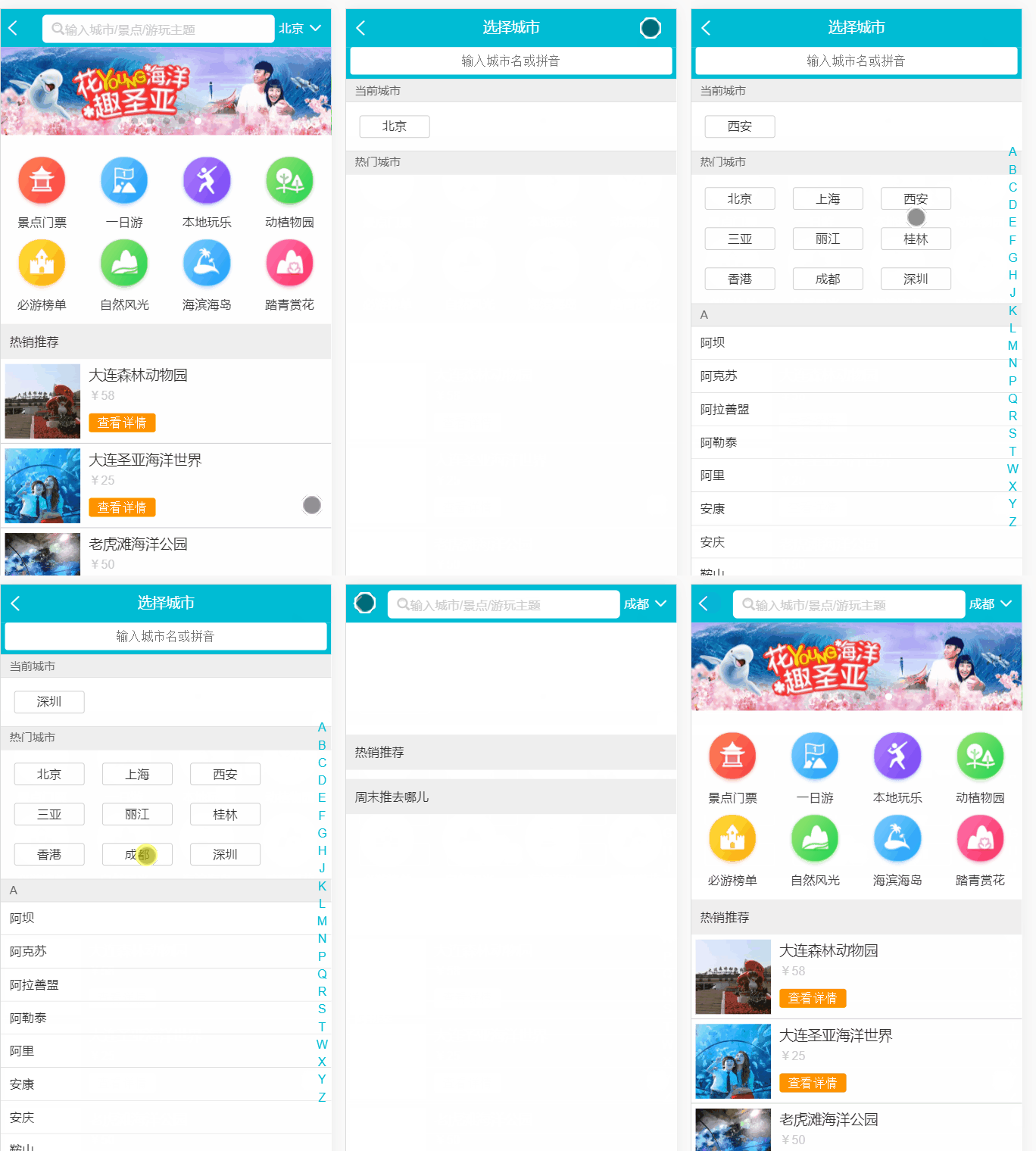
效果:
3. 简化步骤
    HandleCity (value) {

      this.$store.commit('citychanged', value)

    }
index.js中 省略actions:
  mutations: {

    citychanged (state, city) {

      state.city = city

    }

  }
搜索Seatch组件步骤一致
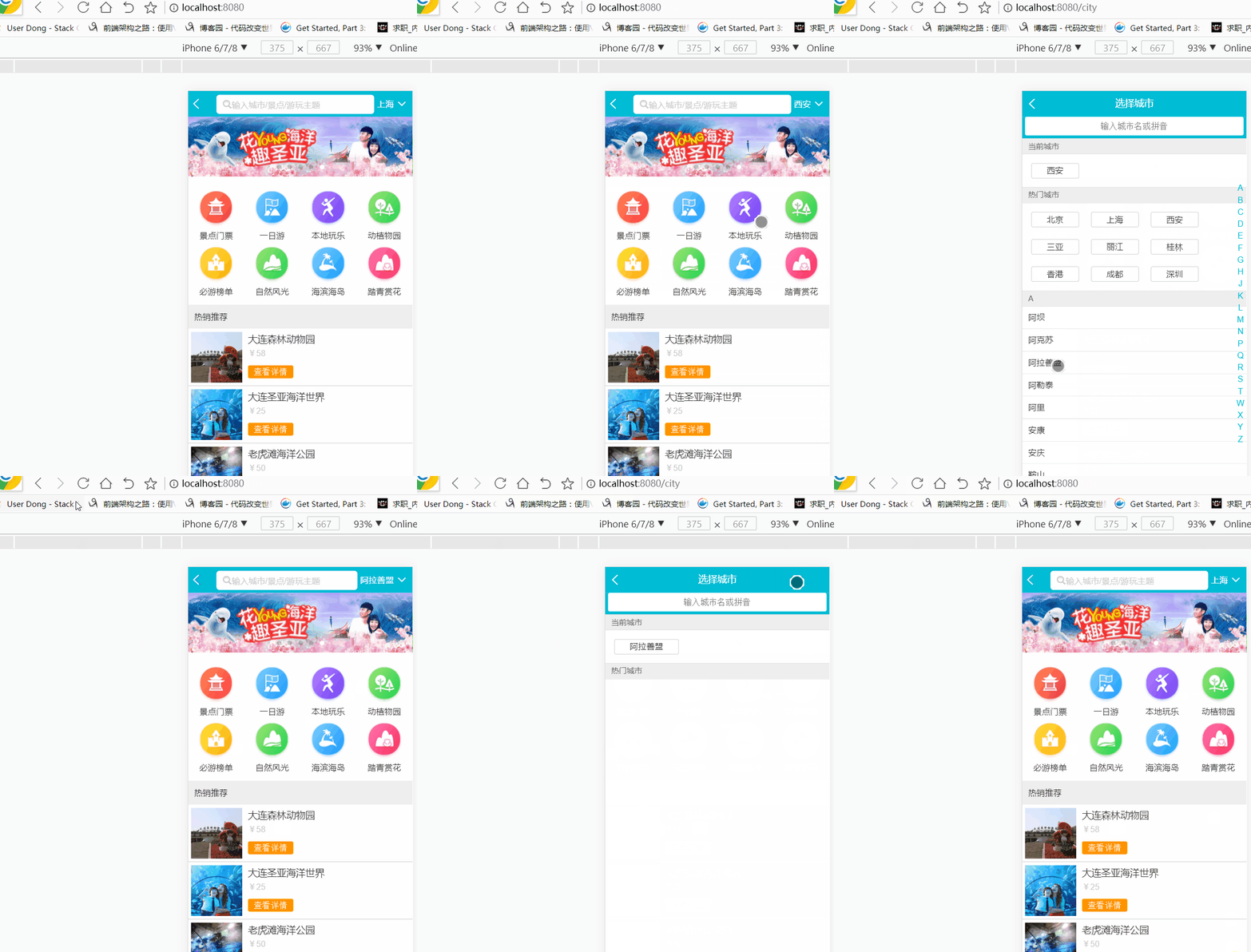
三,使用localstorage存储当前城市,并返回到城市
每次刷新后,城市默认
localStorage - 用于长久保存整个网站的数据,保存的数据没有过期时间,直到手动去除。
let defaultCity = '北京'

try {
  //判断浏览器是否支持

  if (localStorage.city) {

    defaultCity = localStorage.city

  }

} catch (e) {}
//点击后页面跳转

this.$router.push('/')
在 Vue 实例内部,你可以通过 $router 访问路由实例。因此你可以调用 this.$router.push
四,vuex高级使用
mapState:
import { mapState, mapMutations } from 'vuex'
mapState指将state数据映射到city的计算属性中
computed: mapState({

    current_city: 'city'

})
// html写法:
// {{this.current_city}}
mapMutations : 你可以在组件中使用this.$store.commit('xxx')提交 mutation,或者使用mapMutations辅助函数将组件中的 methods 映射为store.commit调用
    HandleCity (value) {

      this.citychanged(value)

      this.$router.push('/')

    },

    ...mapMutations([

      'citychanged'

    ])
mapgetter函数:
mapGetters 辅助函数仅仅是将 store 中的 getter 映射到局部计算属性:

import { mapGetters } from 'vuex'

export default {

  // ...

  computed: {

  // 使用对象展开运算符将 getter 混入 computed 对象中

    ...mapGetters([

      'doneTodosCount',

      'anotherGetter',

      // ...

    ])

  }

}

如果你想将一个 getter 属性另取一个名字,使用对象形式:

mapGetters({

  // 把 `this.doneCount` 映射为 `this.$store.getters.doneTodosCount`

  doneCount: 'doneTodosCount'

})
<template>

  <div class="list" ref="wrapper">

    <div>

      <div class="area">

        <div class="title border-topbottom">当前城市</div>

        <div class="button-list">

          <div class="button-wrapper">

            <div class="button" ref="mycity">{{this.current_city}}</div>

          </div>

        </div>

      </div>

      <div class="area">

        <div class="title border-topbottom">热门城市</div>

        <div class="button-list">

          <div class="button-wrapper"  v-for="city in hotcities" :key="city.id">

            <div class="button" @click="HandleCity(city.name)">{{city.name}}</div>

          </div>

        </div>

      </div>

      <div class="area" v-for="(city,key) in cities" :key="key" :ref="key">

        <div class="title border-topbottom">{{key}}</div>

        <div class="item-list">

          <div class="item border-bottom" v-for="c in city" :key="c.id" @click="HandleCity(c.name)">{{c.name}}</div>

        </div>

      </div>

    </div>

  </div>

</template>

<script>

import BScroll from 'better-scroll'

import { mapState, mapMutations } from 'vuex'

export default {

  name: 'CityList',

  mounted: function () {

    this.scroll = new BScroll(this.$refs.wrapper)

  },

  props: ['cities', 'hotcities', 'letter'],

  methods: {

    HandleCity (value) {

      // this.$store.commit('citychanged', value)

      this.citychanged(value)

      this.$router.push('/')

    },

    ...mapMutations([

      'citychanged'

    ])

  },

  watch: {

    letter () {

      if (this.letter) {

        const element = this.$refs[this.letter][0]

        this.scroll.scrollToElement(element)

      }

    }

  },

  computed: mapState({

    current_city: 'city'

  })

}

</script>

<style lang="stylus" scoped>

  @import "~styles/varibles.styl"

  .border-topbottom

    &:before

      border-color #ccc

    &:after

      border-color #ccc

  .border-bottom

  &:before

    border-color #ccc

  .list

    overflow hidden

    position absolute

    top 1.58rem

    right 0

    bottom 0

    left 0

    .title

      line-height .54rem

      padding-left .2rem

      background #eee

      color #666

      font-size .26rem

    .button-list

      padding .1rem .6rem .1rem .1rem

      overflow hidden

      .button-wrapper

        float left

        padding .1rem

        .button

          text-align center

          margin .1rem

          border .02rem solid #ccc

          border-radius .06rem

          padding .1rem .5rem

    .item-list

      .item

        line-height .76rem

        padding-left .2rem

</style>
List.vue
import Vue from 'vue'

import Vuex from 'vuex'

import state from './state'

import mutations from './mutations'

Vue.use(Vuex)

export default new Vuex.Store({

  state: state,

  // 省略步骤

  // 1. this.$store.dispatch('citychanged', value)

  // 2. actions: {

  //   citychanged (ctx, cityname) {

  //     ctx.commit('citychanged', cityname)

  //   }

  // },

  mutations: mutations

})
/src/store/index.js
五,keep-alive优化网页性能
解决每次进入页面都发送ajax请求的问题
1. keep-alive是Vue提供的一个抽象组件,用来对组件进行缓存,从而节省性能
<template>

  <div id="app">

    <!--#显示当前路由对应的内容-->

    <keep-alive>

      <router-view/>

    </keep-alive>

  </div>

</template>
2. 当组件在keep-alive内被切换时组件的activated、deactivated这两个生命周期钩子函数会被执行
添加LastCity 属性
  mounted () {

    this.getHomeInfo()

    this.LastCity = this.city

  }
  activated () {

    // 当页面加载时,进行判断,城市发生了改变

    if (this.LastCity !== this.city) {

      this.getHomeInfo()
    // 更新上一城市

      this.LastCity = this.city

    }

  },
项目地址:
https://github.com/1417766861/Vue2.5-App
Vue2.5开发去哪儿网App 城市列表开发之 Vuex实现数据共享及高级使用的更多相关文章
- Vue2.5开发去哪儿网App 城市列表开发之 兄弟组件间联动及列表性能优化
一, 兄弟组件间联动 1. 点击城市字母,左侧对应显示 给遍历的 字母 添加一个点击事件: Alphabet.vue @click="handleLetterClick" ha ...
- Vue2.5开发去哪儿网App 城市列表开发
一,城市选择页面路由配置 ...
- Vue2.5 开发去哪儿网App
Vue2.5开发去哪儿网App 技术栈和主要框架
- Vue2.5开发去哪儿网App 从零基础入门到实战项目
第1章 课程介绍本章主要介绍课程的知识大纲,学习前提,讲授方式及预期收获. 1-1 课程简介 试看第2章 Vue 起步本章将快速讲解部分 Vue 基础语法,通过 TodoList 功能的编写,在熟悉基 ...
- Vue2.5开发去哪儿网App 搜索功能完成
效果展示: Search.vue: <div class="search-content" ref="search" v-show="keywo ...
- Vue2.5开发去哪儿网App 首页开发
主页划 5 个组件,即 header icon swiper recommend weekend 一. header区域开发 1. 安装 stylus npm install stylus --s ...
- Vue2.5开发去哪儿网App 第五章笔记 上
1.css动画原理 .fade-enter{ opacity: 0; } .fade-enter-active{ transition: opacity 2s; } .fade-leave-to{ o ...
- Vue2.5开发去哪儿网App 第五章笔记 下
1. 多个元素或组件的过渡 多个元素的过渡: <style> .v-enter,.v-leace-to{ opacity: 0; } .v-enter-active,.v-leave-ac ...
- Vue2.5开发去哪儿网App 第四章笔记 下
1.解决非父子组件之间的传值问题 非父子组件传值(Bus/总线/发布订阅模式/观察者模式) 给 Vue类上挂在一个属性,然后创建vue实例时,实例就拥有了这个属性 Vue.prototype.bus ...
随机推荐
- 2018.06.27The Windy's(费用流)
The Windy's Time Limit: 5000MS Memory Limit: 65536K Total Submissions: 6003 Accepted: 2484 Descripti ...
- springboot深入学习(二)-----profile配置、运行原理、web开发
一.profile配置 通常企业级应用都会区分开发环境.测试环境以及生产环境等等.spring提供了全局profile配置的方式,使得在不同环境下使用不同的applicaiton.properties ...
- myBatis中if test 字符串注意事项
错误写法: <if test="userName == 'boshen'"> AND `USER_NAME` = #{userName} </if> 正确写 ...
- Java之spilt()函数,trim()函数
一.单个符号作为分隔符 package com.regix; public class FuncSpilt { public static void main(String[] args) { // ...
- mysql学习之路_sql
查看数据库: Show databases; 查看指定部分数据库:模糊查询 Show databases like ‘patten’;--paatten是匹配模式 %:表示是匹配模式 _:表示匹配单个 ...
- CodeForces 916C Jamie and Interesting Graph (构造)
题意:给定两个数,表示一个图的点数和边数,让你构造出一个图满足 1- n 的最短路是素数,并且最小生成树也是素数. 析:首先 1 - n 的最短路,非常好解决,直接 1 连 n 就好了,但是素数尽量 ...
- AngularJS实战之filter的使用一
一.格式化数字为货币格式. <div>{{money|currency:"$"}}</div> <div>{{money|currency:&q ...
- C++编译器详解(三)函数调用的区别:_cdecl以及_stdcall
1._stdcall是Pascal程序的缺省调用方式,通常用于Win32 API中,函数采用从右到左的压栈方式,自己在退出时清空堆栈.VC将函数编译后会在函数名前面加上下划线前缀,在函数名后加上&qu ...
- 1.7.6方法stop()与java.lang.threadDeath异常
调用stop方法时会抛出java.lang.ThreadDeath异常,但一般情况下这个异常不需要显示的捕捉 package com.cky.thread; /** * Created by edis ...
- 《mysql必知必会》学习_第9章_20180731_欢
第九章,用正则表达式进行搜索. P52 select prod_name from products where prod_name regexp '1000' order by prod_name; ...