
前端vue2-org-tree实现精美组织架构图
最近遇到开发组织架构的需求,与以往开发的组织架构不同,不光要展示人名,还要显示职务(或者子公司名称)、对应的头像等,并且要考虑,如果用户未上传头像,需使用默认头像(男、女、中性),(⊙o⊙)…要尊重尊重,不能随便喊那啥...,还要考虑子公司或者不同部门之间的员工借调问题,现简化效果图如下:
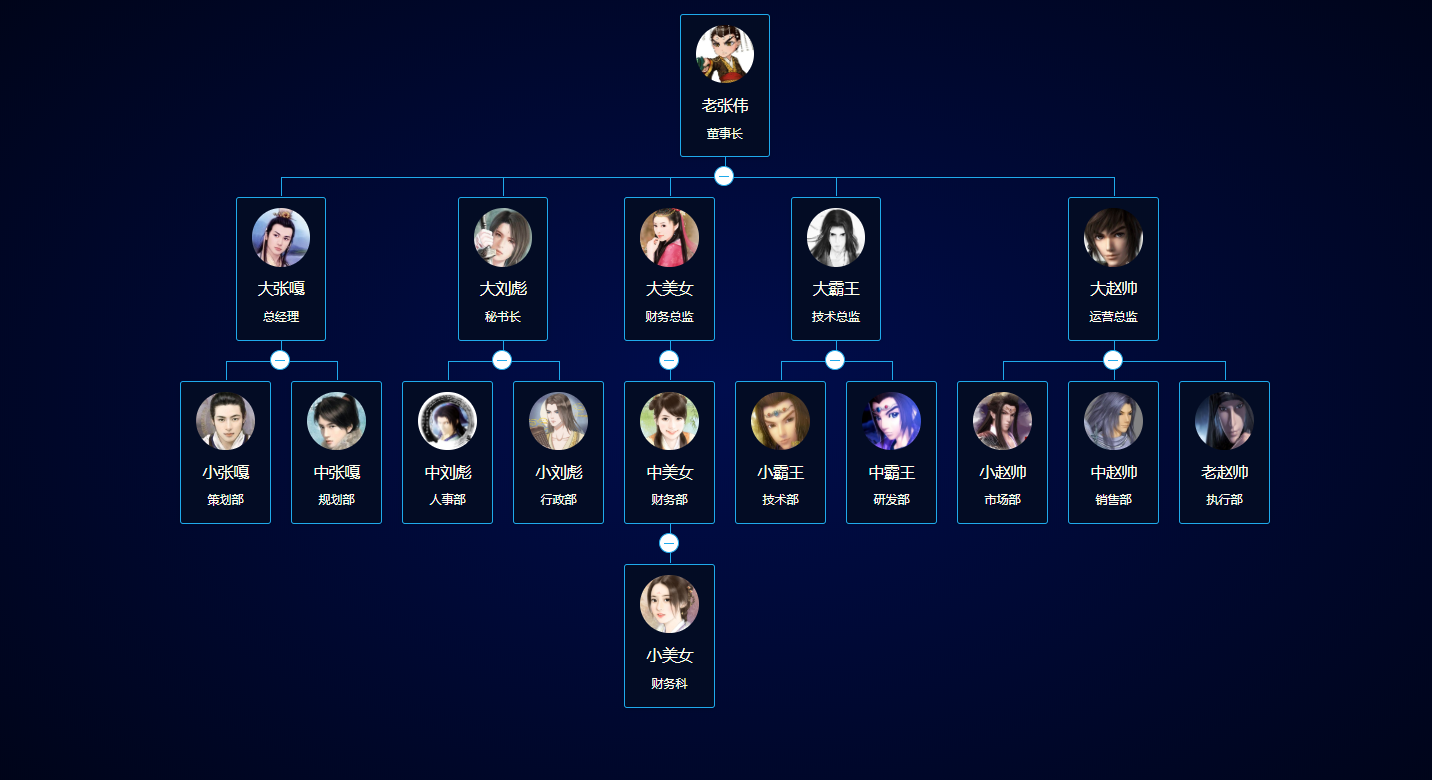
最终实现效果图如下:
纵向(默认展开前3级):

横向(默认展开前3级,因为截图无法全屏的问题,部分第3级未展开):
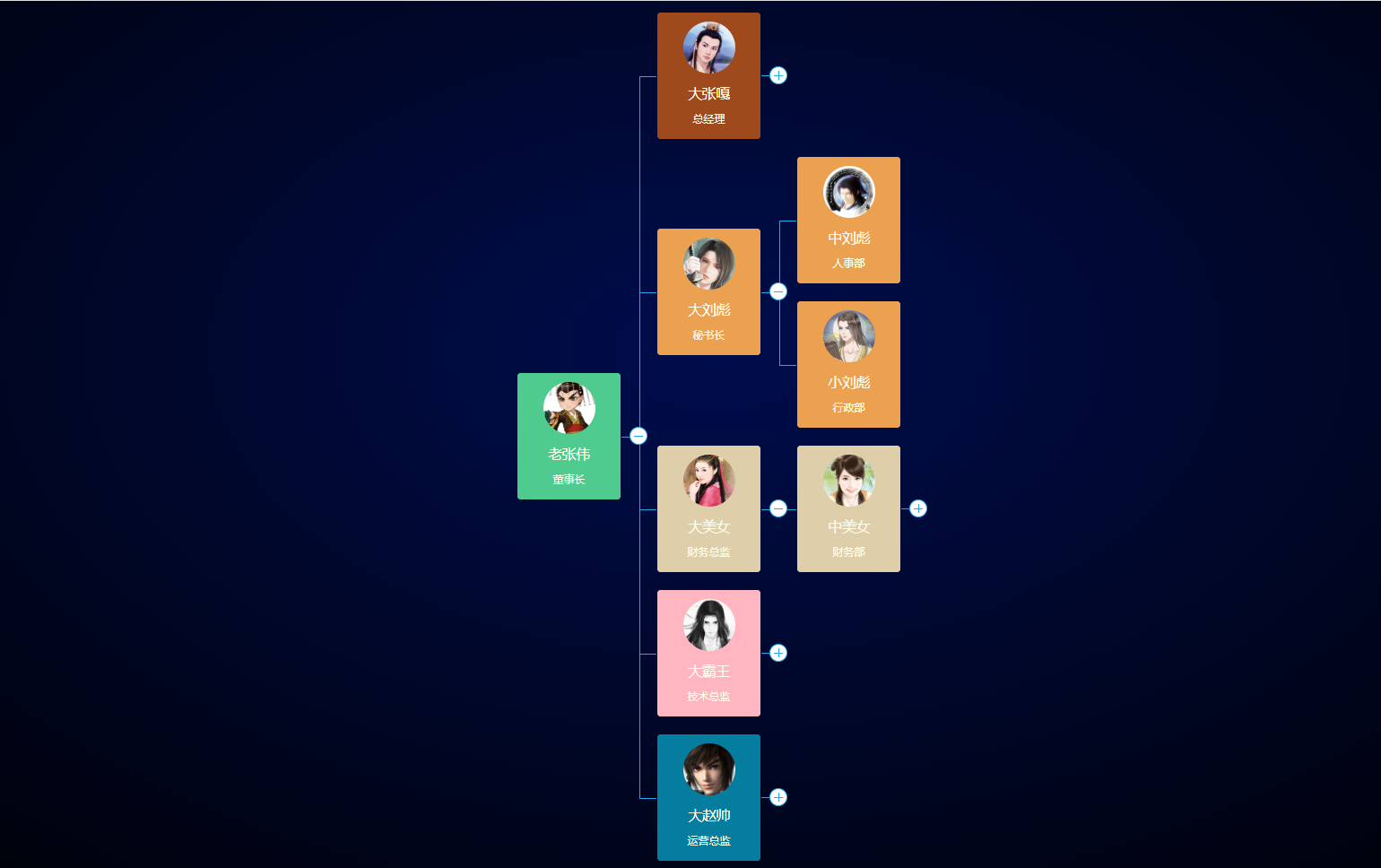
废话不多说,说方法:采用vue2-org-tree组件来实现效果。
npm
1 # use npm

2 npm i vue2-org-tree

3 # use yarn

4 yarn add vue2-org-tree
安装 loader
npm install --save-dev less less-loader(不安装less-loader基本上都会报错)
Import Plugins(main.js引入) (CDN方式请自行测试)
import Vue2OrgTree from 'vue2-org-tree'Vue.use(Vue2OrgTree)

 @colors:#1FAAEB;

 .org-tree-container {

   display: inline-block;

   padding: 15px;

   background-color: #fff;

 }

 .org-tree {

   // display: inline-block;

   display: table;

   text-align: center;

   &:before, &:after {

     content: '';

     display: table;

   }

   &:after {

     clear: both;

   }

 }

 .org-tree-node,

 .org-tree-node-children {

   position: relative;

   margin:;

   padding:;

   list-style-type: none;

   &:before, &:after {

     transition: all .35s;

   }

 }

 .org-tree-node-label {

   position: relative;

   display: inline-block;

   .org-tree-node-label-inner {

     padding: 10px 15px;

     text-align: center;

     border-radius: 3px;

     box-shadow: 0 1px 5px rgba(0, 0, 0, .15);

   }

 }

 .org-tree-node-btn {

   position: absolute;

   top: 100%;

   left: 50%;

   width: 20px;

   height: 20px;

   z-index:;

   margin-left: -11px;

   margin-top: 9px;

   background-color: #fff;

   border: 1px solid @colors;

   border-radius: 50%;

   box-shadow: 0 0 2px rgba(0, 0, 0, .15);

   cursor: pointer;

   transition: all .35s ease;

   &:hover {

     background-color: #e7e8e9;

     transform: scale(1.15);

   }

   &:before, &:after {

     content: '';

     position: absolute;

   }

   &:before {

     top: 50%;

     left: 4px;

     right: 4px;

     height:;

     border-top: 1px solid @colors;

   }

   &:after {

     top: 4px;

     left: 50%;

     bottom: 4px;

     width:;

     border-left: 1px solid @colors;

   }

   &.expanded:after {

     border: none;

   }

 }

 .org-tree-node {

   padding-top: 20px;

   display: table-cell;

   vertical-align: top;

   &.is-leaf, &.collapsed {

     padding-left: 10px;

     padding-right: 10px;

   }

   &:before, &:after {

     content: '';

     position: absolute;

     top:;

     left:;

     width: 50%;

     height: 19px;

   }

   &:after {

     left: 50%;

     border-left: 1px solid @colors;

   }

   &:not(:first-child):before,

   &:not(:last-child):after {

     border-top: 1px solid @colors;

   }

 }

 .collapsable .org-tree-node.collapsed {

   padding-bottom: 30px;

   .org-tree-node-label:after {

     content: '';

     position: absolute;

     top: 100%;

     left:;

     width: 50%;

     height: 20px;

     border-right: 1px solid @colors;

   }

 }

 .org-tree > .org-tree-node {

   padding-top:;

   &:after {

     border-left: 0;

   }

 }

 .org-tree-node-children {

   padding-top: 20px;

   display: table;

   &:before {

     content: '';

     position: absolute;

     top:;

     left:;

     width: 50%;

     height: 20px;

     border-right: 1px solid @colors;

     border-left: none;

   }

   &:after {

     content: '';

     display: table;

     clear: both;

   }

 }

 .horizontal {

   .org-tree-node {

     // display: flex;

     // flex-direction: row;

     // justify-content: flex-start;

     // align-items: center;

     display: table-cell;

     float: none;

     padding-top:;

     padding-left: 20px;

     &.is-leaf, &.collapsed {

       padding-top: 10px;

       padding-bottom: 10px;

     }

     &:before, &:after {

       width: 19px;

       height: 50%;

     }

     &:after {

       top: 50%;

       left:;

       border-left:;

     }

     &:only-child:before {

       top: 1px;

       border-bottom: 1px solid @colors;

     }

     &:not(:first-child):before,

     &:not(:last-child):after {

       border-top:;

       border-left: 1px solid @colors;

     }

     &:not(:only-child):after {

       border-top: 1px solid @colors;

     }

     .org-tree-node-inner {

       display: table;

     }

   }

   .org-tree-node-label {

     display: table-cell;

     vertical-align: middle;

   }

   &.collapsable .org-tree-node.collapsed {

     padding-right: 30px;

     .org-tree-node-label:after {

       top: 0;

       left: 100%;

       width: 20px;

       height: 50%;

       border-right:;

       border-bottom: 1px solid @colors;

     }

   }

   .org-tree-node-btn {

     top: 50%;

     left: 100%;

     margin-top: -11px;

     margin-left: 9px;

   }

   & > .org-tree-node:only-child:before {

     border-bottom:;

   }

   .org-tree-node-children {

     // display: flex;

     // flex-direction: column;

     // justify-content: center;

     // align-items: flex-start;

     display: table-cell;

     padding-top:;

     padding-left: 20px;

     &:before {

       top: 50%;

       left:;

       width: 20px;

       height:;

       border-left:;

       border-top: 1px solid @colors;

     }

     &:after {

       display: none;

     }

     & > .org-tree-node {

       display: block;

     }

   }

 }
组件中HTML代码如下:
 <template>

   <div class="org-boxs">

     <vue2-org-tree

       name="test"

       :data="datas"

       :horizontal="horizontal"

       :label-class-name="labelClassName"

       :render-content="renderContent"

       collapsable

       @on-expand="onExpand"

       @on-node-click="onNodeClick"

     />

   </div>

 </template>
data中定义如下:
 data () {

       return {

         horizontal: false,

         collapsable: false,

         expandAll: true,

         labelClassName: "bg-none",

         datas:{

           id:'1',

           label:'老张伟',

           position:'董事长',

           img:'https://ss2.bdstatic.com/70cFvnSh_Q1YnxGkpoWK1HF6hhy/it/u=4007973853,1345044449&fm=15&gp=0.jpg',

           relations:'1',

           children:[

             {

               id:'1-1',

               label:'大张嘎',

               position:'总经理',

               img:'https://ss0.bdstatic.com/70cFvHSh_Q1YnxGkpoWK1HF6hhy/it/u=629230260,2582796696&fm=26&gp=0.jpg',

               relations:'1-1',

               children:[

                 {

                   id:'1-1-1',

                   label:'小张嘎',

                   position:'策划部',

                   img:'https://ss0.bdstatic.com/70cFvHSh_Q1YnxGkpoWK1HF6hhy/it/u=2495406741,1368429183&fm=26&gp=0.jpg',

                   relations:'1-1',

                 },

                 {

                   id:'1-1-2',

                   label:'中张嘎',

                   position:'规划部',

                   img:'https://ss2.bdstatic.com/70cFvnSh_Q1YnxGkpoWK1HF6hhy/it/u=4125471676,2511464594&fm=26&gp=0.jpg',

                   relations:'1-1',

                 },

               ]

             },

             {

               id:'1-2',

               label:'大刘彪',

               position:'秘书长',

               img:'https://ss1.bdstatic.com/70cFvXSh_Q1YnxGkpoWK1HF6hhy/it/u=291861640,4252957999&fm=26&gp=0.jpg',

               relations:'1-2',

               children:[

                 {

                   id:'1-2-1',

                   label:'中刘彪',

                   position:'人事部',

                   img:'https://ss1.bdstatic.com/70cFvXSh_Q1YnxGkpoWK1HF6hhy/it/u=4122062364,793453037&fm=26&gp=0.jpg',

                   relations:'1-2',

                 },

                 {

                   id:'1-2-2',

                   label:'小刘彪',

                   position:'行政部',

                   img:'https://ss0.bdstatic.com/70cFuHSh_Q1YnxGkpoWK1HF6hhy/it/u=1018449383,841488959&fm=15&gp=0.jpg',

                   relations:'1-2',

                 },

               ]

             },

             {

               id:'1-3',

               label:'大美女',

               position:'财务总监',

               img:'https://ss0.bdstatic.com/70cFvHSh_Q1YnxGkpoWK1HF6hhy/it/u=2745812195,432411379&fm=26&gp=0.jpg',

               relations:'1-3',

               children:[

                 {

                   id:'1-3-1',

                   label:'中美女',

                   position:'财务部',

                   img:'',

                   relations:'1-3',

                   sex:2,

                   children:[

                     {

                       id:'1-3-1-1',

                       label:'小美女',

                       position:'财务科',

                       img:'',

                       sex:0,

                       relations:'1-3',

                     },

                   ]

                 },

               ]

             },

             {

               id:'1-4',

               label:'大霸王',

               position:'技术总监',

               img:'',

               sex:1,

               relations:'1-4',

               children:[

                 {

                   id:'1-4-1',

                   label:'小霸王',

                   position:'技术部',

                   img:'https://ss0.bdstatic.com/70cFvHSh_Q1YnxGkpoWK1HF6hhy/it/u=481633131,466344723&fm=26&gp=0.jpg',

                   relations:'1-4',

                 },

                 {

                   id:'1-4-2',

                   label:'中霸王',

                   position:'研发部',

                   img:'https://ss1.bdstatic.com/70cFvXSh_Q1YnxGkpoWK1HF6hhy/it/u=1490853638,1893546593&fm=26&gp=0.jpg',

                   relations:'1-4',

                 },

               ]

             },

             {

               id:'1-5',

               label:'大赵帅',

               position:'运营总监',

               img:'https://ss1.bdstatic.com/70cFvXSh_Q1YnxGkpoWK1HF6hhy/it/u=2010835987,458488842&fm=15&gp=0.jpg',

               relations:'1-5',

               children:[

                 {

                   id:'1-5-1',

                   label:'小赵帅',

                   position:'市场部',

                   img:'https://ss0.bdstatic.com/70cFuHSh_Q1YnxGkpoWK1HF6hhy/it/u=3576627708,888952220&fm=26&gp=0.jpg',

                   relations:'1-5',

                 },

                 {

                   id:'1-5-2',

                   label:'中赵帅',

                   position:'销售部',

                   img:'https://ss1.bdstatic.com/70cFuXSh_Q1YnxGkpoWK1HF6hhy/it/u=3102026869,1790261072&fm=26&gp=0.jpg',

                   relations:'1-3',

                 },

                 {

                   id:'1-5-3',

                   label:'老赵帅',

                   position:'执行部',

                   img:'https://ss1.bdstatic.com/70cFuXSh_Q1YnxGkpoWK1HF6hhy/it/u=3444708870,1488183897&fm=26&gp=0.jpg',

                   relations:'1-5',

                 },

               ]

             },

           ],

         },

         manUrl:require('@/assets/man.jpeg'),

         womanUrl:require('@/assets/woman.jpg'),

         shemaleUrl:require('@/assets/shemale.jpg'),

       }

     },
manUrl、womanUrl、shemaleUrl为对应的男、女、中性默认头像,datas中的img为用户上传到服务器的URL,relations默认为各个公司的id(可根据实际情况自行设置),用来判断该人员劳动关系属于哪个公司/部门(尤其是子公司之间的员工借调问题,或者政府部门市县局间的人员借调问题)。
组件自带方法如下:
 onExpand(e, data) {

         if ("expand" in data) {

           data.expand = !data.expand;

           if (!data.expand && data.children) {

             this.collapse(data.children);

           }

         } else {

           this.$set(data, "expand", true);

         }

       },

       //点击选项执行的方法,可以用于跳转到其他链接,注意一定要写协议头

       onNodeClick(e, data) {

         //console.log(data.label);

         if(data.url==null){

           return false

         }else{

           window.open(data.url)

         }

       },

       collapse(list) {

         var _this = this;

         list.forEach(function(child) {

           if (child.expand) {

             child.expand = false;

           }

           child.children && _this.collapse(child.children);

         });

       },

       expandChange() {

         this.toggleExpand(this.data, this.expandAll);

       },

       toggleExpand(data, val) {

         var _this = this;

         if (Array.isArray(data)) {

           data.forEach(function(item) {

             _this.$set(item, "expand", val);

             if (item.children) {

               _this.toggleExpand(item.children, val);

             }

           });

         } else {

           this.$set(data, "expand", val);

           if (data.children) {

             _this.toggleExpand(data.children, val);

           }

         }

       }
组件加载时的初始化方法如下(默认展开3级):
 initOrg(){

         this.$set(this.datas,'expand',true);

         if(this.datas.children){

           this.datas.children.forEach((item,index)=>{

             this.$set(item,'expand',true);

           })

         }

       },
重点来了,每个节点内容的渲染方法如下:
 renderContent(h, data) {

         return (

           <span style="width:100%;height:100%;display:block;padding:10px 15px;border-radius:3px;" class={data.relations === '1-1'?'bg-tomato':(data.relations === '1-2'?'bg-gold':(data.relations === '1-3'?'bg-gray':(data.relations === '1-4'?'bg-lightpink':(data.relations === '1-5'?'bg-blue':'bg-green'))))}>

             <dd style="height:6vh;border-radius:50%;padding:0;margin-bottom:1vh;"><img style="width:6vh;height:6vh;border-radius:50%;" src={data.img?data.img:(data.sex === 1?this.manUrl:(data.sex === 2?this.womanUrl:this.shemaleUrl))}/></dd>

             <dd style="font-size:1.6vh;">{data.label}</dd>

             <dd style="font-size:1vh;">{data.position}</dd>

           </span>

         )

       },
CSS样式如下:
 <style lang="less">

   @import "~@assets/less/org-tree.less";

   .org-boxs{

     width:100%;

     height:100%;

     text-align: center;

     /*background: #030C24;*/

     background-image: -webkit-radial-gradient(ellipse farthest-corner at center 40%, #000d4d 0%, #000105 100%);

     background-image: radial-gradient(ellipse farthest-corner at center 40%, #000d4d 0%, #000105 100%);

     overflow-y: scroll;

   }

   .org-tree-container{

     background:none!important;

   }

   .org-tree-node-label {

     white-space: nowrap;

   }

   .bg-none{

     background-color:#030C24;

     color:#ffffed;

   }

   .bg-white {

      background-color: #ECF5FF;

    }

   .org-tree-node-label .org-tree-node-label-inner {

     width:6vw;

     padding: 0px 0px;

     text-align: center;

     border-radius: 3px;

     box-shadow: 0 1px 5px rgba(0, 0, 0, 0.15);

    /* border: 1px solid @colors;*/

     overflow: hidden;

     box-sizing: border-box;

   }

   .bg-tomato {

     background-color: #9E4A1C;

   }

   .bg-gold {

     background-color: #ECA150;

   }

   .bg-gray {

     background-color: #DECEAA;

   }

   .bg-lightpink {

     background-color: lightpink;

   }

   .bg-blue {

     background-color: #057D9F;

   }

   .bg-green {

     background-color: #50CB90;

   }

 </style>
最终效果如文章开始效果图所示,renderContent方法中渲染节点背景颜色class的判断,有更好的方式的,请联系我,多谢!
PS:组件封装至此已基本完毕,转载请注明出处
前端vue2-org-tree实现精美组织架构图的更多相关文章
- iphone开发 IOS 组织架构图
转载自 :http://blog.csdn.net/mashi321323/article/details/18267719 登录|注册 mashi321323的专栏 目录视图 ...
- Atitit jOrgChart的使用 组织架构图css html
Atitit jOrgChart的使用 组织架构图css html 1. 项目要做组织架构图,要把它做成自上而下的树形结构,于是决定1 2. Html导入 以来的css js1 2.1. 数据来源 ...
- 使用jOrgChart插件, 异步加载生成组织架构图
jOrgChart插件是一个用来实现组织结构图的Jquery的插件- 一.特点 1.支持拖拽修改子节点: 2.支持节点缩放展示: 3.方便修改css定义样式: 4.超轻量型: 5.兼容性好,基本支持所 ...
- OC 框架组织架构图
- Django+zTree构建组织架构树
树,因其清晰明了的展现形式而被广泛的使用 日常的开发过程中我们需要经常与"树"打交道,例如公司的组织架构树.服务器的项目归属树,管理后台侧边树等等,本篇文章介绍关于树的两个内容 多 ...
- .Net Core with 微服务 - 架构图
上一次我们简单介绍了什么是微服务(.NET Core with 微服务 - 什么是微服务 ).介绍了微服务的来龙去脉,一些基础性的概念.有大佬在评论区指出说这根本不是微服务.由于本人的能力有限,大概也 ...
- 飞达资讯App总体介绍及关系架构图
飞达资讯App总体介绍: 下图为飞达资讯App的关系架构图: 该App关系架构图所需的图片云盘链接地址:http://pan.baidu.com/s/1gfHIe4b 提取密码:x1nr 该App的云 ...
- 关于SAP4.7的几个架构图
http://blog.itpub.net/92530/viewspace-154881/ 1.SAP基本架构图 2.SAP的应用层的工作进程架构图 3.SAP的内存类型图 4.SAP数据访问架构图 ...
- android系统架构图
android的系统架构和其操作系统一样,采用了分层的架构.从架构图看,android分为四个层,从高层到低层分别是应用程序层.应用程序框架层.系统运行库层和Linux核心层. 1.应用程序 Andr ...
随机推荐
- Mybatis——@MapperScan原理
@MapperScan配置在@Configuration注解的类上会导入MapperScannerRegistrar类. 而MapperScannerRegistrar实现了ImportBeanDef ...
- Monster Audio 使用教程(四)Wifi 远程遥控
Android端下载二维码:(链接指向的是apk包地址,所以微信可能打不开,请用自带浏览器扫描二维码) IOS下载二维码: 安装好上面的app,确保你的移动端设备和你电脑连接的是同一个路由器(也就是 ...
- Git Push提示没有权限
中途协助别人开发的一个小项目, 我已经是该项目的Developer, 可是提交代码依然提示无权限 这是由于我是在master上直接提交的, 而GitLab默认是保护master分支的, push只对M ...
- PPT如何转换为Word文档?
首先,打开你要转换的PPT,按F12键,此时会跳出另存为窗口,如图: 然后点击保存类型,选择RTF文件,保存到指定路径即可. 找到保存好的RTF文件,用word打开即可.
- Python删除元组
Python删除元组: 删除元组中的某一个元素: # 删除元组中的元素 tuple_1 = ('a','b','c','d','e') # 删除第 2 个元素 tuple_1 = tuple_1[:1 ...
- PHP easter_days() 函数
------------恢复内容开始------------ 实例 输出不同年份的复活节与 3 月 21 日之间的天数: <?phpecho "Easter Day is " ...
- PHP date_time_set() 函数
------------恢复内容开始------------ 实例 设置时间: <?php$date=date_create("2013-05-01");date_time_ ...
- PHP atan2() 函数
实例 通过 atan2() 函数返回两个变量的反正切: <?phpecho(atan2(0.50,0.50) . "<br>");echo(atan2(-0.50 ...
- PHP imagearc - 画椭圆弧
imagearc — 用于画椭圆弧.高佣联盟 www.cgewang.com 语法 bool imagearc ( resource $image , int $cx , int $cy , int ...
- markdown利器-小书匠
markdown利器-小书匠 为什么要用markdown语法编写文档? 编写文档的好处这里就不多说了.相信很多人都会在一些博客网站上发布自己的博客,那么怎么能使得自己的博客内容更加具有通用性呢?正如j ...