
The OAuth 2.0 Authorization Framework OAuth2.0的核心角色code 扫码登录
RFC 6749 - The OAuth 2.0 Authorization Framework https://tools.ietf.org/html/rfc6749
The OAuth 2.0 authorization framework enables a third-party

   application to obtain limited access to an HTTP service, either on

   behalf of a resource owner by orchestrating an approval interaction

   between the resource owner and the HTTP service, or by allowing the

   third-party application to obtain access on its own behalf.  This

   specification replaces and obsoletes the OAuth 1.0 protocol described

   in RFC 5849.
     +--------+                               +---------------+

     |        |--(A)- Authorization Request ->|   Resource    |

     |        |                               |     Owner     |

     |        |<-(B)-- Authorization Grant ---|               |

     |        |                               +---------------+

     |        |

     |        |                               +---------------+

     |        |--(C)-- Authorization Grant -->| Authorization |

     | Client |                               |     Server    |

     |        |<-(D)----- Access Token -------|               |

     |        |                               +---------------+

     |        |

     |        |                               +---------------+

     |        |--(E)----- Access Token ------>|    Resource   |

     |        |                               |     Server    |

     |        |<-(F)--- Protected Resource ---|               |

     +--------+                               +---------------+

                     Figure 1: Abstract Protocol Flow
准备工作 | 微信开放文档 https://developers.weixin.qq.com/doc/oplatform/Website_App/WeChat_Login/Wechat_Login.html
<a href="javascript:void(0)" onclick="window.location='//qq.jd.com/new/wx/login.action'+window.location.search;return false;" clstag="pageclick|keycount|login_pc_201804112|4" class="pdl"><b class="weixin-icon"></b><span>微信</span></a>
https://open.weixin.qq.com/connect/qrconnect?appid=wx827225356b689e24&state=37885F29ED84E7A32744D04AF8D910EB9DB48506D5A4B18A81F834D1716AB7F9BD1819E2DDA20290D62202F83F3A74E4&redirect_uri=https://qq.jd.com/new/wx/callback.action?view=null&uuid=f838bb53f861486486f7f97934d4b226&response_type=code&scope=snsapi_login#wechat_redirect
https://open.weixin.qq.com/connect/qrconnect?appid=wx827225356b689e24&state=37885F29ED84E7A32744D04AF8D910EB9DB48506D5A4B18A81F834D1716AB7F9BD1819E2DDA20290D62202F83F3A74E4&redirect_uri=https://qq.jd.com/new/wx/callback.action?view=null&uuid=f838bb53f861486486f7f97934d4b226&response_type=code&scope=snsapi_login#wechat_redirect
【JD站,微信登录】
'//qq.jd.com/new/wx/login.action'+window.location.search
1、JD loginPage
1.1
URL :https://passport.jd.com/new/login.aspx?ReturnUrl=https%3A%2F%2Fwww.jd.com%2F
1.2
wxLogin-ICON
<a href="javascript:void(0)" onclick="window.location='//qq.jd.com/new/wx/login.action'+window.location.search;return false;" clstag="pageclick|keycount|login_pc_201804112|4" class="pdl"><b class="weixin-icon"></b><span>微信</span></a>
window.location.search="?ReturnUrl=https%3A%2F%2Fwww.jd.com%2F"
"//qq.jd.com/new/wx/login.action?ReturnUrl=https%3A%2F%2Fwww.jd.com%2F"
clicked
|
|
|【请求用户点击icon后,页面发起请求至JD-HTTP-接口,接口返回数据中 ,告知客户端浏览器 跳转到哪个URL(微信的QrURl)以及伴随业务参数】
2、 WX QrPage
https://open.weixin.qq.com/connect/qrconnect?appid=wx827225356b689e24&state=E925E7045D788ADB8662DBA54E29AABC0468A59508F5B0E77CDA9FF80769CEF566FD04C231469DF8FC6A5CEDAC4250ED&redirect_uri=https%3A%2F%2Fqq.jd.com%2Fnew%2Fwx%2Fcallback.action%3Fview%3Dnull%26uuid%3De26c7d9b20594ff9b32a586018d61f1f&response_type=code&scope=snsapi_login#wechat_redirect
https://open.weixin.qq.com/connect/qrconnect?appid=wx827225356b689e24&state=37885F29ED84E7A32744D04AF8D910EB9DB48506D5A4B18A81F834D1716AB7F9BD1819E2DDA20290D62202F83F3A74E4&redirect_uri=https://qq.jd.com/new/wx/callback.action?view=null&uuid=f838bb53f861486486f7f97934d4b226&response_type=code&scope=snsapi_login#wechat_redirect
轮询微信服务器,用户扫码情况:1、是否扫码成功;2、扫码成功后是否授权浏览器端登录JD;页面再做相应的跳转。
【注意:2中轮询到扫码成功后,会在轮询成功的数据中,包含临时票据,供JD向自己的服务器发起请求,返回扫码者信息 OAuth2.0】
用户手机扫码后,手机端微信收到扫码成功的提示,提醒用户是否确认登录;
准备工作 | 微信开放文档 https://developers.weixin.qq.com/doc/oplatform/Website_App/WeChat_Login/Wechat_Login.html
获取access_token时序图:
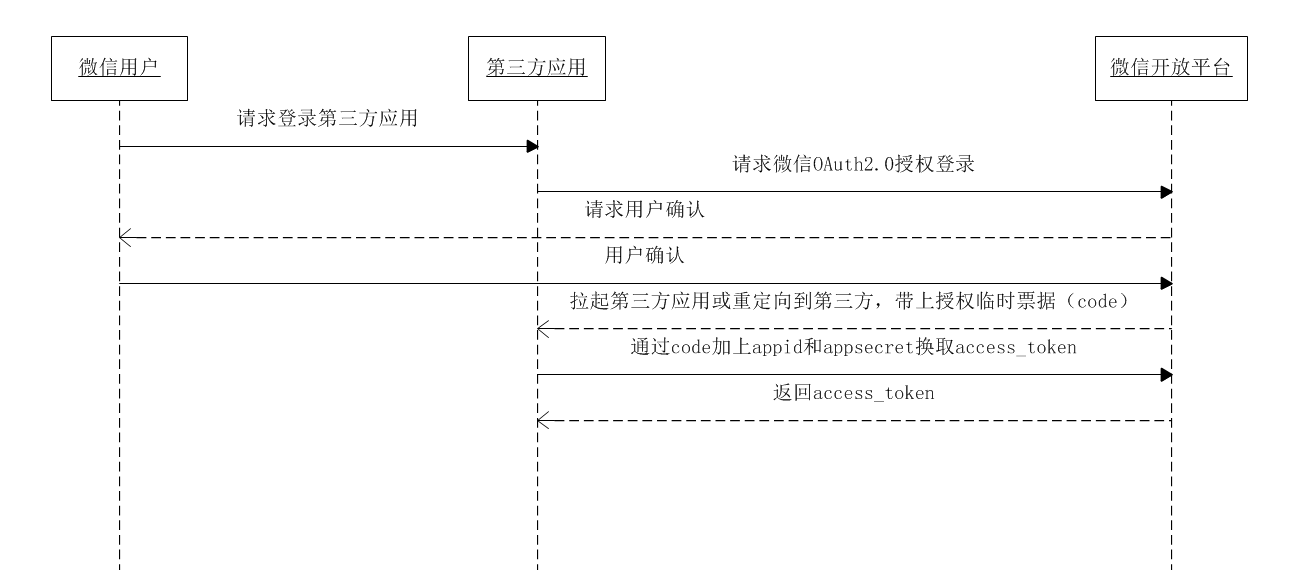
第一步:请求CODE
第三方使用网站应用授权登录前请注意已获取相应网页授权作用域(scope=snsapi_login),则可以通过在PC端打开以下链接: https://open.weixin.qq.com/connect/qrconnect?appid=APPID&redirect_uri=REDIRECT_URI&response_type=code&scope=SCOPE&state=STATE#wechat_redirect 若提示“该链接无法访问”,请检查参数是否填写错误,如redirect_uri的域名与审核时填写的授权域名不一致或scope不为snsapi_login。
参数说明
| 参数 | 是否必须 | 说明 |
|---|---|---|
| appid | 是 | 应用唯一标识 |
| redirect_uri | 是 | 请使用urlEncode对链接进行处理 |
| response_type | 是 | 填code |
| scope | 是 | 应用授权作用域,拥有多个作用域用逗号(,)分隔,网页应用目前仅填写snsapi_login |
| state | 否 | 用于保持请求和回调的状态,授权请求后原样带回给第三方。该参数可用于防止csrf攻击(跨站请求伪造攻击),建议第三方带上该参数,可设置为简单的随机数加session进行校验 |
【注意】
为什么 有 state
返回说明
用户允许授权后,将会重定向到redirect_uri的网址上,并且带上code和state参数
redirect_uri?code=CODE&state=STATE
若用户禁止授权,则重定向后不会带上code参数,仅会带上state参数
redirect_uri?state=STATE为了满足网站更定制化的需求,我们还提供了第二种获取code的方式,支持网站将微信登录二维码内嵌到自己页面中,用户使用微信扫码授权后通过JS将code返回给网站。 JS微信登录主要用途:网站希望用户在网站内就能完成登录,无需跳转到微信域下登录后再返回,提升微信登录的流畅性与成功率。
【淘宝站,支付宝登录】
<a href="https://auth.alipay.com/login/index.htm?loginScene=7&goto=https%3A%2F%2Fauth.alipay.com%2Flogin%2Ftaobao_trust_login.htm%3Ftarget%3Dhttps%253A%252F%252Flogin.taobao.com%252Fmember%252Falipay_sign_dispatcher.jhtml%253Ftg%253Dhttps%25253A%25252F%25252Fwww.taobao.com%25252F&params=VFBMX3JlZGlyZWN0X3VybD1odHRwcyUzQSUyRiUyRnd3dy50YW9iYW8uY29tJTJG" target="_self" class="alipay-login"><i class="iconfont"></i>支付宝登录</a>
https://auth.alipay.com/login/index.htm?loginScene=7&goto=https%3A%2F%2Fauth.alipay.com%2Flogin%2Ftaobao_trust_login.htm%3Ftarget%3Dhttps%253A%252F%252Flogin.taobao.com%252Fmember%252Falipay_sign_dispatcher.jhtml%253Ftg%253Dhttps%25253A%25252F%25252Fwww.taobao.com%25252F¶ms=VFBMX3JlZGlyZWN0X3VybD1odHRwcyUzQSUyRiUyRnd3dy50YW9iYW8uY29tJTJG
URL decode
https://auth.alipay.com/login/index.htm?loginScene=7&goto=https://auth.alipay.com/login/taobao_trust_login.htm?target=https://login.taobao.com/member/alipay_sign_dispatcher.jhtml?tg=https%3A%2F%2Fwww.taobao.com%2F¶ms=VFBMX3JlZGlyZWN0X3VybD1odHRwcyUzQSUyRiUyRnd3dy50YW9iYW8uY29tJTJG
网站支付宝登录产品介绍 - 支付宝开放平台 https://opendocs.alipay.com/open/263/105808
快速接入 - 支付宝开放平台 https://opendocs.alipay.com/open/01emu5
准备工作 | 微信开放文档 https://developers.weixin.qq.com/doc/oplatform/Website_App/WeChat_Login/Wechat_Login.html
【注意:
https://qq.jd.com/new/wx/callback.action?view=null&uuid=f838bb53f861486486f7f97934d4b226
出现的场景:
1、JD服务器返回的WxQrUrl中有;
2、1中的页面的html的js中有;
3、OAuth2.0的核心角色code:
var h = "https://qq.jd.com/new/wx/callback.action?view=null&uuid=e26c7d9b20594ff9b32a586018d61f1f";
h = h.replace(/&/g, "&"),
h += (h.indexOf("?") > -1 ? "&": "?") + "code=" + wx_code + "&state=E925E7045D788ADB8662DBA54E29AABC0468A59508F5B0E77CDA9FF80769CEF566FD04C231469DF8FC6A5CEDAC4250ED";
【注意 code 是返回到浏览器端的,浏览器拿着code 请求 JD服务器,而不是微信服务器去请求】
https://lp.open.weixin.qq.com/connect/l/qrconnect?uuid=021Gbt1B4xzull27&_=1610271592960
window.wx_errcode=408;window.wx_code='';
它返回后,给js中的变量赋值了。
!function(){function a(a){var b=document.location.search||document.location.hash;if(b){if(/\?/.test(b)&&(b=b.split("?")[1]),null==a)return decodeURIComponent(b);for(var c=b.split("&"),d=0;d<c.length;d++)if(c[d].substring(0,c[d].indexOf("="))==a)return decodeURIComponent(c[d].substring(c[d].indexOf("=")+1))}return""}function b(a){jQuery.ajax({type:"GET",url:p+"/connect/l/qrconnect?uuid=061J0Tvh1aLnFa1N"+(a?"&last="+a:""),dataType:"script",cache:!1,timeout:6e4,success:function(a,e,f){var g=window.wx_errcode;switch(g){case 405:var h="https://qq.jd.com/new/wx/callback.action?view=null&uuid=e26c7d9b20594ff9b32a586018d61f1f";h=h.replace(/&/g,"&"),h+=(h.indexOf("?")>-1?"&":"?")+"code="+wx_code+"&state=E925E7045D788ADB8662DBA54E29AABC0468A59508F5B0E77CDA9FF80769CEF566FD04C231469DF8FC6A5CEDAC4250ED";var i=c("self_redirect");if(d)if("true"!==i&&"false"!==i)try{document.domain="qq.com";var j=window.top.location.host.toLowerCase();j&&(window.location=h)}catch(k){window.top.location=h}else if("true"===i)try{window.location=h}catch(k){window.top.location=h}else window.top.location=h;else window.location=h;break;case 404:jQuery(".js_status").hide(),jQuery(".js_qr_img").hide(),jQuery(".js_wx_after_scan").show(),setTimeout(b,100,g);break;case 403:jQuery(".js_status").hide(),jQuery(".js_qr_img").hide(),jQuery(".js_wx_after_cancel").show(),setTimeout(b,2e3,g);break;case 402:case 500:window.location.reload();break;case 408:setTimeout(b,2e3)}},error:function(a,c,d){var e=window.wx_errcode;408==e?setTimeout(b,5e3):setTimeout(b,5e3,e)}})}function c(a,b){b||(b=window.location.href),a=a.replace(/[\[\]]/g,"\\$&");var c=new RegExp("[?&]"+a+"(=([^&#]*)|&|#|$)"),d=c.exec(b);return d?d[2]?decodeURIComponent(d[2].replace(/\+/g," ")):"":null}var d=window.top!=window;if(!d){document.getElementsByClassName||(document.getElementsByClassName=function(a){for(var b=[],c=new RegExp("(^| )"+a+"( |$)"),d=document.getElementsByTagName("*"),e=0,f=d.length;f>e;e++)c.test(d[e].className)&&b.push(d[e]);return b});for(var e=document.getElementsByClassName("status"),f=0,g=e.length;g>f;++f){var h=e[f];h.className=h.className+" normal"}}var i=parseInt(a("styletype"),10),j=parseInt(a("sizetype"),10),k=a("bgcolor"),l=NaN;if(1!==i&&0!==i&&1===l&&(i=0),1===i)d?document.body.className=document.body.className+" redesign-style_iframe"+(1===j?" redesign-style_iframe-small":""):document.body.className=document.body.className+"redesign-style_page",k&&(document.body.style.backgroundColor=k),jQuery(".new-template").show();else{if(d){var m="";"white"!=m&&(document.body.style.color="#373737")}else document.body.style.backgroundColor="#333333",document.body.style.padding="50px";if(jQuery(".old-template").show(),0!==i){var n="";if(n){var o=document.createElement("link");o.rel="stylesheet",o.href=n.replace(new RegExp("javascript:","gi"),""),document.getElementsByTagName("head")[0].appendChild(o)}}}var p=window.usenewdomain?"https://lp.open.weixin.qq.com":"https://long.open.weixin.qq.com";setTimeout(b,100)}();
!function () {

    function a(a) {

        var b = document.location.search || document.location.hash;

        if (b) {

            if (/\?/.test(b) && (b = b.split("?")[1]), null == a) return decodeURIComponent(b);

            for (var c = b.split("&"), d = 0; d < c.length; d++) if (c[d].substring(0, c[d].indexOf("=")) == a) return decodeURIComponent(c[d].substring(c[d].indexOf("=") + 1))

        }

        return ""

    }

    function b(a) {

        jQuery.ajax({

            type: "GET",

            url: p + "/connect/l/qrconnect?uuid=061J0Tvh1aLnFa1N" + (a ? "&last=" + a : ""),

            dataType: "script",

            cache: !1,

            timeout: 6e4,

            success: function (a, e, f) {

                var g = window.wx_errcode;

                switch (g) {

                    case 405:

                        var h = "https://qq.jd.com/new/wx/callback.action?view=null&uuid=e26c7d9b20594ff9b32a586018d61f1f";

                        h = h.replace(/&/g, "&"), h += (h.indexOf("?") > -1 ? "&" : "?") + "code=" + wx_code + "&state=E925E7045D788ADB8662DBA54E29AABC0468A59508F5B0E77CDA9FF80769CEF566FD04C231469DF8FC6A5CEDAC4250ED";

                        var i = c("self_redirect");

                        if (d) if ("true" !== i && "false" !== i) try {

                            document.domain = "qq.com";

                            var j = window.top.location.host.toLowerCase();

                            j && (window.location = h)

                        } catch (k) {

                            window.top.location = h

                        } else if ("true" === i) try {

                            window.location = h

                        } catch (k) {

                            window.top.location = h

                        } else window.top.location = h; else window.location = h;

                        break;

                    case 404:

                        jQuery(".js_status").hide(), jQuery(".js_qr_img").hide(), jQuery(".js_wx_after_scan").show(), setTimeout(b, 100, g);

                        break;

                    case 403:

                        jQuery(".js_status").hide(), jQuery(".js_qr_img").hide(), jQuery(".js_wx_after_cancel").show(), setTimeout(b, 2e3, g);

                        break;

                    case 402:

                    case 500:

                        window.location.reload();

                        break;

                    case 408:

                        setTimeout(b, 2e3)

                }

            },

            error: function (a, c, d) {

                var e = window.wx_errcode;

                408 == e ? setTimeout(b, 5e3) : setTimeout(b, 5e3, e)

            }

        })

    }

    function c(a, b) {

        b || (b = window.location.href), a = a.replace(/[\[\]]/g, "\\$&");

        var c = new RegExp("[?&]" + a + "(=([^&#]*)|&|#|$)"), d = c.exec(b);

        return d ? d[2] ? decodeURIComponent(d[2].replace(/\+/g, " ")) : "" : null

    }

    var d = window.top != window;

    if (!d) {

        document.getElementsByClassName || (document.getElementsByClassName = function (a) {

            for (var b = [], c = new RegExp("(^| )" + a + "( |$)"), d = document.getElementsByTagName("*"), e = 0, f = d.length; f > e; e++) c.test(d[e].className) && b.push(d[e]);

            return b

        });

        for (var e = document.getElementsByClassName("status"), f = 0, g = e.length; g > f; ++f) {

            var h = e[f];

            h.className = h.className + " normal"

        }

    }

    var i = parseInt(a("styletype"), 10), j = parseInt(a("sizetype"), 10), k = a("bgcolor"), l = NaN;

    if (1 !== i && 0 !== i && 1 === l && (i = 0), 1 === i) d ? document.body.className = document.body.className + " redesign-style_iframe" + (1 === j ? " redesign-style_iframe-small" : "") : document.body.className = document.body.className + "redesign-style_page", k && (document.body.style.backgroundColor = k), jQuery(".new-template").show(); else {

        if (d) {

            var m = "";

            "white" != m && (document.body.style.color = "#373737")

        } else document.body.style.backgroundColor = "#333333", document.body.style.padding = "50px";

        if (jQuery(".old-template").show(), 0 !== i) {

            var n = "";

            if (n) {

                var o = document.createElement("link");

                o.rel = "stylesheet", o.href = n.replace(new RegExp("javascript:", "gi"), ""), document.getElementsByTagName("head")[0].appendChild(o)

            }

        }

    }

    var p = window.usenewdomain ? "https://lp.open.weixin.qq.com" : "https://long.open.weixin.qq.com";

    setTimeout(b, 100)

}();
<!DOCTYPE html>
<html>
<head>
<title>微信登录</title>
<meta charset="utf-8">
<link rel="stylesheet" href="https://res.wx.qq.com/connect/zh_CN/htmledition/style/impowerApp45a337.css">
<link href="https://res.wx.qq.com/connect/zh_CN/htmledition/images/favicon3696b4.ico" rel="Shortcut Icon">
<script src="https://res.wx.qq.com/connect/zh_CN/htmledition/js/jquery.min3696b4.js"></script>
</head>
<body>
<div class="old-template" style="display: none;">
<div class="main impowerBox">
<div class="loginPanel normalPanel">
<div class="title">微信登录</div>
<div class="waiting panelContent">
<div class="wrp_code"><img class="qrcode lightBorder" src="/connect/qrcode/061eTl3r2M8z000N" /></div>
<div class="info">
<div class="status status_browser js_status js_wx_default_tip" id="wx_default_tip">
<p>请使用微信扫描二维码登录</p>
<p>“极客邦科技”</p>
</div>
<div class="status status_succ js_status js_wx_after_scan" style="display:none" id="wx_after_scan">
<i class="status_icon icon38_msg succ"></i>
<div class="status_txt">
<h4>扫描成功</h4>
<p>请在微信中点击确认即可登录</p>
</div>
</div>
<div class="status status_fail js_status js_wx_after_cancel" style="display:none" id="wx_after_cancel">
<i class="status_icon icon38_msg warn"></i>
<div class="status_txt">
<h4>您已取消此次登录</h4>
<p>您可再次扫描登录,或关闭窗口</p>
</div>
</div>
</div>
</div>
</div>
</div>
</div>
<div class="new-template" style="display: none;">
<div class="wechat-bg"></div>
<div class="wechat-logo"></div>
<div class="redesign-login__area">
<div class="redesign-login__wrp">
<div class="redesign-login__title">微信登录“极客邦科技”</div>
<div class="redesign-login__card">
<div class="redesign-login__qrcheck">
<img class="qrcode-image js_qr_img" src="/connect/qrcode/061eTl3r2M8z000N" />
<div class="redesign-msg_text js_status js_wx_default_tip" id="wx_default_tip">
<h4>请使用微信扫描二维码登录</h4>
</div>
</div>
<div class="redesign-msg redesign-msg_success js_status js_wx_after_scan" style="display:none" id="wx_after_scan">
<i class="redesign-msg__icon redesign-msg__icon_success"></i>
<div class="redesign-msg_text">
<h4>扫描成功</h4>
<p>请在微信中点击确认即可登录</p>
</div>
</div>
<div class="redesign-msg redesign-msg_warn js_status js_wx_after_cancel" style="display:none" id="wx_after_cancel">
<i class="redesign-msg__icon redesign-msg__icon_warn"></i>
<div class="redesign-msg_text">
<h4>您已取消此次登录</h4>
<p>您可再次扫描登录,或关闭窗口</p>
</div>
</div>
</div>
</div>
</div>
</div>
<script>
// @cunjin 下面的变量是给开发者工具用的,inline到html里面,一定不能删掉
var fordevtool = "https://long.open.weixin.qq.com/connect/l/qrconnect?uuid=061eTl3r2M8z000N"
console.log('devtool use', fordevtool)
</script>
<script>
var usenewdomain = '1' * 1 || 0
</script>
<script>
function AQ_SECAPI_ESCAPE(a,b){for(var c=new Array,d=0;d<a.length;d++)if("&"==a.charAt(d)){var e=[3,4,5,9],f=0;for(var g in e){var h=e[g];if(d+h<=a.length){var i=a.substr(d,h).toLowerCase();if(b[i]){c.push(b[i]),d=d+h-1,f=1;break}}}0==f&&c.push(a.charAt(d))}else c.push(a.charAt(d));return c.join("")}function AQ_SECAPI_CheckXss(){for(var a=new Object,b="'\"<>`script:daex/hml;bs64,",c=0;c<b.length;c++){for(var d=b.charAt(c),e=d.charCodeAt(),f=e,g=e.toString(16),h=0;h<7-e.toString().length;h++)f="0"+f;a["&#"+e+";"]=d,a["&#"+f]=d,a["&#x"+g]=d}a["<"]="<",a[">"]=">",a["""]='"';var i=location.href,j=document.referrer;i=decodeURIComponent(AQ_SECAPI_ESCAPE(i,a)),j=decodeURIComponent(AQ_SECAPI_ESCAPE(j,a));var k=new RegExp("['\"<>`]|script:|data:text/html;base64,");if(k.test(i)||k.test(j)){var l="1.3",m="http://zyjc.sec.qq.com/dom",n=new Image;n.src=m+"?v="+l+"&u="+encodeURIComponent(i)+"&r="+encodeURIComponent(j),i=i.replace(/['\"<>`]|script:/gi,""),i=i.replace(/data:text\/html;base64,/gi,"data:text/plain;base64,"),location.href=i}}AQ_SECAPI_CheckXss();
</script>
<script>
!function(){function a(a){var b=document.location.search||document.location.hash;if(b){if(/\?/.test(b)&&(b=b.split("?")[1]),null==a)return decodeURIComponent(b);for(var c=b.split("&"),d=0;d<c.length;d++)if(c[d].substring(0,c[d].indexOf("="))==a)return decodeURIComponent(c[d].substring(c[d].indexOf("=")+1))}return""}function b(a){jQuery.ajax({type:"GET",url:p+"/connect/l/qrconnect?uuid=061eTl3r2M8z000N"+(a?"&last="+a:""),dataType:"script",cache:!1,timeout:6e4,success:function(a,e,f){var g=window.wx_errcode;switch(g){case 405:var h="https://account.geekbang.org/account/oauth/callback?type=wechat&ident=22ee36&login=0&cip=0&redirect=https%3A%2F%2Faccount.geekbang.org%2Fthirdlogin%3Fremember%3D1%26type%3Dwechat%26is_bind%3D0%26platform%3Dtime%26failedurl%3Dhttps%3A%2F%2Faccount.geekbang.org%2Fsignin";h=h.replace(/&/g,"&"),h+=(h.indexOf("?")>-1?"&":"?")+"code="+wx_code+"&state=b82914f3cf5f5f22d06c1565a898b047";var i=c("self_redirect");if(d)if("true"!==i&&"false"!==i)try{document.domain="qq.com";var j=window.top.location.host.toLowerCase();j&&(window.location=h)}catch(k){window.top.location=h}else if("true"===i)try{window.location=h}catch(k){window.top.location=h}else window.top.location=h;else window.location=h;break;case 404:jQuery(".js_status").hide(),jQuery(".js_qr_img").hide(),jQuery(".js_wx_after_scan").show(),setTimeout(b,100,g);break;case 403:jQuery(".js_status").hide(),jQuery(".js_qr_img").hide(),jQuery(".js_wx_after_cancel").show(),setTimeout(b,2e3,g);break;case 402:case 500:window.location.reload();break;case 408:setTimeout(b,2e3)}},error:function(a,c,d){var e=window.wx_errcode;408==e?setTimeout(b,5e3):setTimeout(b,5e3,e)}})}function c(a,b){b||(b=window.location.href),a=a.replace(/[\[\]]/g,"\\$&");var c=new RegExp("[?&]"+a+"(=([^&#]*)|&|#|$)"),d=c.exec(b);return d?d[2]?decodeURIComponent(d[2].replace(/\+/g," ")):"":null}var d=window.top!=window;if(!d){document.getElementsByClassName||(document.getElementsByClassName=function(a){for(var b=[],c=new RegExp("(^| )"+a+"( |$)"),d=document.getElementsByTagName("*"),e=0,f=d.length;f>e;e++)c.test(d[e].className)&&b.push(d[e]);return b});for(var e=document.getElementsByClassName("status"),f=0,g=e.length;g>f;++f){var h=e[f];h.className=h.className+" normal"}}var i=parseInt(a("styletype"),10),j=parseInt(a("sizetype"),10),k=a("bgcolor"),l=NaN;if(1!==i&&0!==i&&1===l&&(i=0),1===i)d?document.body.className=document.body.className+" redesign-style_iframe"+(1===j?" redesign-style_iframe-small":""):document.body.className=document.body.className+"redesign-style_page",k&&(document.body.style.backgroundColor=k),jQuery(".new-template").show();else{if(d){var m="";"white"!=m&&(document.body.style.color="#373737")}else document.body.style.backgroundColor="#333333",document.body.style.padding="50px";if(jQuery(".old-template").show(),0!==i){var n="";if(n){var o=document.createElement("link");o.rel="stylesheet",o.href=n.replace(new RegExp("javascript:","gi"),""),document.getElementsByTagName("head")[0].appendChild(o)}}}var p=window.usenewdomain?"https://lp.open.weixin.qq.com":"https://long.open.weixin.qq.com";setTimeout(b,100)}();
</script>
</body>
</html> https://account.geekbang.org/account/oauth/callback?type=wechat&ident=6c73da&login=0&cip=0&redirect=https%3A%2F%2Faccount.geekbang.org%2Fthirdlogin%3Fremember%3D1%26type%3Dwechat%26is_bind%3D0%26gk_notautolg%3D1%26platform%3Dtime%26failedurl%3Dhttps%3A%2F%2Faccount.geekbang.org%2Fsignin%3Fgk_notautolg%3D1&code=0611GWZv335yDV2Z243w3N6TEJ31GWZ9&state=8a2842918585373351e99e5e1cd41e8d type: wechat
ident: 6c73da
login: 0
cip: 0
redirect: https://account.geekbang.org/thirdlogin?remember=1&type=wechat&is_bind=0&gk_notautolg=1&platform=time&failedurl=https://account.geekbang.org/signin?gk_notautolg=1
code: 0611GWZv335yDV2Z243w3N6TEJ31GWZ9
state: 8a2842918585373351e99e5e1cd41e8d https://account.geekbang.org/thirdlogin?remember=1&type=wechat&is_bind=0&gk_notautolg=1&platform=time& remember: 1
type: wechat
is_bind: 0
gk_notautolg: 1
platform: time
第一步:请求CODE
第三方使用网站应用授权登录前请注意已获取相应网页授权作用域(scope=snsapi_login),则可以通过在PC端打开以下链接: https://open.weixin.qq.com/connect/qrconnect?appid=APPID&redirect_uri=REDIRECT_URI&response_type=code&scope=SCOPE&state=STATE#wechat_redirect 若提示“该链接无法访问”,请检查参数是否填写错误,如redirect_uri的域名与审核时填写的授权域名不一致或scope不为snsapi_login。
参数说明
| 参数 | 是否必须 | 说明 |
|---|---|---|
| appid | 是 | 应用唯一标识 |
| redirect_uri | 是 | 请使用urlEncode对链接进行处理 |
| response_type | 是 | 填code |
| scope | 是 | 应用授权作用域,拥有多个作用域用逗号(,)分隔,网页应用目前仅填写snsapi_login |
| state | 否 | 用于保持请求和回调的状态,授权请求后原样带回给第三方。该参数可用于防止csrf攻击(跨站请求伪造攻击),建议第三方带上该参数,可设置为简单的随机数加session进行校验 |
返回说明
用户允许授权后,将会重定向到redirect_uri的网址上,并且带上code和state参数
redirect_uri?code=CODE&state=STATE
若用户禁止授权,则重定向后不会带上code参数,仅会带上state参数
redirect_uri?state=STATEThe OAuth 2.0 Authorization Framework OAuth2.0的核心角色code 扫码登录的更多相关文章
- OAuth 2.0 Authorization Framework RFC
Internet Engineering Task Force (IETF) D. Hardt, Ed.Request for Comments: 6749 MicrosoftObsoletes: 5 ...
- The OAuth 2.0 Authorization Framework: Bearer Token Usage
https://tools.ietf.org/html/rfc6750 1.2. Terminology Bearer Token A security token with the property ...
- The OAuth 2.0 Authorization Framework
The OAuth 2.0 Authorization Framework Abstract The OAuth 2.0 authorization framework enables a thi ...
- 微信开放平台开发——网页微信扫码登录(OAuth2.0)
1.OAuth2.0 OAuth(开放授权)是一个开放标准,允许用户让第三方应用访问该用户在某一网站上存储的私密的资源(如照片,视频,联系人列表),而无需将用户名和密码提供给第三方应用. 允许用户提供 ...
- 第三方登录:微信扫码登录(OAuth2.0)
1.OAuth2.0 OAuth(开放授权)是一个开放标准,允许用户让第三方应用访问该用户在某一网站上存储的私密的资源(如照片,视频,联系人列表),而无需将用户名和密码提供给第三方应用. 允许用户提供 ...
- php微信开放平台--第三方网页微信扫码登录(OAuth2.0)
第一.OAuth2.0 OAuth(开放授权)是一个开放标准,允许用户让第三方应用访问该用户在某一网站上存储的私密的资源(如照片,视频,联系人列表),而无需将用户名和密码提供给第三方应用. 允许用户提 ...
- 基于spring boot2.0+spring security +oauth2.0+ jwt微服务架构
github地址:https://github.com/hankuikuide/microservice-spring-security-oauth2 项目介绍 该项目是一个演示项目,主要演示了,基于 ...
- thymeltesys-基于Spring Boot Oauth2的扫码登录框架
thymeltesys thymelte是一个基于Spring Boot Oauth2的扫码登录框架,使用PostgreSQL存储数据,之后会慢慢支持其他关系型数据库.即使你不使用整个框架,只使用其中 ...
- Wechat login authorization(OAuth2.0)
一.前言 昨天小组开了个会,让我今天实现一个微信网页授权的功能,可以让用户在授权之后无需再次登录既可进入用户授权界面.在这之前我也从没接触过微信公众号开发之类的,也不知道公众号后台是啥样子的,自己所在 ...
随机推荐
- 输入xls格式 输出 xls
package com.cn.peitest.excel.word; import java.io.File; import java.io.FileInputStream; import java. ...
- leetcode Add to List 31. Next Permutation找到数组在它的全排列中的下一个
直接上代码 public class Solution { /* 做法是倒着遍历数组,目标是找到一个数比它前边的数大(即这个数后边的是降序排列),如果找到了那么这个数前边的那个数就是需要改变的最高位, ...
- JAVA初始化及类的加载
在许多传统语言中,程序是作为启动过程的一部分被加载的.然后是初始化,紧接着程序开始运行.这些语言的初始化过程必须小心控制,以确保定义为static的东西,其初始化顺序不会造成麻烦.例如C++期望一个s ...
- 手动修复 under-replicated blocks in HDFS
解决方式步骤: 1.进入hdfs的pod kubectl get pod -o wide | grep hdfs kubectl exec -ti hadoop-hdfs-namenode-hdfs1 ...
- hbase:ERROR: org.apache.hadoop.hbase.ipc.ServerNotRunningYetException: Server is not running yet
hbase连接deug:DEBUG [main-SendThread(bigdata.server1:2181)] - Reading reply sessionid:0x16f764e7f6e000 ...
- 单细胞分析实录(8): 展示marker基因的4种图形(一)
今天的内容讲讲单细胞文章中经常出现的展示细胞marker的图:tsne/umap图.热图.堆叠小提琴图.气泡图,每个图我都会用两种方法绘制. 使用的数据来自文献:Single-cell transcr ...
- Akka Typed 官方文档之随手记
️ 引言 近两年,一直在折腾用FP与OO共存的编程语言Scala,采取以函数式编程为主的方式,结合TDD和BDD的手段,采用Domain Driven Design的方法学,去构造DDDD应用(Dom ...
- NOIP初赛篇——02计算机系统的基本结构
引言 计算机系统由硬件和软件两部分组成,硬件系统是计算机的"躯干",是物质基础.而软件系统则是建立在这个"躯干"上的"灵魂". 计算机硬件 ...
- WixVersionControl Wix项目版本控制
原文链接:https://www.swack.cn/wiki/001565675133949eff0d3d5a51f48288cf6d8248905e28f000/001569821278313e6b ...
- Gradle最佳实践
一.Gradle相比Maven的优势 配置简洁 Maven是用pom.xml管理,引入一个jar包至少5行代码,Gradle只需要一行. 构建速度快 Gradle支持daemon方式运行,启动速度快, ...