
Jmeter(四十) - 从入门到精通进阶篇 - Jmeter配置文件的刨根问底 - 中篇(详解教程)
1.简介
为什么宏哥要对Jmeter的配置文件进行一下讲解了,因为有的童鞋或者小伙伴在测试中遇到一些需要修改配置文件的问题不是很清楚也不是很懂,就算修改了也是模模糊糊的。更有甚者觉得那是禁地神圣不可轻犯不敢触碰不敢修改,害怕修改错了Jmeter运行不了了。听宏哥的大胆修改大不了再重新安装一个新的Jmeter,或者你有做备份的好习惯,在修改前备份好以后大胆修改,修改错了直接使用备份文件恢复过来就可以。
2.配置文件
在%JMETER_HOME%\bin(or $JMETER_HOME/bin)目录下搜索框中输入:properties 会发现存在多个配置文件,如下图所示:
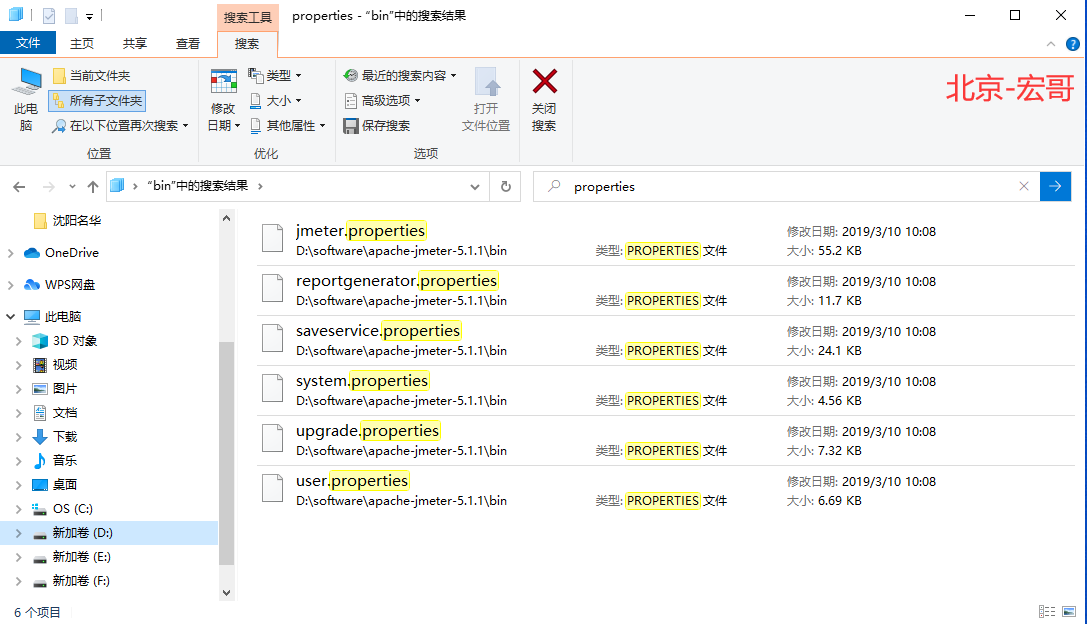
宏哥上一篇中对其中最重要的是jmeter.properties.是Jmeter核心配置项文件,进行了讲解和说明,下面对其它常用的一些配置文件的设置进行总结与说明.按计划今天宏哥将要讲解user.properties文件。
3.user.properties
这个文件不是很大,宏哥将其内容全部进行翻译了一下,我们下边看看其中到底含有那些配置项。
3.1文件说明
第1段——许可证说明
(1)原文
# Sample user.properties file

#

## Licensed to the Apache Software Foundation (ASF) under one or more

## contributor license agreements. See the NOTICE file distributed with

## this work for additional information regarding copyright ownership.

## The ASF licenses this file to You under the Apache License, Version 2.0

## (the "License"); you may not use this file except in compliance with

## the License. You may obtain a copy of the License at

##

## http://www.apache.org/licenses/LICENSE-2.0

##

## Unless required by applicable law or agreed to in writing, software

## distributed under the License is distributed on an "AS IS" BASIS,

## WITHOUT WARRANTIES OR CONDITIONS OF ANY KIND, either express or implied.

## See the License for the specific language governing permissions and

## limitations under the License.
(2)译文
# 示例user.properties文件

#

## Apache软件基金会(ASF)下一个或多个许可

## 贡献者许可协议。请参阅

## 此作品用于获取关于版权所有权的附加信息。

## ASF根据Apache 2.0 版本许可证协议将此文件授权给您。

## (“许可证”);除非符合以下条件,否则不能使用此文件

## 许可证。您可以在

##

## http://www.apache.org/licenses/LICENSE-2.0

##

## 除非适用法律要求或书面同意,软件

## 根据在“AS IS”BASIS上分发的许可证基础上发布的,

## 无任何明示或暗示的保证或条件。

## 有关管理权限的特定语言,请参阅许可证

## 《许可证》规定的限制。
3.2类路径配置
(一)第2段——用于搜索其他JMeter插件类的路径列表
(1)原文
#---------------------------------------------------------------------------

# Classpath configuration

#---------------------------------------------------------------------------

#

# List of paths (separated by ;) to search for additional JMeter plugin classes,

# for example new GUI elements and samplers.

# A path item can either be a jar file or a directory.

# Any jar file in such a directory will be automatically included,

# jar files in sub directories are ignored.

# The given value is in addition to any jars found in the lib/ext directory.

# Do not use this for utility or plugin dependency jars.

#search_paths=/app1/lib;/app2/lib
(2)译文
#---------------------------------------------------------------------------

# 类路径配置

#---------------------------------------------------------------------------

#

# 用于搜索其他JMeter插件类的路径列表(由;分隔),

# 例如,新的GUI元素和采样器。

# 路径项可以是jar文件或目录。

# 这样的目录中的任何jar文件都将自动包含,

# 忽略子目录中的jar文件。

# 给定值是在lib/ext目录中找到的任何jar之外的值。

# 不要将此用于实用程序或插件依赖项jar。

#search_paths=/app1/lib;/app2/lib
(二)第3段——搜索实用程序和插件依赖类的路径列表
(1)原文
# List of paths that JMeter will search for utility and plugin dependency classes.

# Use your platform path separator (java.io.File.pathSeparatorChar in Java) to separate multiple paths.

# A path item can either be a jar file or a directory.

# Any jar file in such a directory will be automatically included,

# jar files in sub directories are ignored.

# The given value is in addition to any jars found in the lib directory.

# All entries will be added to the class path of the system class loader

# and also to the path of the JMeter internal loader.

# Paths with spaces may cause problems for the JVM

#Example for windows (; separator)

#user.classpath=../classes;../lib;../app1/jar1.jar;../app2/jar2.jar

#Example for linux (:separator)

#user.classpath=../classes:../lib:../app1/jar1.jar:../app2/jar2.jar
(2)译文
# JMeter将搜索实用程序和插件依赖类的路径列表。

# 使用您的平台路径分隔符(Java中的java. Io.Fiel.PosialStutoRealar)来分离多条路径。

# 路径项可以是jar文件或目录。

# 这样的目录中的任何jar文件都将自动包含,

# 忽略子目录中的jar文件。

# 给定的值是在lib目录中找到的任何jar之外的值。

# 所有条目都将添加到系统类加载器的类路径

# 以及JMeter内部加载程序的路径。

# 带有空间的路径可能导致JVM的问题

#示例 Windows(分离器)

#user.classpath=../classes;../lib;../app1/jar1.jar;../app2/jar2.jar

#示例 linux (分离器)

#user.classpath=../classes:../lib:../app1/jar1.jar:../app2/jar2.jar
(三)第4段——搜索实用程序的路径列表
(1)原文
# List of paths (separated by ;) that JMeter will search for utility

# and plugin dependency classes.

# A path item can either be a jar file or a directory.

# Any jar file in such a directory will be automatically included,

# jar files in sub directories are ignored.

# The given value is in addition to any jars found in the lib directory

# or given by the user.classpath property.

# All entries will be added to the path of the JMeter internal loader only.

# For plugin dependencies using plugin_dependency_paths should be preferred over

# user.classpath.

#plugin_dependency_paths=../dependencies/lib;../app1/jar1.jar;../app2/jar2.jar
(2)译文
# JMeter将搜索实用程序的路径列表(由;分隔)

# 以及插件依赖类。

# 路径项可以是jar文件或目录。

# 这样的目录中的任何jar文件都将自动包含,

# 忽略子目录中的jar文件。

# 给定值是在lib目录中找到的任何jar之外的值

# 或者由user.classpath属性给出。

# 所有条目将仅添加到JMeter内部加载程序的路径。

# 对于插件依赖关系,应该优先使用 plugin_dependency_paths

# user.classpath.

#plugin_dependency_paths=../dependencies/lib;../app1/jar1.jar;../app2/jar2.jar
3.3报告配置
(一)第5段——标题
(1)原文
#---------------------------------------------------------------------------

# Reporting configuration

#---------------------------------------------------------------------------
(2)译文
#---------------------------------------------------------------------------

# 报告配置

#---------------------------------------------------------------------------
(二)第6段——更改报表标题
(1)原文
# Configure this property to change the report title

#jmeter.reportgenerator.report_title=Apache JMeter Dashboard
(2)译文
# 配置此属性以更改报表标题

#jmeter.reportgenerator.report_title=Apache JMeter Dashboard
(三)第7段——根据日期范围生成报告
(1)原文
# Used to generate a report based on a date range if needed

# Default date format (from SimpleDateFormat Java API and Locale.ENGLISH)

#jmeter.reportgenerator.date_format=yyyyMMddHHmmss

# Date range start date using date_format property

#jmeter.reportgenerator.start_date=

# Date range end date using date_format property

#jmeter.reportgenerator.end_date=
(2)译文
# 如果需要,可用于根据日期范围生成报告

# 默认日期格式 (来自 Java API 和 Locale.ENGLISH 的日期格式)

#jmeter.reportgenerator.date_format=yyyyMMddHHmmss

# 日期范围开始日期使用 date_format 属性

#jmeter.reportgenerator.start_date=

# 日期范围结束日期使用 date_format 属性

#jmeter.reportgenerator.end_date=
(四)第8段——更改随时间变化的图的粒度
(1)原文
# Change this parameter if you want to change the granularity of over time graphs.

#jmeter.reportgenerator.overall_granularity=60000
(2)译文
# 如果希望更改随时间变化的图的粒度,请更改此参数。

#jmeter.reportgenerator.overall_granularity=60000
(五)第9段——更改响应时间分布的粒度
(1)原文
# Change this parameter if you want to change the granularity of Response time distribution

# Set to 100 ms by default

#jmeter.reportgenerator.graph.responseTimeDistribution.property.set_granularity=100
(2)译文
# 如果希望更改响应时间分布的粒度,请更改此参数

# 默认设置为100ms

#jmeter.reportgenerator.graph.responseTimeDistribution.property.set_granularity=100
(六)第10段——指示为图形和统计生成保留哪些样本
(1)原文
# Change this parameter if you want to keep only some samples.

# Regular Expression which Indicates which samples to keep for graphs and statistics generation.

# Empty value means no filtering

#jmeter.reportgenerator.sample_filter=
(2)译文
# 如果仅希望保留一些示例,请更改此参数。

# 正则表达式,它指示为图形和统计生成保留哪些样本。

# 空值意味着没有过滤

#jmeter.reportgenerator.sample_filter=
(七)第11段——修改APDEX满意度阈值
(1)原文
# Change this parameter if you want to override the APDEX satisfaction threshold.

#jmeter.reportgenerator.apdex_satisfied_threshold=500
(2)译文
# 如果要修改APDEX满意度阈值,请更改此参数。

#jmeter.reportgenerator.apdex_satisfied_threshold=500
(八)第12段——修改APDEX容忍阈值
(1)原文
# Change this parameter if you want to override the APDEX tolerance threshold.

#jmeter.reportgenerator.apdex_tolerated_threshold=1500
(2)译文
# 如果要修改APDEX容忍阈值,请更改此参数。

#jmeter.reportgenerator.apdex_tolerated_threshold=1500
(九)第13段—— 指示筛选的图形系列(正则表达式)
(1)原文
# Indicates which graph series are filtered (regular expression)

# In the below example we filter on Search and Order samples

# Note that the end of the pattern should always include (-success|-failure)?$

# TransactionsPerSecondGraphConsumer suffixes transactions with "-success" or "-failure" depending

# on the result

#jmeter.reportgenerator.exporter.html.series_filter=^(Search|Order)(-success|-failure)?$
(2)译文
# 指示筛选的图形系列(正则表达式)

# 在下面的示例中,在下面的示例中,我们对搜索和订单样本进行过滤(您只能修改搜索|订单字段值,保留其余部分,以便在您不想要所有内容时仅保留报表中所需的事务)。

# 注意,模式的结尾应该始终包括 (-success|-failure)?$

# Transactions每秒后缀使用“-success”或“-failure”的事务,取决于

# 结果的

#jmeter.reportgenerator.exporter.html.series_filter=^(搜索|订单)(-success|-failure)?$
(十)第14段——指示是否仅在支持该控制器的图形上显示控制器示例
(1)原文
# Indicates whether only controller samples are displayed on graphs that support it.

#jmeter.reportgenerator.exporter.html.show_controllers_only=false
(2)译文
# 指示是否仅在支持该控制器的图形上显示控制器示例。

#jmeter.reportgenerator.exporter.html.show_controllers_only=false
(十一)第15段——选择默认情况下将导出哪些事务
(1)原文
# This property is used by menu item "Export transactions for report"

# It is used to select which transactions by default will be exported

#jmeter.reportgenerator.exported_transactions_pattern=[a-zA-Z0-9_\\-{}\\$\\.]*[-_][0-9]*
(2)译文
# 此属性用于菜单项“导出事务报告”

# 它用于选择默认情况下将导出哪些事务

#jmeter.reportgenerator.exported_transactions_pattern=[a-zA-Z0-9_\\-{}\\$\\.]*[-_][0-9]*
(十二)第16段——自定义图形定义
(1)原文
## Custom graph definition

#jmeter.reportgenerator.graph.custom_mm_hit.classname=org.apache.jmeter.report.processor.graph.impl.CustomGraphConsumer

#jmeter.reportgenerator.graph.custom_mm_hit.title=Graph Title

#jmeter.reportgenerator.graph.custom_mm_hit.property.set_Y_Axis=Response Time (ms)

#jmeter.reportgenerator.graph.custom_mm_hit.property.set_X_Axis=Over Time

#jmeter.reportgenerator.graph.custom_mm_hit.property.set_granularity=${jmeter.reportgenerator.overall_granularity}

#jmeter.reportgenerator.graph.custom_mm_hit.property.setSampleVariableName=VarName

#jmeter.reportgenerator.graph.custom_mm_hit.property.setContentMessage=Message for graph point label
(2)译文
## 自定义图形定义

#jmeter.reportgenerator.graph.custom_mm_hit.classname=org.apache.jmeter.report.processor.graph.impl.CustomGraphConsumer

#jmeter.reportgenerator.graph.custom_mm_hit.title=Graph Title

#jmeter.reportgenerator.graph.custom_mm_hit.property.set_Y_Axis=Response Time (ms)

#jmeter.reportgenerator.graph.custom_mm_hit.property.set_X_Axis=Over Time

#jmeter.reportgenerator.graph.custom_mm_hit.property.set_granularity=${jmeter.reportgenerator.overall_granularity}

#jmeter.reportgenerator.graph.custom_mm_hit.property.setSampleVariableName=VarName

#jmeter.reportgenerator.graph.custom_mm_hit.property.setContentMessage=Message for graph point label
3.4分布式测试配置
第17段——分布式测试配置
(1)原文
########################################################################

################## DISTRIBUTED TESTING CONFIGURATION ##################

########################################################################

# Type of keystore : JKS

#

#server.rmi.ssl.keystore.type=JKS

#

# Keystore file that contains private key

#

#server.rmi.ssl.keystore.file=rmi_keystore.jks

#

# Password of Keystore

#

#server.rmi.ssl.keystore.password=changeit

#

# Key alias

#

#server.rmi.ssl.keystore.alias=rmi

#

# Type of truststore : JKS

#

#server.rmi.ssl.truststore.type=JKS

#

# Keystore file that contains certificate

#

#server.rmi.ssl.truststore.file=rmi_keystore.jks

#

# Password of Trust store

#

#server.rmi.ssl.truststore.password=changeit

#

# Set this if you don't want to use SSL for RMI

#

#server.rmi.ssl.disable=false
(2)译文
########################################################################

################## 分布式测试配置 ##################

########################################################################

# 密钥库类型:JKS

#

#server.rmi.ssl.keystore.type=JKS

#

# 包含私钥的密钥文件

#

#server.rmi.ssl.keystore.file=rmi_keystore.jks

#

# 键盘密码

#

#server.rmi.ssl.keystore.password=changeit

#

# 密钥别名

#

#server.rmi.ssl.keystore.alias=rmi

#

# 信任库类型:JKS

#

#server.rmi.ssl.truststore.type=JKS

#

# 包含证书的密钥文件

#

#server.rmi.ssl.truststore.file=rmi_keystore.jks

#

# 信任存储区密码

#

#server.rmi.ssl.truststore.password=changeit

#

# 如果不想为RMI使用SSL,请设置此设置

#

#server.rmi.ssl.disable=false
4.小结
上一篇中我们讲解修改jmeter.properties文件官方建议:将需要修改的属性值,复制粘贴到同目录下的 user.properties,为什么本来在jmeter.properties修改的属性值,复制到user.properties文件中仍然可以起作用了,原因如下图所示:
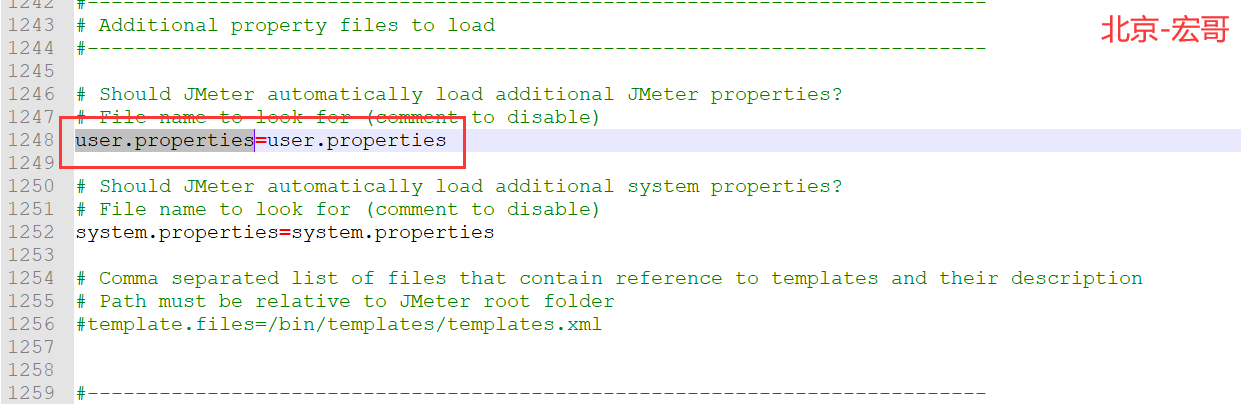
从上图中我们可以看出,Jmeter启动读取jmeter.properties文件的时候也会自动加载user.properties文件。所以在jmeter.properties修改的属性值,复制到user.properties文件中仍然可以起作用。
好了,今天就分析和讲解到这里吧!谢谢您耐心的阅读!!!
Jmeter(四十) - 从入门到精通进阶篇 - Jmeter配置文件的刨根问底 - 中篇(详解教程)的更多相关文章
- Jmeter(四十一) - 从入门到精通进阶篇 - Jmeter配置文件的刨根问底 - 下篇(详解教程)
1.简介 为什么宏哥要对Jmeter的配置文件进行一下讲解了,因为有的童鞋或者小伙伴在测试中遇到一些需要修改配置文件的问题不是很清楚也不是很懂,就算修改了也是模模糊糊的.更有甚者觉得那是禁地神圣不可轻 ...
- Jmeter(四十三) - 从入门到精通高级篇 - Jmeter之IP伪装和欺骗(详解教程)
1.简介 我们从小接受的教育就是不要撒谎,要做一个诚实的孩子,但是在现实生活中有时候说一个善意的谎言也不是可以的.这里由于服务器各种安全机制的限制和校验,因此我们不得不欺骗一下服务器,今天宏哥就给大家 ...
- Jmeter(五十) - 从入门到精通高级篇 - jmeter 之模拟弱网进行测试(详解教程)
1.简介 在实际工作中,网络带宽一定不会是持续稳定的保持某一个值,而是有高有低.因此为了测试场景和实际能够无限的接近,所以我们需要模拟一下来达到效果.还有就是在实际的测试工作中,会因为业务需要,有时限 ...
- Jmeter(四十二) - 从入门到精通进阶篇 - Jmeter配置文件的刨根问底 -番外篇(详解教程)
1.简介 为什么宏哥要对Jmeter的配置文件进行一下讲解了,因为有的童鞋或者小伙伴在测试中遇到一些需要修改配置文件的问题不是很清楚也不是很懂,就算修改了也是模模糊糊的.更有甚者觉得那是禁地神圣不可轻 ...
- Jmeter(三十七) - 从入门到精通进阶篇 - 输出HTML格式的性能测试报告(详解教程)
1.简介 相对于Loadrunner,Jmeter其实也是可以有测试报告产出的,虽然一般都不用(没有Loadrunner的报告那么强大是一方面),但是有小伙伴们私下问,那宏哥还是顺手写一下吧,今天我们 ...
- Jmeter(四十七) - 从入门到精通高级篇 - 分布式压测部署之负载机的设置(详解教程)
1.简介 千呼万唤始出来,这一篇感觉写了好久,总想写的清楚明白简洁,但是还是洋洋洒洒写了好多,希望大家喜欢吧!本来打算将这一篇文章是放在性能测试中讲解和分享的,但是有的童鞋或者小伙伴们私下问的太多了, ...
- Jmeter(七) - 从入门到精通 - 建立数据库测试计划实战<MySQL数据库>(详解教程)
1.简介 在实际工作中,我们经常会听到数据库的性能和稳定性等等,这些有时候也需要测试工程师去评估和测试,上一篇文章宏哥主要介绍了jmeter连接和创建数据库测试计划的过程,宏哥在文中通过示例和代码非常 ...
- Jmeter(五十一) - 从入门到精通高级篇 - jmeter之运动战(详解教程)
1.简介 运动战是一种军事作战方式,依托较大的作战空间来换取时间移动兵力包围敌方,以优势兵力速战速决,运动战的运用归为这样一段话"避敌主力,诱敌深入,集中优势兵力逐个击破".今天宏 ...
- Jmeter(二) - 从入门到精通 - 创建测试计划(Test Plan)(详解教程)
1.简介 上一篇中宏哥已经教你把JMeter的测试环境搭建起来了,那么这一篇我们就将JMeter启动起来,一睹其芳容,首先宏哥给大家介绍一下如何来创建一个测试计划(Test Plan). 2.创建一个 ...
随机推荐
- JSON-LD & SEO
JSON-LD & SEO https://json-ld.org/ https://en.wikipedia.org/wiki/JSON-LD Google Search structure ...
- web testing
web testing cypress https://www.cypress.io/ https://github.com/cypress-io/cypress https://docs.cypre ...
- SameSite & Cookies
SameSite & Cookies SameSite=None && Secure (HTTPS) https://developer.mozilla.org/en-US/d ...
- SVG & getBBox
SVG & getBBox https://developer.mozilla.org/en-US/docs/Web/API/SVGGraphicsElement/getBBox const ...
- Flutter: random color
import 'dart:math' as math; import 'package:flutter/material.dart'; void main() => runApp(App()); ...
- 稳定币USDN的算法调控
在NGK公链的稳定币系统中,USDN的价格有时会出现一定幅度的波动.正如我们会看到USDT有时会是0.99美元,有时是1.01美元一样.那么,要保障USDN在二级市场的价格基本稳定,要如何调节供需呢? ...
- mysql数据库表引入redis解决方案
缓存方案 缓存方案在我的另外一篇博客里有详细说明,地址:https://www.cnblogs.com/wingfirefly/p/14419728.html 数据结构: 方案1: 1.存储结构采用h ...
- Oracle check TBS usage
select d.tablespace_name, space||'M' "SUM_SPACE(M")", blocks "SUM_BLOCKS", ...
- Hive 填坑指南
Hive 填坑指南 目录 Hive 填坑指南 数据表备份 数据表备份 方法1:create table 表名_new as select * from 原表 create table 表名_new a ...
- 关于Java中for,while,if,方法的练习
练习 计算0到100之间的奇数和偶数和 package com.kangkang.forDemo;public class demo01 { public static void main(S ...