
Android 8.1 关机充电动画(三)Android模式
system:Android 8.1
platform:RK3326/PX30
uboot
kernel
system/core/healthd
Android 8.1 关机充电动画(一)模式选择
Android 8.1 关机充电动画(二)Uboot模式
Android 8.1 关机充电动画(三)Android模式
前言
Android模式下的关机充电动画修改相对来说需要修改Linux应用层的东西了,可以定位到源码路径/system/core/healthd下,和uboot模式类似,这里只需要修改轮播的充电图片,然后将每张图片和电量百分比对应到代码中即可,思路还是比较简单的,下面我会慢慢分析具体实现的细节。
文件列表
在system/core/healthd下可以看到以下文件,只有一部分文件需要修改,我们需要重点关注一下healthd_mode_charger.cpp,因为基本上修改这个文件就够了。
Android.mk						11-Jun-2018	5.2 KiB

animation.h						11-Jun-2018	1.7 KiB

AnimationParser.cpp				11-Jun-2018	4.8 KiB

AnimationParser.h				11-Jun-2018	1 KiB

BatteryMonitor.cpp				11-Jun-2018	24 KiB

BatteryPropertiesRegistrar.cpp	11-Jun-2018	4 KiB

BatteryPropertiesRegistrar.h	11-Jun-2018	1.8 KiB

charger.cpp						11-Jun-2018	2.8 KiB

healthd.cpp						11-Jun-2018	3.8 KiB

healthd_common.cpp				11-Jun-2018	8.6 KiB

healthd_draw.cpp				11-Jun-2018	5.7 KiB

healthd_draw.h					11-Jun-2018	2.3 KiB

healthd_mode_android.cpp		11-Jun-2018	2 KiB

healthd_mode_charger.cpp		11-Jun-2018	20.6 KiB

images/							11-Jun-2018	4 KiB

include/						11-Jun-2018	4 KiB

tests/							11-Jun-2018	4 KiB
修改 healthd_mode_charger.cpp
- 在头文件
animation.h的结构体animation添加成员变量user_animation_file,如下所示;
struct animation {

...

	#define USER_IMAGE_NUM 5

	std::string user_animation_file[USER_IMAGE_NUM];

...

}
- 在
healthd_mode_charger.cpp添加frame数组user_animation_frames,目前添加了5帧画面,而且代码里直接固定为5帧的画面为一个充电循环来做,这里后面可能需要改动一下;
static animation::frame user_animation_frames[] = {

    {

        .disp_time = 750,

        .min_level = 0,

        .max_level = 19,

        .surface = NULL,

    },

    {

        .disp_time = 750,

        .min_level = 0,

        .max_level = 39,

        .surface = NULL,

    },

    {

        .disp_time = 750,

        .min_level = 0,

        .max_level = 59,

        .surface = NULL,

    },

    {

        .disp_time = 750,

        .min_level = 0,

        .max_level = 79,

        .surface = NULL,

    },

    {

        .disp_time = 750,

        .min_level = 0,

        .max_level = 100,

        .surface = NULL,

    },

};
init_animation
需要对init_animation函数进行部分的修改,这里简单说明一下;
animation_desc_path = "/res/values/charger/animation.txt",这里程序中路径具体我也没有找到源码中对应的路径,最终debug的结果是parse_success = false是一直成立的;所以程序中会直接制定路径下的图片,源码路径system/core/healthd/images/下的图片会在编译的过程中被拷贝到制定的路径下;- 原程序的做法只去解析一张
png图片,而且这张图片中包含了所有电池电量百分比的对应信息。 - 修改部分加入到条件编译的宏定义
CHARGER_USER_ANIMATION中;
animation* init_animation() {

    bool parse_success;

    std::string content;

    if (base::ReadFileToString(animation_desc_path, &content)) {

        parse_success = parse_animation_desc(content, &battery_animation);

    } else {

        LOGW("Could not open animation description at %s\n", animation_desc_path);

        parse_success = false;

    }

    if (!parse_success) {

        LOGW("Could not parse animation description. Using default animation.\n");

        battery_animation = BASE_ANIMATION;

#ifdef CHARGER_USER_ANIMATION

		battery_animation.user_animation_file[0].assign("charger/battery_user_0");

		battery_animation.user_animation_file[1].assign("charger/battery_user_1");

		battery_animation.user_animation_file[2].assign("charger/battery_user_2");

		battery_animation.user_animation_file[3].assign("charger/battery_user_3");

		battery_animation.user_animation_file[4].assign("charger/battery_user_4");

		battery_animation.frames = user_animation_frames;

        battery_animation.num_frames = ARRAY_SIZE(user_animation_frames);

#else

        battery_animation.animation_file.assign("charger/battery_scale");

        battery_animation.frames = default_animation_frames;

		battery_animation.num_frames = ARRAY_SIZE(default_animation_frames);

#endif

    }

    if (battery_animation.fail_file.empty()) {

#ifdef CHARGER_USER_ANIMATION

		battery_animation.fail_file.assign("charger/battery_user_fail");

#else

        battery_animation.fail_file.assign("charger/battery_fail");

#endif

    }

	if(battery_animation.text_percent.font_file.empty())

	battery_animation.text_percent.font_file.assign("charger/font");

	//battery_animation.text_clock.font_file.assign("charger/font");

    LOGW("Animation Description:\n");

    LOGW("  animation: %d %d '%s' (%d)\n", battery_animation.num_cycles,

         battery_animation.first_frame_repeats, battery_animation.animation_file.c_str(),

         battery_animation.num_frames);

    LOGW("  fail_file: '%s'\n", battery_animation.fail_file.c_str());

    LOGW("  clock: %d %d %d %d %d %d '%s'\n", battery_animation.text_clock.pos_x,

         battery_animation.text_clock.pos_y, battery_animation.text_clock.color_r,

         battery_animation.text_clock.color_g, battery_animation.text_clock.color_b,

         battery_animation.text_clock.color_a, battery_animation.text_clock.font_file.c_str());

    LOGW("  percent: %d %d %d %d %d %d '%s'\n", battery_animation.text_percent.pos_x,

         battery_animation.text_percent.pos_y, battery_animation.text_percent.color_r,

         battery_animation.text_percent.color_g, battery_animation.text_percent.color_b,

         battery_animation.text_percent.color_a, battery_animation.text_percent.font_file.c_str());

    for (int i = 0; i < battery_animation.num_frames; i++) {

        LOGW("  frame %.2d: %d %d %d\n", i, battery_animation.frames[i].disp_time,

             battery_animation.frames[i].min_level, battery_animation.frames[i].max_level);

    }

    return &battery_animation;

}
healthd_mode_charger_init
Android底层的2D引擎库使用了skia,对应的每一帧需要分配GRSurface,通过函数res_create_display_surface分配内存,所以,对于需要定制加入的图片,都需要重新分配内存,然后保存到anim->frames[i].surface中,具体的修改如下所示;
void healthd_mode_charger_init(struct healthd_config* config) {

    int ret;

    charger* charger = &charger_state;

    int i;

    int epollfd;

    dump_last_kmsg();

    LOGW("--------------- STARTING CHARGER MODE ---------------\n");

    ret = ev_init(std::bind(&input_callback, charger, std::placeholders::_1, std::placeholders::_2));

    if (!ret) {

        epollfd = ev_get_epollfd();

        healthd_register_event(epollfd, charger_event_handler, EVENT_WAKEUP_FD);

    }

    animation* anim = init_animation();

    charger->batt_anim = anim;

    ret = res_create_display_surface(anim->fail_file.c_str(), &charger->surf_unknown);

    if (ret < 0) {

        LOGE("Cannot load custom battery_fail image. Reverting to built in.\n");

        ret = res_create_display_surface("charger/battery_fail", &charger->surf_unknown);

        if (ret < 0) {

            LOGE("Cannot load built in battery_fail image\n");

            charger->surf_unknown = NULL;

        }

    }

#ifdef CHARGER_USER_ANIMATION

    GRSurface* scale_frames[USER_IMAGE_NUM];

	for(int i = 0; i<USER_IMAGE_NUM; i++){

		ret = res_create_display_surface(anim->user_animation_file[i].c_str(), &scale_frames[i]);

			if (ret < 0) {

				LOGE("Cannot load custom %s image. Reverting to built in.\n",anim->user_animation_file[i].c_str());

			}else{

				anim->frames[i].surface = scale_frames[i];

				LOGW("file is:[%s],anim->frames[%d].surface = charger->surf_unknown;\n",

					anim->user_animation_file[i].c_str(),i);

			}

	}

#else

	GRSurface** scale_frames

    int scale_count;

    int scale_fps;  // Not in use (charger/battery_scale doesn't have FPS text

                    // chunk). We are using hard-coded frame.disp_time instead.

	ret = res_create_multi_display_surface(anim->animation_file.c_str(), &scale_count, &scale_fps,

											   &scale_frames);

		if (ret < 0) {

			LOGE("Cannot load battery_scale image\n");

			anim->num_frames = 0;

			anim->num_cycles = 1;

		} else if (scale_count != anim->num_frames) {

			LOGE("battery_scale image has unexpected frame count (%d, expected %d)\n", scale_count,

				 anim->num_frames);

			anim->num_frames = 0;

			anim->num_cycles = 1;

		} else {

			for (i = 0; i < anim->num_frames; i++) {

				anim->frames[i].surface = scale_frames[i];

			}

		}

#endif

    ev_sync_key_state(

        std::bind(&set_key_callback, charger, std::placeholders::_1, std::placeholders::_2));

    charger->next_screen_transition = -1;

    charger->next_key_check = -1;

    charger->next_pwr_check = -1;

    healthd_config = config;

    charger->boot_min_cap = config->boot_min_cap;

}
替换图片
把图片复制到/system/core/healthd/images/路径下,注意图片格式需要是png,而且图片保存的位深度为8位,文件名需要和程序中定义的路径变量保持一致即可;如下所示;我简单地切了五张图片,感觉切图的时间比debug的时间还要久。苦。
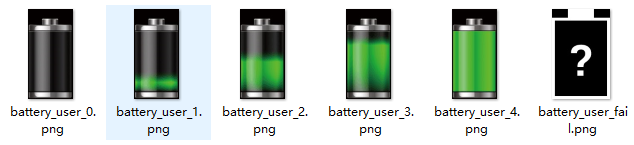
然后,在Android.mk中可找到,在编译的时候对图片进行了打包,相应的命令如下所示;
...

 _img_modules :=

 _images :=

 $(foreach _img, $(call find-subdir-subdir-files, "images", "*.png"), \

   $(eval $(call _add-charger-image,$(_img))))

...
完成以上这些步骤之后,重新编译Android系统,当然还需要进入关机充电的Android模式,可以发现充电动画已经修改完了。
总结
这里介绍的是比较简单对充电动画的单帧图片进行替换,如果有更加复杂的需求,还需要在healthd_draw.cpp进行修改,或者更高级可以自己画充电动画出来也未尝不可。
Android 8.1 关机充电动画(三)Android模式的更多相关文章
- Android 8.1 关机充电动画(二)Uboot模式
system:Android 8.1 platform:RK3326/PX30 uboot kernel Android 8.1 关机充电动画(一)模式选择 Android 8.1 关机充电动画(二) ...
- Android 8.1 关机充电动画(一)模式选择
system:Android 8.1 platform:RK3326/PX30 uboot kernel Android 8.1 关机充电动画(一)模式选择 Android 8.1 关机充电动画(二) ...
- Android MTK6580 客制化关机充电动画
1.客制化关机充电图片 vendor/mediatek/proprietary/bootable/bootloader/lk/dev/logo/xxx 找到对应分辨率替换 2.调整显示图片位置.大小 ...
- Android9.0 MTK 平板横屏方案修改(强制app横屏 + 开机logo/动画+关机充电横屏 + RecoveryUI 横屏)
文章较长建议先收藏再看 拆解步骤 1.app 强制横屏显示,无视 android:screenOrientation="portrait" 属性 2.屏幕触摸坐标修改为横屏 3.开 ...
- Android ListView item项 显示动画
(1)使用LayoutAnimation 所谓的布局动画,其实就是为ViewGroup添加显示动画效果,主要用过LayoutAnimationController来控制实现.LayoutAnimati ...
- 【转】android 电池(二):android关机充电流程、充电画面显示
关键词:android 电池关机充电 androidboot.mode charger关机充电 充电画面显示 平台信息:内核:linux2.6/linux3.0系统:android/android4. ...
- Android 电池关机充电
android 电池(一):锂电池基本原理篇 android 电池(二):android关机充电流程.充电画面显示 android 电池(三):android电池系统 android电池(四):电池 ...
- android 电池(二):android关机充电流程、充电画面显示【转】
本文转载自:http://blog.csdn.net/xubin341719/article/details/8498580 上一篇我们讲了锂电池的充放电的流程和电池的一些特性,这一节我们重点说一下a ...
- android 关机充电流程
点击打开链接 0.主要流程 usb插入通过传递cmdline给init解析从而启动充电进程 1. LK lk\app\aboot\aboot.c update_cmdline ---------- i ...
随机推荐
- 利用SSIS进行SharePoint 列表数据的ETL
好几年前写了一篇<SSIS利用Microsoft Connector for Oracle by Attunity组件进行ETL!>,IT技术真是日新月异,这种方式对于新的SQL SERV ...
- How Many Answers Are Wrong HDU - 3038 (经典带权并查集)
题目大意:有一个区间,长度为n,然后跟着m个子区间,每个字区间的格式为x,y,z表示[x,y]的和为z.如果当前区间和与前面的区间和发生冲突,当前区间和会被判错,问:有多少个区间和会被判错. 题解:x ...
- 论JDK5/7/8版本都做出了哪些革新
在Java发展的里程碑上,有三个版本做出的改动,是革命性的 为什么说是革命性的呢? 因为这三个版本所推出的有些新机制,在之后的Java框架开发.新类的产生等等中, 都被广泛使用了. 那么,这三个版本的 ...
- Linux系统安装docker教程-CentOS7(完美教程)
一.前言 最近有网友反应不在安装Linux 安装docker,为了方便大家更快的安装,以CentOS7安装为例,写了一篇比较简单的博客,让大家学习. 二.背景介绍 Linux,全称GNU/Linux ...
- Jetson AGX Xavier更换apt-get源
使用apt-get安装时,会很慢,更换了国内的源后,就可以解决这个问题了. 1. 备份sources.list文件 sudo cp /etc/apt/sources.list /etc/apt/sou ...
- ARP/RARP报文格式
arp协议 地址解析协议ARP(Address Resolution Protocol)是用来将IP地址解析为MAC地址的协议. arp格式: 一个字节等于8位 硬件类型:指明发送方想知道的硬件接口类 ...
- QString 转换成 wchar 的一个小陷阱
QString::toWCharArray(wchar_t * array) 其中 wchar_t * array 除了要分配内存之外,必须用 wmemset 初始化. 环境是 Visual Stud ...
- Task Scheduler API Error 80041318
https://stackoverflow.com/questions/42307917/task-scheduler-api-error-80041318/42462235#42462235 Hi ...
- js 运动函数篇(二) (加速度运动、弹性运动、重力场运动(多方向+碰撞检测+重力加速度+能量损失运动)拖拽运动)层层深入
前言: 本人纯小白一个,有很多地方理解的没有各位大牛那么透彻,如有错误,请各位大牛指出斧正!小弟感激不尽. 本篇文章为您分析一下原生JS写加速度运动.弹性运动.重力场运 ...
- Qt之QListWidget:项目的多选与单选设置
2019独角兽企业重金招聘Python工程师标准>>> #include "widget.h" #include <QApplication> #in ...