
二,文件上传控件el-upload
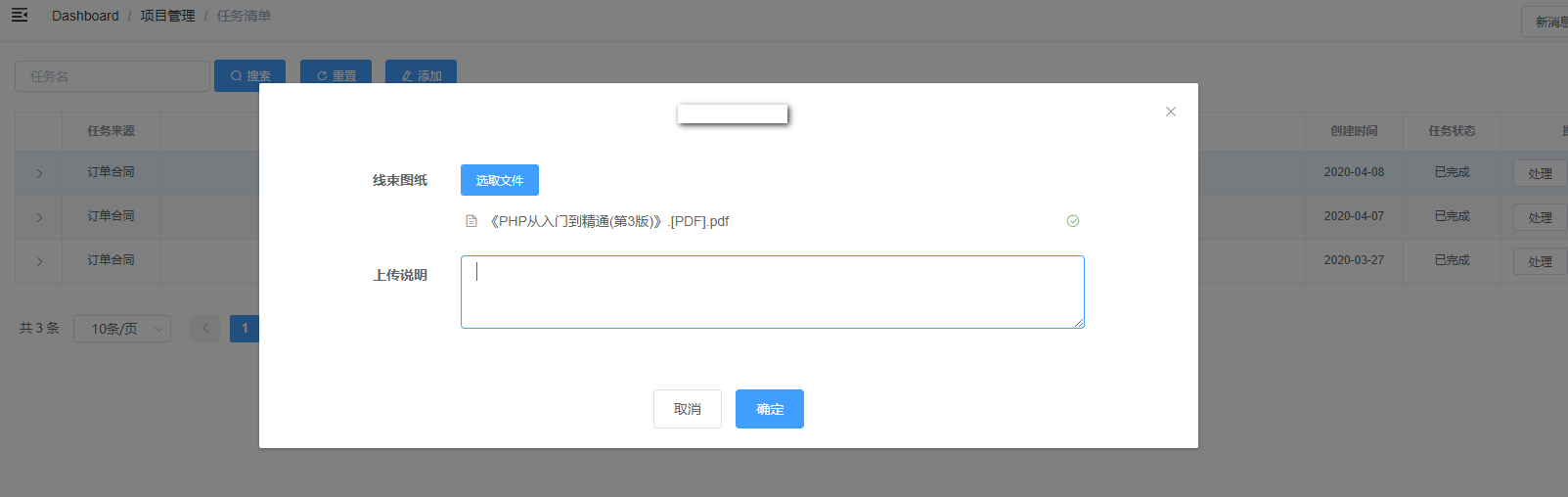
需求: 上传文件,保存到服务器,并保存历史记录
上效果图
      <el-form-item label="文件">

        <el-upload

          ref="uploadHarnessDrawing"

          v-loading="loadingFile"

          action=""

          :limit=""

          :on-preview="handlePreview"

          :on-change="onHarnessDrawingFileChange"

          :on-remove="onHarnessDrawingFileRemove"

          :file-list="harnessDrawingFileList"

          :auto-upload="false"

        >

          <el-button slot="trigger" size="small" type="primary">选取文件</el-button>

        </el-upload>

      </el-form-item>
el-upload 为Element上传控件,需要注意的以下三个事件,分别为预览,Change以及删除,change和remove直接修改file-list属性
:on-preview="handlePreview"
:on-change="onHarnessDrawingFileChange"
:on-remove="onHarnessDrawingFileRemove"
:file-list="harnessDrawingFileList"
onHarnessDrawingFileChange(file, fileList) {

      this.harnessDrawingFileList = fileList

    },

    onHarnessDrawingFileRemove(file, fileList) {

      this.harnessDrawingFileList = fileList

    },

    handlePreview(file) {

      var url = file.url

      if (url === undefined) {

        return

      }

      this.viewFile(url)

    },

    viewFile(url) {

      var param = {

        token: getToken(),

        url: url

      }

      this.loadingFile = true

      fileDownload(param).then(res => {

        if (res.code === 20000) {

          downloadFile(res.data.name, res.data.dataStr)

          this.loadingFile = false

        }

      })

    }
这么做的原因是功能不使用自带的提交功能,而是使用按钮统一提交,并且在后台判断文件修改
提交事件
submitUpload() {

      this.loading = true

      this.uploadForm = new FormData()

      this.uploadForm.append('id', this.id)

      this.uploadForm.append('token', this.token)

      this.uploadForm.append('comment', this.temp.Comment === undefined ? '' : this.temp.Comment)

      var config = {

        // 这里是重点,需要和后台沟通好请求头,Content-Type不一定是这个值

        headers: { 'Content-Type': 'multipart/form-data' }

      }

      for (var i = 0; i < this.harnessDrawingFileList.length; i++) {

        this.uploadForm.append('harnessDrawingFileList', this.harnessDrawingFileList[i].raw)

        if (this.harnessDrawingFileList[i].raw === undefined) {

          // 初始文件

          this.uploadForm.append('initialHarnessDrawingFileList', this.harnessDrawingFileList[i].url)

        }

      }

      // 添加请求头

      axios.post(this.baseURL + '/ProjectManager/uploadFile', this.uploadForm, config).then(response => {

        this.loading = false

        if (response.data.code !== 20000) {

          MessageBox.alert(response.data.msg)

          return

        }

        this.innerVisible = false

        this.$notify({

          title: '成功',

          message: response.data.msg,

          type: 'success',

          duration: 2000

        })

        this.$emit('refreshTable')

      })

    }
后台代码:
/// <summary>

        /// 上传文件

        /// </summary>

        /// <param name="id">Id</param>

        /// <param name="token">登录Token</param>

        /// <returns></returns>

        [HttpPost]

        public HttpResponseMessage uploadElectricalEngineerFile()

        {

            // 返回数据

            String result = String.Empty;

            String tempUploadPath = String.Empty;

            String tempUploadDatePath = String.Empty;

            try

            {

                String msg = String.Empty;

                String token = HttpContext.Current.Request.Form["token"];

                LoginUser loginUser = GetCurrentLoginUser(token);

                tempUploadPath = HttpContext.Current.Request.MapPath(String.Format("/upload/Temp/{0}/", loginUser.Uid));

                tempUploadDatePath = tempUploadPath + DateTime.Now.ToString("yyyyMMddHHmmss") + "/";

                String taskId = HttpContext.Current.Request.Form["id"];

                String comment = HttpContext.Current.Request.Form["comment"] == null ? "" : HttpContext.Current.Request.Form["comment"];

                HttpFileCollection files = HttpContext.Current.Request.Files;

                // 文件夹信息获取,根据项目名 命名

                String path = HttpContext.Current.Request.MapPath("/upload/");

                TaskDomain task = TaskBiz.GetById(taskId);

                TechnicalSupportDomain techDomain = null;

                if (task == null)

                {

                    AppLog.Error(Constant.MSG_NO_TASK_DATA);

                    return JsonResultModel(Result_Success_Error, Constant.MSG_NO_TASK_DATA, result);

                }

                techDomain = TechnicalSupportBiz.GetById(task.MasterId);

                if (techDomain == null)

                {

                    AppLog.Error(Constant.MSG_NO_SOURCE_DATA);

                    return JsonResultModel(Result_Success_Error, Constant.MSG_NO_SOURCE_DATA, result);

                }

                ContractDomain contract = pjService.GetContractById(techDomain.ContractId); //ContractBiz.GetById(techDomain.ContractId);

                path = String.Format("/upload/{0}/{1}/{2}", contract.CustomerName, contract.ProjectName, Constant.FILE_PATH_TECHNICAL_SUPPORT);

                msg = String.Format("用户【{0}】为项目【{1}】", loginUser.User.FullName, contract.ProjectName);

                // 把所有的文件保存到临时文件夹中,在临时文件夹操作

                String initialHarnessDrawingFileFileList = HttpContext.Current.Request.Form["initialHarnessDrawingFileList"] == null ? "" : HttpContext.Current.Request.Form["initialHarnessDrawingFileList"];

                List<String> lsInitialHarnessDrawingFileFile = new List<String>(initialHarnessDrawingFileFileList.Split(",".ToCharArray(), StringSplitOptions.RemoveEmptyEntries));

                // 判断文件是否变更

                GetElectricalEngineerFileInfo(techDomain);

                List<String> harnessDrawingFiles = techDomain.HarnessDrawingFiles.Select(p => p.url).ToList();

                // 文件是否变更

                techDomain.HarnessDrawingFileChange = lsInitialHarnessDrawingFileFile.All(harnessDrawingFiles.Contains) && harnessDrawingFiles.All(lsInitialHarnessDrawingFileFile.Contains) && lsInitialHarnessDrawingFileFile.Count == harnessDrawingFiles.Count;

                // 没有改变

                if (techDomain.HarnessDrawingFileChange && files.AllKeys.Length == )

                {

                    return JsonResultModel(Result_Success_Code, Result_Success_MSG, result);

                }

                List<String> deleteFileInfo = new List<String>();

                // 找出删除的文件

                List<String> list = harnessDrawingFiles.Except(lsInitialHarnessDrawingFileFile).ToList();

                if (list != null && list.Count > )

                {

                    list.ForEach(item =>

                    {

                        deleteFileInfo.Add(String.Format("文件{0}", Path.GetFileName(item)));

                    });

                }

                // 把现有的文件保存到临时文件夹中

                if (!Directory.Exists(tempUploadDatePath + "HarnessDrawing/"))

                {

                    Directory.CreateDirectory(tempUploadDatePath + "HarnessDrawing/");

                }

                for (int iIndex = ; iIndex < lsInitialHarnessDrawingFileFile.Count; iIndex++)

                {

                    FileInfo file = new FileInfo(HttpContext.Current.Request.MapPath(lsInitialHarnessDrawingFileFile[iIndex]));

                    file.CopyTo(tempUploadDatePath + "HarnessDrawing/" + file.Name);

                }

                String fileName = String.Empty;

                for (int iIndex = ; iIndex < files.AllKeys.Length; iIndex++)

                {

                    HttpPostedFile postedFile = files[iIndex];

                    fileName = System.IO.Path.GetFileName(postedFile.FileName);

                    switch (files.AllKeys[iIndex])

                    {

                        case Constant.FILE_HARNESSDRAWING_LIST:

                            postedFile.SaveAs(tempUploadDatePath + "HarnessDrawing/" + fileName);

                            break;

                    }

                }

                // 获取最终的文件

                DirectoryInfo dir = new DirectoryInfo(tempUploadDatePath + "HarnessDrawing/");

                List<FileInfo> lastedHarnessDrawingFiles = dir.GetFiles().ToList();

                // 上传文件

                String filePath = String.Empty;

                String bakDate = DateTime.Now.ToString("yyyy-MM-dd HH:mm:ss");

                String versionName = DateTime.Now.ToFileTimeUtc().ToString();

                String versionPath = String.Empty;

                List<String> fileInfoList = new List<String>();

                // 文件

                techDomain.HarnessDrawing = String.Empty;

                filePath = path + String.Format("/{0}/", Constant.FILE_PATH_HARNESSDRAWING);

                foreach (FileInfo file in lastedHarnessDrawingFiles)

                {

                    fileName = file.Name;

                    if (!Directory.Exists(filePath))

                    {

                        Directory.CreateDirectory(filePath);

                    }

                    versionPath = filePath + versionName + "/";

                    techDomain.HarnessDrawing = versionPath;

                    fileInfoList.Add(String.Format(" 文件:{0}", fileName));

                    // 备份文件

                    versionPath = HttpContext.Current.Request.MapPath(versionPath);

                    if (!Directory.Exists(versionPath))

                    {

                        Directory.CreateDirectory(versionPath);

                    }

                    file.CopyTo(versionPath + fileName);

                }

                // 写入Log

                if (lastedHarnessDrawingFiles.Count > )

                {

                    CommonMethod.WriteVersionLog(HttpContext.Current.Request.MapPath(filePath) + Constant.VERSION_LOG_NAME, String.Format("{0}|{1}|{2}", bakDate, versionName, comment));

                }

                techDomain.TaskId = taskId;

                result = pjService.SaveElectricalEngineerTaskInfo(techDomain, loginUser);

                if (!String.IsNullOrEmpty(result))

                {

                    AppLog.Error(result);

                    return JsonResultModel(Result_Success_Error, result, null);

                }

                if (deleteFileInfo.Count > )

                {

                    msg += String.Format("删除了{0}", String.Join(",", deleteFileInfo));

                }

                if (fileInfoList.Count > )

                {

                    msg += String.Format("上传了{0}", String.Join(",", fileInfoList));

                }

                LogHelper.LogOperate(msg, Constant.OPEARTE_LOG_INFO, loginUser);

            }

            catch (Exception ex)

            {

                AppLog.Error(ex);

                return JsonResultModel(Result_Success_Error, ex.Message, result);

            }

            finally

            {

                if (!String.IsNullOrEmpty(tempUploadPath))

                {

                    // 删除临时文件夹

                    CommonMethod.DeleteDirectory(tempUploadPath, tempUploadDatePath.TrimEnd('/'));

                }

            }

            return JsonResultModel(Result_Success_Code, Result_Success_MSG, result);

        }
自此,文件上传功能完成
二,文件上传控件el-upload的更多相关文章
- jquery文件上传控件 Uploadify
(转自 http://www.cnblogs.com/mofish/archive/2012/11/30/2796698.html) 基于jquery的文件上传控件,支持ajax无刷新上传,多个文件同 ...
- 使用Uploadify(UploadiFive)多文件上传控件遇到的坑
最近项目中需要实现多文件上传功能,于是结合需求最终选择了Uploadify这一款控件来实现.相比其他控件,Uploadify具有简洁的界面,功能API基本可以解决大多数需求,又是基于jquery的,配 ...
- ***文件上传控件bootstrap-fileinput的使用和参数配置说明
特别注意: 引入所需文件后页面刷新查看样式奇怪,浏览器提示错误等,可能是因为js.css文件的引用顺序问题,zh.js需要在fileinput.js后面引入.bootstrap最好在filein ...
- jquery文件上传控件 Uploadify 可以和ajax交互
http://www.cnblogs.com/mofish/archive/2012/11/30/2796698.html 原网址 基于jquery的文件上传控件,支持ajax无刷新上传,多个文件同 ...
- jquery文件上传控件 Uploadify(转)
原文:http://www.cnblogs.com/mofish/archive/2012/11/30/2796698.html 基于jquery的文件上传控件,支持ajax无刷新上传,多个文件同时上 ...
- jquery文件上传控件 Uploadify 问题记录
Uploadify v3.2.1 首先引用下面的文件 <!--上传控件 uploadify--> <script type="text/javascript" s ...
- 因用了NeatUpload大文件上传控件而导致Nonfile portion > 4194304 bytes错误的解决方法
今天遇到一个问题,就是“NeatUpload大文件上传控件而导致Nonfile portion > 4194304 bytes错误”,百度后发现了一个解决方法,跟大家分享下: NeatUploa ...
- 对FileUpload文件上传控件的一些使用方法说明
//创建时间:2014-03-12 //创建人:幽林孤狼 //说明:FileUpload文件上传控件使用说明(只是部分)已共享学习为主 //可以上传图片,txt文档.doc,wps,还有音频文件,视屏 ...
- [Vue]写一个简单的文件上传控件
这篇将介绍如何写一个简单的基于Vue+Element的文件上传控件. 控件将具有 1. 上传队列的列表,显示文件名称,大小等信息,可以显示上传进度实时刷新 2. 取消上传 使用Element的u ...
- 在WebBrowser中通过模拟键盘鼠标操控网页中的文件上传控件(转)
引言 这两天沉迷了Google SketchUp,刚刚玩够,一时兴起,研究了一下WebBrowser. 我在<WebBrowser控件使用技巧分享>一文中曾谈到过“我现在可以通过WebBr ...
随机推荐
- 高可用性GRE+IPSEC中心—分支
在实际网络运用中我们时常跑GRE+IPSEC来实现我们中心到分支的远程访问回话,这样以来容易配置,而来可用性高,我们知道L2L无论是链路备份还是设备备份,都不是状态备份,当一个点断掉后,用经过几十秒甚 ...
- CF思维联系– Codeforces-990C Bracket Sequences Concatenation Problem(括号匹配+模拟)
ACM思维题训练集合 A bracket sequence is a string containing only characters "(" and ")" ...
- 智能称体脂称实现(datasheet篇)
(本文均出于个人理解而写,仅用于学习和交流,某些过程可能不一定正确,希望各位提出意见进行交流,共同进步) TI的参考方案是采用AFE4300芯片 同时进行生物阻抗身体成分测量和体重测量,以MSP430 ...
- python ——文件的操作大全,如with..as
工作中遇到了需要对json文件进行增删内容操作的需要,于是系统性的整理了一下关于文件的基本操作这里的知识点: 结构:新建文件→打开文件→读取文件→关闭文件 一.基本文件操作 1.新建文件(打开文件), ...
- C. The Big Race
\(给出数n,a,b\) \(在[1,n]区间内随机选数,选出的数被a,b除后同余的概率\) \(这题的精度问题真的是烦炸了~\) \(设最小公倍数lcm=a*b/gcd(a,b)\) \(所以在区间 ...
- Java 常用API(一)
目录 Java 常用API(一) 1. Scanner类 引用类型的一般使用步骤 Scanner的使用步骤 例题 2. 匿名对象 概述 匿名对象作为方法的参数 匿名对象作为方法的返回值 3. Rand ...
- java读源码 之 map源码分析(HashMap,图解)一
开篇之前,先说几句题外话,写博客也一年多了,一直没找到一种好的输出方式,博客质量其实也不高,很多时候都是赶着写出来的,最近也思考了很多,以后的博客也会更注重质量,同时也尽量写的不那么生硬,能让大家 ...
- ssh框架整合时的延迟加载问题(no session问题)的分析以及解决方案
当我们整合完三大框架,并采用hibernate的延迟加载方案时,会出现如下的异常: 现在对这个异常进行分析,如下图所示(模拟通过id查询用户信息的过程): 上图分析了为什么会出现no session的 ...
- 修改MySQL表中的字段属性
登录数据库 >mysql -u root -p 数据库名称 查询所有数据表 mysql>show tables; 查询表的字段信息 mysql>desc 表名称; 1.修改某个表的字 ...
- 使用Android studio过程中发现的几个解决R变红的办法
刚开始使用Android studio的时候,好几次碰见新建了一个xml文件,或者new了一个activity之后,Android studio莫名其妙的报错了,而显示红色的地方就是常用的(R.id. ...