
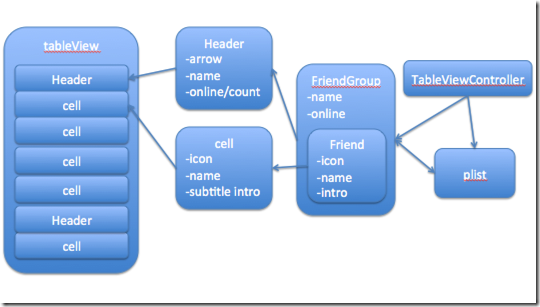
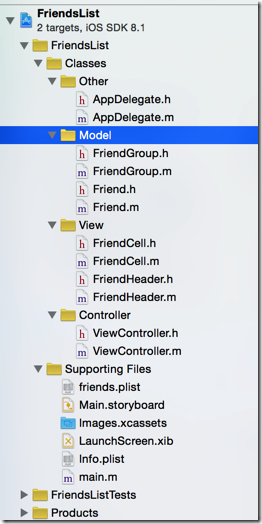
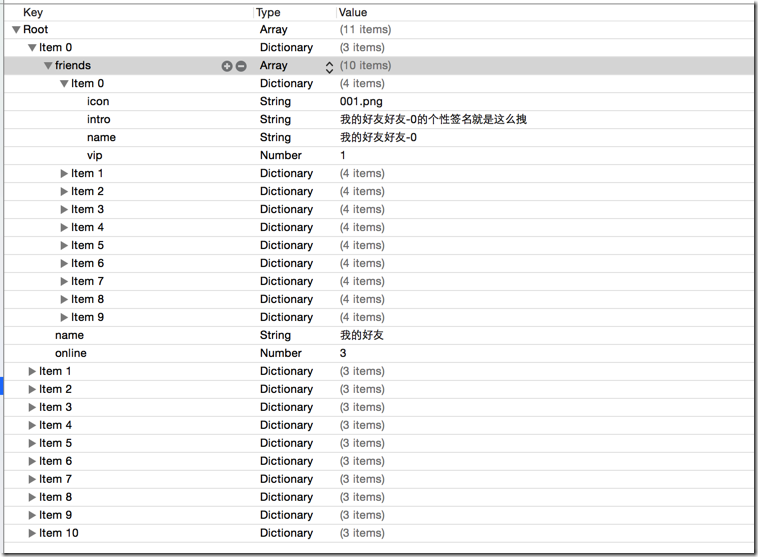
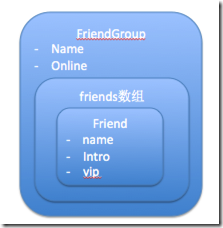
[iOS基础控件 - 6.9.3] QQ好友列表Demo TableView
 //

 //  FriendGroup.h

 //  FriendsList

 //

 //  Created by hellovoidworld on 14/12/12.

 //  Copyright (c) 2014年 hellovoidworld. All rights reserved.

 //

 #import <Foundation/Foundation.h>

 @class Friend;

 @interface FriendGroup : NSObject

 /** 好友组 */

 @property(nonatomic, strong) NSArray *friends;

 /** 好友组名 */

 @property(nonatomic, copy) NSString *name;

 /** 在线人数 */

 @property(nonatomic, assign) int online;

 - (instancetype) initWithDictionary:(NSDictionary *) dictionary;

 + (instancetype) friendGroupWithDictionary:(NSDictionary *) dictionary;

 @end

 /** 加载数据  */

 - (void)setFriendGroup:(FriendGroup *)friendGroup
 /** 子控件布局方法

     在init的时候,只分配的内存,没有初始化控件的尺寸,在此处header已经有了位置尺寸了

 */

 - (void)layoutSubviews {

     // 必须先调用父类的方法

     [super layoutSubviews];

     // 1.背景

     self.headerButtonView.frame = self.bounds;

     // 2.在线人数/组内总人数

     CGFloat countWidth = ;

     CGFloat countHeight = self.frame.size.height;

     CGFloat countX = self.frame.size.width -  - countWidth;

     CGFloat countY = ;

     self.onlineCountView.frame = CGRectMake(countX, countY, countWidth, countHeight);

 }
 /** 自定义每个section的头部 */

 - (UIView *) tableView:(UITableView *)tableView viewForHeaderInSection:(NSInteger)section {

     FriendHeader *header = [FriendHeader friendHeaderWithTableView:self.tableView];

     header.friendGroup = self.friendGroups[section];

     return header;

 }
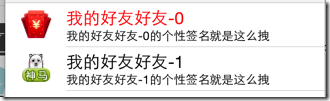
 /** 自定义构造方法 */

 + (instancetype) cellWithTableView:(UITableView *) tableView {

     static NSString *ID = @"friendCell";

     FriendCell *cell = [tableView dequeueReusableCellWithIdentifier:ID];

     if (nil == cell) {

         cell = [[self alloc] initWithStyle:UITableViewCellStyleSubtitle reuseIdentifier:ID];

     }

     return cell;

 }

 /** 加载数据 */

 - (void)setFriendData:(Friend *)friendData {

     _friendData = friendData;

     self.imageView.image = [UIImage imageNamed:friendData.icon];

     self.textLabel.text = friendData.name;

     self.textLabel.textColor = friendData.isVip?[UIColor redColor]:[UIColor blackColor];

     self.detailTextLabel.text = friendData.intro;

 }
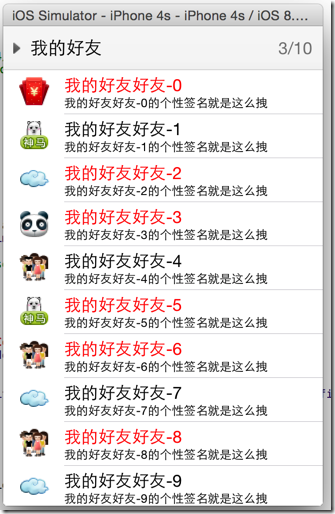
 /** 是否伸展显示好友 */

 @property(nonatomic, assign, getter=isOpened) BOOL opened;
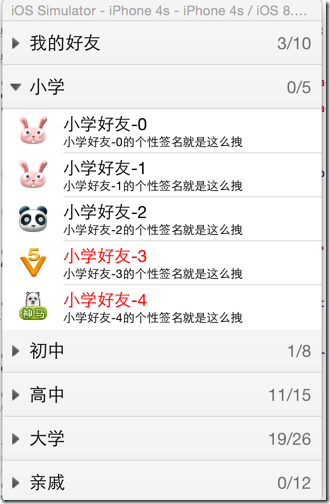
         // 1.4点击事件

         [headerButtonView addTarget:self action:@selector(headerClicked) forControlEvents:UIControlEventTouchUpInside];
 /** 点击事件 */

 - (void) headerClicked {

     // 1.伸展、隐藏组内好友

     self.friendGroup.opened = !self.friendGroup.isOpened;

     // 2.刷新tableView

     if ([self.delegate respondsToSelector:@selector(friendHeaderDidClickedHeader:)]) {

         [self.delegate friendHeaderDidClickedHeader:self];

     }

 }
 @protocol FriendHeaderDelegate <NSObject>

 /** header被点击的代理方法 */

 @optional

 - (void) friendHeaderDidClickedHeader:(FriendHeader *) header;

 @end
 - (NSInteger)tableView:(UITableView *)tableView numberOfRowsInSection:(NSInteger)section {

     FriendGroup *group = self.friendGroups[section];

     // 先检查模型数据内的伸展标识

     return group.isOpened? group.friends.count : ;

 }
 #pragma mark - FriendHeaderDelegate方法

 - (void)friendHeaderDidClickedHeader:(FriendHeader *)header {

     // 刷新数据

     [self.tableView reloadData];

 }
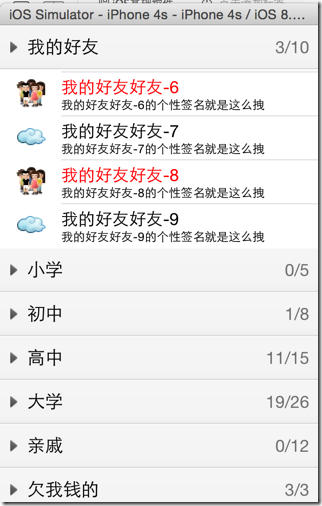
 /**

     被加到父控件之前

     由于tableView刷新数据后,所有header会被重新创建,所以要在这里对箭头朝向做出修改

 */

 - (void)didMoveToSuperview {

     // 改变箭头朝向,顺时针旋转90度

     CGFloat rotation = self.friendGroup.isOpened? M_PI_2 : ;

     self.headerButtonView.imageView.transform = CGAffineTransformMakeRotation(rotation);

 }
         // 改变箭头填充方式为居中

         [headerButtonView.imageView setContentMode:UIViewContentModeCenter];

         // 不需要裁剪箭头图片的边界

         [headerButtonView.imageView setClipsToBounds:NO];
[iOS基础控件 - 6.9.3] QQ好友列表Demo TableView的更多相关文章
- [iOS基础控件 - 6.12.1] QQ菜单管理 UITabBarController 控制器管理
A.需求 1.类似QQ.微信顶部或者底部的窗口转换导航条 2.给每个页面添加相应内容 B.UITabBarController 1.基本概念: (1)内容高度 iOS7之前内容高度为:屏幕高度 - ...
- [iOS基础控件 - 4.4] 进一步封装"APP列表”,初见MVC模式
A.从ViewController分离View 之前的代码中,View的数据加载逻辑放在了总的ViewController中,增加了耦合性,应该对控制器ViewController隐藏数据加载到Vie ...
- [iOS基础控件 - 6.10.1] PickerView 餐点搭配Demo
A.需求 1.使用PickerView做出有3列餐点(水果.主菜.饮料)的搭配Demo 2.选择的餐点实时显示在“显示区” 3.提供“随机”按钮,随机选择菜品搭配 B.实现步骤 1.拖入一个Pic ...
- [iOS基础控件 - 5.5] 代理设计模式 (基于”APP列表"练习)
A.概述 在"[iOS基础控件 - 4.4] APP列表 进一步封装,初见MVC模式”上进一步改进,给“下载”按钮加上效果.功能 1.按钮点击后,显示为“已下载”,并且不 ...
- [iOS基础控件 - 3.1] QQ登陆界面
A.storyboard 控件版 1.label 2.textfield a.Keyboard Type 账号:Number Pad 密码:Num ...
- iOS 基础控件(下)
上篇介绍了UIButton.UILabel.UIImageView和UITextField,这篇就简短一点介绍UIScrollView和UIAlertView. UIScrollView 顾名思义也知 ...
- [iOS基础控件 - 6.9] 聊天界面Demo
A.需求 做出一个类似于QQ.微信的聊天界面 1.每个cell包含发送时间.发送人(头像).发送信息 2.使用对方头像放在左边,我方头像在右边 3.对方信息使用白色背景对话框,我方信息使用蓝色背景对话 ...
- [iOS基础控件 - 7.0] UIWebView
A.基本使用 1.概念 iOS内置的浏览器控件 Safari浏览器就是通过UIWebView实现的 2.用途:制作简易浏览器 (1)基本请求 创建请求 加载请求 (2)代理监听webView加载, ...
- [iOS基础控件 - 6.11.3] 私人通讯录Demo 控制器的数据传递、存储
A.需求 1.搭建一个"私人通讯录"Demo 2.模拟登陆界面 账号 密码 记住密码开关 自动登陆开关 登陆按钮 3.退出注销 4.增删改查 5.恢复数据(取消修改) 这个代码 ...
随机推荐
- HDU 3336 (KMP next性质) Count the string
直接上传送门好了,我觉得他分析得非常透彻. http://972169909-qq-com.iteye.com/blog/1114968 #include <cstdio> #includ ...
- 全球最受欢迎的十大Linux发行版(图)
帮助新的Linux用户在越来越多的Linux发行版中选择最合适的操作系统,是创建这个网页的原因.它列出了迄今为止最流行的10个Linux发行版(另外增加的是FreeBSD,到目前为止最为流行的BSD系 ...
- highcharts 柱状图动态设置数据应用实例
<div id="container" style="min-width:700px;height:400px"></div> #jav ...
- apache开源项目 -- tomee
Apache TomEE,发音是“Tommy”,是一个经Apache.JavaEE6.Web框架认证的适配器,其在Tomcat服务器中是最强大的.Apache TomEE是由香草项目(简化常见编程任务 ...
- Java [Leetcode 168]Excel Sheet Column Title
题目描述: Given a positive integer, return its corresponding column title as appear in an Excel sheet. F ...
- H.264中NAL、Slice与frame意思及相互关系
H.264中NAL.Slice与frame意思及相互关系 NAL nal_unit_type中的1(非IDR图像的编码条带).2(编码条带数据分割块A).3(编码条带数据分割块B).4(编码条带数据分 ...
- 【转】定时器、sigevent结构体详解
原文网址:http://blog.163.com/zheng_he_xiang/blog/static/18650532620116311020390/ 最强大的定时器接口来自POSIX时钟系列,其创 ...
- 关于web安全
从技术到安全, 这是一个趋势. 以前追求的是比较炫酷的技术, 等实现过后发现, 自己还能做什么. 炫技完了之后,差不多就该到悟道的时候了. 用户安全, 就是一个很大的禅. 苹果拒绝 FBI, goog ...
- 开源Jabber(XMPP) IM服务器介绍
一.摘要 这是我粗略读了一遍Jabber协议和相关技术文章后的产物,有些地方不一定准确.在文章中引用的一些代码来自www.jabber.org上的文章. 二. 什么是Jabber Jabber就 ...
- MyBatis学习 之 二、SQL语句映射文件(2)增删改查、参数、缓存
目录(?)[-] 二SQL语句映射文件2增删改查参数缓存 select insert updatedelete sql parameters 基本类型参数 Java实体类型参数 Map参数 多参数的实 ...