
[iOS基础控件 - 3.1] QQ登陆界面
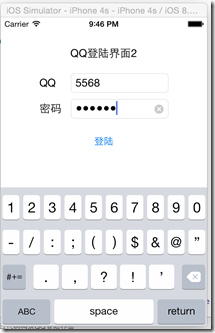
 1 @interface ViewController ()

 2 @property (weak, nonatomic) IBOutlet UITextField *qqField;

 3 @property (weak, nonatomic) IBOutlet UITextField *pwdField;

 4

 5 - (IBAction)login;

 6

 7 @end

 8

 9 @implementation ViewController

10

11 - (void)viewDidLoad {

12     [super viewDidLoad];

13     // Do any additional setup after loading the view, typically from a nib.

14 }

15

16 - (void)didReceiveMemoryWarning {

17     [super didReceiveMemoryWarning];

18     // Dispose of any resources that can be recreated.

19 }

20

21 - (IBAction)login {

22     NSLog(@"%@ - %@", self.qqField.text, self.pwdField.text);

23 }

24 @end
 1 @interface ViewController ()

 2

 3 - (void) addLabel;

 4 - (void) addTextField;

 5 - (void) addLoginButton;

 6 - (void) login;

 7

 8 @end

 9

10 @implementation ViewController

11

12 - (void)viewDidLoad {

13     [super viewDidLoad];

14     // Do any additional setup after loading the view, typically from a nib.

15

16     [self addLabel];

17     [self addTextField];

18     [self addLoginButton];

19 }

20

21 - (void)didReceiveMemoryWarning {

22     [super didReceiveMemoryWarning];

23     // Dispose of any resources that can be recreated.

24 }

25

26 - (void) addLabel {

27     UILabel *titleLabel = [[UILabel alloc] initWithFrame:CGRectMake(0, 45, self.view.frame.size.width, 21)];

28     [titleLabel setTextAlignment:NSTextAlignmentCenter];

29     titleLabel.text = @"QQ登陆界面2";

30     [self.view addSubview:titleLabel];

31

32     UILabel *qqLabel = [[UILabel alloc] initWithFrame:CGRectMake(60, 91, 26, 21)];

33     qqLabel.text = @"QQ";

34     [self.view addSubview:qqLabel];

35

36     UILabel *pwdLabel = [[UILabel alloc] initWithFrame:CGRectMake(60, 131, 34, 21)];

37     pwdLabel.text = @"密码";

38     [self.view addSubview:pwdLabel];

39 }

40

41 - (void) addTextField {

42     UITextField *qqField = [[UITextField alloc] initWithFrame:CGRectMake(109, 87, 151, 30)];

43     qqField.placeholder = @"请输入QQ账号";

44     [qqField setClearButtonMode:UITextFieldViewModeWhileEditing];

45     [qqField setKeyboardType:UIKeyboardTypeNumberPad];

46     [qqField setBorderStyle:UITextBorderStyleRoundedRect];

47     [qqField setTag:1];

48     [self.view addSubview:qqField];

49

50     UITextField *pwdField = [[UITextField alloc] initWithFrame:CGRectMake(109, 127, 151, 30)];

51     pwdField.placeholder = @"请输入QQ密码";

52     [pwdField setSecureTextEntry:YES];

53     [pwdField setKeyboardType:UIKeyboardTypeNumbersAndPunctuation];

54     [pwdField setClearButtonMode:UITextFieldViewModeWhileEditing];

55     [pwdField setBorderStyle:UITextBorderStyleRoundedRect];

56     [pwdField setTag:2];

57     [self.view addSubview:pwdField];

58 }

59

60 - (void) addLoginButton {

61     // 注意如果使用UIButtonTypeCustom,默认背景色和titleColor都是是白色,显示不出来

62     UIButton *loginButton = [UIButton buttonWithType:UIButtonTypeSystem];

63

64     CGRect loginRect = CGRectMake(145, 177, 30, 30);

65     loginButton.frame = loginRect;

66     [loginButton setTitle:@"登陆" forState:UIControlStateNormal];

67     [loginButton addTarget:self action:@selector(login) forControlEvents:UIControlEventTouchUpInside];

68

69     [self.view addSubview:loginButton];

70 }

71

72 #pragma mark - action

73 - (void) login {

74     UITextField *qqField = [self.view viewWithTag:1];

75     UITextField *pwdField = [self.view viewWithTag:2];

76

77     NSLog(@"登陆---->%@ - %@", qqField.text, pwdField.text);

78 }

79 @end
[iOS基础控件 - 3.1] QQ登陆界面的更多相关文章
- [iOS基础控件 - 6.9.1] 聊天界面Demo 代码
框架: 所有代码文件: Model: // // Message.h // QQChatDemo // // Created by hellovoidworld on 14/12/8. // ...
- [iOS基础控件 - 5.5] 代理设计模式 (基于”APP列表"练习)
A.概述 在"[iOS基础控件 - 4.4] APP列表 进一步封装,初见MVC模式”上进一步改进,给“下载”按钮加上效果.功能 1.按钮点击后,显示为“已下载”,并且不 ...
- [iOS基础控件 - 6.12.1] QQ菜单管理 UITabBarController 控制器管理
A.需求 1.类似QQ.微信顶部或者底部的窗口转换导航条 2.给每个页面添加相应内容 B.UITabBarController 1.基本概念: (1)内容高度 iOS7之前内容高度为:屏幕高度 - ...
- [iOS基础控件 - 6.9.3] QQ好友列表Demo TableView
A.需求 1.使用plist数据,展示类似QQ好友列表的分组.组内成员显示缩进功能 2.组名使用Header,展示箭头图标.组名.组内人数和上线人数 3.点击组名,伸展.缩回好友组 code so ...
- iOS 基础控件(下)
上篇介绍了UIButton.UILabel.UIImageView和UITextField,这篇就简短一点介绍UIScrollView和UIAlertView. UIScrollView 顾名思义也知 ...
- [iOS基础控件 - 6.11.3] 私人通讯录Demo 控制器的数据传递、存储
A.需求 1.搭建一个"私人通讯录"Demo 2.模拟登陆界面 账号 密码 记住密码开关 自动登陆开关 登陆按钮 3.退出注销 4.增删改查 5.恢复数据(取消修改) 这个代码 ...
- [iOS基础控件 - 6.9] 聊天界面Demo
A.需求 做出一个类似于QQ.微信的聊天界面 1.每个cell包含发送时间.发送人(头像).发送信息 2.使用对方头像放在左边,我方头像在右边 3.对方信息使用白色背景对话框,我方信息使用蓝色背景对话 ...
- [iOS基础控件 - 7.0] UIWebView
A.基本使用 1.概念 iOS内置的浏览器控件 Safari浏览器就是通过UIWebView实现的 2.用途:制作简易浏览器 (1)基本请求 创建请求 加载请求 (2)代理监听webView加载, ...
- [iOS基础控件 - 6.10.2] PickerView 自定义row内容 国家选择Demo
A.需求 1.自定义一个UIView和xib,包含国家名和国旗显示 2.学习row的重用 B.实现步骤 1.准备plist文件和国旗图片 2.创建模型 // // Flag.h // Co ...
随机推荐
- 【BZOJ 1038】 1038: [ZJOI2008]瞭望塔
1038: [ZJOI2008]瞭望塔 Description 致力于建设全国示范和谐小村庄的H村村长dadzhi,决定在村中建立一个瞭望塔,以此加强村中的治安.我们将H村抽象为一维的轮廓.如下图所示 ...
- Get请求携带数据量的各种限制及解决办法、Post请求说明
1. Get请求携带数据量的各种限制及解决办法 Http Get方法提交的数据大小长度并没有限制,HTTP协议规范没有对URL长度进行限制.这个限制是特定的浏览器及服务器对它的限制. 到新公司处理 ...
- Razor视图引擎的基本概念与法语
Razor 视图引擎的特点: 简洁.富于表现.流畅 尽量减少页面代码的输入,实现快速流畅的编程工作 不必明确为服务器代码标记起始与结束符,Razor 能智能判断,这样让页面看清洁,代码方便阅读 asp ...
- Android TextView结合SpannableString使用
super.onCreate(savedInstanceState); TextView txtInfo = new TextView(this); SpannableString ss = new ...
- 《 UNIX网络编程》源码的使用
学习编程这东西,看代码,改代码,运行代码这样才能学到实际东西!本书说在www.unpbook.com可以获取源码,不过打不开!所以google unpv13e.tar.gz 并在网络上找到了:源码:h ...
- eclipse 中创建maven web项目
Maven的Eclipse插件m2eclipse在线安装地址 http://m2eclipse.sonatype.org/sites/m2e:我又试了link方式安装也没什么作用,不知怎么回事? 还有 ...
- asp mvc 路由
public override void RegisterArea(AreaRegistrationContext context) { context.MapRoute( "Workflo ...
- iframe控件
function goTo(url) { document.getElementById("iframeid").src = url; //获得要显示的页面,当点击时就会在ifra ...
- ubuntu常用快捷键
1.直接退出窗口 Ctrl + q 2.窗口变大变小 Alt + Q 3.最小化窗口,显示桌面Ctrl + Alt + D 4.把当前窗口移到另一个工作区 Shift+ Ctrl + Alt +方 ...
- Swift不可变数组
Objective-C编写了2个不同的类来区分不可变数组(NSArray)和可变数组(NSMutableArray): Swift通过使用常量和变量来区分不可变数组和可变数组. 只要将数组定义为常量, ...