
C#接口之IEnumerable,IEnumerator
IEnumerable

截图来源于https://msdn.microsoft.com/zh-cn/library/system.collections.ienumerable.getenumerator.aspx
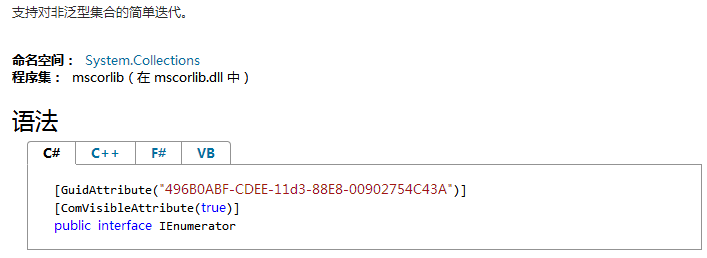
IEnumerable只包含一个抽象方法GetEnumerable(),它返回一个可用于循环访问集合的IEnumberator对象。我们可以通过定义foreach语句功能实现并支持非泛型方法的迭代。
在MSDN上给出了一个关于GetEnumerable()方法的例子:
 using System;

 using System.Collections.Generic;

 using System.Linq;

 using System.Text;

 using System.Threading.Tasks;

 using System.Collections;

 namespace TestInterface

 {

     public class Person

     {

         public Person(string fName,string lName)

         {

             this.firstName = fName;

             this.lastName = lName;

         }

         public string firstName;

         public string lastName;

     }

     public class People:IEnumerable//继承IEnumerable类,重写GetNumberable()方法

     {

         private Person[] _peopele;

         public People(Person[] pArray)

         {

             _peopele = new Person[pArray.Length];

             for (int i = ; i < pArray.Length; i++)

                 _peopele[i] = pArray[i];

         }

         IEnumerator IEnumerable.GetEnumerator()//实现GetEnumerable接口

         {

             return (IEnumerator) GetEnumerator();//调用重写的GetEnumerator方法

         }

         public PeopleEnum GetEnumerator()

         {

             return new PeopleEnum(_peopele);//返回一个PeopleEnum类型的对象,PeopleEnum继承了IEnumerator类

         }

     }

     public class PeopleEnum:IEnumerator

     {

         public Person[] _people;

         int position = -;

         /// <summary>

         /// 构造函数

         /// </summary>

         /// <param name="list">

         /// _people指针指向list数组

         /// </param>

         public PeopleEnum(Person[] list)

         {

             _people = list;

         }

         /// <summary>

         ///将枚举数推进到集合的下一个元素。         /// </summary>

         /// <returns>

         /// 成功返回true,失败返回false

         /// </returns>

         public bool MoveNext()

         {

             position++;

             return (position < _people.Length);

         }

         /// <summary>

         /// 将枚举数设置为其初始位置,该位置位于集合中第一个元素之前。

         /// </summary>

         public void Reset()

         {

             position = -;

         }

         /// <summary>

         /// 获取当前位置的对象

         /// </summary>

         object IEnumerator.Current

         {

             get { return Current; }

         }

         /// <summary>

         /// 实现接口方法

         /// </summary>

         public Person Current

         {

             get

             {

                 try

                 {

                     return _people[position];

                 }

                 catch(IndexOutOfRangeException)

                 {

                     throw new InvalidOperationException();

                 }

             }

         }

     }

     class Program

     {

         static void Main(string[] args)

         {

             Person[] peopleArray = new Person[]

             {

                 new Person("John","Smith"),

                 new Person("Jim","Johnson"),

                 new Person("Sue","Rabon"),

             };

             People peopleList = new People(peopleArray);//初始化对象集合

             foreach (Person p in peopleList)

                 Console.WriteLine(p.firstName + " " + p.lastName);

         }

     }

 }
如果我们将第23-42代码改写如下:
  public class People//继承IEnumerable类,重写GetNumberable()方法

     {

         private Person[] _peopele;

         public People(Person[] pArray)

         {

             _peopele = new Person[pArray.Length];

             for (int i = ; i < pArray.Length; i++)

                 _peopele[i] = pArray[i];

         }

     }
即不让People继承IEnumerable类,重写GetNumerator接口的部分也删除掉。那么编译器就会提示:

这是因为People类中没有实现GetNumerator()方法,所以People对象就不能返回一个IEnumerator对象,以至于foreach语句不能遍历Person集合。
IEnumerator
下面来介绍一下IEnumerator
截图来源于:https://msdn.microsoft.com/zh-cn/library/system.collections.ienumerator(v=vs.110).aspx
属性 描述
Current 获取集合中的当前元素
方法 描述
MoveNext 将枚举数推进到集合的下一个元素。
Reset 将枚举数设置为其初始位置,该位置位于集合中第一个元素之前。
正是因为People类中没有实现GetNumerator()方法,所以People对象就不能返回一个IEnumerator对象,那么也就不能使用MoveNext方法,foreach也就不能实现遍历Person集合。
C#接口之IEnumerable,IEnumerator的更多相关文章
- IEnumerable, IEnumerator接口
IEnumerable接口 // Exposes the enumerator, which supports a simple iteration over a non-generic collec ...
- C# ~ 从 IEnumerable / IEnumerator 到 IEnumerable<T> / IEnumerator<T> 到 yield
IEnumerable / IEnumerator 首先,IEnumerable / IEnumerator 接口定义如下: public interface IEnumerable /// 可枚举接 ...
- C# 常用接口学习 IEnumerable<T>
作者:乌龙哈里 时间:2015-10-24 平台:Window7 64bit,Visual Studio Community 2015 本文参考: MSDN IEnumerable<T> ...
- ICollection IEnumerable/IEnumerator IDictionaryEnumerator yield
Enumerable和IEnumerator接口是.NET中非常重要的接口,二者区别: 1. IEnumerable是个声明式的接口,声明实现该接口的类就是“可迭代的enumerable”,但并没用说 ...
- c#yield,IEnumerable,IEnumerator
foreach 在编译成IL后,实际代码如下: 即:foreach实际上是先调用可枚举对象的GetEnumerator方法,得到一个Enumerator对象,然后对Enumerator进行while循 ...
- IEnumerable & IEnumerator
IEnumerable 只有一个方法:IEnumerator GetEnumerator(). INumerable 是集合应该实现的一个接口,这样,就能用 foreach 来遍历这个集合. IEnu ...
- C#内建接口:IEnumerable
这节讲一下接口IEnumerable. 01 什么是Enumerable 在一些返回集合数据的接口中,我们经常能看到IEnumerable接口的身影.那什么是Enumerable呢?首先它跟C#中的e ...
- 【Unity|C#】基础篇(20)——枚举器与迭代器(IEnumerable/IEnumerator)
[学习资料] <C#图解教程>(第18章):https://www.cnblogs.com/moonache/p/7687551.html 电子书下载:https://pan.baidu. ...
- [设计模式] Iterator - 迭代器模式:由一份奥利奥早餐联想到的设计模式
Iterator - 迭代器模式 目录 前言 回顾 UML 类图 代码分析 抽象的 UML 类图 思考 前言 这是一包奥利奥(数组),里面藏了很多块奥利奥饼干(数组中的元素),我将它们放在一个碟子上慢 ...
随机推荐
- mysql特殊语句学习
一.Mysql ON子句和USING子句 Mysql 中联接SQL语句中,ON子句的语法格式为:table1.column_name = table2.column_name. 当模式设计对联接表的列 ...
- <二>读<<大话设计模式>>之策略模式
又和大家见面了.可以坚持写出第二篇文章真不错,好好加油. <<大话设计模式>>解说策略模式是以商场收银软件程序开头的,那么问题来了.哪家商场收银软件强,开玩笑了. 读过上篇文章 ...
- SyntaxError: missing ] after element list 火狐问题
关于火狐运行var obj = eval('(' + data + ')');时 报SyntaxError: missing ] after element list错误,Chrome和IE正常 情形 ...
- 错误 1 error LNK2019: 无法解析的外部符号 "public: __thiscall Distance::Distance(int)" (??0Distance@@QAE@H@Z),该符号在函数 _main 中被引用
错误: 错误 1 error LNK2019: 无法解析的外部符号 "public: __thiscall Distance::Distance(int)" (??0Distanc ...
- 利用U盘进行软件加密的方法
利用U盘进行软件加密的方法 一般的U盘不具备加密的功能,虽然U盘和加密狗外形有一些相似,但是内部完全不一样的,U盘只是一个存储器芯片和简单的附属电路,而现在的智能卡加密狗都具有一个单独的CPU或者加密 ...
- electron 的窗口设置最大化 最小化
/** * Created by Administrator on 2016/11/23. * 页面对窗口的一些操作封装,用于渲染进程 */ "use strict"; const ...
- RTX——第7章 任务管理
以下内容转载自安富莱电子: http://forum.armfly.com/forum.php 单任务系统学习多任务系统之前,我们先来回顾下单任务系统的编程框架,即裸机时的编程框架. 裸机编程主要是采 ...
- 也来看看hadoop的WordCount
其实这个例子都是书上的,我也只是拿过来理解学习下. WordCount是Hadoop中的Hello, world,这是我听得最多的一个表述. 下面是WordCount.java的源码 package ...
- java日期工具类DateUtil-续一
上篇文章中,我为大家分享了下DateUtil第一版源码,但就如同文章中所说,我发现了还存在不完善的地方,所以我又做了优化和扩展. 更新日志: 1.修正当字符串日期风格为MM-dd或yyyy-MM时,若 ...
- kubernetes deployment
deployment是k8s中部署应用最常见的一种方式.如果不需要被访问,那么只需要定义deployment即可.如果需要被其他服务访问,那么可以创建一个service与其绑定,通过访问service ...