
[udemy]WebDevelopment_Bootstrap,Templates
Bootstrap Introduction
Bootstrap 相对于CSS, JS
就像PPT模板相对于PPT
说白了就是前人已经做好了(pre-build)很多模板,你可以直接拿来主义
Bootstarp 4
Two ways to use it
1. download
you will see a bunch of files
Bootstarp.min.css means they are minified
2. CDN(Content Delivery Network)
we can directly copy this code into index.html

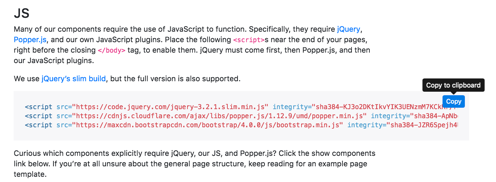
Because JS would be read after CSS, it be put in the bottom of body part
 <!DOCTYPE html>

 <html>

 <head>

     <title>Bootstrap</title>

     <link rel="stylesheet" href="https://maxcdn.bootstrapcdn.com/bootstrap/4.0.0/css/bootstrap.min.css" integrity="sha384-Gn5384xqQ1aoWXA+058RXPxPg6fy4IWvTNh0E263XmFcJlSAwiGgFAW/dAiS6JXm" crossorigin="anonymous">

 </head>

 <body>

     <script src="https://code.jquery.com/jquery-3.2.1.slim.min.js" integrity="sha384-KJ3o2DKtIkvYIK3UENzmM7KCkRr/rE9/Qpg6aAZGJwFDMVNA/GpGFF93hXpG5KkN" crossorigin="anonymous"></script>

     <script src="https://cdnjs.cloudflare.com/ajax/libs/popper.js/1.12.9/umd/popper.min.js" integrity="sha384-ApNbgh9B+Y1QKtv3Rn7W3mgPxhU9K/ScQsAP7hUibX39j7fakFPskvXusvfa0b4Q" crossorigin="anonymous"></script>

     <script src="https://maxcdn.bootstrapcdn.com/bootstrap/4.0.0/js/bootstrap.min.js" integrity="sha384-JZR6Spejh4U02d8jOt6vLEHfe/JQGiRRSQQxSfFWpi1MquVdAyjUar5+76PVCmYl" crossorigin="anonymous"></script>

 </body>

 </html>
next step,
if we would like to add Navbar in our website
copy the code into your html file directly
 <!DOCTYPE html>

 <html>

 <head>

     <title>Bootstrap</title>

     <link rel="stylesheet" href="https://maxcdn.bootstrapcdn.com/bootstrap/4.0.0/css/bootstrap.min.css" integrity="sha384-Gn5384xqQ1aoWXA+058RXPxPg6fy4IWvTNh0E263XmFcJlSAwiGgFAW/dAiS6JXm" crossorigin="anonymous">

 </head>

 <body>

 <nav class="navbar navbar-expand-lg navbar-light bg-light">

   <a class="navbar-brand" href="#">Navbar</a>

   <button class="navbar-toggler" type="button" data-toggle="collapse" data-target="#navbarSupportedContent" aria-controls="navbarSupportedContent" aria-expanded="false" aria-label="Toggle navigation">

     <span class="navbar-toggler-icon"></span>

   </button>

   <div class="collapse navbar-collapse" id="navbarSupportedContent">

     <ul class="navbar-nav mr-auto">

       <li class="nav-item active">

         <a class="nav-link" href="#">Home <span class="sr-only">(current)</span></a>

       </li>

       <li class="nav-item">

         <a class="nav-link" href="#">Link</a>

       </li>

       <li class="nav-item dropdown">

         <a class="nav-link dropdown-toggle" href="#" id="navbarDropdown" role="button" data-toggle="dropdown" aria-haspopup="true" aria-expanded="false">

           Dropdown

         </a>

         <div class="dropdown-menu" aria-labelledby="navbarDropdown">

           <a class="dropdown-item" href="#">Action</a>

           <a class="dropdown-item" href="#">Another action</a>

           <div class="dropdown-divider"></div>

           <a class="dropdown-item" href="#">Something else here</a>

         </div>

       </li>

       <li class="nav-item">

         <a class="nav-link disabled" href="#">Disabled</a>

       </li>

     </ul>

     <form class="form-inline my-2 my-lg-0">

       <input class="form-control mr-sm-2" type="search" placeholder="Search" aria-label="Search">

       <button class="btn btn-outline-success my-2 my-sm-0" type="submit">Search</button>

     </form>

   </div>

 </nav>

     <script src="https://code.jquery.com/jquery-3.2.1.slim.min.js" integrity="sha384-KJ3o2DKtIkvYIK3UENzmM7KCkRr/rE9/Qpg6aAZGJwFDMVNA/GpGFF93hXpG5KkN" crossorigin="anonymous"></script>

     <script src="https://cdnjs.cloudflare.com/ajax/libs/popper.js/1.12.9/umd/popper.min.js" integrity="sha384-ApNbgh9B+Y1QKtv3Rn7W3mgPxhU9K/ScQsAP7hUibX39j7fakFPskvXusvfa0b4Q" crossorigin="anonymous"></script>

     <script src="https://maxcdn.bootstrapcdn.com/bootstrap/4.0.0/js/bootstrap.min.js" integrity="sha384-JZR6Spejh4U02d8jOt6vLEHfe/JQGiRRSQQxSfFWpi1MquVdAyjUar5+76PVCmYl" crossorigin="anonymous"></script>

 </body>

 </html>
Then beautiful Navbar is shown

Use the same step,
we can add Jumbotron ['dʒʌmbəutrɔn] n. 电视机的超大屏幕
and modal
You may notice that when we click the button
we have our own modal, which proves this is JS
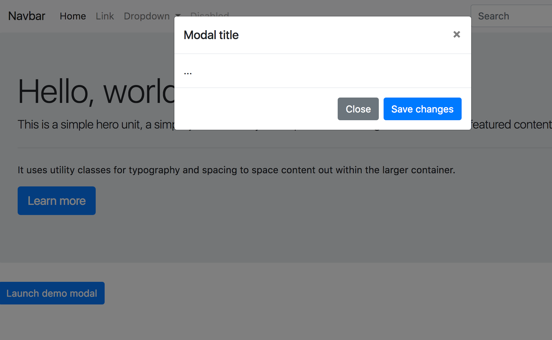
How can we add our own custom look ?
For example, I would like to change Launch demo modal button's color
We can search buttons code, and edit the Launch demo modal's button code
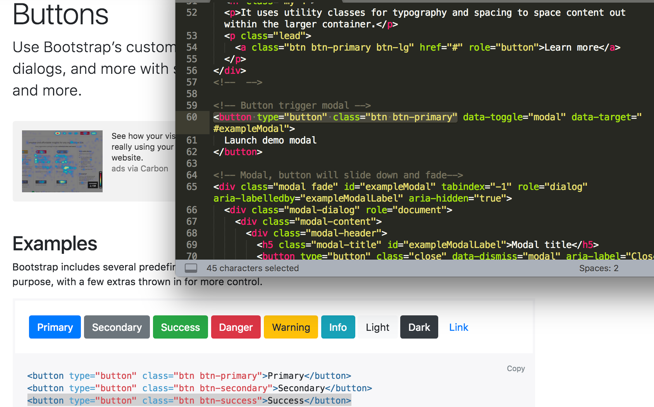
Or we can change it in the style.css file
.btn-success{

    background-color: orange;

}
Bootstrap 4 Grid
This is the reason why bootstrap is so popular.
Boootstrap allowed us to create very responsive website using these ideas of columns
   <div class="container">

     <div class="row">

         <div class="col col-sm-6" >

           1 of 2

         </div>

         <div class="col col-sm-3" >

           2 of 2

         </div>

          </div>

   </div>
.col{

    background-color: grey;

    border: 2px solid black;

}
The web site would be shown like this,

Bootstrap has the idea of a grid system and this grid system has 12 lines
col-sm-6 : 1 of 2 part covers 6/12
col-sm-3 : 2 of 2 part covers 3/12
   <div class="container">

     <div class="row">

         <div class="col col-sm-6" >

           1 of 2

         </div>

         <div class="col col-sm-3" >

           2 of 2

         </div>

         <div class="col col-sm-3" >

           Extra

         </div>

          </div>

   </div>
The web site would be shown like this,

But what if the sum of these three is over 12 ?
  <div class="container">

     <div class="row">

         <div class="col col-sm-6" >

           1 of 2

         </div>

         <div class="col col-sm-3" >

           2 of 2

         </div>

         <div class="col col-sm-4" >

           Extra

         </div>

          </div>

   </div>
The web site would be shown like this,

   <div class="container">

     <div class="row">

         <div class="col col-sm-6 col-md-12 col-lg-12" >

           1 of 2

         </div>

         <div class="col col-sm-3 col-md-6 col-lg-12" >

           2 of 2

         </div>

         <div class="col col-sm-4 col-md-6 col-lg-12" >

           Extra

         </div>

          </div>

   </div>
If the size of the window is medium then I want the whole 12 grid system to the first div, 6/12 gird to the second, 6/12 to the third.
Same logic as col-lg-12.
This is how you can create really responsive websites. And the biggest selling feature of bootstrap is that it make sure our website look good no matter what screen size.
Putting Your Website Online
github.io
DEVELOPER FUNDAMENTALS:IV
Try to use free templates:
Animate.css (https://daneden.github.io/animate.css/)
So it is very rare when build something from scratch
Create-tim(https://www.creative-tim.com/)
有已经搭好的web模板
[udemy]WebDevelopment_Bootstrap,Templates的更多相关文章
- 解决Windows版Git出现templates not found的问题
环境: Win10 x64 Git windows客户端(下载自 https://git-scm.com/) SourceTree 1.9.6.1(使用系统安装的Git,而非SourceTree内嵌的 ...
- [c++] Templates
Template是编译时多态.所有的模板都是在编译时产生对应的代码,它没有面向对象中的虚表,无法实现动态多态. Function Template A function template is a p ...
- webstrom live templates
javascript: 在live templates底部要选择javascript # $('#$END$') $ $($end$) $bd $(document.body) $d $(docume ...
- Myeclipse Templates详解(一) —— Java模板基础
目录 Templates简介 MyEclipse自带Templates详解 新建Template 自定义Template 因为自己比较懒,尤其是对敲重复代码比较厌恶,所以经常喜欢用快捷键和模板,Mye ...
- Using FreeMarker templates (FTL)- Tutorial
Lars Vogel, (c) 2012, 2016 vogella GmbHVersion 1.4,06.10.2016 Table of Contents 1. Introduction to F ...
- juqery模板 Templates
现在已经有了许多JavaScript的解决方案模板,从这方面说,标准化的模板解决方案必然是大势所趋.在本节中,我们向你简要描述四个最流行最有趣的模板.现有的模板解决方案能解决什么?那些特色在jQuer ...
- django TEMPLATES
?: (1_8.W001) The standalone TEMPLATE_* settings were deprecated in Django 1.8 and the TEMPLATES dic ...
- django复习笔记3:urls/views/templates三板斧
0.先看看文件结构 mysite/ mysite/ ├── __pycache__ │ └── manage.cpython-.pyc ├── blog │ ├── __init__.py │ ...
- Effective C++ -----条款44:将与参数无关的代码抽离templates
Templates生成多个classes和多个函数,所以任何template代码都不该与某个造成膨胀的template参数产生相依关系. 因非类型模板参数(non-type template para ...
随机推荐
- Swift自定义头视图和尾视图
var data: [[String]]! override func viewDidLoad() { super.viewDidLoad() // Do any additional setup a ...
- /dev/mem直接操作硬件寄存器
/******************************************************************************* * /dev/mem直接操作硬件寄存器 ...
- DesignPattern(五)行为型模式(上)
行为型模式 行为型模式是对在不同对象之间划分责任和算法的抽象化.行为模式不仅仅关于类和对象,还关于它们之间的相互作用.行为型模式又分为类的行为模式和对象的行为模式两种. 类的行为模式——使用继承关系在 ...
- 关于mybatis中一级缓存和二级缓存的简单介绍
关于mybatis中一级缓存和二级缓存的简单介绍 mybatis的一级缓存: MyBatis会在表示会话的SqlSession对象中建立一个简单的缓存,将每次查询到的结果结果缓存起来,当下次查询的时候 ...
- Jenkins在windows环境下安装无法安装插件
在windos平台下安装jenkins要是无法安装插件,tomcat控制台报以下错误: 解决方法: 进入到jenkins里头,Jenkins -- 管理插件 -- 高级 -- 升级站点,如图所示: 将 ...
- Pgsql和Mysql的对比
工作中用过这两个数据库,但都不是太深入,仅限于用而已,但给我留下的印象就是Pgsql更好些,因为这两个库我都遇到过数据丢失的问题,前者我通过网上方法加自己的判断有惊无险的恢复了,而后者搜索各种资料加问 ...
- RabbitMQ 概念与Java例子
RabbitMQ简介 目前RabbitMQ是AMQP 0-9-1(高级消息队列协议)的一个实现,使用Erlang语言编写,利用了Erlang的分布式特性. 概念介绍: Broker:简单来说就是消息队 ...
- SQL相关简单游标
BEGIN TRY Create Table #Temp_Table_Record_Stat ( .... ) DECLARE table_Cursor CURSOR FOR SELECT objec ...
- 解决标准FPGA资源丰富却浪费的问题
FPGA以计算速度快.资源丰富.可编程著称,之前一直应用于高速数字信号领域和ASIC验证.随着逻辑资源的丰富和编程工具的改进,FPGA在机器学习和硬件加速上得到越来越多的重视,目前数据中心已经大量采用 ...
- 查询出结果 给其 加上序号的方法 msql
基本用法 SELECT @rownum := @rownum +1 AS rownum, e.*FROM (SELECT @rownum := 0) r , (select A.id,B.user_u ...