
Hudson-ci/Installing Hudson Windows Service---官方文档
| Hudson Continuous Integration Server |
| Website |
| Download |
| Community |
| Mailing List • Forums • IRC |
| Bugzilla |
| Open |
| Help Wanted |
| Bug Day |
| Contribute |
| Browse Source |
 |
Installing Hudson as a Windows Service |
|---|
Contents[hide] |
Install Hudson as a Windows service
First, you need to start Hudson before installing it. This can be done by running java -jar hudson.war. Now connect to hudson by going to the following URL http://locahost:8080/
Once Hudson is started, click the manage Hudson link and look for the "Install as Windows Service" link on the management page.
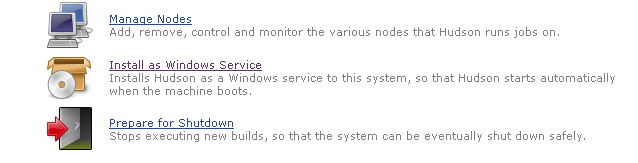
Clicking this link shows you the installation screen:
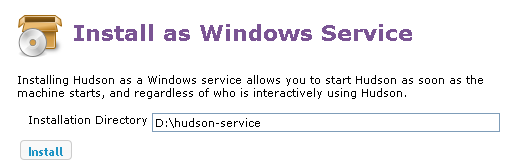
Choose the directory where Hudson shall be installed (the directory must already exist). This will become HUDSON_HOME and will be used to store data files and programs.
Upon successful completion of the installation, you should see a page asking you to restart Hudson. Note that you will need administrator privileges to complete this operation.
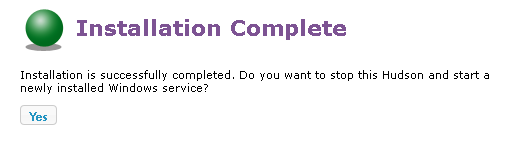
Hudson will then be relaunched as a Windows service.

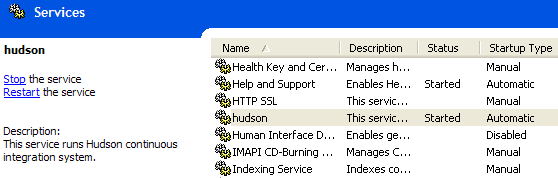
At this point you can use the service manager to confirm that Hudson is running as a service.
Install Slave as a Windows service (requires .Net 2 framework)
Hudson also allows you to install a slave agent as a Windows service. (See Distributed Builds for more about how to do distributed builds in general.)
First, you configure your slave to run as a JNLP slave agent. This should create a JNLP launch icon in the corresponding page, as shown below: 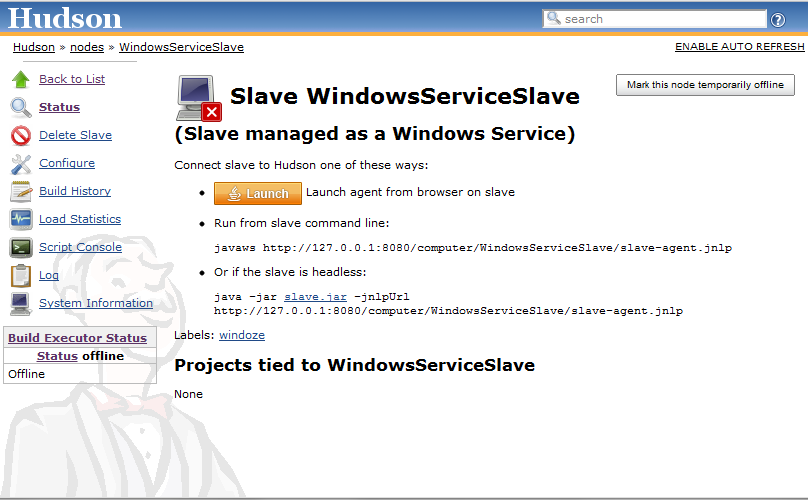
From the slave machine, launch a slave agent. You should see a window like this:

Choose "File" > "Install as Windows Service" from the menu:
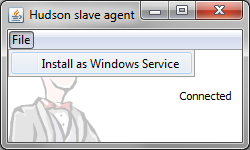
Confirm your intention to install as a service. The installation will place the program files to the directory designated as the slave root directory (from the "configure executors" screen.)
Once the installation succeeds, you'll be asked if you'd like to stop the current slave agent and immediately start a slave agent. When you click "OK", the slave agent window will terminate. The new slave agent runs as a service without showing a window, so head over to the service manager from the control panel and confirm that the slave agent is indeed running as a service.
Changing the configuration of services
The JVM launch parameters of these Windows services are controlled by an XML file hudson.xml and hudson-slave.xml respectively. These files can be found in$HUDSON_HOME and in the slave root directory respectively, after you've install them as Windows services.
The file format should be self-explanatory. Tweak the arguments for example to give JVM a bigger memory.
Stdout and stderr from the service processes go to log files in the same directory.
Uninstallation
To uninstall the service, run hudson-slave.exe uninstall from the command line. The Hudson-slave executable can be found in the slave root directory. Note that you should run the uninstall from a admin command prompt on Windows 7 and the service will not be removed until the service is manually stopped or the Windows machine is re-booted. you can also manually uninstall the service using the command: sc delete Hudson Slave, again issue this from an admin console.
Hudson-ci/Installing Hudson Windows Service---官方文档的更多相关文章
- hbase官方文档(转)
FROM:http://www.just4e.com/hbase.html Apache HBase™ 参考指南 HBase 官方文档中文版 Copyright © 2012 Apache Soft ...
- 【K8S】K8S-网络模型、POD/RC/SVC YAML 语法官方文档
K8S-网络模型.POD/RC/SVC YAML 语法官方文档 Kubernetes - Production-Grade Container Orchestration kubernetes/kub ...
- gRPC官方文档(概览)
文章来自gRPC 官方文档中文版 概览 开始 欢迎进入 gRPC 的开发文档,gRPC 一开始由 google 开发,是一款语言中立.平台中立.开源的远程过程调用(RPC)系统. 本文档通过快速概述和 ...
- HBase 官方文档
HBase 官方文档 Copyright © 2010 Apache Software Foundation, 盛大游戏-数据仓库团队-颜开(译) Revision History Revision ...
- HBase官方文档
HBase官方文档 目录 序 1. 入门 1.1. 介绍 1.2. 快速开始 2. Apache HBase (TM)配置 2.1. 基础条件 2.2. HBase 运行模式: 独立和分布式 2.3. ...
- ubuntu16.04下snort的安装(官方文档安装)(图文详解)
不多说,直接上干货! 最近为了科研,需要安装和使用Snort. snort的官网 https://www.snort.org/ Snort作为一款优秀的开源主机入侵检测系统,在windows和Linu ...
- ubuntu14.04下snort的安装(官方文档安装)(图文详解)
不多说,直接上干货! 最近为了科研,需要安装和使用Snort. snort的官网 https://www.snort.org/ Snort作为一款优秀的开源主机入侵检测系统,在windows和Linu ...
- Elasticsearch 7.4.0官方文档操作
官方文档地址 https://www.elastic.co/guide/en/elasticsearch/reference/current/index.html 1.0.0 设置Elasticsea ...
- MySQL8.0.28安装教程全程参考MySQL官方文档
前言 为了MySQL8.0.28安装教程我竟然在MySQL官方文档逛了一天,至此献给想入门MySQL8.0的初学者.以目前最新版本的MySQL8.0.28为示例进行安装与初步使用的详细讲解,面向初学者 ...
- 一起学微软Power BI系列-官方文档-入门指南(7)发布与共享-终结篇+完整PDF文档
接触Power BI的时间也只有几个月,虽然花的时间不多,但通过各种渠道了解收集,谈不上精通,但对一些重要概念和细节还是有所了解.在整理官方文档的过程中,也熟悉和了解了很多概念.所以从前到后把微软官方 ...
随机推荐
- C#泛型使用小记
最近C#的泛型使用频次略多,特在此记下一个印象深刻的. 情景如下, 基类BaseClass 有一系列的子类 SubClass1, SubClass2, SubClass3... 且其构造函数的参数较多 ...
- 深入CSS属性(九):z-index
如果你不是一名csser新手,想必你对z-index的用法应该有个大致的了解了吧,z-index可以控制定位元素在垂直于显示屏方向(Z 轴)上的堆叠顺序,本文不去讲述基本的API如何使用,而是去更深入 ...
- Jenkins pipeline中使用内置全局变量
在pipeline中不像在windows batch command中直接%WORKSPACE%这样 需要写成这样: echo env.WORKSPACE
- UDP实现一个简易的聊天室 (Unity&&C#完成)
效果展示(尚未完善) UDP User Data Protocol 用户数据报协议 概述 UDP是不连接的数据报模式.即传输数据之前源端和终端不建立连接.使用尽最大努力交付原则,即不保证可靠交付. 数 ...
- MVC-controller随笔
初识MVC-controller随笔 之前用的一些其他框架,也没有系统性的学习MVC框架.最近才开始接触,给大家简单的分享一下经验. 1 MVC的核心就是Controller(控制器),它负责处 ...
- JS判断时特殊值与boolean类型的转换
扒开JQuery以及其他一些JS框架源码,常常能看到下面这样的判断,写惯了C#高级语言语法的我,一直以来没能系统的理解透这段代码. var test; //do something... if(tes ...
- UnSafe类中的一些重要方法
UnSafe类中的一些重要方法 JDK中的rt.jar保重Unsafe类中提供了硬件级别的原子性操作,Unsafe类中的方法都是navtice方法,他们使用JNI的方式访问C++实现库,下面我们来了解 ...
- 九、基础正则表达式BRE
1.重要性:简单的说正则表达式就是处理一套字符串的规则和方法,以行为单位对字符串进行处理. 运维工作中,会有大量的访问日志,错误日志,大数据学习正则表达式是不可少的. 2.linux正则表达式,主要是 ...
- pymongo 学习
查看一条记录,返回一条 dict 记录 db.Account.find_one({"UserName":"keyword"}) 查看某一列的一条记录(此时的1, ...
- “全栈2019”Java异常第二十一章:finally不被执行的情况
难度 初级 学习时间 10分钟 适合人群 零基础 开发语言 Java 开发环境 JDK v11 IntelliJ IDEA v2018.3 文章原文链接 "全栈2019"Java异 ...