
Zabbix学习之路(九)之低级自动发现以及MySQL多实例
1、概述
Zabbix的网络发现是指zabbix server通过配置好的规则,自动添加host,group,template
Zabbix的主动注册刚好和网络发现是相反的,功能基本一致。zabbix agent主动联系zabbix server,server自动添加host,group,template
以上两种方式都是发现host,添加host,而low-level discovery(低级自动发现)更加底层,用于发现item,trigger,graph等等。
2、MySQL多实例的低级自动发现
(1)配置3307、3308的实例

[root@linux-node2 ~]# mkdir /data/{,} -p

[root@linux-node2 ~]# chown -R mysql.mysql /data

[root@linux-node2 ~]# cp /etc/my.cnf /etc/my3307.cnf

[root@linux-node2 ~]# vim /etc/my3307.cnf

[mysqld]

datadir=/data/

socket=/data//mysql.sock

# Disabling symbolic-links is recommended to prevent assorted security risks

symbolic-links=

port=

# Settings user and group are ignored when systemd is used.

# If you need to run mysqld under a different user or group,

# customize your systemd unit file for mariadb according to the

# instructions in http://fedoraproject.org/wiki/Systemd

[mysqld_safe]

log-error=/data//mariadb.log

pid-file=/data//mariadb.pid

#

# include all files from the config directory

#

!includedir /etc/my.cnf.d

[root@linux-node2 ~]# cp /etc/my3307.cnf /etc/my3308.cnf

[root@linux-node2 ~]# vim /etc/my3308.cnf

[mysqld]

datadir=/data/

socket=/data//mysql.sock

# Disabling symbolic-links is recommended to prevent assorted security risks

symbolic-links=

port=

# Settings user and group are ignored when systemd is used.

# If you need to run mysqld under a different user or group,

# customize your systemd unit file for mariadb according to the

# instructions in http://fedoraproject.org/wiki/Systemd

[mysqld_safe]

log-error=/data//mariadb.log

pid-file=/data//mariadb.pid

#

# include all files from the config directory

#

!includedir /etc/my.cnf.d

(2)初始化数据库

[root@linux-node2 ~]# mysql_install_db --user=mysql --defaults-file=/etc/my3307.cnf

Installing MariaDB/MySQL system tables in '/data/3307' ...

 :: [Note] /usr/libexec/mysqld (mysqld 5.5.-MariaDB) starting as process  ...

OK

Filling help tables...

 :: [Note] /usr/libexec/mysqld (mysqld 5.5.-MariaDB) starting as process  ...

OK

To start mysqld at boot time you have to copy

support-files/mysql.server to the right place for your system

PLEASE REMEMBER TO SET A PASSWORD FOR THE MariaDB root USER !

To do so, start the server, then issue the following commands:

'/usr/bin/mysqladmin' -u root password 'new-password'

'/usr/bin/mysqladmin' -u root -h linux-node2 password 'new-password'

Alternatively you can run:

'/usr/bin/mysql_secure_installation'

which will also give you the option of removing the test

databases and anonymous user created by default.  This is

strongly recommended for production servers.

See the MariaDB Knowledgebase at http://mariadb.com/kb or the

MySQL manual for more instructions.

You can start the MariaDB daemon with:

cd '/usr' ; /usr/bin/mysqld_safe --datadir='/data/3307'

You can test the MariaDB daemon with mysql-test-run.pl

cd '/usr/mysql-test' ; perl mysql-test-run.pl

Please report any problems at http://mariadb.org/jira

The latest information about MariaDB is available at http://mariadb.org/.

You can find additional information about the MySQL part at:

http://dev.mysql.com

Consider joining MariaDB's strong and vibrant community:

https://mariadb.org/get-involved/

[root@linux-node2 ~]# mysqld_safe --defaults-file=/etc/my3307.cnf &

[]

[root@linux-node2 ~]#  :: mysqld_safe Logging to '/data/3307/mariadb.log'.

 :: mysqld_safe Starting mysqld daemon with databases from /data/

[root@linux-node2 ~]# mysql_install_db --user=mysql --defaults-file=/etc/my3308.cnf

Installing MariaDB/MySQL system tables in '/data/3308' ...

 :: [Note] /usr/libexec/mysqld (mysqld 5.5.-MariaDB) starting as process  ...

OK

Filling help tables...

 :: [Note] /usr/libexec/mysqld (mysqld 5.5.-MariaDB) starting as process  ...

OK

To start mysqld at boot time you have to copy

support-files/mysql.server to the right place for your system

PLEASE REMEMBER TO SET A PASSWORD FOR THE MariaDB root USER !

To do so, start the server, then issue the following commands:

'/usr/bin/mysqladmin' -u root password 'new-password'

'/usr/bin/mysqladmin' -u root -h linux-node2 password 'new-password'

Alternatively you can run:

'/usr/bin/mysql_secure_installation'

which will also give you the option of removing the test

databases and anonymous user created by default.  This is

strongly recommended for production servers.

See the MariaDB Knowledgebase at http://mariadb.com/kb or the

MySQL manual for more instructions.

You can start the MariaDB daemon with:

cd '/usr' ; /usr/bin/mysqld_safe --datadir='/data/3308'

You can test the MariaDB daemon with mysql-test-run.pl

cd '/usr/mysql-test' ; perl mysql-test-run.pl

Please report any problems at http://mariadb.org/jira

The latest information about MariaDB is available at http://mariadb.org/.

You can find additional information about the MySQL part at:

http://dev.mysql.com

Consider joining MariaDB's strong and vibrant community:

https://mariadb.org/get-involved/

[root@linux-node2 ~]# mysqld_safe --defaults-file=/etc/my3308.cnf &

[]

[root@linux-node2 ~]#  :: mysqld_safe Logging to '/data/3308/mariadb.log'.

 :: mysqld_safe Starting mysqld daemon with databases from /data/

[root@linux-node2 ~]# netstat -tulnp

Active Internet connections (only servers)

Proto Recv-Q Send-Q Local Address           Foreign Address         State       PID/Program name

tcp               0.0.0.0:            0.0.0.0:*               LISTEN      /mysqld

tcp               0.0.0.0:            0.0.0.0:*               LISTEN      /mysqld

tcp               0.0.0.0:              0.0.0.0:*               LISTEN      /nginx: master

tcp               0.0.0.0:              0.0.0.0:*               LISTEN      /sshd

tcp               127.0.0.1:            0.0.0.0:*               LISTEN      /master

tcp               0.0.0.0:           0.0.0.0:*               LISTEN      /zabbix_agentd

tcp               0.0.0.0:            0.0.0.0:*               LISTEN      /mysqld

tcp6              :::                   :::*                    LISTEN      /sshd

tcp6              :::                  :::*                    LISTEN      /master

tcp6              :::                :::*                    LISTEN      /zabbix_agentd

[root@linux-node2 ~]# netstat -tulnp |grep mysql|awk -F "[ :]+" '{print $5}'

3306


(3)编写获取端口号的shell脚本

[root@linux-node2 scripts]# vim discovery_mysql.sh

#!/bin/bash

#mysql low-lever discovery

res=`netstat -lntp|grep mysql |awk -F "[ :]+" '{print $5}'`

port=($res)

printf '{'

printf '"data":['

for key in ${!port[@]}

do

        if [[ "${#port[@]}" -gt  && "${key}"  -ne "$((${#port[@]}-1))" ]];then

                printf '{'

                printf "\"{#MYSQLPORT}\":\"${port[${key}]}\"},"

        else [[ "${key}" -eq "((${#port[@]}-1))" ]]

                printf '{'

                printf "\"{#MYSQLPORT}\":\"${port[${key}]}\"}"

        fi

done

printf ']'

printf '}'

[root@linux-node2 scripts]# sh discovery_mysql.sh |python -m json.tool    #采用json格式显示

{

    "data": [

        {

            "{#MYSQLPORT}": ""

        },

        {

            "{#MYSQLPORT}": ""

        },

        {

            "{#MYSQLPORT}": ""

        }

    ]

}

[root@linux-node2 zabbix_agentd.d]# vim discovery_mysql.conf    #编辑自定义key

UserParameter=discovery_mysql,/bin/bash /etc/zabbix/zabbix_agentd.d/scripts/discovery_mysql.sh

[root@linux-node1 ~]# zabbix_get -s linux-node2 -k discovery_mysql    #测试server端获取数据

(Not all processes could be identified, non-owned process info

 will not be shown, you would have to be root to see it all.)

{"data":[]}

#这里报错是因为netstat -tulnp的参数-p在执行时需要root的权限,这里使用suid的方式进行授权

[root@linux-node2 ~]# chmod u+s `which netstat`

[root@linux-node2 ~]# ll `which netstat`

-rwsr-xr-x.  root root  8月    : /usr/bin/netstat

[root@linux-node1 ~]# zabbix_get -s linux-node2 -k discovery_mysql

{"data":[{"{#MYSQLPORT}":""},{"{#MYSQLPORT}":""},{"{#MYSQLPORT}":""}]}

(4)编辑自定义key,获取每个端口的状态数据

[root@linux-node2 zabbix_agentd.d]# cat userparameter_mysql.conf

UserParameter=mysql.status[*],echo "show global status where Variable_name='$2';" | HOME=/var/lib/zabbix mysql -uroot -p123456 -h 127.0.0.1 -P $ -N | awk '{print $$2}'

修改不同端口的mysql密码:

[root@linux-node2 zabbix_agentd.d]# mysqladmin -h 127.0.0.1 -uroot password '' -P3306

[root@linux-node2 zabbix_agentd.d]# mysqladmin -h 127.0.0.1 -uroot password '' -P3307

[root@linux-node2 zabbix_agentd.d]# mysqladmin -h 127.0.0.1 -uroot password '' -P3308

测试是否正常

[root@linux-node2 zabbix_agentd.d]# mysql -uroot -p123456 -h 127.0.0.1 -P3306 -e "use mysql;show GLOBAL VARIABLES like 'port';"

+---------------+-------+

| Variable_name | Value |

+---------------+-------+

| port          |   |

+---------------+-------+

[root@linux-node2 zabbix_agentd.d]# mysql -uroot -p123456 -h 127.0.0.1 -P3307 -e "use mysql;show GLOBAL VARIABLES like 'port';"

+---------------+-------+

| Variable_name | Value |

+---------------+-------+

| port          |   |

+---------------+-------+

[root@linux-node2 zabbix_agentd.d]# mysql -uroot -p123456 -h 127.0.0.1 -P3308 -e "use mysql;show GLOBAL VARIABLES like 'port';"

+---------------+-------+

| Variable_name | Value |

+---------------+-------+

| port          |   |

+---------------+-------+

zabbix_get测试是否能正常获取数据:

[root@linux-node1 ~]# zabbix_get -s linux-node2 -k mysql.status[,Bytes_sent]
3、创建发现规则
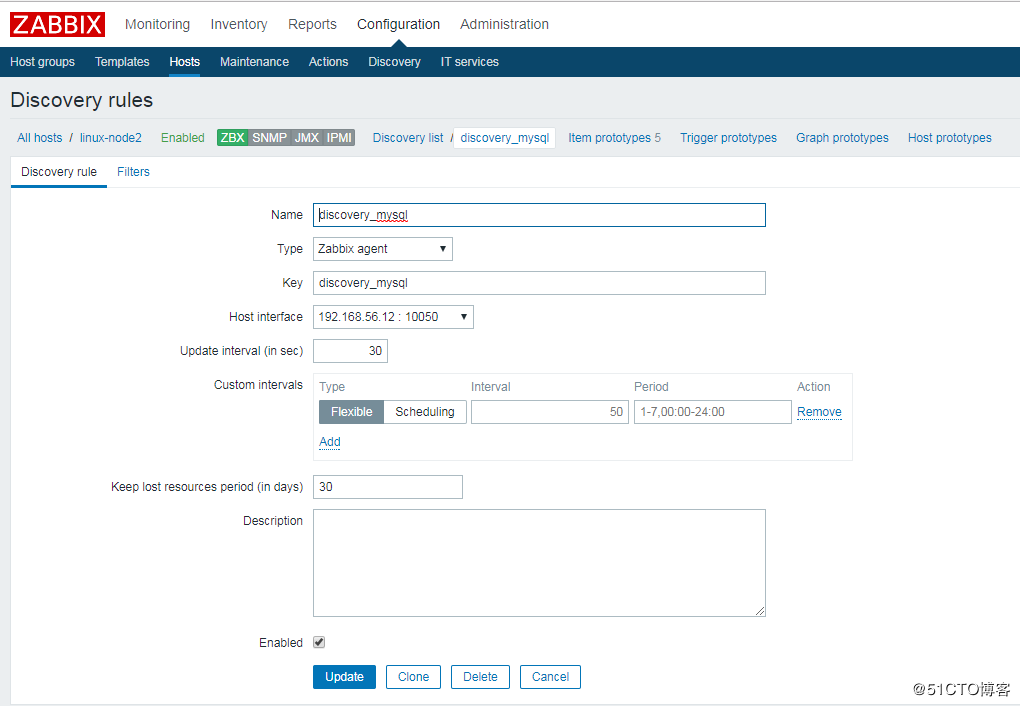
这里直接在linux-node2上进行创建
"Configuration"-->"Host"-->"linux-node2"-->"Discovery"-->"Create discovery rule"-->"Add"
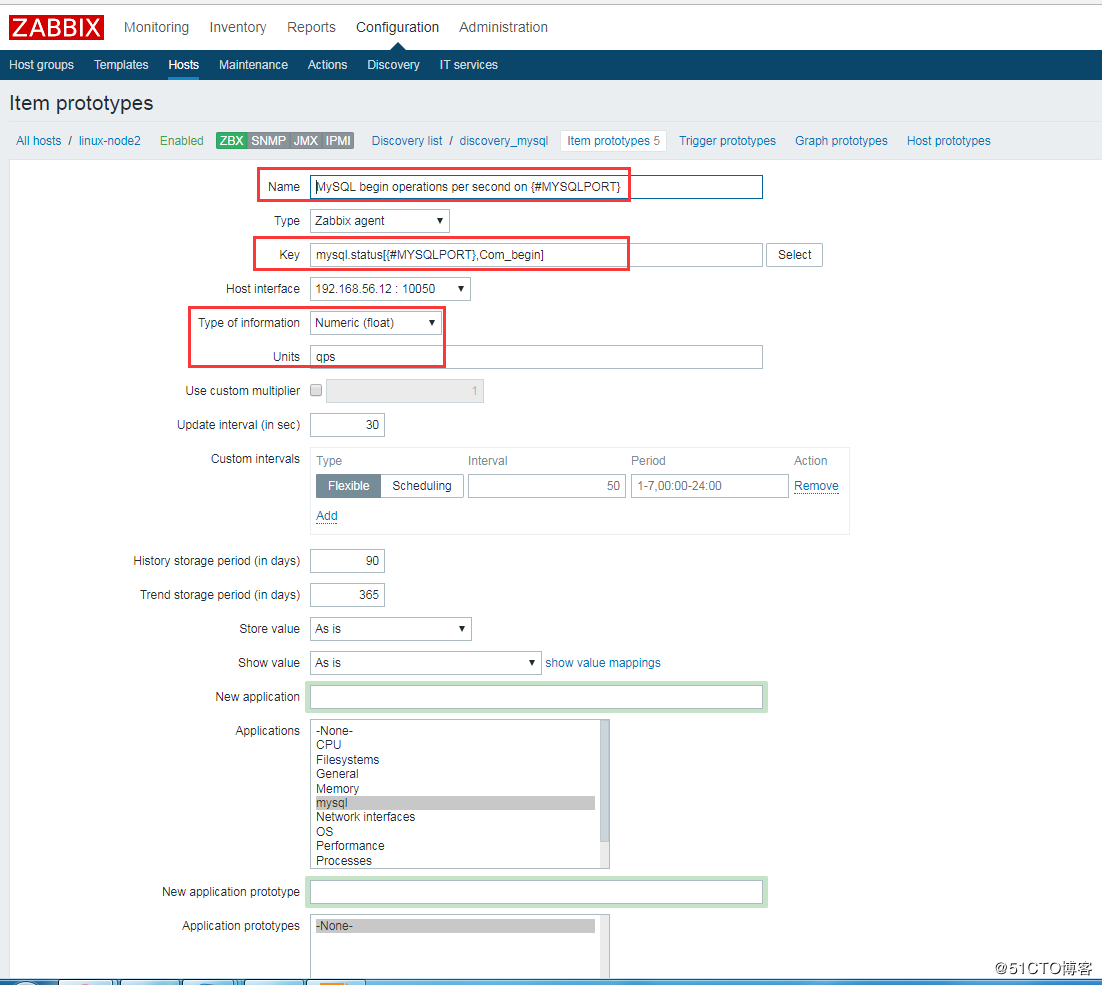
创建 Item prototypes,其实就是一个创建一个 item
Item prototypes (0)>>create Item prototypes,按照官方模板来配置。这里配5个展示

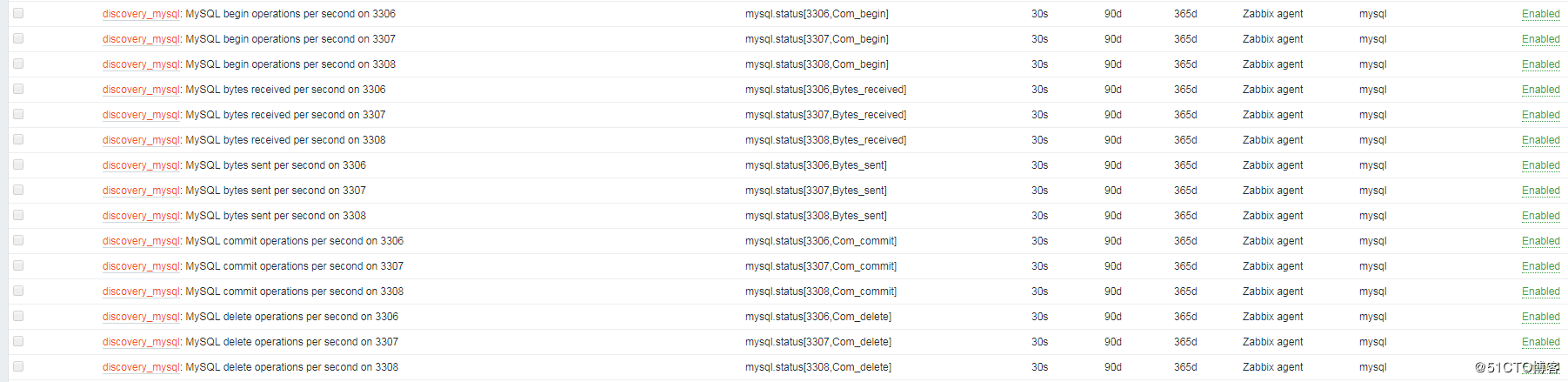
再查看Host中的item项,会多出以下监控项:
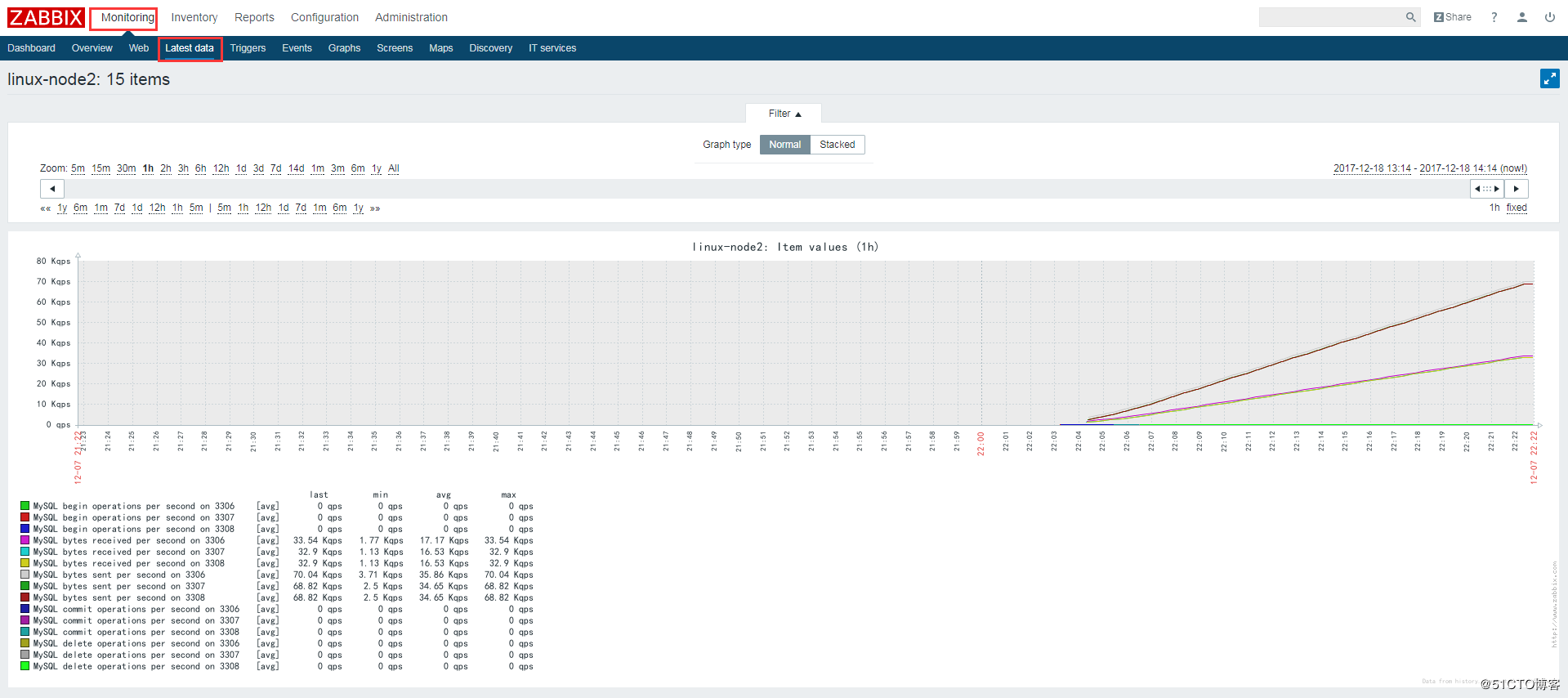
查看监控最新数据图表,即可看到3306、3307、3308的数据库状态信息:
Zabbix学习之路(九)之低级自动发现以及MySQL多实例的更多相关文章
- zabbix低级自动发现之mysql多实例
1.低级自动发现概述 zabbix的低级自动发现(LLD)适用于监控多实例,监控变化的数据(分区.网卡). 自动发现(LLD)提供了一种在计算机上为不同实体自动创建监控项,触发器和图形的方法.例如,Z ...
- 016-zabbix低级自动发现以及MySQL多实例
1.概述 Zabbix的网络发现是指zabbix server通过配置好的规则,自动添加host,group,template Zabbix的主动注册刚好和网络发现是相反的,功能基本一致.zabbix ...
- Zabbix低级主动发现之MySQL多实例
接上篇:Zabbix自动发现与主动注册 在一个agent安装一个maraidb 拷贝一个原始配置文档并且修改配置用于开启多实例 按照配置文件初始化数据库 mysql_install_db --user ...
- zabbix自动发现监控mysql
一. 数据库给只读权限 1.1 grant usage on *.* to 'zabbix'@'127.0.0.1' identified by 'zabbix'; flush privileges; ...
- Zabbix--06主动模式和被动模式、低级自动发现、性能优化、
目录 一. Zabbix主动模式和被动模式 1.克隆模版 2.修改克隆后的模版为主动模式 3.修改监控主机关联的模版为主动模式 4.修改客户端配置文件并重启 5.查看最新数据 二.Zabbix低级自动 ...
- Zabbix整合MegaCLI实现物理硬盘的自动发现和监控
MegaCLI是LSI提供的用户空间管理RAID卡(LSI芯片)工具,适用于大多数的Dell服务器. MegaCLI介绍: http://zh.community.dell.com/techcente ...
- 使用 zabbix 自动发现监控 MySQL
介绍 使用 zabbix 的 low-level 自动发现功能完成单主机多端口的监控, 详见low_level_discovery, 整体上监控类似 percona 的 zabbix 监控插件, 不过 ...
- zabbix监控vCenter报错,无法自动发现主机
公司机房停电检修,检修完成后重新上电,发现VCSA起不来了,尝试多次无法解决,无奈只好重装.重装VCSA 6.5U2之后又发现无法自动发现主机,报错如下: 'config.vpxd.stats.max ...
- Zabbix学习之路(八)之自动化监控网络发现和主动注册
1.网络发现 分两步走:创建发现规则(rule)和执行的动作(Action)(1)创建发现规则"Configuration"-->"Create discover ...
随机推荐
- luogu P1272 重建道路
嘟嘟嘟 这好像是一种树上背包. 我们令dp[i][j] 表示在 i 所在的子树中(包括节点 i)分离出一个大小为 j 的子树最少需割多少条边. 那么转移方程就是 dp[u][j] = min(dp[u ...
- springmvc与Structs2本质区别
1.前端控制器不同:structs2入口是一个filter过滤器,springmvc入口是一个servlet. 2.设计思想不同: struts2通过在action类中定义成员变量接收请求参数,str ...
- PAT——1028. 人口普查
某城镇进行人口普查,得到了全体居民的生日.现请你写个程序,找出镇上最年长和最年轻的人. 这里确保每个输入的日期都是合法的,但不一定是合理的——假设已知镇上没有超过200岁的老人,而今天是2014年9月 ...
- 【luogu P3953 逛公园】 题解
题目链接:https://www.luogu.org/problemnew/show/P3953 题外话:感觉2017年神题好多..这还不是最神的一道,真在考场上我也就写个最短路计数暴力了.现在在大佬 ...
- linux系统安装redis服务器与php redis扩展
一 安装redis服务 1更新yum源 CentOS/RHEL 7.x: rpm -Uvh https://dl.fedoraproject.org/pub/epel/epel-release-lat ...
- 面试官问你JS基本类型时他想知道什么?
面试的时候我们经常会被问答js的数据类型.大部分情况我们会这样回答包括:1.基本类型(值类型或者原始类型): Number.Boolean.String.NULL.Undefined以及ES6的Sym ...
- iOS 利用KeyChain+ IDFV + BundleID 来作为UUID,保证传给服务端的UUID唯一
查了相关资料,发现只有KeyChain + IDFV可以保证UUID唯一,参考以下代码 , UICKeyChainStore + (NSString*)identifierForVender{ UIC ...
- nodejs( koa2 )配置 browserHistory
前言 既然能搜到并且还点进来看这篇文章, 那么肯定是知道后台为什么要配置 browserHistory, 也肯定知道为什么非要去用相对来说更麻烦的吧browserHistory, 而不用更简单点的不需 ...
- P1015 回文数解题思路(非原创)
测试 #include<bits/stdc++.h> using namespace std; int n,m,step; string nn; int len,nex; bool dfs ...
- ElasticSearch优化系列七:优化建议
尽量运行在Sun/Oracle JDK1.7以上环境中,低版本的jdk容易出现莫名的bug,ES性能体现在在分布式计算中,一个节点是不足以测试出其性能,一个生产系统至少在三个节点以上. ES集群节点规 ...