
在Red Hat Enterprise Linux 7.3上安装SQL Server 2017
必要条件:
1、在此快速安装过程中,您需要安装SQL Server 2017或SQL Server 2019上Red Hat Enterprise Linux (RHEL) 7.3 +。然后使用sqlcmd创建第一个数据库连接以及运行查询。
2、必须使用RHEL 7.3或7.4且必须拥有至少2GB的内存。如果以前已安装CTP或SQL Server 2017的RC版本,必须在执行以下步骤之前删除旧存储库。

在Red Hat Enterprise Linux 7.3上安装SQL Server 2017
SQL Server,是Microsoft公司推出的关系型数据库服务,是一款成功的数据库产品,在微软的产品中占有非常重要的位置。下图是当前排行前三的数据库,分别是Oracle,MySQL和SQL Server(数据来自DB-Engines 2017年10月)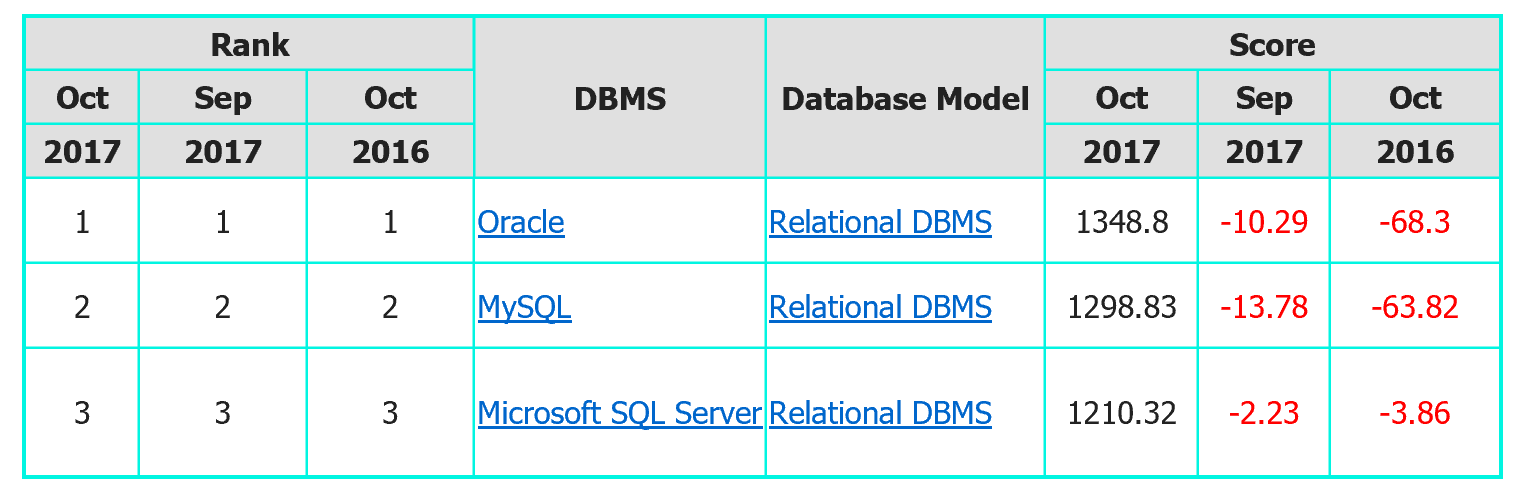
微软在去年3月份的时候,宣布了旗下数据库SQL Server向Linux系统开放。如今,我们已经可以在RHEL中安装SQL Server。今天给大家介绍如何在RHEL7.3上安装SQL Server。在本教程中,首先安装Red Hat Enterprise 7.3,并确保和Internet相连接
注意:在RHEL7.3或更高版本上安装SQL Server 2017要保证计算机至少有3.25G的内存。
第一部分:SQL Server的安装及配置
1.1,下载Microsoft SQL Server Red Hat软件仓库配置文件,此仓库为我们提供了安装SQL Server所必须的软件$ curl -o /etc/yum.repos.d/mssql-server.repo https://packages.microsoft.com/config/rhel/7/mssql-server.repo
1.2,更新软件仓库并安装SQL Server
$ yum update

$ yum -y install mssql-server
1.3,运行包安装完成后,使用mssql-conf安装并按照提示操作以设置SA密码,并选择你的版本(注意,设置密码时请符合密码安全策略,建议最少8个字符,包括大写和小写字母,十进制数字和/或非字母数字符号。
$ /opt/mssql/bin/mssql-conf setup

The license terms for this product can be found in /usr/share/doc/mssql-server or downloaded from:`

部分省略...

Do you accept the license terms? [Yes/No]:Yes

Choose an edition of SQL Server:

1) Evaluation (free, no production use rights, 180-day limit)

2) Developer (free, no production use rights)

3) Express (free)

4) Web (PAID)

5) Standard (PAID)

6) Enterprise (PAID)

7) I bought a license through a retail sales channel and have a product key to enter.

部分省略....

Enter your edition(1-7): 3 Enter the SQL Server system administrator password: [你的SA密码]

Confirm the SQL Server system administrator password: [你的SA密码]

Configuring SQL Server...

部分省略...

Setup has completed successfully. SQL Server is now starting.
1.4,配置完成后,请验证服务是否正在运行。
$ systemctl status mssql-server

● mssql-server.service - Microsoft SQL Server Database Engine

Loaded: loaded (/usr/lib/systemd/system/mssql-server.service; enabled; vendor preset: disabled) Active: active (running) since Thu 2017-10-12 03:50:58 CST; 3min 58s ago

Docs: https://docs.microsoft.com/en-us/sql/linux Main PID: 3238 (sqlservr)

CGroup: /system.slice/mssql-server.service

├─3238 /opt/mssql/bin/sqlservr

└─3258 /opt/mssql/bin/sqlservr
1.5,如果你的服务器允许远程连接数据库,请在防火墙上设置相关策略,SQL Server默认使用1433 / tcp端口
$ firewall-cmd --permanent --add-port = 1433 / tcp

$ firewall-cmd --reload
第二部分:SQL Server的其他配置此时
数据库已经准备就绪。如果需要安装SQL Server命令行,例如创建数据库,需要使用命令sqlcmd和bcp。则需要安装相应软件,此时请执行以下操作:2.1,同样下载Microsoft Red Hat软件库配置文件,并更新
$ yum update
2.2,如果你有以前版本的mssql工具安装,请删除任何较旧的unixODBC程序包。如果没有,请跳过此步骤,直接进行2.3步
$ yum remove unixODBC-utf16 unixODBC-utf16-devel
2.3,安装mssql工具与unixODBC开发人员包
$ yum install -y mssql-tools unixODBC-devel

Loaded plugins: product-id, search-disabled-repos, subscription-manager

部分省略...

The license terms for this product can be downloaded from https://aka.ms/odbc131eula and found in /usr/share/doc/msodbcsql/LICENSE.TXT . By entering 'YES', you indicate that you accept the license terms.

Do you accept the license terms? (Enter YES or NO)

YES # 请输入YES

Installing : >msodbcsql-13.1.9.1-1.x86_64 3/5

The license terms for this product can be downloaded from http://go.microsoft.com/fwlink/?LinkId=746949 and found in /usr/share/doc/mssql-tools/LICENSE.txt . By entering 'YES',

you indicate that you accept the license terms.

Do you accept the license terms? (Enter YES or NO)

YES # 请输入YES

部分省略...

Complete!
2.4,为方便起见,添加/opt/mssql-tools/bin/到你路径环境变量。这使您可以在Bash中直接运行工具,而无需指定完整路径。运行以下命令以修改路径登录会话和交互式/非 - 登录会话:
$ echo 'export PATH="$PATH:/opt/mssql-tools/bin"' >> /etc/bashrc

$ echo 'export PATH="$PATH:/opt/mssql-tools/bin"' >> /etc/profile

$ source /etc/bashrc
注意:这里做了全局的环境变量,如果您不要设置全局的环境变量,可以将/etc/bashrc替换为$HOME/.bashrc,将/etc/profile替换为$HOME/.bash_profile
第三部分:SQL服务器本地测试
3.1,测试,使用本地方式登录数据库,如果登录成功,则提示1>$ /opt/mssql-tools/bin/sqlcmd -S 127.0.0.1 -U sa
Password:
1> CREATE DATABASE test
2> GO
1> USE test 2> GO
Changed database context to 'test'.
1> quit- 至此,安装就结束了。
在Red Hat Enterprise Linux 7.3上安装SQL Server 2017的更多相关文章
- Configure Red Hat Enterprise Linux shared disk cluster for SQL Server——RHEL上的“类”SQL Server Cluster功能
下面一步一步介绍一下如何在Red Hat Enterprise Linux系统上为SQL Server配置共享磁盘集群(Shared Disk Cluster)及其相关使用(仅供测试学习之用,基础篇) ...
- Configure Red Hat Enterprise Linux shared disk cluster for SQL Server
下面一步一步介绍一下如何在Red Hat Enterprise Linux系统上为SQL Server配置共享磁盘集群(Shared Disk Cluster)及其相关使用(仅供测试学习之用,基础篇) ...
- Red Hat Enterprise Linux 7.4上安装Oracle 11.2.0.4
1. 配置Yum源及关闭SeLinux [root@localhost ~]# mkdir /media/rhel [root@localhost ~]# mount /dev/cdrom /medi ...
- Red Hat Enterprise Linux / CentOS 7 yum安装zabbix4.0
添加Zabbix存储库安装存储库配置包. 该软件包包含yum(软件包管理器)配置文件. rpm -ivh https://repo.zabbix.com/zabbix/4.0/rhel/7/x86_6 ...
- Red Hat Enterprise Linux 6.6安装体验
Red Hat Enterprise Linux 6.6的安装首界面有五个选项,这跟以前的Red Hat Enterprise Linux 5.x的安装界面是有一些区别的. 安装或者升级现有系统( ...
- Red Hat Enterprise Linux 6 “桌面”、“工作站”、“服务器” 版本差异比较
Red Hat Enterprise Linux 6,共有三个版本.通过安装发现,所谓的"桌面"."工作站"."服务器"这三个版本的区别就在 ...
- Red Hat Enterprise Linux 5 64-bit chinese language support config steps
Red Hat Enterprise Linux 5 64-bit 系统下安装中文语言支持方法 测试环境:Windows2012+Vmvare9.0+Red Hat Enterprise Linux ...
- How to disable transparent hugepages (THP) on Red Hat Enterprise Linux 7
How to disable transparent hugepages (THP) on Red Hat Enterprise Linux 7 $ Solution 已验证 - 已更新2017年六月 ...
- Red Hat Enterprise Linux 7.2修改主机名(hostname)
Red Hat Enterprise Linux 7.2在安装的时候,会默认生成主机名:localhost. 那么如何修改成自己想要的自己名? //格式为:用户名@主机名 比如: [root@loca ...
随机推荐
- Drupal网站报错:PDOException: in lock_may_be_available()
Drupal网站报错: 原因: windows中mysql的服务停止了: 解决办法: 在服务中,启动mysql服务 启动后,刷新页面,问题完美解决
- Web前端面试指导(十八):用纯CSS创建一个三角形的原理是什么?
题目点评 三角形的图标在网页设计是很常见的,属于基本常识题,只要在练习做到过这个功能都能回答出来,可以把你做过的思路描述出来就可以了,本题的难易程度为简单 答题要点 1.采用的是均分原理 盒子都是一个 ...
- line-height属性的深入了解
line-height属性的细节与大多数CSS属性不同,line-height支持属性值设置为无单位的数字.有无单位在子元素继承属性时有微妙的不同. 语法line-height: normal | & ...
- _tcsrchr
原文:http://www.cnblogs.com/diyunpeng/archive/2012/01/18/2325289.html _tcsrchr #include <afx.h> ...
- 结对编程——Java实现黄金分割点游戏
这是我和队员根据老师要求自创的一个人机黄金分割点游戏.这个小游戏在Windows10 下开发,用Eclipse做开发工具,实现语言是Java. 利用目前自己所学的Java知识实现了一人登录,电脑自行匹 ...
- Oracle PL/SQL Dev工具(破解版)被植入勒索病毒的安全预警及自查通告
[问题描述] 近日,有项目组遇到了勒索软件攻击:勒索代码隐藏在Oracle PL/SQL Dev软件中(网上下载的破解版),里面的一个文件afterconnet.sql被黑客注入了病毒代码.这个代码会 ...
- MVC中异常: An exception of type 'System.Data.ProviderIncompatibleException' occurred in EntityFramework.dll的一种解决办法
今天在调试MVC的例子的时候,总是出错(An exception of type 'System.Data.ProviderIncompatibleException' occurred in Ent ...
- 从golang-gin-realworld-example-app项目学写httpapi (五)
https://github.com/gothinkster/golang-gin-realworld-example-app/blob/master/users/middlewares.go 中间件 ...
- ORACLE 数据找回
-- 找回一个小时前的数据 select * from sys_system_dictionary as of timestamp sysdate - 1/24order by id AS OF TI ...
- January 06 2017 Week 1st Friday
Victory won't come to me unless I go to it. 胜利是不会向我走来的,我必须自己走向胜利. I wish I can walk from one victory ...