
控件属性和InitializeComponent()关系:
 namespace Test22

 {

     partial class Form1

     {

         /// <summary>

         /// 必需的设计器变量。

         /// </summary>

         private System.ComponentModel.IContainer components = null;

         /// <summary>

         /// 清理所有正在使用的资源。

         /// </summary>

         /// <param name="disposing">如果应释放托管资源,为 true;否则为 false。</param>

         protected override void Dispose(bool disposing)

         {

             if (disposing && (components != null))

             {

                 components.Dispose();

             }

             base.Dispose(disposing);

         }

         #region Windows 窗体设计器生成的代码

         /// <summary>

         /// 设计器支持所需的方法 - 不要

         /// 使用代码编辑器修改此方法的内容。

         /// </summary>

         private void InitializeComponent()

         {

             this.numericUpDown1 = new System.Windows.Forms.NumericUpDown();

             ((System.ComponentModel.ISupportInitialize)(this.numericUpDown1)).BeginInit();

             this.SuspendLayout();

             //

             // numericUpDown1

             //

             this.numericUpDown1.DecimalPlaces = ;//属性里对应!!!!!

             this.numericUpDown1.Location = new System.Drawing.Point(, );

             this.numericUpDown1.Name = "numericUpDown1";

             this.numericUpDown1.Size = new System.Drawing.Size(, );

             this.numericUpDown1.TabIndex = ;

             //

             // Form1

             //

             this.AutoScaleDimensions = new System.Drawing.SizeF(6F, 12F);

             this.AutoScaleMode = System.Windows.Forms.AutoScaleMode.Font;

             this.ClientSize = new System.Drawing.Size(, );

             this.Controls.Add(this.numericUpDown1);

             this.Name = "Form1";

             this.Text = "Form1";

             this.Load += new System.EventHandler(this.Form1_Load);

             ((System.ComponentModel.ISupportInitialize)(this.numericUpDown1)).EndInit();

             this.ResumeLayout(false);

         }

         #endregion

         private System.Windows.Forms.NumericUpDown numericUpDown1;

     }

 }
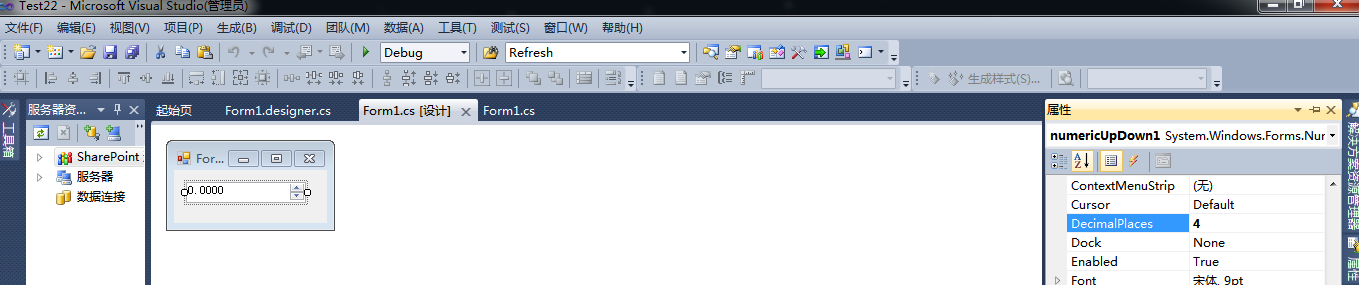
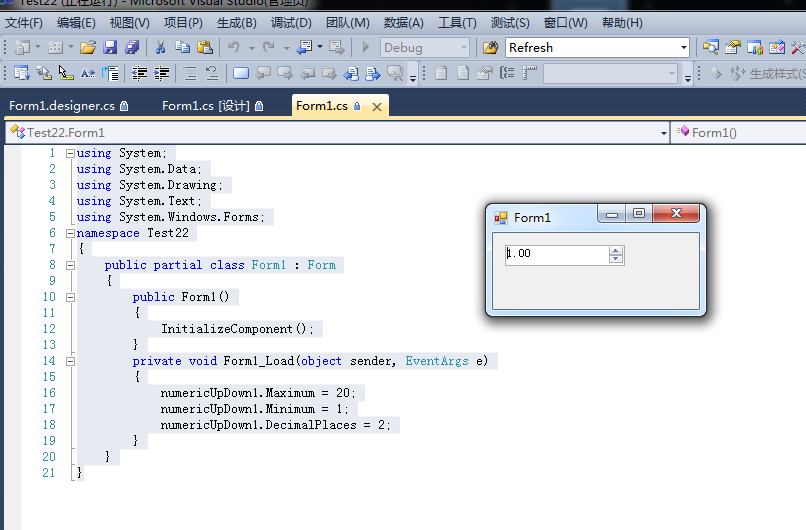
控件中小数点位数和InitializeComponent()里面的代码相呼应,而下面的代码又设置了2,所以覆盖掉了,代码和运行结果如下:
 using System;

 using System.Data;

 using System.Drawing;

 using System.Text;

 using System.Windows.Forms;

 namespace Test22

 {

     public partial class Form1 : Form

     {

         public Form1()

         {

             InitializeComponent();

         }

         private void Form1_Load(object sender, EventArgs e)

         {

             numericUpDown1.Maximum = ;

             numericUpDown1.Minimum = ;

             numericUpDown1.DecimalPlaces = ;

         }

     }

 }
控件属性和InitializeComponent()关系:的更多相关文章
- Android控件属性大全(转)
http://blog.csdn.net/pku_android/article/details/7365685 LinearLayout 线性布局 子元素任意: Tab ...
- atitit.组件化事件化的编程模型--服务端控件(1)---------服务端控件与标签的关系
atitit.组件化事件化的编程模型--服务端控件(1)---------服务端控件与标签的关系 1. 服务器控件是可被服务器理解的标签.有三种类型的服务器控件: 1 1.1. HTML 服务器控件 ...
- Android控件属性大全[整理转载]
控件属性: android属性 Android功能强大,界面华丽,但是众多的布局属性就害苦了开发者,下面这篇文章结合了网上不少资料, 第一类:属性值为true或falseandroid:layout_ ...
- WPF编程,通过【帧】动态更改控件属性的一种方法。
原文:WPF编程,通过[帧]动态更改控件属性的一种方法. 版权声明:我不生产代码,我只是代码的搬运工. https://blog.csdn.net/qq_43307934/article/detail ...
- C# 常用控件属性及方法介绍
C#常用控件属性及方法介绍 目录 1.窗体(Form) 2.Label (标签)控件 3.TextBox ...
- visual studio开发工具的C#主流控件属性一览表
visual studio开发工具的C#主流控件属性一览表 详细的介绍了各控制属性的详细中文介绍 C#控件及常用设计整理 1.窗体 1.常用属性 (1)Name属性:用来获取或设置窗体的名称,在应用程 ...
- 几个关于控件的优先级: UseSystemPasswordChar > PasswordChar > 控件属性设置
using System; using System.Data; using System.Drawing; using System.Text; using System.Windows.Forms ...
- 【转载】Android控件属性大全
控件属性: android属性 Android功能强大,界面华丽,但是众多的布局属性就害苦了开发者,下面这篇文章结合了网上不少资料, 第一类:属性值为true或falseandroid:layout_ ...
- WPF利用通过父控件属性来获得绑定数据源RelativeSource
WPF利用通过父控件属性来获得绑定数据源RelativeSource 有时候我们不确定作为数据源的对象叫什么名字,但知道作为绑定源与UI布局有相对的关系,如下是一段XAML代码,说明多层布局控件中 ...
随机推荐
- python学习笔记(二):基础知识点
python基本元素 7 // 2 3 7 % 3 1 # 取商以及余数 divmod(7,3) (2, 1) 1j*1j (-1+0j) 10/3 3.3333333333333335 '3,''1 ...
- SWT_之Table篇
package edu.ch4; import org.eclipse.swt.SWT;import org.eclipse.swt.events.SelectionAdapter;import or ...
- 安装虚拟机以及学习Linux基础入门
安装虚拟机 参考基于VirtualBox虚拟机安装Ubuntu图文教程完成了虚拟机的安装,主要遇到了以下2个问题 在新建虚拟电脑的时候,如果类型选择了Linux,则版本就只能选择Ubuntu(32 位 ...
- 成都Uber优步司机奖励政策(4月17日)
滴快车单单2.5倍,注册地址:http://www.udache.com/ 如何注册Uber司机(全国版最新最详细注册流程)/月入2万/不用抢单:http://www.cnblogs.com/mfry ...
- vcruntime140.dll 丢失64位系统
1. 下载VC Redistributable for VS2015,网址https://www.microsoft.com/en-us/download/confirmation.aspx?id=4 ...
- Vue视图
1. 基本模板语法 1.1 插值 文本 数据绑定最常见的形式就是使用“Mustache”语法 (双大括号) 的文本插值 v-text 指令也可以用于数据绑定,如果要更新部分的 textContent ...
- flask ssti python2和python3 注入总结和区别
总结一下flask ssti的注入语句 代码 import uuid from flask import Flask, request, make_response, session,render_t ...
- charles基本使用文档
Charles 主要的功能包括: 截取 Http 和 Https 网络封包. 支持重发网络请求,方便后端调试. 支持修改网络请求参数. 支持网络请求的截获并动态修改. 支持模拟慢速网络. Charle ...
- jmeter接口测试实例:带参数、带token
测试内容简介: 1.get请求,无参数 2.get请求,参数为第一条响应中的id 3.get请求,带token 结构图: 下面进行详解: 一.添加cookie管理器等 1.添加ht ...
- halcon中关于文本的创建以及写入
原文链接:http://blog.sina.com.cn/s/blog_61cc743001017nxr.html#FileName 1.open_file( : : FileName, FileTy ...