
自然语言16_Chunking with NLTK
python机器学习-乳腺癌细胞挖掘(博主亲自录制视频)https://study.163.com/course/introduction.htm?courseId=1005269003&utm_campaign=commission&utm_source=cp-400000000398149&utm_medium=share
Chunking with NLTK
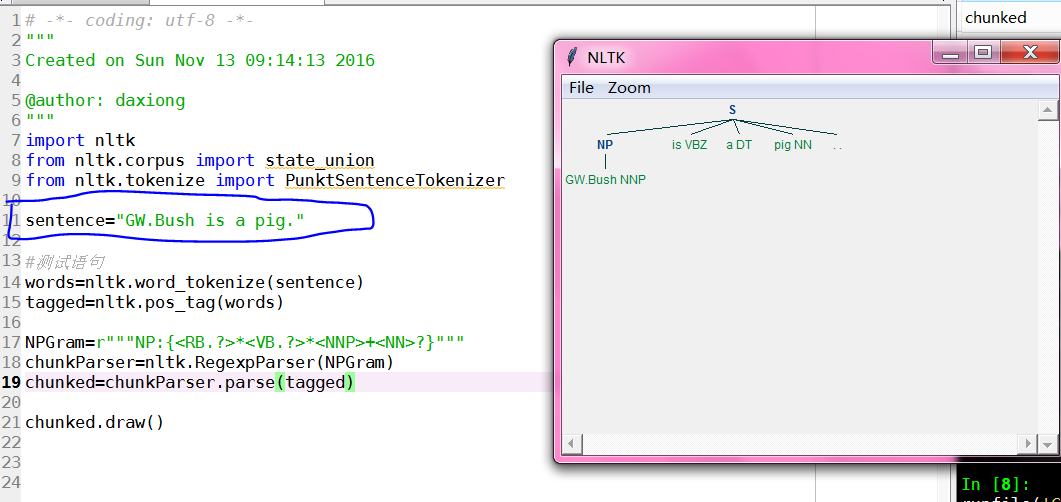
对chunk分类数据结构可以图形化输出,用于分析英语句子主干结构
# -*- coding: utf-8 -*-
"""
Created on Sun Nov 13 09:14:13 2016

@author: daxiong
"""
import nltk
sentence="GW.Bush is a big pig."
#切分单词
words=nltk.word_tokenize(sentence)
#词性标记
tagged=nltk.pos_tag(words)
#正则表达式,定义包含所有名词的re
NPGram=r"""NP:{<NNP>|<NN>|<NNS>|<NNPS>}"""
chunkParser=nltk.RegexpParser(NPGram)
chunked=chunkParser.parse(tagged)
#树状图展示
chunked.draw()
# -*- coding: utf-8 -*-

"""

Created on Sun Nov 13 09:14:13 2016

@author: daxiong

"""

import nltk

from nltk.corpus import state_union

from nltk.tokenize import PunktSentenceTokenizer

#训练数据

train_text=state_union.raw("2005-GWBush.txt")

#测试数据

sample_text=state_union.raw("2006-GWBush.txt")

'''

 Punkt is designed to learn parameters (a list of abbreviations, etc.)

 unsupervised from a corpus similar to the target domain.

 The pre-packaged models may therefore be unsuitable:

 use PunktSentenceTokenizer(text) to learn parameters from the given text

'''

#我们现在训练punkttokenizer(分句器)

custom_sent_tokenizer=PunktSentenceTokenizer(train_text)

#训练后,我们可以使用punkttokenizer(分句器)

tokenized=custom_sent_tokenizer.tokenize(sample_text)

'''

nltk.pos_tag(["fire"]) #pos_tag(列表)

Out[19]: [('fire', 'NN')]

'''

words=nltk.word_tokenize(tokenized[0])

tagged=nltk.pos_tag(words)

chunkGram=r"""Chunk:{<RB.?>*<VB.?>*<NNP>+<NN>?}"""

chunkParser=nltk.RegexpParser(chunkGram)

chunked=chunkParser.parse(tagged)

#lambda t:t.label()=='Chunk' 包含Chunk标签的列

for subtree in chunked.subtrees(filter=lambda t:t.label()=='Chunk'):

    print(subtree)
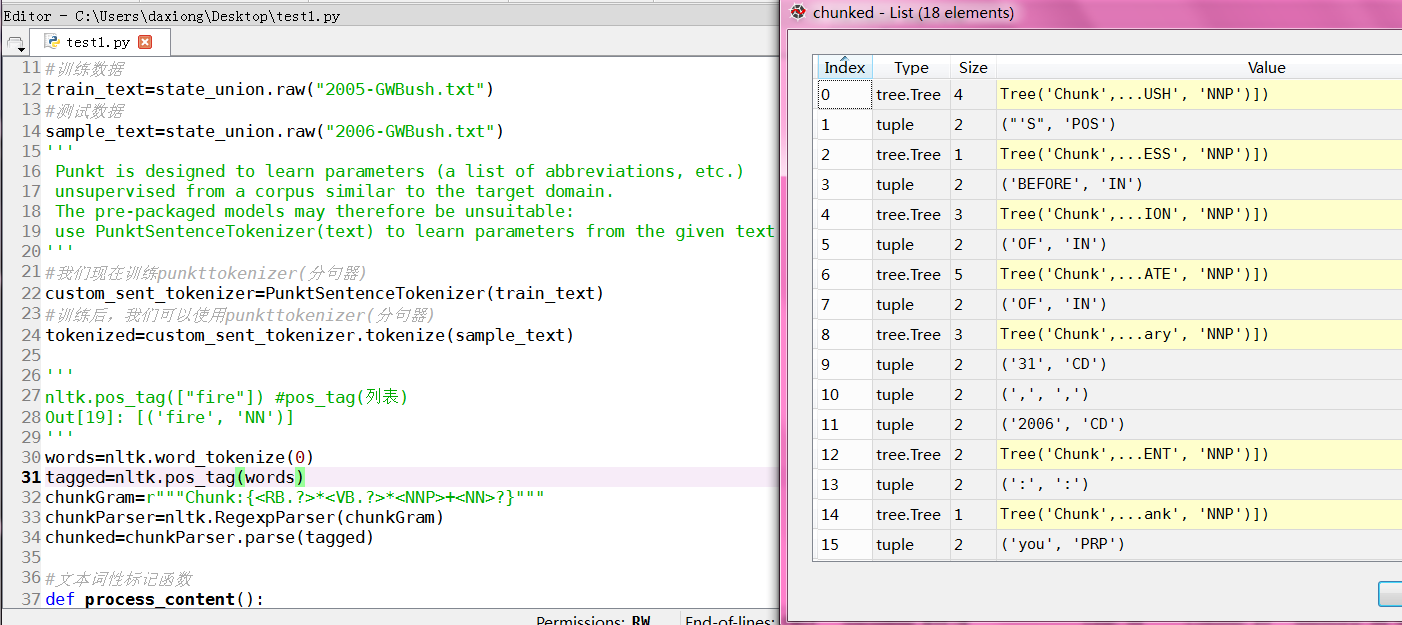
数据类型:chunked 是树结构
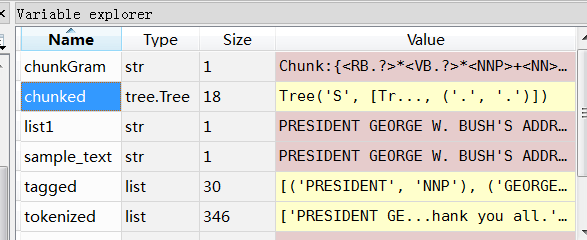
#lambda t:t.label()=='Chunk' 包含Chunk标签的列
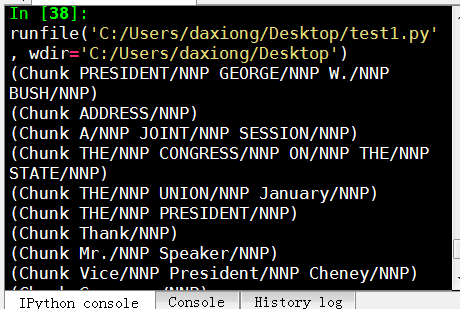
输出只包含Chunk标签的列

完整代码
# -*- coding: utf-8 -*-

"""

Created on Sun Nov 13 09:14:13 2016

@author: daxiong

"""

import nltk

from nltk.corpus import state_union

from nltk.tokenize import PunktSentenceTokenizer

#训练数据

train_text=state_union.raw("2005-GWBush.txt")

#测试数据

sample_text=state_union.raw("2006-GWBush.txt")

'''

 Punkt is designed to learn parameters (a list of abbreviations, etc.)

 unsupervised from a corpus similar to the target domain.

 The pre-packaged models may therefore be unsuitable:

 use PunktSentenceTokenizer(text) to learn parameters from the given text

'''

#我们现在训练punkttokenizer(分句器)

custom_sent_tokenizer=PunktSentenceTokenizer(train_text)

#训练后,我们可以使用punkttokenizer(分句器)

tokenized=custom_sent_tokenizer.tokenize(sample_text)

'''

nltk.pos_tag(["fire"]) #pos_tag(列表)

Out[19]: [('fire', 'NN')]

'''

'''

#测试语句

words=nltk.word_tokenize(tokenized[0])

tagged=nltk.pos_tag(words)

chunkGram=r"""Chunk:{<RB.?>*<VB.?>*<NNP>+<NN>?}"""

chunkParser=nltk.RegexpParser(chunkGram)

chunked=chunkParser.parse(tagged)

#lambda t:t.label()=='Chunk' 包含Chunk标签的列

for subtree in chunked.subtrees(filter=lambda t:t.label()=='Chunk'):

    print(subtree)

'''

#文本词性标记函数

def process_content():

    try:

        for i in tokenized[0:5]:

            words=nltk.word_tokenize(i)

            tagged=nltk.pos_tag(words)

            #RB副词,VB动词,NNP专有名词单数形式,NN单数名词

            chunkGram=r"""Chunk:{<RB.?>*<VB.?>*<NNP>+<NN>?}"""

            chunkParser=nltk.RegexpParser(chunkGram)

            chunked=chunkParser.parse(tagged)

            #print(chunked)

            for subtree in chunked.subtrees(filter=lambda t:t.label()=='Chunk'):

                print(subtree)

            #chunked.draw()

    except Exception as e:

        print(str(e))

process_content()
得到所有名词分类
Now that we know the parts of speech, we can do what is called chunking, and group words into hopefully meaningful chunks. One of the main goals of chunking is to group into what are known as "noun phrases." These are phrases of one or more words that contain a noun, maybe some descriptive words, maybe a verb, and maybe something like an adverb. The idea is to group nouns with the words that are in relation to them.
In order to chunk, we combine the part of speech tags with regular expressions. Mainly from regular expressions, we are going to utilize the following:
+ = match 1 or more

? = match 0 or 1 repetitions.

* = match 0 or MORE repetitions

. = Any character except a new line
See the tutorial linked above if you need help with regular expressions. The last things to note is that the part of speech tags are denoted with the "<" and ">" and we can also place regular expressions within the tags themselves, so account for things like "all nouns" (<N.*>)
import nltk

from nltk.corpus import state_union

from nltk.tokenize import PunktSentenceTokenizer

train_text = state_union.raw("2005-GWBush.txt")

sample_text = state_union.raw("2006-GWBush.txt")

custom_sent_tokenizer = PunktSentenceTokenizer(train_text)

tokenized = custom_sent_tokenizer.tokenize(sample_text)

def process_content():

    try:

        for i in tokenized:

            words = nltk.word_tokenize(i)

            tagged = nltk.pos_tag(words)

            chunkGram = r"""Chunk: {<RB.?>*<VB.?>*<NNP>+<NN>?}"""

            chunkParser = nltk.RegexpParser(chunkGram)

            chunked = chunkParser.parse(tagged)

            chunked.draw()

    except Exception as e:

        print(str(e))

process_content()
The result of this is something like:
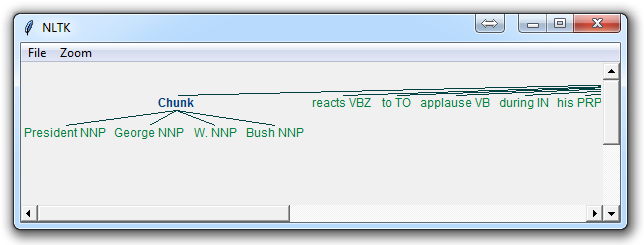
The main line here in question is:
chunkGram = r"""Chunk: {<RB.?>*<VB.?>*<NNP>+<NN>?}"""
This line, broken down:
<RB.?>* = "0 or more of any tense of adverb," followed by:
<VB.?>* = "0 or more of any tense of verb," followed by:
<NNP>+ = "One or more proper nouns," followed by
<NN>? = "zero or one singular noun."
Try playing around with combinations to group various instances until you feel comfortable with chunking.
Not covered in the video, but also a reasonable task is to actually access the chunks specifically. This is something rarely talked about, but can be an essential step depending on what you're doing. Say you print the chunks out, you are going to see output like:
(S

  (Chunk PRESIDENT/NNP GEORGE/NNP W./NNP BUSH/NNP)

  'S/POS

  (Chunk

    ADDRESS/NNP

    BEFORE/NNP

    A/NNP

    JOINT/NNP

    SESSION/NNP

    OF/NNP

    THE/NNP

    CONGRESS/NNP

    ON/NNP

    THE/NNP

    STATE/NNP

    OF/NNP

    THE/NNP

    UNION/NNP

    January/NNP)

  31/CD

  ,/,

  2006/CD

  THE/DT

  (Chunk PRESIDENT/NNP)

  :/:

  (Chunk Thank/NNP)

  you/PRP

  all/DT

  ./.)
Cool, that helps us visually, but what if we want to access this data via our program? Well, what is happening here is our "chunked" variable is an NLTK tree. Each "chunk" and "non chunk" is a "subtree" of the tree. We can reference these by doing something like chunked.subtrees. We can then iterate through these subtrees like so:
            for subtree in chunked.subtrees():

                print(subtree)
Next, we might be only interested in getting just the chunks, ignoring the rest. We can use the filter parameter in the chunked.subtrees() call.
            for subtree in chunked.subtrees(filter=lambda t: t.label() == 'Chunk'):

                print(subtree)
Now, we're filtering to only show the subtrees with the label of "Chunk." Keep in mind, this isn't "Chunk" as in the NLTK chunk attribute... this is "Chunk" literally because that's the label we gave it here: chunkGram = r"""Chunk: {<RB.?>*<VB.?>*<NNP>+<NN>?}"""
Had we said instead something like chunkGram = r"""Pythons: {<RB.?>*<VB.?>*<NNP>+<NN>?}""", then we would filter by the label of "Pythons." The result here should be something like:
-

(Chunk PRESIDENT/NNP GEORGE/NNP W./NNP BUSH/NNP)

(Chunk

  ADDRESS/NNP

  BEFORE/NNP

  A/NNP

  JOINT/NNP

  SESSION/NNP

  OF/NNP

  THE/NNP

  CONGRESS/NNP

  ON/NNP

  THE/NNP

  STATE/NNP

  OF/NNP

  THE/NNP

  UNION/NNP

  January/NNP)

(Chunk PRESIDENT/NNP)

(Chunk Thank/NNP)
Full code for this would be:
import nltk

from nltk.corpus import state_union

from nltk.tokenize import PunktSentenceTokenizer

train_text = state_union.raw("2005-GWBush.txt")

sample_text = state_union.raw("2006-GWBush.txt")

custom_sent_tokenizer = PunktSentenceTokenizer(train_text)

tokenized = custom_sent_tokenizer.tokenize(sample_text)

def process_content():

    try:

        for i in tokenized:

            words = nltk.word_tokenize(i)

            tagged = nltk.pos_tag(words)

            chunkGram = r"""Chunk: {<RB.?>*<VB.?>*<NNP>+<NN>?}"""

            chunkParser = nltk.RegexpParser(chunkGram)

            chunked = chunkParser.parse(tagged)

            print(chunked)

            for subtree in chunked.subtrees(filter=lambda t: t.label() == 'Chunk'):

                print(subtree)

            chunked.draw()

    except Exception as e:

        print(str(e))

process_content()
If you get particular enough, you may find that you may be better off if there was a way to chunk everything, except some stuff. This process is what is known as chinking, and that's what we're going to be covering next.
自然语言16_Chunking with NLTK的更多相关文章
- 转 --自然语言工具包(NLTK)小结
原作者:http://www.cnblogs.com/I-Tegulia/category/706685.html 1.自然语言工具包(NLTK) NLTK 创建于2001 年,最初是宾州大学计算机与 ...
- 自然语言22_Wordnet with NLTK
QQ:231469242 欢迎喜欢nltk朋友交流 https://www.pythonprogramming.net/wordnet-nltk-tutorial/?completed=/nltk-c ...
- 自然语言17_Chinking with NLTK
https://www.pythonprogramming.net/chinking-nltk-tutorial/?completed=/chunking-nltk-tutorial/ 代码 # -* ...
- Python自然语言处理工具NLTK的安装FAQ
1 下载Python 首先去python的主页下载一个python版本http://www.python.org/,一路next下去,安装完毕即可 2 下载nltk包 下载地址:http://www. ...
- Python自然语言工具包(NLTK)入门
在本期文章中,小生向您介绍了自然语言工具包(Natural Language Toolkit),它是一个将学术语言技术应用于文本数据集的 Python 库.称为“文本处理”的程序设计是其基本功能:更深 ...
- Python NLTK 自然语言处理入门与例程(转)
转 https://blog.csdn.net/hzp666/article/details/79373720 Python NLTK 自然语言处理入门与例程 在这篇文章中,我们将基于 Pyt ...
- NLTK在自然语言处理
nltk-data.zip 本文主要是总结最近学习的论文.书籍相关知识,主要是Natural Language Pracessing(自然语言处理,简称NLP)和Python挖掘维基百科Infobox ...
- Python自然语言处理工具小结
Python自然语言处理工具小结 作者:白宁超 2016年11月21日21:45:26 目录 [Python NLP]干货!详述Python NLTK下如何使用stanford NLP工具包(1) [ ...
- 自然语言处理(NLP)入门学习资源清单
Melanie Tosik目前就职于旅游搜索公司WayBlazer,她的工作内容是通过自然语言请求来生产个性化旅游推荐路线.回顾她的学习历程,她为期望入门自然语言处理的初学者列出了一份学习资源清单. ...
随机推荐
- 50ms延时程序
12MHz晶振 一个机器周期2us, DEL: MOV R7,#200D DEL1: MOV R6,#125 DEL2: DJNZ R6,DEL2 ;125*2=250us DJNZ R7,DE ...
- Android Material Design 控件常用的属性
android:fitsSystemWindows="true" 是一个boolean值的内部属性,让view可以根据系统窗口(如status bar)来调整自己的布局,如果值为t ...
- ActiveMQ_安全配置(五)
如果Activemq不加安全配置,那么任何知道队列所在服务器IP的人都可以发送接收队列消息 安全配置主要是通过配置账号密码增强安全性 参考资料:http://activemq.apache.org/s ...
- ios审核要注意的地方(转)
磨刀不误砍柴工.作为手机应用开发者,你需要向应用商店提交应用审核,迅速通过审核可以让你抢占先机.对苹果iOS应用开发者来说尤其如此.苹果应用商店的审核近乎吹毛求疵,下面这些清单可以让你知道苹果会在哪些 ...
- flex布局无法自动适应的bug以及实现textarea根据内容自适应
-webkit-box布局无法自动适应高度的bug css3的新属性display:-webkit-box带来了前端开发自动适应布局的春天 ,但是我发现这个布局有个问题, 而且这个问题我无法解决: 描 ...
- Web前端性能优化教程02:使用内容分发网络
基础知识 服务器离用户越近,HTTP请求的响应时间将更短. CNAME:别名记录,当多个域名需要指向同一服务器IP,可以使用一个域名做A记录指向该服务器IP,然后让多个域名指向该A记录. ICP:In ...
- MySQL 配置优化
1. 连接请求的变量: A.max_connections 如果服务器的并发连接请求量比较大,建议调高此值,以增加并行连接数量, 当然这建立在机器能支撑的情况下,因为如果连接数越多,介于MySQL ...
- iOS 蓝牙开发(四)BabyBluetooth蓝牙库介绍(转)
转载自:http://www.cocoachina.com/ios/20151106/14072.html 原文作者:刘彦玮 BabyBluetooth 是一个最简单易用的蓝牙库,基于CoreBlue ...
- 由一段JS代码引发的思考
不知道大家在编程的时候有没有遇到过这种情况,就是在循环遍历删除一部分内容的时候,发现只能删除其中一部分,而另一部分却总也删不掉,然后觉得自己的逻辑没有问题啊,于是陷入了深深的抑郁之中…… 昨天在处理一 ...
- Sender
多个对象用同一个方法的时候,想对多个对象分别操作的话就用Sender. BackGroundWorker worker1 = sender as BackGroundWork. 分别去取当前的对象 ...