
[TPYBoard-Micropython之会python就能做硬件 3] 制作电子时钟
转载请注明:@小五义 http://www.cnblogs.com/xiaowuyi
一、本次实验所需器材
1、TPYboard V102板 一块
2、DS3231模块 一块
3、NOKIA 5110 LCD 屏 一块
4、杜邦线:若干
===感谢某宝“萝卜城”提供的TPYboard V102豪华版套餐===
二、DS3231模块
1、什么是DS3231
DS3231是低成本、高精度I2C实时时钟(RTC),具有集成的温补晶振(TCXO)和晶体。该器件包含电池输入端,断开主电源时仍可保持精确的计时。集成晶振提高了器件的长期精确度,并减少了生产线的元件数量。DS3231提供商用级和工业级温度范围,采用16引脚300mil的SO封装。RTC保存秒、分、时、星期、日期、月和年信息。少于31天的月份,将自动调整月末的日期,包括闰年的修正。时钟的工作格式可以是24小时或带/AM/PM指示的12小时格式。提供两个可设置的日历闹钟和一个可设置的方波输出。地址与数据通过I2C双向总线串行传输。
2、DS3231与TPYBoardv102的连接(IIC连接)
DS3231与TPYBoard V102使用IIC连接方法,使用DS3231的SCL,SDA,VCC,GND四个针脚即可设定读出当前时间,对应如下表:
| DS3231 | TPYboard V102 |
| GND | GND |
| SCL | X9 |
| SDA | X10 |
| VCC | 3.3V |
这里IIC常用命令如下:
》 i2c.deinit(),解除I2C定义
》 i2c.init(mode, *, addr=0x12, baudrate=400000, gencall=False),初始化
. mode,只能是 I2C.MASTER 或 I2C.SLAVE
.addr,7位I2C地址
.baudrate,时钟频率
.gencall,通用调用模式
》 i2c.is_ready(addr),检测I2C设备是否响应,只对主模式有效
》 i2c.mem_read(data, addr, memaddr, *, timeout=5000, addr_size=8),读取数据
.data,整数或者缓存
.addr,设备地址
. memaddr,内存地址
. timeout,读取等待超时时间
.addr_size,memaddr的大小。8位或16位
》 i2c.mem_write(data, addr, memaddr, *, timeout=5000, addr_size=8),写入数据,参数含义同上
》 i2c.recv(recv, addr=0x00, *, timeout=5000),从总线读取数据
. recv,需要读取数据数量,或者缓冲区
. addr,I2C地址
. timeout,超时时间
》 i2c.send(send, addr=0x00, *, timeout=5000)
. send,整数或者缓冲区
. addr,I2C地址
. timeout,超时时间
》 i2c.scan(),搜索I2C总线上设备。
三、调试DS3231模块
1、TPYBoard V102的调试
如何能够时时对TPYBoard V102的输出进行调试和查看呢?这里需要用到putty工具。
第一步:将TPYBoard V102与pc通过usb线进行连接,然后通过设备管理器查看其对应的端口号。

第二步:打开putty,如下图进行填写。
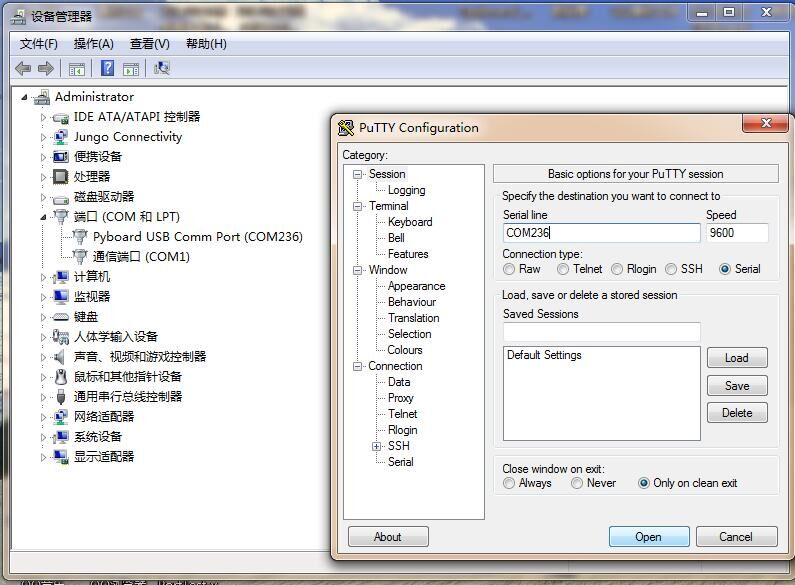
第三步:点击确定,进入调试窗口,此时屏幕上显示"hello world",是因为main.py程序做了修改,否则不显示。
#main.py
# main.py -- put your code here!

import pyb

print "hello world!!"

第四步:这时就可以在命令行进行调试,常用的几个组合键如下:
Ctrl + C:终止程序
Ctrl + D:重新运行。
2、连接DS3231进行调试
DS3231的连接方法见上文。
第一步:DS3231时间设定,以设定2017年1月25日为例。在TPYBoard V102里添加DS3231.py文件,修改main.py,具体代码如下:
#DS3231.py
import pyb

from pyb import I2C

DS3231_ADDR       = const(0x68)

DS3231_REG_SEC    = const(0x00)

DS3231_REG_MIN    = const(0x01)

DS3231_REG_HOUR   = const(0x02)

DS3231_REG_WEEKDAY= const(0x03)

DS3231_REG_DAY    = const(0x04)

DS3231_REG_MONTH  = const(0x05)

DS3231_REG_YEAR   = const(0x06)

DS3231_REG_A1SEC  = const(0x07)

DS3231_REG_A1MIN  = const(0x08)

DS3231_REG_A1HOUR = const(0x09)

DS3231_REG_A1DAY  = const(0x0A)

DS3231_REG_A2MIN  = const(0x0B)

DS3231_REG_A2HOUR = const(0x0C)

DS3231_REG_A2DAY  = const(0x0D)

DS3231_REG_CTRL   = const(0x0E)

DS3231_REG_STA    = const(0x0F)

DS3231_REG_OFF    = const(0x10)

DS3231_REG_TEMP   = const(0x11)

class ds3231(object):

    def __init__(self, i2c_num):

        self.i2c = I2C(i2c_num, I2C.MASTER, baudrate = 100000)

    def DATE(self, dat=[]):

        if dat==[]:

            t = []

            t.append(self.year())

            t.append(self.month())

            t.append(self.day())

            return t

        else:

            self.year(dat[0])

            self.month(dat[1])

            self.day(dat[2])

    def TIME(self, dat=[]):

        if dat==[]:

            t = []

            t.append(self.hour())

            t.append(self.min())

            t.append(self.sec())

            return t

        else:

            self.hour(dat[0])

            self.min(dat[1])

            self.sec(dat[2])

    def DateTime(self, dat=[]):

        if dat==[]:

            return self.DATE() + self.TIME()

        else:

            self.year(dat[0])

            self.month(dat[1])

            self.day(dat[2])

            self.hour(dat[3])

            self.min(dat[4])

            self.sec(dat[5])

    def dec2hex(self, dat):

        return (int(dat/10)<<4) + (dat%10)

    def setREG(self, dat, reg):

        buf = bytearray(2)

        buf[0] = reg

        buf[1] = dat

        self.i2c.send(buf, DS3231_ADDR)

    def getREG_DEC(self, reg):

        self.i2c.send(reg, DS3231_ADDR)

        t = self.i2c.recv(1, DS3231_ADDR)[0]

        return (t>>4)*10 + (t%16)

    def sec(self, sec=''):

        if sec == '':

            return self.getREG_DEC(DS3231_REG_SEC)

        else:

            self.setREG(self.dec2hex(sec), DS3231_REG_SEC)

    def min(self, min=''):

        if min == '':

            return self.getREG_DEC(DS3231_REG_MIN)

        else:

            self.setREG(self.dec2hex(min), DS3231_REG_MIN)

    def hour(self, hour=''):

        if hour=='':

            return self.getREG_DEC(DS3231_REG_HOUR)

        else:

            self.setREG(self.dec2hex(hour), DS3231_REG_HOUR)

    def day(self, day=''):

        if day=='':

            return self.getREG_DEC(DS3231_REG_DAY)

        else:

            self.setREG(self.dec2hex(day), DS3231_REG_DAY)

    def month(self, month=''):

        if month=='':

            return self.getREG_DEC(DS3231_REG_MONTH)

        else:

            self.setREG(self.dec2hex(month), DS3231_REG_MONTH)

    def year(self, year=''):

        if year=='':

            return self.getREG_DEC(DS3231_REG_YEAR)

        else:

            self.setREG(self.dec2hex(year), DS3231_REG_YEAR)

    def TEMP(self):

        self.i2c.send(DS3231_REG_TEMP, DS3231_ADDR)

        t1 = self.i2c.recv(1, DS3231_ADDR)[0]

        self.i2c.send(DS3231_REG_TEMP+1, DS3231_ADDR)

        t2 = self.i2c.recv(1, DS3231_ADDR)[0]

        if t1>0x7F:

            return t1 - t2/256 -256

        else:

            return t1 + t2/256
#main.py
# main.py -- put your code here!

from ds3231 import ds3231

ds=ds3231(1)

ds.DATE([17,01,25])

ds.TIME([10,26,30])

while True:

    ds.TEMP()

    print('Tem:',ds.TEMP())

    print('Time:',ds.DateTime())

    pyb.delay(1000)
第二步:按一下RST键,此时DS3231的时间已经设定为2017年1月25日,具体见图:

四、利用DS3231和5110制作电子时钟
5110的使用方法请见:http://www.cnblogs.com/xiaowuyi/p/6347336.html
1、连接方法
(注意与上面不同,用的是TPYBoard的第二个I2C口)
| TPYboard | 5110LCD | DS3231 |
| GND | GND | |
| X4 | BL | |
| 3.3V | Vcc | |
| X6 | CLK | |
| X8 | DIN | |
| X3 | DC | |
| X2 | CE | |
| X1 | RST | |
| GND | GND | |
| 3.3V | VCC | |
| Y9 | SCL | |
| Y10 | SDA |
2、程序原代码
该程序涉及文件5个,分别为boot.py、main.py、、chinese.py、font.py、DS3231.py、upcd8544.py,具体代码如下:
#boot.py
//转载请注明:@小五义http://www.cnblogs.com/xiaowuyiQQ群:64770604
# boot.py -- run on boot-up

# can run arbitrary Python, but best to keep it minimal

import machine

import pyb

pyb.main('main.py') # main script to run after this one

#pyb.usb_mode('CDC+MSC') # act as a serial and a storage device

#pyb.usb_mode('CDC+HID') # act as a serial device and a mouse
#main.py
# main.py -- put your code here!

import pyb

import upcd8544

from machine import SPI,Pin

from DS3231 import DS3231

ds=DS3231(1) #定义DS3231,用DS3231(2)的话就要选择IIC2

# 用于设定时间和日期

def setDateTime(year,month,day,time,minutes,seconds):

    ds.DATE([year,month,day])

    ds.TIME([time,minutes,seconds])

# 在LCD5110 显示时间或日期,separator 中间的分割符

# x,y 在LCD5110 显示的位置

def showTimeOrDate(why,x,y,separator=':'):

    # [HH,MM,SS] >> HH:MM:SS

    why = why.replace('[','')

    why = why.replace(']','')

    why = why.replace(',',separator)

    print(why)

    lcd_5110.lcd_write_string(why,x,y)

def main():

    lcd_5110.lcd_write_chinese('萝',14,0)

    lcd_5110.lcd_write_chinese('卜',30,0)

    lcd_5110.lcd_write_chinese('智',46,0)

    lcd_5110.lcd_write_chinese('能',62,0)

    lcd_5110.lcd_write_string('TEM:',14,2)

    lcd_5110.lcd_write_string(str(ds.TEMP()),44,2)

    lcd_5110.lcd_write_chinese("当",14,3)

    lcd_5110.lcd_write_chinese("前",30,3)

    lcd_5110.lcd_write_chinese("时",46,3)

    lcd_5110.lcd_write_chinese("间",62,3)

    showTimeOrDate(str(ds.TIME()),14,5)

    print(str(ds.TIME()))

    pyb.delay(1000)

if __name__ == '__main__':

    #setDateTime(2016,12,27,13,17,00)#设置时间

    ds.DATE()

    SPI = pyb.SPI(1) #DIN=>X8-MOSI/CLK=>X6-SCK

    #DIN =>SPI(1).MOSI 'X8' data flow (Master out, Slave in)

    #CLK =>SPI(1).SCK  'X6' SPI clock

    RST    = pyb.Pin('X1')

    CE     = pyb.Pin('X2')

    DC     = pyb.Pin('X3')

    LIGHT  = pyb.Pin('X4')

    lcd_5110 = upcd8544.PCD8544(SPI, RST, CE, DC, LIGHT)

    while(1):

     main()
#font.py
//转载请注明:@小五义http://www.cnblogs.com/xiaowuyiQQ群:64770604
class FONT6_8:

    """docstring for FONT6_8"""

    FONTTYPE6_8 = [

        [0x00, 0x00, 0x00, 0x00, 0x00, 0x00] # 20

        ,[0x00, 0x00, 0x00, 0x5f, 0x00, 0x00] # 21 !

        ,[0x00, 0x00, 0x07, 0x00, 0x07, 0x00] # 22 "

        ,[0x00, 0x14, 0x7f, 0x14, 0x7f, 0x14] # 23 #

        ,[0x00, 0x24, 0x2a, 0x7f, 0x2a, 0x12] # 24 $

        ,[0x00, 0x23, 0x13, 0x08, 0x64, 0x62] # 25 %

        ,[0x00, 0x36, 0x49, 0x55, 0x22, 0x50] # 26 &

        ,[0x00, 0x00, 0x05, 0x03, 0x00, 0x00] # 27 '

        ,[0x00, 0x00, 0x1c, 0x22, 0x41, 0x00] # 28 (

        ,[0x00, 0x00, 0x41, 0x22, 0x1c, 0x00] # 29 )

        ,[0x00, 0x14, 0x08, 0x3e, 0x08, 0x14] # 2a *

        ,[0x00, 0x08, 0x08, 0x3e, 0x08, 0x08] # 2b +

        ,[0x00, 0x00, 0x50, 0x30, 0x00, 0x00] # 2c ,

        ,[0x00, 0x08, 0x08, 0x08, 0x08, 0x08] # 2d -

        ,[0x00, 0x00, 0x60, 0x60, 0x00, 0x00] # 2e .

        ,[0x00, 0x20, 0x10, 0x08, 0x04, 0x02] # 2f /

        ,[0x00, 0x3e, 0x51, 0x49, 0x45, 0x3e] # 30 0

        ,[0x00, 0x00, 0x42, 0x7f, 0x40, 0x00] # 31 1

        ,[0x00, 0x42, 0x61, 0x51, 0x49, 0x46] # 32 2

        ,[0x00, 0x21, 0x41, 0x45, 0x4b, 0x31] # 33 3

        ,[0x00, 0x18, 0x14, 0x12, 0x7f, 0x10] # 34 4

        ,[0x00, 0x27, 0x45, 0x45, 0x45, 0x39] # 35 5

        ,[0x00, 0x3c, 0x4a, 0x49, 0x49, 0x30] # 36 6

        ,[0x00, 0x01, 0x71, 0x09, 0x05, 0x03] # 37 7

        ,[0x00, 0x36, 0x49, 0x49, 0x49, 0x36] # 38 8

        ,[0x00, 0x06, 0x49, 0x49, 0x29, 0x1e] # 39 9

        ,[0x00, 0x00, 0x36, 0x36, 0x00, 0x00] # 3a :

        ,[0x00, 0x00, 0x56, 0x36, 0x00, 0x00] # 3b ;

        ,[0x00, 0x08, 0x14, 0x22, 0x41, 0x00] # 3c <

        ,[0x00, 0x14, 0x14, 0x14, 0x14, 0x14] # 3d =

        ,[0x00, 0x00, 0x41, 0x22, 0x14, 0x08] # 3e >

        ,[0x00, 0x02, 0x01, 0x51, 0x09, 0x06] # 3f ?

        ,[0x00, 0x32, 0x49, 0x79, 0x41, 0x3e] # 40 @

        ,[0x00, 0x7e, 0x11, 0x11, 0x11, 0x7e] # 41 A

        ,[0x00, 0x7f, 0x49, 0x49, 0x49, 0x36] # 42 B

        ,[0x00, 0x3e, 0x41, 0x41, 0x41, 0x22] # 43 C

        ,[0x00, 0x7f, 0x41, 0x41, 0x22, 0x1c] # 44 D

        ,[0x00, 0x7f, 0x49, 0x49, 0x49, 0x41] # 45 E

        ,[0x00, 0x7f, 0x09, 0x09, 0x09, 0x01] # 46 F

        ,[0x00, 0x3e, 0x41, 0x49, 0x49, 0x7a] # 47 G

        ,[0x00, 0x7f, 0x08, 0x08, 0x08, 0x7f] # 48 H

        ,[0x00, 0x00, 0x41, 0x7f, 0x41, 0x00] # 49 I

        ,[0x00, 0x20, 0x40, 0x41, 0x3f, 0x01] # 4a J

        ,[0x00, 0x7f, 0x08, 0x14, 0x22, 0x41] # 4b K

        ,[0x00, 0x7f, 0x40, 0x40, 0x40, 0x40] # 4c L

        ,[0x00, 0x7f, 0x02, 0x0c, 0x02, 0x7f] # 4d M

        ,[0x00, 0x7f, 0x04, 0x08, 0x10, 0x7f] # 4e N

        ,[0x00, 0x3e, 0x41, 0x41, 0x41, 0x3e] # 4f O

        ,[0x00, 0x7f, 0x09, 0x09, 0x09, 0x06] # 50 P

        ,[0x00, 0x3e, 0x41, 0x51, 0x21, 0x5e] # 51 Q

        ,[0x00, 0x7f, 0x09, 0x19, 0x29, 0x46] # 52 R

        ,[0x00, 0x46, 0x49, 0x49, 0x49, 0x31] # 53 S

        ,[0x00, 0x01, 0x01, 0x7f, 0x01, 0x01] # 54 T

        ,[0x00, 0x3f, 0x40, 0x40, 0x40, 0x3f] # 55 U

        ,[0x00, 0x1f, 0x20, 0x40, 0x20, 0x1f] # 56 V

        ,[0x00, 0x3f, 0x40, 0x38, 0x40, 0x3f] # 57 W

        ,[0x00, 0x63, 0x14, 0x08, 0x14, 0x63] # 58 X

        ,[0x00, 0x07, 0x08, 0x70, 0x08, 0x07] # 59 Y

        ,[0x00, 0x61, 0x51, 0x49, 0x45, 0x43] # 5a Z

        ,[0x00, 0x00, 0x7f, 0x41, 0x41, 0x00] # 5b [

        ,[0x00, 0x02, 0x04, 0x08, 0x10, 0x20] # 5c \ #

        ,[0x00, 0x00, 0x41, 0x41, 0x7f, 0x00] # 5d ]

        ,[0x00, 0x04, 0x02, 0x01, 0x02, 0x04] # 5e ^

        ,[0x00, 0x40, 0x40, 0x40, 0x40, 0x40] # 5f _

        ,[0x00, 0x00, 0x01, 0x02, 0x04, 0x00] # 60 `

        ,[0x00, 0x20, 0x54, 0x54, 0x54, 0x78] # 61 a

        ,[0x00, 0x7f, 0x48, 0x44, 0x44, 0x38] # 62 b

        ,[0x00, 0x38, 0x44, 0x44, 0x44, 0x20] # 63 c

        ,[0x00, 0x38, 0x44, 0x44, 0x48, 0x7f] # 64 d

        ,[0x00, 0x38, 0x54, 0x54, 0x54, 0x18] # 65 e

        ,[0x00, 0x08, 0x7e, 0x09, 0x01, 0x02] # 66 f

        ,[0x00, 0x0c, 0x52, 0x52, 0x52, 0x3e] # 67 g

        ,[0x00, 0x7f, 0x08, 0x04, 0x04, 0x78] # 68 h

        ,[0x00, 0x00, 0x44, 0x7d, 0x40, 0x00] # 69 i

        ,[0x00, 0x20, 0x40, 0x44, 0x3d, 0x00] # 6a j

        ,[0x00, 0x7f, 0x10, 0x28, 0x44, 0x00] # 6b k

        ,[0x00, 0x00, 0x41, 0x7f, 0x40, 0x00] # 6c l

        ,[0x00, 0x7c, 0x04, 0x18, 0x04, 0x78] # 6d m

        ,[0x00, 0x7c, 0x08, 0x04, 0x04, 0x78] # 6e n

        ,[0x00, 0x38, 0x44, 0x44, 0x44, 0x38] # 6f o

        ,[0x00, 0x7c, 0x14, 0x14, 0x14, 0x08] # 70 p

        ,[0x00, 0x08, 0x14, 0x14, 0x18, 0x7c] # 71 q

        ,[0x00, 0x7c, 0x08, 0x04, 0x04, 0x08] # 72 r

        ,[0x00, 0x48, 0x54, 0x54, 0x54, 0x20] # 73 s

        ,[0x00, 0x04, 0x3f, 0x44, 0x40, 0x20] # 74 t

        ,[0x00, 0x3c, 0x40, 0x40, 0x20, 0x7c] # 75 u

        ,[0x00, 0x1c, 0x20, 0x40, 0x20, 0x1c] # 76 v

        ,[0x00, 0x3c, 0x40, 0x30, 0x40, 0x3c] # 77 w

        ,[0x00, 0x44, 0x28, 0x10, 0x28, 0x44] # 78 x

        ,[0x00, 0x0c, 0x50, 0x50, 0x50, 0x3c] # 79 y

        ,[0x00, 0x44, 0x64, 0x54, 0x4c, 0x44] # 7a z

        ,[0x00, 0x00, 0x08, 0x36, 0x41, 0x00] # 7b [

        ,[0x00, 0x00, 0x00, 0x7f, 0x00, 0x00] # 7c |

        ,[0x00, 0x00, 0x41, 0x36, 0x08, 0x00] # 7d ]

        ,[0x00, 0x10, 0x08, 0x08, 0x10, 0x08] # 7e ~

        ,[0x00, 0x78, 0x46, 0x41, 0x46, 0x78] # 7f (delete)

    ]

    def get_font6_8(self, data):

        return self.FONTTYPE6_8[bytearray(data)[0] - 0x20]
#chinese.py
class CN_UTF8:

    """docstring for CN_UTF8"""

    #key:values

    #key: 使用汉字的UTF-8码

    #values: 16*16

    #   [0] 8*16 上半部分

    #   [1] 8*16 下半部分

    UTF8_CHINESE = {

        0xe6aca2:[

                    [0x04,0x24,0x44,0x84,0x64,0x9C,0x40,0x30,0x0F,0xC8,0x08,0x08,0x28,0x18,0x00,0x00],

                    [0x10,0x08,0x06,0x01,0x82,0x4C,0x20,0x18,0x06,0x01,0x06,0x18,0x20,0x40,0x80,0x00]

                ],#欢

        0xe8bf8e:[

                    [0x40,0x40,0x42,0xCC,0x00,0x00,0xFC,0x04,0x02,0x00,0xFC,0x04,0x04,0xFC,0x00,0x00],

                    [0x00,0x40,0x20,0x1F,0x20,0x40,0x4F,0x44,0x42,0x40,0x7F,0x42,0x44,0x43,0x40,0x00]

                ],#迎

        0xe4bdbf:[

                    [0x80,0x60,0xF8,0x07,0x04,0xE4,0x24,0x24,0x24,0xFF,0x24,0x24,0x24,0xE4,0x04,0x00],

                    [0x00,0x00,0xFF,0x00,0x80,0x81,0x45,0x29,0x11,0x2F,0x41,0x41,0x81,0x81,0x80,0x00]

                ],#使

        0xe794a8:[

                    [0x00,0x00,0xFE,0x22,0x22,0x22,0x22,0xFE,0x22,0x22,0x22,0x22,0xFE,0x00,0x00,0x00],

                    [0x80,0x60,0x1F,0x02,0x02,0x02,0x02,0x7F,0x02,0x02,0x42,0x82,0x7F,0x00,0x00,0x00]

                ],#用

        0xe78eb0:[

                    [0x04,0x84,0x84,0xFC,0x84,0x84,0x00,0xFE,0x02,0x02,0xF2,0x02,0x02,0xFE,0x00,0x00],

                    [0x20,0x60,0x20,0x1F,0x10,0x90,0x40,0x23,0x18,0x06,0x01,0x7E,0x80,0x83,0xE0,0x00]

                ],#现

        0xe59ca8:[

                    [0x08,0x08,0x88,0xC8,0x38,0x0C,0x0B,0x08,0x08,0xE8,0x08,0x08,0x08,0x08,0x08,0x00],

                    [0x02,0x01,0x00,0xFF,0x40,0x41,0x41,0x41,0x41,0x7F,0x41,0x41,0x41,0x41,0x40,0x00]

                ],#在

        0xe697b6:[

                    [0x00,0xFC,0x84,0x84,0x84,0xFC,0x00,0x10,0x10,0x10,0x10,0x10,0xFF,0x10,0x10,0x00],

                    [0x00,0x3F,0x10,0x10,0x10,0x3F,0x00,0x00,0x01,0x06,0x40,0x80,0x7F,0x00,0x00,0x00]

                ],#时

        0xe997b4:[

                    [0x00,0xF8,0x01,0x06,0x00,0xF0,0x12,0x12,0x12,0xF2,0x02,0x02,0x02,0xFE,0x00,0x00],

                    [0x00,0xFF,0x00,0x00,0x00,0x1F,0x11,0x11,0x11,0x1F,0x00,0x40,0x80,0x7F,0x00,0x00]

                ], #间

        0xe68891:[

                    [0x20,0x24,0x24,0x24,0xFE,0x23,0x22,0x20,0x20,0xFF,0x20,0x22,0x2C,0xA0,0x20,0x00],

                    [0x00,0x08,0x48,0x84,0x7F,0x02,0x41,0x40,0x20,0x13,0x0C,0x14,0x22,0x41,0xF8,0x00]

                ], #我

        0xe8909d:[

                    [0x02,0x02,0xF2,0x92,0x97,0xF2,0x92,0x92,0x92,0xF2,0x97,0x92,0xF2,0x02,0x02,0x00],

                    [0x00,0x80,0x88,0x88,0x44,0x4A,0x53,0x22,0x22,0x12,0x0A,0x06,0x00,0x00,0x00,0x00]

                ], #萝

        0xe58d9c:[

                    [0x00,0x00,0x00,0x00,0x00,0x00,0xFF,0x00,0x20,0x40,0x80,0x00,0x00,0x00,0x00,0x00],

                    [0x00,0x00,0x00,0x00,0x00,0x00,0xFF,0x00,0x00,0x00,0x00,0x03,0x00,0x00,0x00,0x00]

                ], #卜

        0xe699ba:[

                    [0x10,0x94,0x53,0x32,0x1E,0x32,0x52,0x10,0x00,0x7E,0x42,0x42,0x42,0x7E,0x00,0x00],

                    [0x00,0x00,0x00,0xFF,0x49,0x49,0x49,0x49,0x49,0x49,0x49,0xFF,0x00,0x00,0x00,0x00]

                ], #智

        0xe883bd:[

                    [0x08,0xCC,0x4A,0x49,0x48,0x4A,0xCC,0x18,0x00,0x7F,0x88,0x88,0x84,0x82,0xE0,0x00],

                    [0x00,0xFF,0x12,0x12,0x52,0x92,0x7F,0x00,0x00,0x7E,0x88,0x88,0x84,0x82,0xE0,0x00]

                ],#能

        0xe682a8:[

                    [0x20,0x10,0x08,0xFC,0x23,0x10,0x88,0x67,0x04,0xF4,0x04,0x24,0x54,0x8C,0x00,0x00],

                    [0x40,0x30,0x00,0x77,0x80,0x81,0x88,0xB2,0x84,0x83,0x80,0xE0,0x00,0x11,0x60,0x00]

                ],#您

        0xe5bd93:[

                    [0x00,0x40,0x42,0x44,0x58,0x40,0x40,0x7F,0x40,0x40,0x50,0x48,0xC6,0x00,0x00,0x00],

                    [0x00,0x40,0x44,0x44,0x44,0x44,0x44,0x44,0x44,0x44,0x44,0x44,0xFF,0x00,0x00,0x00]

                ],#当

        0xE5898D:[

                    [0x08,0x08,0xE8,0x29,0x2E,0x28,0xE8,0x08,0x08,0xC8,0x0C,0x0B,0xE8,0x08,0x08,0x00],

                    [0x00,0x00,0xFF,0x09,0x49,0x89,0x7F,0x00,0x00,0x0F,0x40,0x80,0x7F,0x00,0x00,0x00]

                ]#前

    }

    #key 汉字的UTF-8码

    #isBottom 确定这次是获取 某个字的 上半部分(0) 还是下半部分(1)

    def get_chinese_utf8(self, key,isBottom = 0):

        values = self.UTF8_CHINESE[key]

        return values[isBottom]
#upcd8544.py
# -*- coding: utf-8 -*-

"""

MicroPython PCD8544 driver

(for Nokia 5110 displays)

"""

try:

    import pyb as machine

except:

    # WiPy

    import machine

import sys

import struct

import time

import font

import chinese

class PCD8544:

    ADDRESSING_HORIZ = 0x00

    ADDRESSING_VERT  = 0x02

    INSTR_BASIC = 0x00

    INSTR_EXT   = 0x01

    POWER_UP   = 0x00

    POWER_DOWN = 0x04

    DISPLAY_BLANK   = 0x08

    DISPLAY_ALL     = 0x09

    DISPLAY_NORMAL  = 0x0c

    DISPLAY_INVERSE = 0x0d

    TEMP_COEFF_0 = 0x04

    TEMP_COEFF_1 = 0x05

    TEMP_COEFF_2 = 0x06

    TEMP_COEFF_3 = 0x07

    BIAS_1_4  = 0x17   # 1/4th

    BIAS_1_5  = 0x16   # 1/5th

    BIAS_1_6  = 0x15   # 1/6th

    BIAS_1_7  = 0x14   # 1/7th

    BIAS_1_8  = 0x13   # 1/8th

    BIAS_1_9  = 0x12   # 1/9th

    BIAS_1_10 = 0x11   # 1/10th

    BIAS_1_11 = 0x10   # 1/11th

    def __init__(self, spi, rst, ce, dc, light, pwr=None):

        self.width  = 84

        self.height = 48

        self.power      = self.POWER_DOWN

        self.addressing = self.ADDRESSING_HORIZ

        self.instr      = self.INSTR_BASIC

        self.display_mode = self.DISPLAY_BLANK

        self.temp_coeff = self.TEMP_COEFF_0

        self.bias       = self.BIAS_1_11

        self.voltage    = 3060

        # init the SPI bus and pins

        spi.init(spi.MASTER, baudrate=328125, bits=8, polarity=0, phase=1, firstbit=spi.MSB)

        if "OUT_PP" in dir(rst):

            # pyBoard style

            rst.init(rst.OUT_PP, rst.PULL_NONE)  # Reset line

            ce.init(ce.OUT_PP, ce.PULL_NONE)     # Chip Enable

            dc.init(dc.OUT_PP, dc.PULL_NONE)     # Data(1) / Command(0) mode

            light.init(light.OUT_PP, light.PULL_NONE)

            if pwr:

                pwr.init(pwr.OUT_PP, pwr.PULL_NONE)

        else:

            # WiPy style

            rst.init(rst.OUT, None)

            ce.init(ce.OUT, None)

            dc.init(dc.OUT, None)

            light.init(light.OUT, None)

            if pwr:

                pwr.init(pwr.OUT, None)

        self.spi   = spi

        self.rst   = rst

        self.ce    = ce

        self.dc    = dc

        self.light = light

        self.pwr   = pwr

        self.light_off()

        self.power_on()

        self.ce.value(1)  # set chip to disable (don't listen to input)

        self.reset()

        self.set_contrast(0xbf)

        self.clear()

        self.lcd_font = font.FONT6_8()

        self.chinese = chinese.CN_UTF8()

    def _set_function(self):

        """ Write current power/addressing/instructionset values to lcd. """

        value = 0x20 | self.power | self.addressing | self.instr

        self.command([value])

    def set_power(self, power, set=True):

        """ Sets the power mode of the LCD controller """

        assert power in [self.POWER_UP, self.POWER_DOWN], "Power must be POWER_UP or POWER_DOWN."

        self.power = power

        if set:

            self._set_function()

    def set_adressing(self, addr, set=True):

        """ Sets the adressing mode """

        assert addr in [self.ADDRESSING_HORIZ, self.ADDRESSING_VERT], "Addressing must be ADDRESSING_HORIZ or ADDRESSING_VERT."

        self.addressing = addr

        if set:

            self._set_function()

    def set_instr(self, instr, set=True):

        """ Sets instruction set (basic/extended) """

        assert instr in [self.INSTR_BASIC, self.INSTR_EXT], "Instr must be INSTR_BASIC or INSTR_EXT."

        self.instr = instr

        if set:

            self._set_function()

    def set_display(self, display_mode):

        """ Sets display mode (blank, black, normal, inverse) """

        assert display_mode in [self.DISPLAY_BLANK, self.DISPLAY_ALL, self.DISPLAY_NORMAL, self.DISPLAY_INVERSE], "Mode must be one of DISPLAY_BLANK, DISPLAY_ALL, DISPLAY_NORMAL or DISPLAY_INVERSE."

        assert self.instr == self.INSTR_BASIC, "Please switch to basic instruction set first."

        self.display_mode = display_mode

        self.command([display_mode])

    def set_temp_coeff(self, temp_coeff):

        """ Sets temperature coefficient (0-3) """

        assert 4 <= temp_coeff < 8, "Temperature coefficient must be one of TEMP_COEFF_0..TEMP_COEFF_3."

        assert self.instr == self.INSTR_EXT, "Please switch to extended instruction set first."

        self.temp_coeff = temp_coeff

        self.command([temp_coeff])

    def set_bias(self, bias):

        """ Sets the LCD bias. """

        assert 0x10 <= bias <= 0x17, "Bias must be one of BIAS_1_4..BIAS_1_11."

        assert self.instr == self.INSTR_EXT, "Please switch to extended instruction set first."

        self.bias = bias

        self.command([bias])

    def set_voltage(self, millivolts):

        """ Sets the voltage of the LCD charge pump in millivolts. """

        assert 3060 <= millivolts <= 10680, "Voltage must be between 3,060 and 10,680 mV."

        assert self.instr == self.INSTR_EXT, "Please switch to extended instruction set first."

        self.voltage = millivolts

        basevoltage = millivolts - 3060

        incrementor = basevoltage // 60

        code = 0x80 & incrementor

        self.command([code])

    def set_contrast(self, value):

        """ set LCD voltage, i.e. contrast """

        assert 0x80 <= value <= 0xff, "contrast value must be between 0x80 and 0xff"

        self.command([0x21, self.TEMP_COEFF_2, self.BIAS_1_7, value, 0x20, self.DISPLAY_NORMAL])

        # 0x21 - enter extended instruction set (H=1)

        # 0x06 - set temperature coefficient 2

        # 0x14 - set BIAS system to n=3 (recomm. mux rate 1:40/1:34)

        # value - (80-ff) - set Vop (80 = 3.00V, ff = 10.68V), 8b seems to work (0x3b/d70: 3.00+(70*0.06)=7.2V)

        # 0x20 - back to basic instruction set

        # 0x0c - normal display mode

    def position(self, x, y):

        """ set cursor to bank y, column x """

        assert 0 <= x < self.width, "x must be between 0 and 83"

        assert 0 <= y < self.height // 8, "y must be between 0 and 5"

        assert self.instr == self.INSTR_BASIC, "Please switch to basic instruction set first."

        self.command([x + 0x80, y + 0x40])

    def clear(self):

        """ clear screen """

        self.position(0, 0)

        self.data([0] * (self.height * self.width // 8))

        self.position(0, 0)

    def sleep_ms(self, mseconds):

        try:

            time.sleep_ms(mseconds)

        except AttributeError:

            machine.delay(mseconds)

    def sleep_us(self, useconds):

        try:

            time.sleep_us(useconds)

        except AttributeError:

            machine.udelay(useconds)

    def power_on(self):

        if self.pwr:

            self.pwr.value(1)

        self.reset()

    def reset(self):

        """ issue reset impulse to reset the display """

        self.rst.value(0)  # RST on

        self.sleep_us(100) # reset impulse has to be >100 ns and <100 ms

        self.rst.value(1)  # RST off

        # Defaults after reset:

        self.power      = self.POWER_DOWN

        self.addressing = self.ADDRESSING_HORIZ

        self.instr      = self.INSTR_BASIC

        self.display_mode = self.DISPLAY_BLANK

        self.temp_coeff = self.TEMP_COEFF_0

        self.bias       = self.BIAS_1_11

        self.voltage    = 3060

    def power_off(self):

        self.clear()

        self.command([0x20, 0x08])

        # 0x20 - basic instruction set

        # 0x08 - set display to blank (doesn't delete contents)

        self.sleep_ms(10)

        if self.pwr:

            self.pwr.value(0) # turn off power

    def command(self, arr):

        """ send bytes in command mode """

        self.bitmap(arr, 0)

    def data(self, arr):

        """ send bytes in data mode """

        self.bitmap(arr, 1)

    def bitmap(self, arr, dc):

        self.dc.value(dc)

        buf = struct.pack('B'*len(arr), *arr)

        self.ce.value(0) # set chip to listening/enable

        try:

            self.spi.send(buf)

        except AttributeError:

            self.spi.write(buf)

        self.ce.value(1) # set chip to disable

    def light_on(self):

        self.light.value(0)  # pull to GND

    def light_off(self):

        self.light.value(1)  # set to HIGH

    def lcd_write_string(self, string, x, y):

        self.position(x,y)

        for i in string:

            self.data(self.lcd_font.get_font6_8(i))

    def lcd_write_chineses(str,x,y,space = 9):

        # i,j=0,0

        # lsLen = len(str)

        # while (j<lsLen)

            # self.lcd_write_chinese(str[j],x+(i*space),y)

            # i+=1

            # j+=1

        return 0

    def lcd_write_chinese(self,data,x,y):

        #获取 字 的UTF8码

        code = 0x00 #赋初值

        data_code = data.encode("UTF-8")

        code |= data_code[0]<<16

        code |= data_code[1]<<8

        code |= data_code[2]

        #获取 字 的UTF8码 END

        self.position(x,y)

        self.data(self.chinese.get_chinese_utf8(code,0))

        self.position(x,y+1)

        self.data(self.chinese.get_chinese_utf8(code,1))
#DS3231.py
import pyb

from pyb import I2C

DS3231_ADDR       = const(0x68)

DS3231_REG_SEC    = const(0x00)

DS3231_REG_MIN    = const(0x01)

DS3231_REG_HOUR   = const(0x02)

DS3231_REG_WEEKDAY= const(0x03)

DS3231_REG_DAY    = const(0x04)

DS3231_REG_MONTH  = const(0x05)

DS3231_REG_YEAR   = const(0x06)

DS3231_REG_A1SEC  = const(0x07)

DS3231_REG_A1MIN  = const(0x08)

DS3231_REG_A1HOUR = const(0x09)

DS3231_REG_A1DAY  = const(0x0A)

DS3231_REG_A2MIN  = const(0x0B)

DS3231_REG_A2HOUR = const(0x0C)

DS3231_REG_A2DAY  = const(0x0D)

DS3231_REG_CTRL   = const(0x0E)

DS3231_REG_STA    = const(0x0F)

DS3231_REG_OFF    = const(0x10)

DS3231_REG_TEMP   = const(0x11)

class DS3231(object):

    def __init__(self, i2c_num):

        self.i2c = I2C(i2c_num, I2C.MASTER, baudrate = 100000)

    def DATE(self, dat=[]):

        if dat==[]:

            t = []

            t.append(self.year())

            t.append(self.month())

            t.append(self.day())

            return t

        else:

            self.year(dat[0])

            self.month(dat[1])

            self.day(dat[2])

    def TIME(self, dat=[]):

        if dat==[]:

            t = []

            t.append(self.hour())

            t.append(self.min())

            t.append(self.sec())

            # t = ""

            # t+=self.hour()+":"

            # t+=self.min()+":"

            # t+=self.sec()

            return t

        else:

            self.hour(dat[0])

            self.min(dat[1])

            self.sec(dat[2])

    def DateTime(self, dat=[]):

        if dat==[]:

            return self.DATE() + self.TIME()

        else:

            self.year(dat[0])

            self.month(dat[1])

            self.day(dat[2])

            self.hour(dat[3])

            self.min(dat[4])

            self.sec(dat[5])

    def dec2hex(self, dat):

        return (int(dat/10)<<4) + (dat%10)

    def setREG(self, dat, reg):

        buf = bytearray(2)

        buf[0] = reg

        buf[1] = dat

        self.i2c.send(buf, DS3231_ADDR)

    def getREG_DEC(self, reg):

        self.i2c.send(reg, DS3231_ADDR)

        t = self.i2c.recv(1, DS3231_ADDR)[0]

        return (t>>4)*10 + (t%16)

    def sec(self, sec=''):

        if sec == '':

            return self.getREG_DEC(DS3231_REG_SEC)

        else:

            self.setREG(self.dec2hex(sec), DS3231_REG_SEC)

    def min(self, min=''):

        if min == '':

            return self.getREG_DEC(DS3231_REG_MIN)

        else:

            self.setREG(self.dec2hex(min), DS3231_REG_MIN)

    def hour(self, hour=''):

        if hour=='':

            return self.getREG_DEC(DS3231_REG_HOUR)

        else:

            self.setREG(self.dec2hex(hour), DS3231_REG_HOUR)

    def day(self, day=''):

        if day=='':

            return self.getREG_DEC(DS3231_REG_DAY)

        else:

            self.setREG(self.dec2hex(day), DS3231_REG_DAY)

    def month(self, month=''):

        if month=='':

            return self.getREG_DEC(DS3231_REG_MONTH)

        else:

            self.setREG(self.dec2hex(month), DS3231_REG_MONTH)

    def year(self, year=''):

        if year=='':

            return self.getREG_DEC(DS3231_REG_YEAR)

        else:

            self.setREG(self.dec2hex(year), DS3231_REG_YEAR)

    def TEMP(self):

        self.i2c.send(DS3231_REG_TEMP, DS3231_ADDR)

        t1 = self.i2c.recv(1, DS3231_ADDR)[0]

        self.i2c.send(DS3231_REG_TEMP+1, DS3231_ADDR)

        t2 = self.i2c.recv(1, DS3231_ADDR)[0]

        if t1>0x7F:

            return t1 - t2/256 -256

        else:

            return t1 + t2/256
五、实现效果
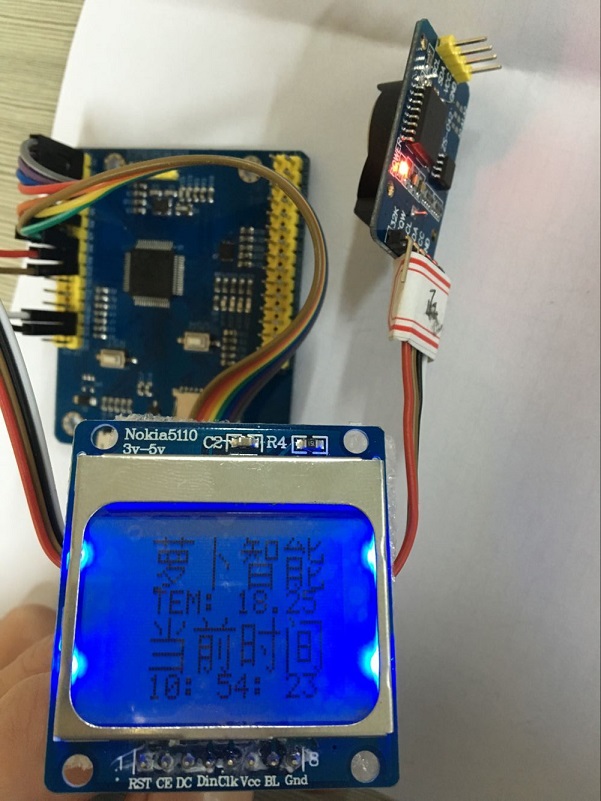
原程序及putty工具下载地址:http://pan.baidu.com/s/1bLUhaQ
[TPYBoard-Micropython之会python就能做硬件 3] 制作电子时钟的更多相关文章
- [TPYBoard - Micropython之会python就能做硬件 1] 运行第一个脚本——点亮LED
转载请注明:@小五义http://www.cnblogs.com/xiaowuyiQQ群:64770604 会python就能做硬件! 一.TPYBoard V102开发板 TPYBoard V102 ...
- [TPYBoard - Micropython之会python就能做硬件 开篇]会python就能做硬件!
转载请注明:@小五义http://www.cnblogs.com/xiaowuyiQQ群:64770604 会python就能做硬件! 在写这套教程之前,首先感觉山东萝卜电子科技有限公司(turnip ...
- [TPYBoard - Micropython之会python就能做硬件 8] 学习使用蓝牙模块及舵机
转载请注明:@小五义 http://www.cnblogs.com/xiaowuyi 欢迎加入讨论群 64770604 一.实验器材 1.TPYboard V102板 一块 2.电机驱动模块L2 ...
- [TPYBoard - Micropython 之会python就能做硬件 9] 五分种学会用TPYBoard V102 制作避障小车(升级版)
转载请注明:@小五义 http://www.cnblogs.com/xiaowuyi 欢迎加入讨论群 64770604 感谢山东萝卜电子科技公司授权 一.实验器材 1.TPYboard V102板 ...
- [TPYBoard - Micropython之会python就能做硬件 8] 学习使用超声波模块制作避障小车
转载请注明:@小五义 http://www.cnblogs.com/xiaowuyi 欢迎加入讨论群 64770604 一.实验器材 1.TPYboard V102板 一块 2.电机驱动模块L2 ...
- [TPYBoard - Micropython之会python就能做硬件 6] 学习使用OLED显示屏
转载请注明:@小五义 http://www.cnblogs.com/xiaowuyi 欢迎加入讨论群 64770604 一.实验器材 1.TPYBoard板子一块 2.数据线一条 ...
- [TPYBoard-Micropython之会python就能做硬件 2] 利用micropython控制NOKIA 5110屏
转载请注明:@小五义 http://www.cnblogs.com/xiaowuyi 欢迎加入讨论群 64770604 一.本次实验所需器材 1.TPYboard V102板 一块 2.DS3231 ...
- [TPYBoard-Micropython之会python就能做硬件 4] 学习使用电位器和1602显示屏
一.实验器材 1.TPYboard V102板 一块 2.电位器 一个 3.1602 屏 一块 4.杜邦线:若干 二.电位器的使用 电位器 (英文:Potentiometer)是可变电阻器的一种 ...
- [TPYBoard-Micropython之会python就能做硬件 5] 学习使用重力传感器及PWM
转载请注明:@小五义 http://www.cnblogs.com/xiaowuyi 欢迎加入讨论群 64770604 一.实验器材 1.TPYboard V102板 一块 2 ...
随机推荐
- POJ 3186 Treats for the Cows
简单DP dp[i][j]表示的是i到j这段区间获得的a[i]*(j-i)+... ...+a[j-1]*(n-1)+a[j]*n最大值 那么[i,j]这个区间的最大值肯定是由[i+1,j]与[i,j ...
- HDU 4408 Minimum Spanning Tree 最小生成树计数
Minimum Spanning Tree Time Limit: 2000/1000 MS (Java/Others) Memory Limit: 32768/32768 K (Java/Ot ...
- S3C2440的定时器详解
还包含用于大电流驱动的死区发生器 位预分频器是可编程的,并且按存储在TCFG0和TCFG1寄存器中的加载值来分频PCLK 位递减计数器.当递减计数器到达零时,产生定时器中断请求通知CPU定时器操作已经 ...
- Thinking in scala (3)----求平方根
采用“牛顿法”求一个数的平方根 object sqrt { def main(args:Array[String])={ println( sqrt(args(0).toDouble)) } def ...
- iOS开发 调用系统相机和相册 分类: ios技术 2015-03-30 15:52 65人阅读 评论(0) 收藏
调用系统相机和相册 (iPad,iPhone) 打开相机:(iPad,iPhone) //先设定sourceType为相机,然后判断相机是否可用(ipod)没相机,不可用将sourceType设定为 ...
- css(三)-- 常用属性
css的常用属性包括以下几种: CSS 背景CSS 文本CSS 字体CSS 列表CSS 表格 1.CSS 背景 /*操作背景的属性 */ body{ /*background-color:#CCC; ...
- ps--记录几个方法步骤
1.图片文字去掉 1.1 矩形工具-->吸管-->alt+delete 1.2 钢笔工具-->Ctrl+回车(变换选区)-->吸管-->alt+delete 2.图层锁不 ...
- Struts2标签遍历List<Map<String,String>>
<s:if test="resultList != null && resultList.size() > 0"> <s:iterator ...
- CentOS 7修复MBR和GRUB
(转载) 一.修复MBR: MBR(Master Boot Record主引导记录): 硬盘的0柱面.0磁头.1扇区称为主引导扇区.其中446Byte是bootloader,64Byte为Partit ...
- Jquery Validate 正则表达式实用验证代码常用的
jQuery.validate 的正则验证功能,包括手机号码.电话号码.邮政编码.QQ号码.IP地址.字母和数字.中文的验证等 手机号码验证 以下为引用内容: 代码如下: jQuery.validat ...